Weather data & microclimate :
- 610.73K
- 4.8
- Installs
- 10.00M
- Price
- Free

Screenshots
Analysis by Reviewed APKs
Weather Underground is a weather app for people who want more than a quick temperature check, especially when conditions can vary from one neighborhood to the next. I like its mix of nearby-station readings, forecasts, radar, and alerts for planning a commute or deciding whether to head outside. It offers plenty of detail, though casual users may find the screen busier than a basic forecast app.
A closer look at today's weather
When I first opened Weather Underground, I thought about the small decisions that make a forecast useful: whether to take a jacket, when to walk the dog, and whether rain might arrive before the ride home. The app focuses on current conditions from nearby personal weather stations, alongside hourly and daily forecasts. That neighborhood-level perspective can be handy when the weather at home does not quite match the report from a distant airport.
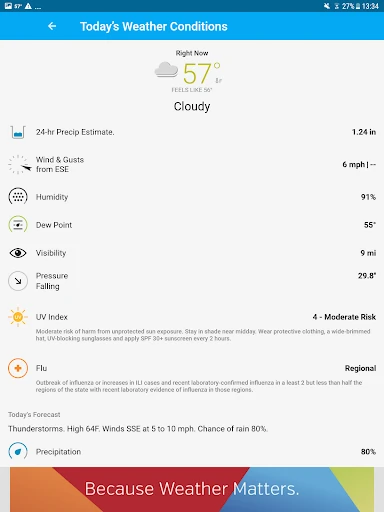
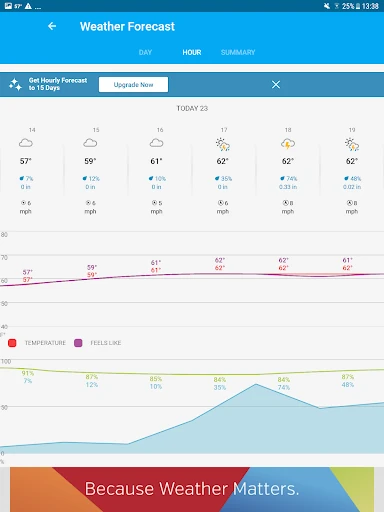
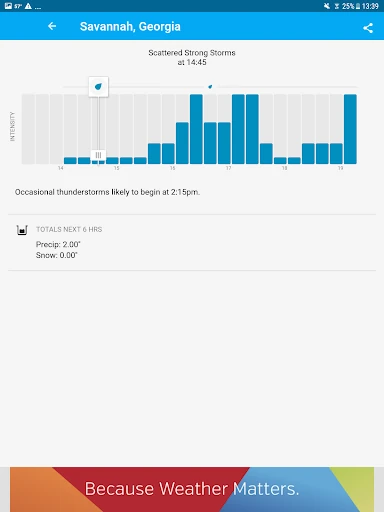
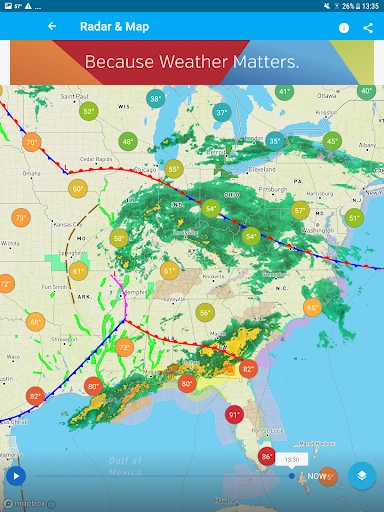
For a rainy afternoon, I can check the chance of rain and the day's accumulation, then look at Doppler radar or a weather map to see how conditions are moving. Wind, humidity, pressure, and feels-like temperature add context beyond the number on the main forecast. I would still treat any forecast as a guide rather than a promise, but having readings, maps, and alerts together makes routine planning more informed.
More than a quick forecast
Compared with a simple weather widget or a one-screen forecast app, Weather Underground puts more emphasis on local station data and interactive maps. It is a better fit for someone who likes checking details, comparing conditions, or following a storm than for someone who only wants to glance at today's high and low. The combination of station readings and broader radar gives different ways to understand what is happening nearby.
This is not a dedicated travel planner, climate archive, or professional meteorology workstation. Its advertised strengths are practical forecasts, weather maps, local measurements, and alerts. If I only need a quick answer before leaving the house, the amount of information can feel like more than I need. If I enjoy checking how a rain band is developing or want additional measures such as UV and air quality, the extra detail has a clearer purpose.
Make the details useful
I get more out of the app by checking a few specific items instead of trying to read every number. Before an outdoor errand, I look at the hourly forecast and rain chance; on a windy day, I add wind speed and direction. Keeping the map view for moments when conditions are changing helps me avoid turning a routine forecast check into a long scroll through every available measurement.
The customization options can also make repeat checks easier. I can choose light or dark mode, select map types, and set preferred units. For weather I care about most, alerts provide another way to stay aware of severe conditions. Premium adds Smart Forecasts for chosen weather preferences and longer hourly forecasts, but the standard forecast and map features already support many everyday checks.
More From Our News Desk

Zoom Meetings, Google Meet, or Teams: Which Is Easiest to Join?

How I Build a Free Streaming Lineup With Tubi

Why Crunchyroll Is the Default Anime App for So Many Fans

YouTube TV: A Practical Guide to Cutting Cable

Rummikub and the Small Comfort of Phone Games

TeamViewer Remote Control or AnyDesk for Helping Family?
Who will get the most from it
I would recommend Weather Underground to people who want a closer view of local conditions, especially anyone who regularly plans walks, yard work, commutes, or other outdoor routines around rain and wind. The mix of nearby station readings, forecast detail, radar, and alerts gives curious weather-checkers useful options without requiring specialist knowledge. People who enjoy looking at maps as well as forecast numbers have the clearest reason to give it a try.
It may not suit someone who wants only a clean, minimal temperature display and dislikes ads or dense information. The app contains ads, while removing them is part of the Premium subscription. I would also think twice if I rarely use maps, alerts, or local measurements; a simpler forecast may be easier for a quick glance. Weather Underground is at its best when I actually use its extra detail to make a small plan.
Weather Underground is the developer, and the Android app is in the Weather category. Google Play shows more than 10 million installs and a 4.8-star rating from about 611,000 ratings. It is free to download, contains ads, and offers in-app purchases. The listed in-app purchase range is $1.99 to $19.99 per item.
The app has an Everyone content rating and requires Android 8.0 or later. The current version provided is 6.19.1. Its release date is December 19, 2011, and the last update was October 30, 2025. The latest release notes describe bug fixes and performance improvements.
A hands-on look at local weather
Getting oriented
My first impression is that Weather Underground has more going on than a basic forecast screen. Its premise is easy to understand: check local conditions, look ahead, and use maps or alerts when the weather deserves closer attention. The app describes its forecasts as drawing on nearby personal weather stations as well as its own forecast model, a combination aimed at neighborhood-scale conditions.
For a first visit, I would start with current conditions and the hourly forecast rather than exploring every map layer at once. The interface offers several kinds of weather information, so it helps to begin with the questions I actually have: Is rain likely? How windy is it? What should I expect later today? That keeps the detail practical instead of overwhelming.
Everyday checks
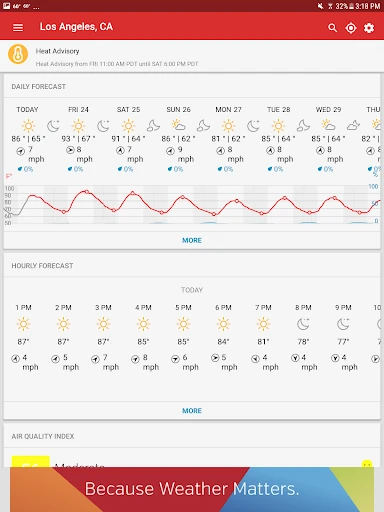
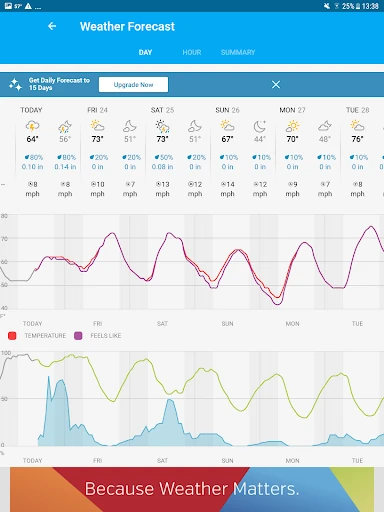
In daily use, the value is in having several useful measures close at hand. Alongside temperature and feels-like conditions, the app covers wind, humidity, pressure, rain accumulation, and the chance of rain. Hourly and daily forecasts extend up to 10 days, making it possible to compare a near-term errand with plans later in the week.
I find the local-station idea especially relevant when nearby conditions differ across town. The app says its network includes more than 250,000 personal weather stations, filling in some of the gaps between airport-based readings. That does not mean every reading will match what I see outside, but it gives the forecast a more local angle than a single regional snapshot.
Maps and alerts
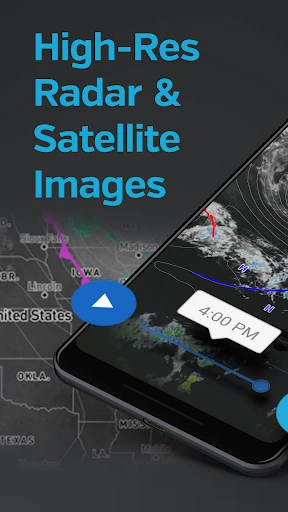
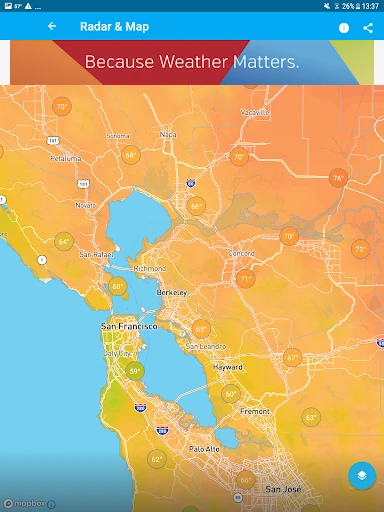
The interactive maps are one of the app's most distinctive parts. Available layers include Nexrad radar, satellite imagery, personal weather stations, temperature and heat maps, and rain accumulation. Switching between those views can help me make sense of a passing shower or see the broader shape of changing conditions without relying on a row of forecast numbers alone.
Weather Underground also describes severe weather alerts, NOAA-customizable alerts, and a hurricane and storm tracker. Satellite and cloud-cover imagery is included among its map options. These tools are most useful when I have a specific reason to check the weather closely, such as a forecast of heavy rain, rather than as something I need to inspect every time I open the app.
A simple weather routine
A practical routine for me would be to check current conditions over breakfast, then glance at the hourly forecast before leaving. If rain looks possible, I would check the radar and rain accumulation; if I am planning to spend time outside later, I would look farther ahead at the daily forecast. It is a quick sequence that uses the app's detail without making weather-checking a project.
For recurring outdoor plans, Premium's Smart Forecasts let subscribers set preferred weather conditions for activities. The app also offers extended hourly forecasts up to 15 days with Premium. Those additions could be useful to someone who plans around a narrow weather window, while most everyday errands can be handled with the standard forecasts and map tools.
A few trade-offs
The main trade-off is density. Weather Underground offers many measurements, map layers, and forecast views, which is useful for people who want options but can feel like clutter when I just need to know whether to bring an umbrella. A little restraint—checking only the forecast details relevant to the day's plans—makes the app easier to use.
Ads are part of the free experience, and removing them requires a Premium subscription. Premium also includes Smart Forecasts and extended hourly forecasts, so the paid tier is not limited to ad removal. The standard forecast reaches up to 10 days, while the extended hourly view is a subscriber feature. I would decide based on whether those extras fit my routine, rather than paying simply because they are available.
Weather is inherently changeable, and a local station reading or forecast can differ from conditions a short distance away. I would use the app as a planning aid and pay attention to its alerts during severe weather, while remembering that forecasts are estimates. Its depth is a strength, but the best experience comes from matching that detail to the situation.
Weather Underground is a capable choice for people who want local readings, detailed forecasts, interactive maps, and weather alerts in one Android app. I especially like the way it encourages a closer look at neighborhood conditions rather than stopping at a single temperature. Its broad set of data is more useful when I have a real plan to make than when I only want a passing glance.
I would try it if weather affects your routines and you enjoy having radar, station readings, and extra measurements available. If you prefer a quiet, minimal forecast and have little interest in maps, the ads and amount of information may wear thin. For curious everyday users, though, it offers a practical set of tools, with Premium features for those who want more.
Weather data & microclimate Frequently Asked Questions
What is Weather Underground used for?
Weather Underground provides local current conditions, hourly and daily forecasts, weather maps, and alerts. It also includes details such as wind, humidity, rain accumulation, UV index, and air quality. Its nearby personal weather station data is intended to give users a closer view of conditions around their location.
Which devices can run Weather Underground?
The app is available for Android through Google Play, and the provided requirements specify Android 8.0 or later. For current availability on a particular device or other platforms, check the store listing, since availability and requirements may vary.
What Android version does Weather Underground require?
The listed minimum requirement is Android 8.0. If you are unsure whether your device can install the current release, it is worth checking Weather Underground's Google Play page, where compatibility details may vary by device.
Does Weather Underground cost money?
Weather Underground is free to download and contains ads. It offers in-app purchases priced in the listed range of $1.99 to $19.99 per item. Premium features described by the app include removing ads, Smart Forecasts, and extended hourly forecasts; current purchase details are worth checking in Google Play.
Is Weather Underground a good fit for me?
It is a good fit if you want neighborhood weather readings, forecasts, maps, and alerts for everyday planning. If you only want a simple temperature glance, its range of detail and ads may feel unnecessary. Whether its paid features suit you depends on how much you would use Smart Forecasts or longer hourly forecasts.
Pros
- Nearby personal weather station readings add useful context to regional forecasts.
- Interactive maps include radar, satellite imagery, temperature, and rain accumulation layers.
- Forecasts combine everyday details such as wind, humidity, and rain chance.
- Customizable alerts and storm tracking support closer checks during severe weather.
Cons
- The amount of weather data and map options can feel busy for quick checks.
- The free version contains ads, with ad removal included in Premium.
- Extended hourly forecasts and Smart Forecasts require a subscription.
- Category
- Weather
- Version
- 6.19.1