TheFrog: Weather app
- 33.26K
- 4.7
- Installs
- 1.00M
- Price
- Free

Screenshots
Analysis by Reviewed APKs
TheFrog: Weather app is a cheerful, practical forecast app for people who want more than a quick temperature check but do not need a professional weather workstation. It brings hourly and daily forecasts together with maps, air quality, webcams, and useful daylight times. After spending time with its mix of everyday details and playful personality, I see it as a handy planning companion rather than a tool for deep meteorological analysis.
A Morning Forecast Check
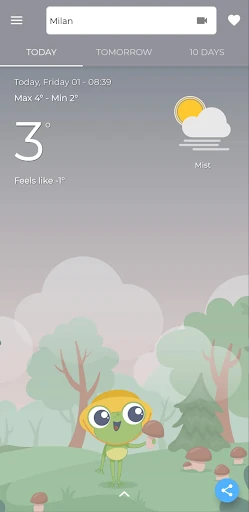
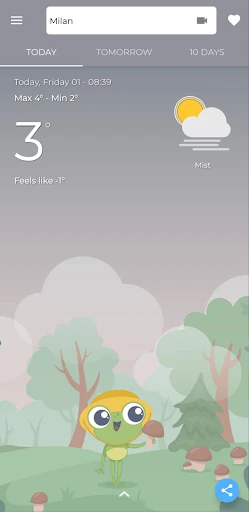
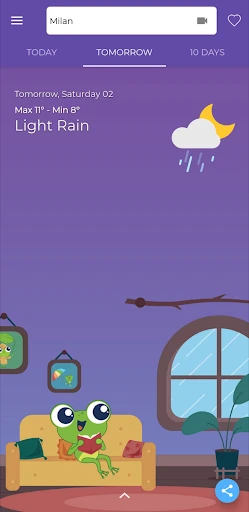
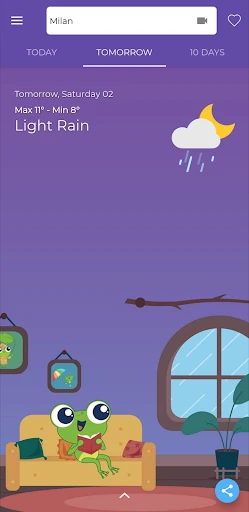
When I first opened TheFrog, I pictured using it during the small decision-making moments that shape a day: whether to walk to a coffee shop, bring a jacket, or move an outdoor plan to tomorrow. Its forecasts for today and tomorrow put near-term planning first, while hourly details let me check how conditions may change rather than relying on one snapshot.
For a broader look, the daily forecast reaches ten days ahead. I found that useful when thinking about a weekend outing or deciding which day might be better for an errand. The app also includes real-time weather updates, so it has a place in a quick morning routine and in the later check when the sky looks different from what I expected.
More Than a Weather Icon
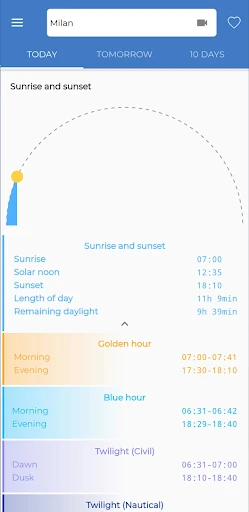
The obvious alternative is a basic weather screen that gives you the current conditions and a short forecast. TheFrog goes further with forecast maps, air quality information, webcam links near a selected location, and times for sunrise, sunset, golden hour, blue hour, and twilight. That range makes it appealing when I want context for a walk, a photo outing, or simply a better sense of the day.
It is still a general-purpose forecast app, not a specialist weather analysis tool. I would not choose it expecting advanced storm tracking, custom alert controls, or detailed scientific charts, since those capabilities are not part of the described feature set. Its strength is gathering familiar planning information in one approachable place, with a light tone that may suit casual users better than people who want dense technical data.
Small Ways to Use It
A simple habit is to check the hourly forecast before leaving home, then glance at the ten-day view when making plans farther out. I like that this creates two distinct uses: the short range answers practical questions about the next few hours, while the longer view helps compare days. TheFrog’s detailed forecasts for today and tomorrow sit neatly between those two scales.
Widgets can make the weather visible without opening the app, which suits a quick glance during a busy morning. I would also use the map and nearby webcam links when I want a more visual impression of conditions around a selected location. For outdoor plans tied to daylight, checking golden hour or twilight times adds a useful detail beyond temperature and rain.
More From Our News Desk

Zoom Meetings, Google Meet, or Teams: Which Is Easiest to Join?

How I Build a Free Streaming Lineup With Tubi

Why Crunchyroll Is the Default Anime App for So Many Fans

YouTube TV: A Practical Guide to Cutting Cable

Rummikub and the Small Comfort of Phone Games

TeamViewer Remote Control or AnyDesk for Helping Family?
Who May Enjoy TheFrog
I would recommend TheFrog to everyday weather checkers who like having several kinds of information together without turning a forecast into a project. Hourly and ten-day forecasts cover routine planning, while air quality, maps, webcam links, and daylight times give curious users more to explore. The widgets are a welcome option for anyone who prefers checking conditions at a glance.
It may be less suitable for people who want a minimalist temperature-only display or rely on highly specialized forecasting tools. The playful framing is part of its identity, so readers who prefer a strictly technical presentation may find it less to their taste. I would also compare its current store details before installing if a particular Android requirement or paid feature matters to you.
TheFrog: Weather app is developed by Giovesoft and is listed in the Weather category. On Google Play it has over one million installs, a 4.7-star rating from around 33,000 ratings, and an Everyone content rating. The app is free to download, but it contains ads and offers in-app purchases. Google Play gives the version as 11.10.8.
The app’s listed release date is August 10, 2020, and its last update date is November 4, 2026. In-app products are priced from $0.99 to $5.49 per item. The available facts do not specify a minimum Android version, so anyone with an older device should check the Google Play entry for current compatibility details before installing.
A Closer Look at Everyday Forecasting
First Open and Setup
My first impression is that TheFrog wants weather checking to feel approachable, not stern. Its premise is simple: combine forecasts and useful local details with a playful mood. The core appeal becomes clear quickly. This is meant to help answer ordinary questions about the day, from what the next few hours look like to whether a later date might suit an outdoor plan.
I would start by looking at the forecast for the location I care about, then work outward through the hourly and daily views. The app also describes webcam links for the selected location, which gives another way to inspect what is happening nearby. I appreciate that the available feature set spans both quick checks and more considered planning without requiring a complicated weather vocabulary.
The Daily Forecast Routine
The most practical part of TheFrog is its range of forecast timing. Detailed information for today and tomorrow handles immediate decisions, hourly forecasts help show changes within a day, and the ten-day forecast offers a longer planning window. I can imagine checking the hourly view before a commute and returning later to see whether an outdoor plan still makes sense.
Real-time weather updates give the app a role beyond a once-a-day glance. Weather can feel different from one part of the day to another, and a current update is useful when I am deciding whether to head out now or wait. The app’s coverage makes it easy to move between present conditions and the broader forecast rather than treating them as separate tasks.
Useful Details Beyond Rain
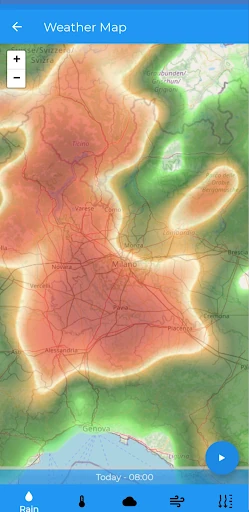
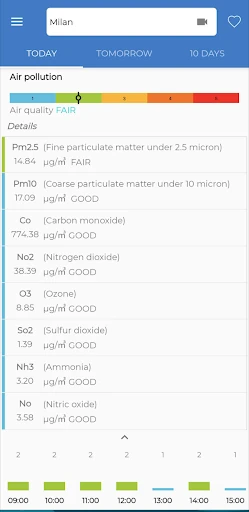
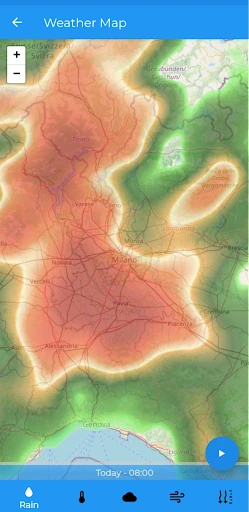
The map forecasts are one of the more visual features, offering a different way to look at weather than a list of numbers. I would turn to them when I want to understand conditions spatially around a selected area. The app also includes air quality, a useful extra for people who want environmental context alongside the standard forecast.
Webcam links can show what is happening near the selected location, while the sunrise and sunset information covers golden hour, blue hour, and twilight as well. Those details make TheFrog more interesting for planning a walk or a photography session. Widgets round out the feature set by putting weather information where it can be checked without opening the app.
Planning an Outdoor Day
For a practical routine, I would check the next ten days when choosing a date for an outdoor plan, then revisit the hourly forecast on the day itself. That avoids treating a long-range forecast as the whole story. The today-and-tomorrow details provide a useful middle step, while real-time updates can help me make a last-minute decision.
If the plan depends on daylight, I would also check sunrise, sunset, or the golden-hour times. For a location where I want a visual sense of current conditions, the map forecast and nearby webcam links offer more context than a single forecast line. This is a straightforward workflow that takes advantage of the app’s different views without needing to inspect every detail.
Limits to Keep in Mind
TheFrog’s breadth is useful, but it does not automatically make it the right fit for everyone. Some people only want the current temperature and a chance-of-rain glance; the extra map, air-quality, webcam, and daylight information may be more than they need. Others may be looking for specialist forecasting tools that go beyond the everyday features described here.
The app is free to download, though ads and in-app purchases are part of the experience. I would keep that in mind if I prefer an entirely ad-free app or want to know exactly what a purchase includes. Device requirements can also matter, and checking the current Google Play details is sensible before installing on an older Android phone.
TheFrog: Weather app makes a good case for itself as an everyday forecast companion. Its combination of short- and longer-range forecasts, maps, air quality, webcams, widgets, and daylight times gives me several reasons to open it beyond checking the temperature. The playful tone is a nice touch, while the practical information remains the main attraction.
I would try it if I wanted a friendly Android weather app with more context than a basic forecast screen. If I needed specialist analysis or wanted the leanest possible display, I would look elsewhere. For routine plans, quick checks, and the occasional golden-hour outing, TheFrog feels like a sensible option.
TheFrog Frequently Asked Questions
What is TheFrog: Weather app used for?
TheFrog is a weather app for checking forecasts and conditions. It includes detailed forecasts for today and tomorrow, hourly forecasts, a ten-day daily forecast, and real-time weather updates. It also offers map forecasts, air quality, webcam links near a selected location, weather widgets, and times for sunrise, sunset, golden hour, blue hour, and twilight.
Which devices can run TheFrog: Weather app?
TheFrog: Weather app is an Android app available through Google Play. The minimum Android version is not provided in the available app details, and compatibility can depend on the device and current app release. If you are using an older phone or tablet, check the Google Play entry for the latest requirements before installing.
Is TheFrog: Weather app free?
TheFrog is free to download on Google Play. It contains ads and offers in-app purchases, with listed items priced from $0.99 to $5.49 each. What a particular purchase includes may vary, so check the current Google Play details if you want to know which paid options are available.
Does TheFrog: Weather app have hourly forecasts?
Yes. The app includes hourly forecasts as well as detailed forecasts for today and tomorrow and daily forecasts for the next ten days. It also provides real-time weather updates. These options make it possible to check near-term changes as well as look ahead when planning a later outing or errand.
Who should try TheFrog: Weather app?
It may suit people who want a friendly weather app with several kinds of everyday planning information in one place. Forecast maps, air quality, webcam links, widgets, and daylight times add options beyond a basic forecast. People who prefer a very minimal screen or need specialized weather analysis may want a different kind of app.
Pros
- Combines hourly forecasts with daily forecasts reaching ten days ahead.
- Includes maps, air quality, webcam links, and useful daylight times.
- Widgets let you check weather without opening the app.
- Playful presentation gives routine forecast checks a lighter feel.
Cons
- Ads and in-app purchases are part of the free app experience.
- Its broad feature set may feel unnecessary for temperature-only checks.
- Minimum Android requirements should be checked for older devices.
- Category
- Weather
- Version
- 11.10.8