MyRadar Weather Radar
- 341.88K
- 4.8
- Installs
- 10.00M
- Price
- Free

Screenshots
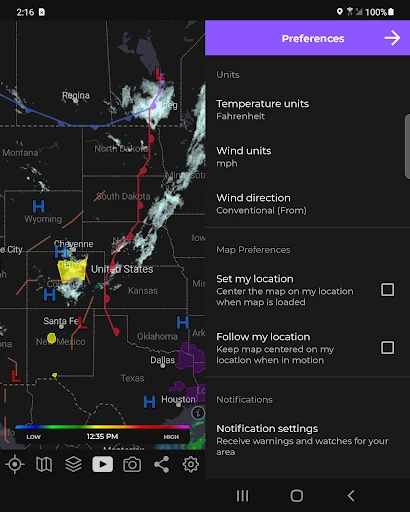
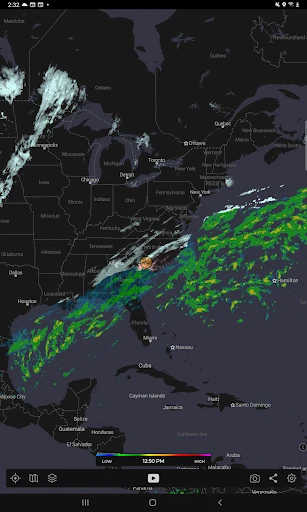
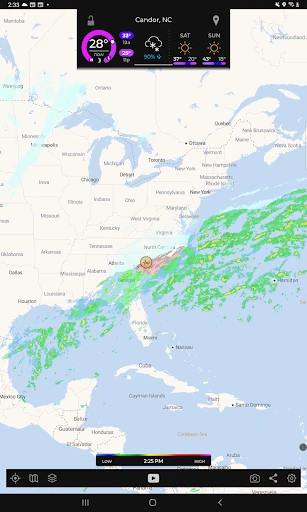
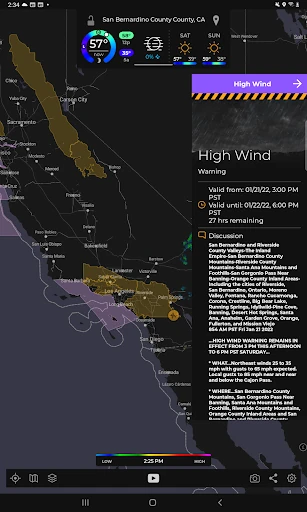
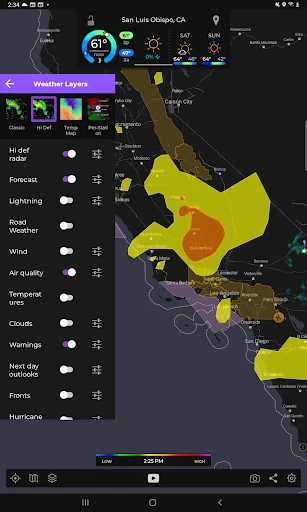
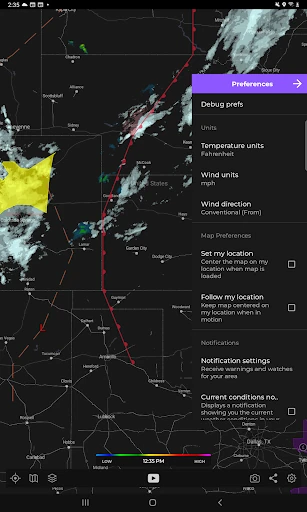
Analysis by Reviewed APKs
MyRadar Weather Radar is a map-first weather app for people who want to see rain and storms moving near them without digging through a forecast. I found its animated radar especially useful for quick decisions about a walk, commute, or outdoor plans. It also offers weather and environmental map layers and alerts, so there is more to explore when a simple snapshot is not enough.
A quick look before heading out
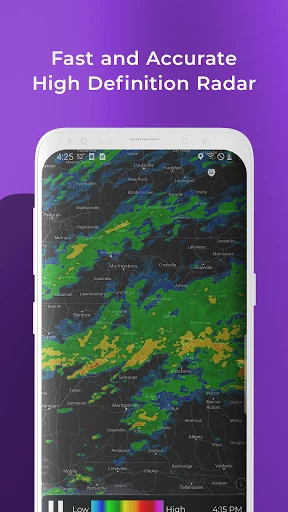
When I first opened MyRadar, the map centered on my location and showed animated radar right away. That makes the app easy to reach for in an ordinary moment: I can check whether a patch of rain is moving toward my neighborhood before leaving, rather than trying to infer it from a line of forecast text. The radar loop can cover up to two hours, giving me a sense of movement as well as what is happening now.
I spent a few minutes panning and zooming around the map to follow weather beyond my immediate area. Pinch-to-zoom and map movement make that feel straightforward, and the same view can be used to look around the United States or elsewhere in the world. For a practical routine, the appeal is simple: open the app, watch the radar, and decide whether to bring a coat or wait before setting off.
Radar first, not a forecast diary
Compared with a conventional weather app built around daily highs and hourly tables, MyRadar puts the map and moving precipitation at the center. That is a useful difference when my main question is whether rain is approaching, or where a storm is moving. Its optional rain alerts can also give advance notice based on the current location, so I do not have to keep reopening the map just to see whether conditions are changing.
I would not treat MyRadar as a replacement for every kind of weather planning. Its described strengths are radar, map layers, and alerts, rather than a detailed week-at-a-glance forecast or a full calendar of conditions. If I want a quick visual read, it suits me well; if I want to compare a week of temperatures and plan several days ahead, I would pair it with a forecast-focused source.
Small habits that help
I get more from MyRadar when I look at the direction and movement of a rain band, not just its position over the map. The animated loop helps me see whether precipitation is heading toward my route or drifting away. Zooming out before a longer drive also gives useful context: a local shower can look less important when I can see the wider system around it.
Alerts are worth considering when I know I will be busy or away from my phone for a while. MyRadar describes rain alerts that can arrive up to an hour ahead and include expected intensity and duration, along with alerts for severe weather and tropical activity. I would keep the map as my visual check and use notifications as a prompt, rather than assuming one alert answers every weather question.
More From Our News Desk

Zoom Meetings, Google Meet, or Teams: Which Is Easiest to Join?

How I Build a Free Streaming Lineup With Tubi

Why Crunchyroll Is the Default Anime App for So Many Fans

YouTube TV: A Practical Guide to Cutting Cable

Rummikub and the Small Comfort of Phone Games

TeamViewer Remote Control or AnyDesk for Helping Family?
Who will get the most from it
I would recommend MyRadar to people who make small plans around changing weather: walkers, commuters, parents deciding whether to head to a park, or anyone who likes to watch a storm’s path on a map. The quick launch and animated radar are its most immediate strengths. People interested in more than rain can also explore layers for wind, fronts, earthquakes, hurricanes, aviation information, and wildfires.
It may be less satisfying for someone whose first priority is a detailed daily forecast or a long-range planning view. MyRadar’s described experience is centered on radar and map data, so I would not choose it solely for a week of temperature comparisons. Some of its more specialized options are part of a premium upgrade, and the free app contains ads and offers in-app purchases. That is worth weighing if you prefer a quieter, all-in-one forecast experience.
MyRadar Weather Radar is made by ACME AtronOmatic LLC. On Google Play, it has over 10 million installs and a 4.8-star rating from about 342,000 ratings. The app is free to install and contains ads, with in-app purchases priced from $2.99 to $59.99 per item. Google Play gives it an Everyone content rating.
The current version is listed as varying with device. The app was released on January 24, 2012, and its latest update is dated November 2, 2026. The minimum Android version is not specified in the available app details, so it is worth checking Google Play on the device you plan to use.
Following the Weather on the Map
An immediate first impression
My first impression was that MyRadar wants me to look, not read. The app opens to an animated radar map around the current location, so the main job is apparent without a tour of menus. For a fast weather check, that is a welcome start: I can see precipitation in context and begin moving around the map right away.
The map uses pinch-to-zoom and panning, which makes it easy to shift from a neighborhood view to a broader look. I found that useful for answering two different questions: is rain close to me, and is a larger system on its way? It is a practical setup for quick checks, even if people who prefer forecast tables may need time to adjust.
The everyday radar check
In day-to-day use, the animated radar is the feature I would return to most. A still map tells me where precipitation is, but a loop helps me understand how it is moving. MyRadar supports radar loops up to two hours, which gives the visual check more context when I am deciding whether to leave now or pause for a while.
I also like that the map is not limited to the spot where I am standing. I can pan and zoom around the United States and the rest of the world. That makes the app useful for checking conditions around a destination as well as at home, although the experience remains map-led rather than a substitute for every detail a dedicated forecast view might provide.
Layers beyond precipitation
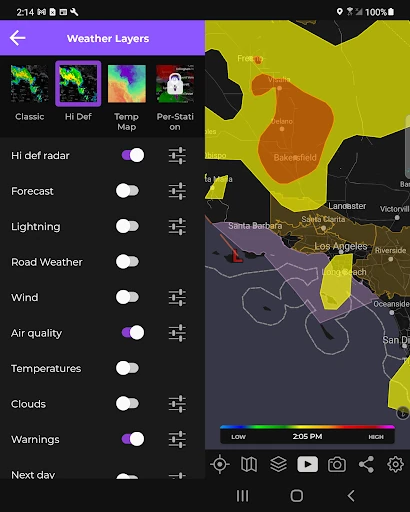
The extra layers are where MyRadar becomes more than a rain map. The app describes animated winds at surface and jetstream levels, fronts and pressure systems, earthquake reports that can be filtered by severity and time, tropical storm and hurricane activity, aviation information, and wildfire activity in the United States. I would not use every layer each day, but their range gives curious users reasons to explore beyond the basic radar.
Alerts add another useful angle. The app can send weather and environmental notifications, including severe weather alerts and notices related to tropical storms and hurricanes. It also offers rain alerts based on the current location, with advance timing and information about intensity and duration. Those features fit people who would rather receive a nudge than repeatedly check the map.
Some specialized radar tools sit behind the premium upgrade. The described professional radar pack allows users to select U.S. radar stations, adjust tilt, and view products such as base reflectivity and wind velocity. Premium hurricane tracking adds a forecast cone and a detailed synopsis from the National Hurricane Center. Those options are aimed at users who want more detail than the basic visual scan.
A simple weather routine
For a typical morning, I would open MyRadar while getting ready and watch the radar loop before choosing an umbrella or changing my departure time. If rain appears nearby, I can zoom out to see its direction and check whether it is part of a wider system. That small routine makes the map useful without turning a quick check into a long session.
On a day when I expect to be occupied, I would consider enabling the relevant alerts so I do not need to keep checking manually. For a trip, I would pan to the destination and look at the broader radar view as well. The app’s different layers can add context when I am curious, but the basic habit stays uncomplicated: check the movement, then make the everyday decision.
Keep the trade-offs in view
MyRadar’s map-first approach is also its main limitation. It works best when I want a visual read on weather, but someone who wants a detailed schedule of conditions may find that this is not the whole toolkit they need. I would use it for radar and pair it with a forecast-oriented app or source when planning several days ahead.
There is also a difference between the free core and the premium tools. The app contains ads and offers in-app purchases; the more specialized radar and hurricane features are described as part of the premium upgrade. That does not get in the way of the central radar idea, but it matters if you expect every layer and advanced option to be available without extra cost.
Finally, an animated map is a useful way to understand changing conditions, not a reason to ignore alerts or other information relevant to a particular situation. MyRadar gives users several ways to follow weather and environmental activity, but the right level of detail depends on what they need. For ordinary rain checks, the straightforward view is the part I found most approachable.
MyRadar Weather Radar is at its best when I want a fast, visual answer to whether rain is nearby and where it is moving. The animated map is easy to understand, while alerts and extra layers give interested users room to go deeper. It feels practical for everyday checks without asking me to make weather tracking a project.
I recommend it to anyone who prefers seeing weather unfold on a map, especially for short-term decisions and storm watching. If your priority is a detailed multi-day forecast, MyRadar may work better alongside a forecast-focused app. The ads and paid extras are worth keeping in mind, but the core radar experience has a clear everyday purpose.
MyRadar Weather Radar Frequently Asked Questions
What is MyRadar Weather Radar used for?
MyRadar Weather Radar is used to view animated radar around your location and track precipitation as it moves. It also provides map layers for topics such as wind, fronts, earthquakes, hurricanes, aviation, and wildfires, plus weather and environmental alerts. Its rain alerts can provide advance notice with information about expected intensity and duration.
Which devices can run MyRadar Weather Radar?
MyRadar Weather Radar is an Android app available through Google Play. The description also says it is available for Wear OS devices, including radar and current-condition tiles. Check the Google Play store details for compatibility with a particular phone or watch, since device support can vary.
What Android version does MyRadar Weather Radar require?
The Android version requirement can vary by device and app release. Check the MyRadar Weather Radar page on Google Play from the device where you plan to install it to see the current compatibility information.
Is MyRadar Weather Radar free?
MyRadar Weather Radar is free to install and contains ads. It also offers in-app purchases, with items priced from $2.99 to $59.99. The description says a premium upgrade includes additional hurricane tracking and professional radar features. Check Google Play for current purchase options and pricing.
Who is MyRadar Weather Radar best for?
It is a good fit for people who want a quick map-based view of precipitation, weather movement, and alerts. Users who enjoy exploring additional weather and environmental layers may find more to dig into. If you mainly want a detailed multi-day forecast, you may prefer to use MyRadar alongside a forecast-focused app.
Pros
- Animated radar makes it easy to see precipitation movement at a glance.
- Map layers cover weather and environmental topics beyond rain.
- Optional rain and severe-weather alerts reduce the need for constant checking.
- Map can be panned and zoomed around the United States and worldwide.
Cons
- The map-first design may not suit users seeking detailed multi-day forecasts.
- Ads appear, and some advanced radar tools require in-app purchases.
- The many specialized map layers may be more than casual users need.
- Category
- Weather