KY3 Weather
- 12.55K
- 4.6
- Installs
- 500.00K
- Price
- Free
Screenshots
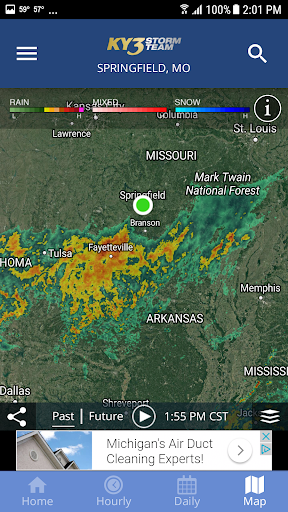
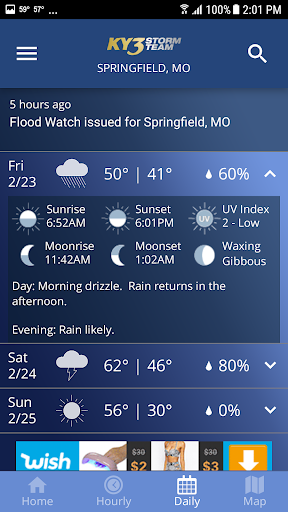
Analysis by Reviewed APKs
KY3 Weather is a local weather app for checking forecasts, radar, and weather alerts on Android. I can see it suiting people who want more than a quick temperature glance, especially anyone who regularly checks changing conditions before a commute or outdoor plans. Its mix of maps, saved places, and adjustable alerts makes it useful for keeping an eye on several locations, though it may feel more involved than a basic forecast app.
Checking Before Heading Out
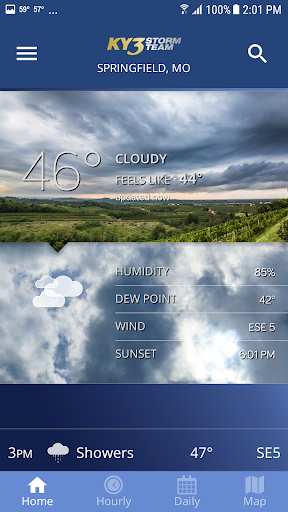
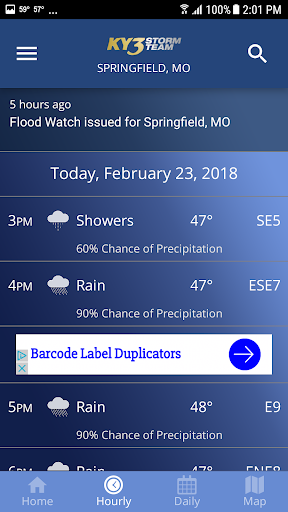
When I first opened KY3 Weather, I thought about the familiar morning routine: checking the forecast while deciding whether to walk, drive, or bring a jacket. The app offers daily and hourly forecast details, so I can look beyond the current conditions and see how the day is expected to change. If rain is approaching, the interactive radar map gives me another way to understand what is happening nearby.
For a day with plans in more than one place, I would save the locations I care about and give them meaningful names using location aliases. That makes it easier to switch from home to a relative's house or another regular destination without relying on memory. The app also provides GPS-based awareness for the current location, so I can check where I am without making every forecast check a manual search.
More Than a Forecast
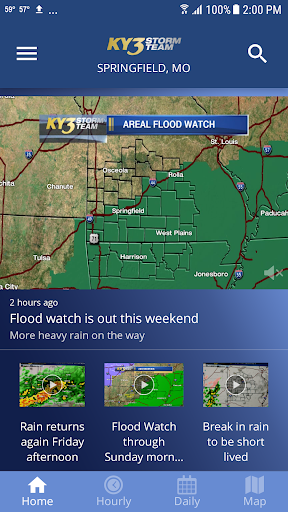
Compared with a simple weather app that mainly answers “How warm is it?”, KY3 Weather puts more emphasis on maps, alerts, and forecast detail. Its radar and satellite imagery are for people who like to see weather patterns, while the ten-day forecast and hourly view help with planning. The map can be displayed vertically or horizontally and includes a looping option, which gives the forecast a more visual, hands-on feel.
That extra depth is not automatically an advantage for everyone. If I only wanted one number and a brief daily summary, this could be more app than I need. It is a weather-information tool, not a general travel planner or a replacement for checking the conditions of a particular activity. Its features are centered on forecasts, weather maps, and alerts rather than broader scheduling or trip organization.
Make the Details Useful
A few small setup choices can make the app feel more personal. I would save the locations I check often, then rename them so each one is immediately recognizable. If I prefer to see the day at a glance, the app supports a small widget and widget configuration for daily or hourly views. That can make a quick forecast check easier without opening the full app every time.
I would also take a moment to choose which alerts I want. KY3 Weather lets users select all alerts or just critical alerts, and notifications can use audio, LED, and vibration. The app can show alert boxes on the map, and there is a setting to switch alerts over the map on or off. Those options are worth tailoring to my routine so useful warnings stand out without making every check feel busy.
More From Our News Desk

Zoom Meetings, Google Meet, or Teams: Which Is Easiest to Join?

How I Build a Free Streaming Lineup With Tubi

Why Crunchyroll Is the Default Anime App for So Many Fans

YouTube TV: A Practical Guide to Cutting Cable

Rummikub and the Small Comfort of Phone Games

TeamViewer Remote Control or AnyDesk for Helping Family?
Who Will Get the Most From It
I would recommend KY3 Weather to Android users who like to check conditions in detail rather than relying on a single daily summary. The combination of hourly and daily forecasts, interactive radar, saved locations, and configurable weather alerts gives it practical value for people who plan around changing weather. It may also suit users who want a widget for a faster glance or who like exploring map layers and storm tracks.
It may be less appealing to someone who wants the simplest possible interface or rarely looks past the current temperature. The range of maps, alert controls, and additional layers can take more attention than a minimal forecast needs. I would also keep in mind that the app contains ads. For someone who is comfortable with that and wants a feature-rich weather view, the added detail is the main reason to give it a try.
KY3 Weather is a weather app from Gray Media for Android. Google Play shows more than 500,000 installs and a 4.6-star rating from about 12,600 ratings. The app is free to download, contains ads, and has no in-app purchases. Its content rating is Everyone, making the store age category suitable for a general audience.
The listed version is “Varies with device,” so the version can differ depending on the device. KY3 Weather was released on September 22, 2011. A minimum Android version and a last-update date are not included in the available app details, so those are best checked on Google Play for the device in question.
A Closer Look at Everyday Weather Checks
A Busy First Look
When I first opened KY3 Weather, the feature list suggested an app built for people who want to explore conditions, not just glance at them. Radar, satellite imagery, forecast views, alerts, and location tools all point toward a fairly comprehensive weather companion. I like that the app includes tips intended to help users learn its features, since an app with this many options can take a little getting used to.
The setup choices that matter most are practical: current-location awareness, saved places, and alert preferences. GPS integration can help bring up conditions for where I am, while saved locations make repeat checks less tedious. I would start with those basics before exploring the extra map layers. That gives me a useful everyday setup without needing to learn every feature on the first visit.
Forecasts and Maps in Use
Day to day, the forecast views are the foundation. KY3 Weather provides a ten-day forecast with daily and hourly detail, which is useful when I need both a broad look at the week and a closer check on today's timing. I can use the hourly view for near-term planning and return to the daily view when I am thinking further ahead.
The interactive map adds a different kind of context. It supports vertical and horizontal display, looping, and map overlays, and the app describes its radar as NOWrad. Satellite cloud imagery is also included. I appreciate having a visual option when a short forecast summary does not answer my question about what is moving through the area. The map is designed to work over 3G and Wi-Fi.
Useful Extra Layers
Some of the features that stand out are the ones that add context to the map. KY3 Weather includes storm-track and tropical-track plotting, earthquake plotting, and a water-temperature layer. Watch and warning boxes can appear on the map, and an option controls whether alerts are shown over it. These are specific tools for users who like to inspect more than precipitation alone.
The Road Weather Index is another distinctive inclusion, described in the app information as an exclusive, patent-pending feature. I would treat it as an additional weather-related reference rather than assuming it answers every travel question. Location aliases are a smaller but genuinely handy touch: calling a saved place “Grandma's House,” for example, is clearer than keeping a list of unfamiliar place names.
Alert handling also has some welcome flexibility. Users can acknowledge alerts from within the app or acknowledge them through the status bar, and can choose all alerts or only critical ones. Audio, LED, and vibration are available for alert notifications. Spanish language support is included, with the language reflecting the overall language setting of the device.
A Routine That Sticks
For a practical daily routine, I would begin with the hourly forecast before leaving home, then check the radar if the conditions look unsettled. If I am heading somewhere I visit often, I can switch to that saved location instead of relying only on my current GPS position. That keeps the app useful for the ordinary question of whether the weather will change between now and later.
I would use the widget for the kind of check that happens while getting ready or between other tasks. Its configuration can show a daily or hourly view, and the app also offers a weather widget for the unlock page. Later, if an alert appears, I can acknowledge it in the app and use the map to see the alert boxes in context. It is a simple routine that uses the app's main strengths without turning weather checking into a project.
Things to Keep in Mind
The main trade-off is complexity. There are enough map layers, alert controls, and forecast options that a first-time user may need to explore before settling on a comfortable routine. Feature tips can help, but someone who wants a bare-bones forecast may find the extra choices unnecessary. I would start with the forecast, favorite locations, and alerts, then add other tools only when they answer a real question.
The app contains ads, which is worth considering if I expect to open it frequently. Its version is listed as varying with device, and a minimum Android requirement is not included in the available details; checking Google Play for the intended device is sensible. Weather apps are also most useful when their forecasts and alerts match the places I care about, so I would make sure my saved locations and alert preferences are set thoughtfully.
KY3 Weather is a capable choice for Android users who want a detailed forecast alongside radar, satellite imagery, saved locations, and adjustable alerts. I like that it offers both quick-glance options and deeper map tools, so I can keep a simple routine or explore more when conditions are changing.
I would recommend it to people who enjoy having weather information in one feature-rich app and do not mind ads or a learning curve. If all you need is a quick temperature check, a simpler forecast app may suit you better. For everyone else, KY3 Weather is worth considering.
KY3 Weather Frequently Asked Questions
What is KY3 Weather used for?
KY3 Weather is an Android weather app for checking daily and hourly forecasts, viewing interactive radar and satellite imagery, saving locations, and receiving weather alerts. It also includes map features such as storm-track plotting, watch and warning boxes, and additional layers. The mix makes it useful for both quick forecast checks and more detailed weather viewing.
Which devices can run KY3 Weather?
KY3 Weather is listed as an Android app on Google Play. The available app details do not specify a minimum Android version, and compatibility can depend on the device. Check the Google Play store listing on the device you plan to use for the current requirements and availability.
Does KY3 Weather cost money?
KY3 Weather is free to download and contains ads. The available facts show no in-app purchases. Store details can change, so it is worth checking the current Google Play page before installing if you want to confirm the latest cost and purchase information.
Does KY3 Weather have weather alerts?
Yes. KY3 Weather includes weather alerts, lets users choose all alerts or only critical alerts, and supports audio, LED, and vibration notifications. Users can acknowledge alerts in the app or through the status bar. Alert boxes can also appear on the map, with a setting to control their display.
Who is KY3 Weather best suited for?
It is best suited to Android users who want forecasts with map views, saved locations, and configurable alerts. People who like checking hourly detail or watching weather patterns may get more from its range of tools. If you want only a very simple temperature and forecast summary, its extra features may feel unnecessary.
Pros
- Combines daily and hourly forecasts with interactive radar and satellite imagery.
- Saved locations can be renamed for quick, recognizable checks.
- Alert settings include critical-only choices and multiple notification types.
- Widgets offer daily or hourly forecast views.
Cons
- The number of features may feel overwhelming for a quick-check user.
- The app contains ads.
- Minimum Android requirements should be checked for a specific device.
- Category
- Weather