VicoHome: Smart Home Camera
- 49.10K
- 4.4
- Installs
- 1.00M
- Price
- Free

Screenshots
Analysis by Reviewed APKs
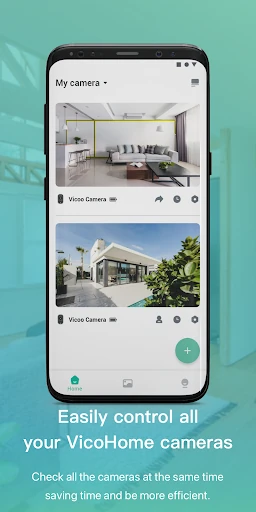
VicoHome: Smart Home Camera is a companion app for connecting to a camera and checking what is happening at home, either live or through previously recorded video. It suits people who want a straightforward way to keep an eye on a space when they are away. My overall impression is that it has a focused, practical job: camera viewing, rather than a broad smart-home control center.
A quick look at home
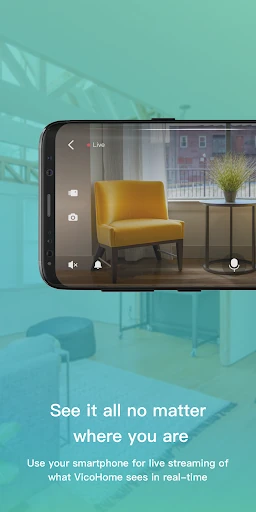
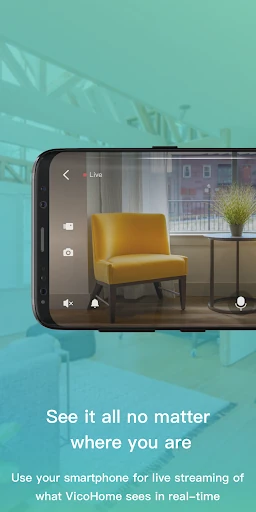
Imagine leaving home for the day and wanting to check on a room later. VicoHome is built around that simple moment: connect your camera, open its live screen, and observe the situation from wherever you are. I like that the main purpose is easy to grasp. This is not an app asking me to build a complicated home dashboard before I can get to the basic reason I opened it.
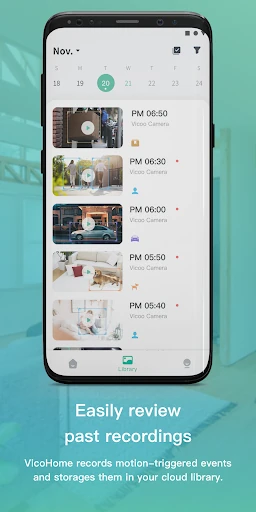
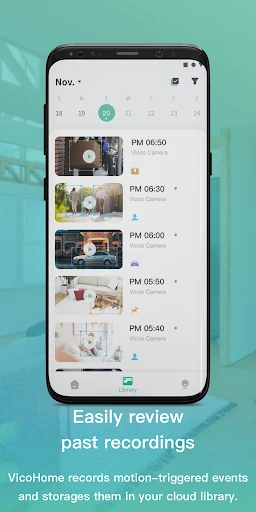
The other useful part of that routine is being able to view video the camera has already recorded. If I missed a moment while I was busy, I can look back rather than relying only on what is happening right now. That makes the app relevant for both quick check-ins and reviewing past footage. The camera is central to the experience, though; VicoHome is a way to connect with it, not a camera in itself.
A focused camera companion
Compared with a general smart-home app, VicoHome has a narrower purpose. Its description centers on connecting with smart devices through the app, with camera viewing as the clear day-to-day use: check a live view or watch video the camera recorded earlier. If your main reason for opening an app is to see what a connected camera can show, that focus may feel welcome rather than limiting.
It is not presented as a broad home-automation hub, a video-editing tool, or a replacement for the camera itself. I would not choose it expecting a long list of controls for unrelated household devices or editing features. The practical question is whether you have a camera you want to view through VicoHome. If you do, its stated role is easy to understand; if you want something else, the narrow scope may not fit.
Make check-ins a habit
A simple habit can make a camera companion more useful: decide when you actually need a live check, rather than opening the app repeatedly without a reason. For example, you might look in during a break or when you are away from home and want a current view. VicoHome’s live screen is the feature suited to that kind of quick glance, keeping the task centered on observing the camera feed.
When a live check does not answer a question about an earlier moment, the recorded video gives you another place to look. I would treat those as two different tasks: live viewing for what is happening now, and past footage for what the camera has already captured. That small distinction keeps expectations sensible. The app’s description supports those two viewing uses, without promising a particular recording schedule or a specific set of playback controls.
More From Our News Desk

Zoom Meetings, Google Meet, or Teams: Which Is Easiest to Join?

How I Build a Free Streaming Lineup With Tubi

Why Crunchyroll Is the Default Anime App for So Many Fans

YouTube TV: A Practical Guide to Cutting Cable

Rummikub and the Small Comfort of Phone Games

TeamViewer Remote Control or AnyDesk for Helping Family?
Who may find it useful
I would recommend VicoHome to someone who already has a compatible camera and wants a dedicated way to view it while away. The clearest fit is a person who values a live check-in and the option to review video recorded by the camera. With more than a million installs and a 4.4-star rating on Google Play, it has attracted a substantial audience, though those figures alone cannot say whether it fits a particular camera or routine.
It may be less appealing if you are looking for a general smart-home command center, a camera purchase, or a tool for editing video. The app’s stated job is observation through connected devices, not a wide range of unrelated tasks. I would also make sure the camera you intend to use works with VicoHome before settling on it, since the app’s usefulness depends on that connection.
VicoHome: Smart Home Camera is developed by VicoTech and is available on Google Play for Android. It has more than 1 million installs and a 4.4-star rating from about 49,000 ratings. The app is free to download, contains no ads, and offers in-app purchases. Google Play gives a per-item price range of $0.99 to $999.99.
The app has an Everyone content rating. Its current version is 4.5.1. It was released on November 12, 2020, and its most recent update is dated October 23, 2026. A minimum Android version is not included in the available app facts, so check Google Play for device compatibility before installing.
A closer look at camera check-ins
A direct first impression
When I first opened the description of VicoHome, the purpose was immediately clear: connect with a camera and use the app to observe a space. That kind of clarity matters in a companion app. I do not have to guess whether the main attraction is photo editing, social sharing, or a collection of unrelated home features. The promise is centered on viewing, both live and after the camera has recorded video.
Getting value from the app depends on having a camera to connect. That makes the first practical step less about exploring a standalone media library and more about whether VicoHome is the right companion for the device you own. I would check compatibility before building a routine around it. Once that question is settled, the live screen gives the app a clear destination for the most immediate task.
Two ways to view
Day to day, the distinction between live viewing and past video is the heart of the experience. A live view is for a current check: open the app when you want to see the situation at home. Recorded video serves a different purpose, letting you look back at footage the camera has captured. Having both kinds of viewing described gives the app a role beyond simply showing a moment in real time.
I can picture using the live screen for a brief check during an ordinary day, then turning to previous video if I want to inspect an earlier moment. That is a useful, understandable pairing. The description does not specify how recordings are organized or how long they remain available, so I would avoid assuming a particular playback workflow. The supported promise is that you can view past video recorded by your camera.
The camera stays central
What stands out is the way VicoHome keeps the camera at the center. The app connects with smart devices, and its stated camera use is to observe the home through a live screen or review video already recorded. That makes it easier to understand what the app is for than a feature list that tries to cover every part of a smart home.
The phrase “anytime and anywhere” points to the convenience of checking in remotely, but the useful details remain concrete: live observation and access to past camera video. I would judge the app by how well those viewing needs match my own, rather than expecting it to provide a complete home-security system or every camera-management option. Its clear strength, based on the available description, is being a route to camera footage.
A practical viewing routine
For a low-friction routine, I would keep the app for moments when a camera check has a purpose. If I am away and want to know what is happening now, I would go to the live view. If the question is about something that has already happened, I would look at the camera’s recorded video instead. Separating those uses makes the app feel like a practical tool, not another feed to check out of habit.
This approach is especially useful when a household has a clear reason to monitor a particular space. A quick live look can answer a present-tense question, while reviewing past footage can help with a question about an earlier moment. VicoHome’s description supports both activities, but it does not lay out a specific schedule or alert routine. I would keep the habit simple and use the viewing options when they are relevant.
Keep expectations grounded
The main limitation is also the app’s defining focus: it is for viewing connected camera content. Someone hoping to control a wide range of smart-home equipment or work with video creatively may find the stated role too narrow. The app is not described as a camera, either, so it depends on having a device to connect. That dependency is worth considering before treating VicoHome as a useful standalone download.
There are also practical details a user should check for their own setup, especially camera compatibility and device requirements. The available description does not spell out a minimum Android version or a particular recording arrangement, so I would not assume those details are the same for everyone. In-app purchases are offered, but the supplied facts do not explain what each purchase includes. The Play Store is the sensible place to check current specifics.
VicoHome: Smart Home Camera makes sense when the task is simple: connect with a camera, check a live view, or look back at recorded video. I appreciate that focused purpose, and the combination of current and past viewing gives it a clear place in an everyday routine.
I would try it if I owned a camera that works with VicoHome and wanted an app specifically for observing its footage. I would look elsewhere if I expected a broad smart-home hub or video editor. Check compatibility and purchase details on Google Play before deciding.
VicoHome Frequently Asked Questions
What is VicoHome: Smart Home Camera used for?
VicoHome connects with smart devices and lets you use a camera’s live screen to observe what is happening at home. It also lets you view video that the camera has recorded. In short, it is a companion for checking a connected camera now or looking back at its footage, rather than a camera or a general video-editing app.
Which devices and platforms support VicoHome?
VicoHome is an Android app available through Google Play. Its stated use is to connect with a smart device such as a camera and view live or recorded video. Whether a particular camera works with it can depend on the device, so check the Google Play details and camera information before relying on it for a specific setup.
What Android version does VicoHome require?
The minimum Android version can vary by device and app release, so check the current Google Play listing for the requirement shown for your phone or tablet. VicoHome’s main purpose is to connect with a camera and view live or previously recorded video, but a compatible Android device and camera are needed for that use.
Is VicoHome free, and does it have in-app purchases?
VicoHome is free to download on Google Play and contains no ads. It does offer in-app purchases, with listed per-item prices ranging from $0.99 to $999.99. What a particular purchase includes and its current price may vary, so review the purchase details in Google Play before buying.
Is VicoHome a good fit for my needs?
It may suit you if you have a camera that works with VicoHome and want to check live video or review footage it recorded. It may not suit you if you want a broad smart-home control app, a camera itself, or a video editor. Check camera compatibility and the current store details before making it part of your routine.
Pros
- Clear focus on checking a connected camera’s live view.
- Supports viewing video already recorded by the camera.
- Free to download and contains no ads.
- More than one million Google Play installs and a 4.4-star rating.
Cons
- Its camera-focused role may be too narrow for broad smart-home control.
- Useful only with a camera that works with the app.
- In-app purchase details should be checked before buying.
- Category
- Video Players & Editors
- Version
- 4.5.1











