Thrive Hearing Control
- 5.96K
- 2.8
- Installs
- 500.00K
- Price
- Free

Screenshots
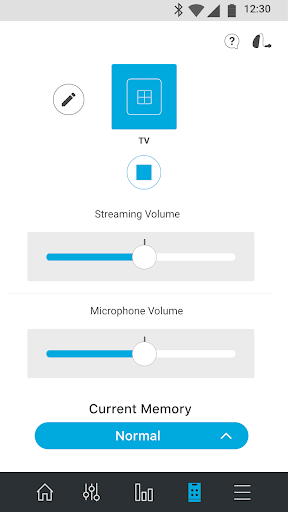
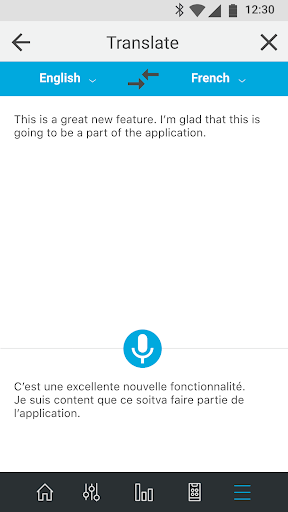
Analysis by Reviewed APKs
Thrive Hearing Control is a companion app for compatible Starkey-family hearing aids, combining everyday hearing adjustments with tools such as activity tracking, transcription and remote support. I’d look at it if I already used a supported hearing aid and wanted to manage more from my phone. Its feature set is broad, but the 2.8-star Google Play rating makes me cautious: compatibility and the experience with a particular hearing aid matter.
A hearing routine on your phone
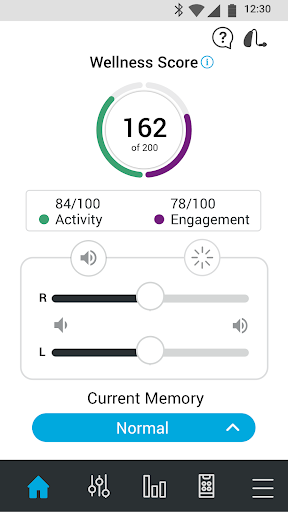
Picture arriving at a busy café after a quiet morning at home. With compatible hearing aids connected, Thrive gives you phone-based controls for volume and memories, including ones you or your hearing professional created. Rather than reaching for small controls on the aids, you can make adjustments from the app. The app also describes Edge Mode for challenging listening situations, so there are options beyond simply turning everything up.
Later, if a conversation is hard to follow, Transcribe can turn spoken conversation into text on your phone. When I think through that sort of day, the appeal is less about having a long feature list and more about having several hearing-related tools together. The app can also stream calls, music and other media, though Android phone and hearing-aid compatibility can affect audio streaming.
More than a remote control
The obvious alternative is using the controls built into hearing aids, or asking a hearing professional to make adjustments. Thrive does not replace that professional relationship; it adds phone controls, custom memories and services such as TeleHear, which connects users with a hearing professional by video call for minor adjustments. For someone who wants to manage supported aids between appointments, that combination may be useful.
It is also not a general-purpose health tracker or a standalone hearing aid. Its tracking features are presented alongside compatible hearing aids, and its hearing controls depend on those aids. The app is a poor fit if you do not use a supported Starkey, Audibel, NuEar, MicroTech or AGX hearing aid. Nor would I treat its Translate or Transcribe tools as a replacement for a dedicated language or accessibility service.
Small habits that help
A little setup can make the controls easier to use later. I’d start by getting familiar with the volume control and the memories already available, then create a custom memory only when I know what change I want for a particular setting. Thrive lets users geotag custom memories so the aids can adjust automatically when they return to that location. That could save a few taps on a regular commute or at a familiar meeting place.
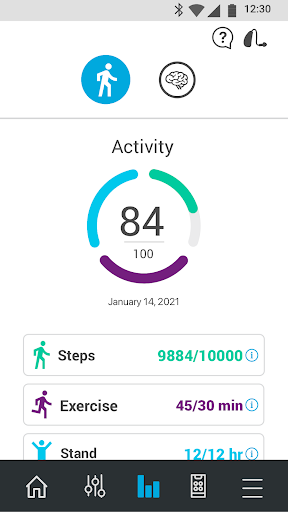
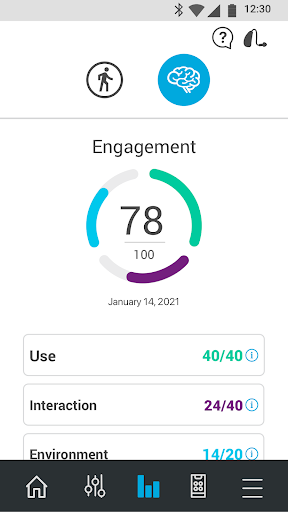
The health features make more sense as a brief daily check-in than as something to monitor constantly. Users can set activity and engagement goals and review their Activity Score and Engagement Score. If sharing is useful, Thrive can send selected information about activity, hearing-aid use and social engagement to chosen people using Thrive Care. I’d first decide which information I actually want to share.
More From Our News Desk

Zoom Meetings, Google Meet, or Teams: Which Is Easiest to Join?

How I Build a Free Streaming Lineup With Tubi

Why Crunchyroll Is the Default Anime App for So Many Fans

YouTube TV: A Practical Guide to Cutting Cable

Rummikub and the Small Comfort of Phone Games

TeamViewer Remote Control or AnyDesk for Helping Family?
Who may find it useful
I’d recommend giving Thrive a look if you use a compatible hearing aid from one of the supported brands and want everyday controls within reach on your Android phone. The mix of remote adjustments, personalized memories, streaming, transcription and hearing-professional support may suit someone who wants one companion app for several parts of hearing-aid use. The activity and engagement tools may also appeal to users who like setting simple daily goals.
It may not suit someone without a compatible hearing aid, or anyone expecting a phone app to improve hearing on its own. Users who mainly want a fitness tracker or a general-purpose translator can find more focused choices elsewhere. The relatively low Google Play rating is another reason to check that the app supports your particular hearing aids and phone before making it part of your routine.
Thrive Hearing Control is developed by Starkey Hearing Technologies and is listed in Health & Fitness on Google Play. The app is free to install, has no in-app purchases and contains no ads. Its content rating is Everyone. Google Play shows over 500,000 installs and a 2.8-star rating from about 6,000 ratings.
The current version is 3.9.2. The app was released on August 26, 2018, and its recorded last update is August 26, 2026. Thrive works with compatible hearing aids from Starkey, Audibel, NuEar, MicroTech and AGX; the aids must be purchased through a hearing professional. Available features can differ by hearing-aid style.
A closer look at daily hearing control
First steps and setup
When I first opened an app like this, I’d want to know one thing before exploring the extras: will it work with my hearing aids? Thrive is built around compatible sensor-enabled hearing aids, not a phone acting alone. The listed brands are Starkey, Audibel, NuEar, MicroTech and AGX, and the hearing aids are purchased from a hearing professional.
After that, I’d take a few minutes to learn the basic remote controls and available memories before trying less familiar tools. The app includes volume adjustment and switching between memories made by the user or hearing professional. Not every feature is available on every hearing-aid style, so a short conversation with the hearing professional can help set realistic expectations about what will appear.
The everyday experience
The central experience is practical: adjust hearing-aid volume, switch memories, and stream audio from an Android phone. A quick adjustment at a restaurant or before a phone call is a more natural use than opening the app just to browse. Thrive also includes Edge Mode for difficult listening situations, described as a way to make immediate sound adjustments.
Streaming deserves a little caution. The app supports music, calls and other media, but Starkey notes that Android phone models vary in their ability to connect and stream to hearing aids. I would test the specific phone-and-aid combination for calls and media rather than assuming that a feature will work identically across devices.
Tools beyond sound settings
Custom memories are one of the more distinctive controls. Users can make sound adjustments and geotag a memory so the hearing aids can switch when they return to that location. That could be convenient for a familiar workplace or a regular restaurant, while still leaving room to change settings manually when the situation differs.
Thrive also brings together tools for communication and support. Transcribe displays conversations as text, Translate is intended to help with communication across languages, and Thrive Assistant answers questions about hearing aids as well as general questions. Self Check lets users run a diagnostic test of hearing-aid components, while TeleHear offers a video connection with a hearing professional for minor adjustments.
A low-effort daily routine
A useful routine could begin with a quick check of hearing-aid settings before leaving home, followed by a switch to a saved memory when moving into a familiar environment. If the day includes a conversation that is difficult to follow, Transcribe is another tool to try. None of that requires treating the app as a constant dashboard; the controls are most relevant when a specific moment calls for them.
At the end of the day, someone interested in Thrive’s health features could review activity and engagement against their daily goals. The app can track steps and other activity, as well as hearing-aid use and social engagement. Users can also share selected information with people they choose who have the Thrive Care app. I’d keep the routine focused on the measures that are genuinely useful to me.
Limits to keep in mind
The biggest practical limit is compatibility. Thrive depends on supported hearing aids, and features vary by hearing-aid style. Android audio streaming also depends on the phone’s capabilities. That means the app’s wide range of tools does not necessarily mean every user will have access to every feature or the same experience.
The Google Play rating of 2.8 stars from about 6,000 ratings is worth weighing alongside the feature list. It does not explain how the app will perform with a particular device, but it is a sensible prompt to check compatibility and expectations before relying on Thrive. The app also does not replace a hearing professional; its remote support is described as helping with minor adjustments.
Thrive Hearing Control has a clear purpose: give users of compatible hearing aids more ways to adjust settings, communicate and check in on selected activity goals. I like that useful controls sit alongside options such as custom memories, Transcribe and TeleHear, rather than the app being only a volume remote.
My recommendation is conditional. If you already use a supported hearing aid, ask your hearing professional about compatibility and try the app’s core controls first. If you do not use compatible aids, Thrive is not the right starting point. Its low rating and device-dependent features make a little checking worthwhile before building it into daily routines.
Thrive Hearing Control Frequently Asked Questions
What is Thrive Hearing Control used for?
Thrive Hearing Control is a companion app for compatible hearing aids. It offers controls for volume and memories, audio streaming, and tools such as Transcribe, Translate, Self Check and TeleHear. It also includes activity and engagement tracking with daily goals. Which features are available depends in part on the hearing-aid style.
Which phones and hearing aids work with Thrive Hearing Control?
The app is available on Android and works with compatible hearing aids from Starkey, Audibel, NuEar, MicroTech and AGX. The hearing aids must be purchased from a hearing professional. Android audio streaming can vary by phone model, and features can vary by hearing-aid style, so check compatibility for your devices in Google Play or with your hearing professional.
What Android version does Thrive Hearing Control require?
The Android version requirement can vary with the app release and device, so check the current Google Play store information before installing. Phone compatibility also matters for audio streaming. If you are setting up Thrive with hearing aids, your hearing professional can help confirm whether your particular combination is supported.
Does Thrive Hearing Control cost money?
Thrive Hearing Control is free to install on Google Play and has no in-app purchases or ads. The app is designed to work with compatible hearing aids, which are purchased from a hearing professional. Check the store information for current app details, and ask your hearing professional about the hearing aids themselves.
Is Thrive Hearing Control right for me?
It may suit you if you use compatible hearing aids and want phone controls, custom memories or additional communication and tracking tools. It is not a standalone hearing aid or a general fitness app. If you do not have supported hearing aids, or need a particular feature, check its availability with your hearing professional before relying on it.
Pros
- Combines volume controls, custom memories and audio streaming for compatible hearing aids.
- Includes Transcribe, Translate, Self Check and remote hearing-professional support.
- Activity and engagement goals offer an optional daily check-in.
- Free to install, with no in-app purchases or ads.
Cons
- Requires compatible hearing aids purchased through a hearing professional.
- Features differ by hearing-aid style, and Android streaming varies by phone.
- Its 2.8-star Google Play rating suggests a mixed user experience.
- Category
- Health & Fitness
- Version
- 3.9.2











