Sutter Health My Health Online
- 3.33K
- 4.3
- Installs
- 500.00K
- Price
- Free

Screenshots
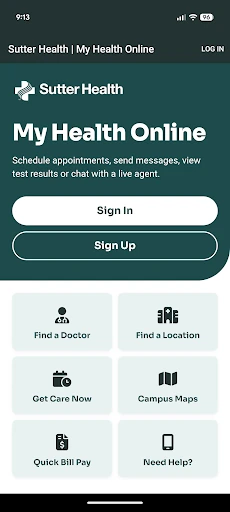
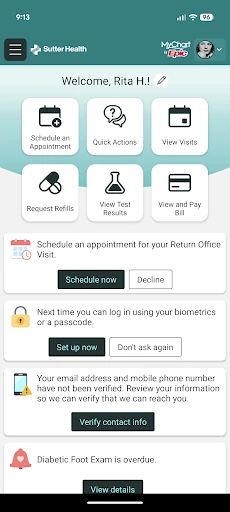
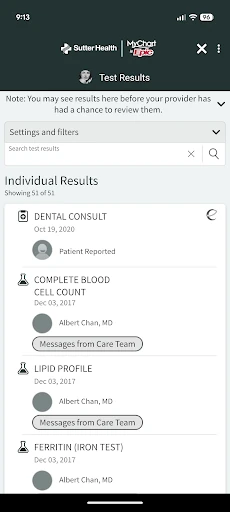
Analysis by Reviewed APKs
Sutter Health My Health Online is a patient portal app for people who already have an active account with Sutter Health. It brings practical health tasks—like checking test results, contacting a care team, managing appointments, and requesting prescription refills—onto a mobile device. After spending time with its range of everyday uses, I see it as a useful companion for Sutter patients, rather than a general health or wellness app.
A Portal for Busy Days
Picture getting home after an appointment and realizing you have a question for your doctor, or wanting to check a test result without making another call. My Health Online gives Sutter patients a place to handle those kinds of tasks from a phone. I found its appeal less about one headline feature and more about keeping several common parts of care—messages, results, appointments, and prescriptions—within reach.
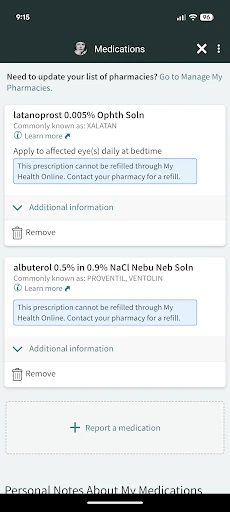
The app is tied to an existing My Health Online account, so it is not something a person can simply open and use as a general health tracker. Once that account is in place, the range of options is practical: review results, request refills, arrange appointments, or book a same-day video visit. It can also show health reminders, medications, and immunization history, which helps make the app useful between visits.
A Sutter-Specific Alternative
The useful comparison is with calling a clinic, using a desktop patient portal, or keeping appointment and medication details in separate places. My Health Online gathers several Sutter-related tasks in one mobile app, including care-team messaging and bill access. That can save a bit of back-and-forth when the task is simple, though it does not replace the conversation or care itself when a situation needs more attention.
This is not a broad medical reference, fitness tracker, or place to manage care outside the Sutter Health account described by the app. Its usefulness depends on being part of that system and having an active account. If you are not a Sutter patient, or you want general wellness tools, the app is unlikely to be a natural fit. For an existing patient, its focused scope is also its main point.
Small Habits That Help
I would make a quick check of the app part of the routine after an appointment: look for results, review any health reminders, and note the next appointment. That turns the portal into a handy follow-up spot instead of something opened only when a problem comes up. The medication and immunization sections can also be useful when you need to review those details, without making the app a substitute for asking your care team.
For recurring needs, it helps to use the app for the task it is designed to handle. Send a message when you have a question for the doctor or care team; use the appointment tools when scheduling is the goal; and check whether a same-day video visit suits the need. Families may also use proxy access to view family members’ health information. I would still check that I am looking at the right account before acting.
More From Our News Desk

Zoom Meetings, Google Meet, or Teams: Which Is Easiest to Join?

How I Build a Free Streaming Lineup With Tubi

Why Crunchyroll Is the Default Anime App for So Many Fans

YouTube TV: A Practical Guide to Cutting Cable

Rummikub and the Small Comfort of Phone Games

TeamViewer Remote Control or AnyDesk for Helping Family?
Who May Find It Useful
I would recommend My Health Online to Sutter patients who want a mobile route to common account tasks. It is especially relevant if you often check results, need to contact your care team, manage appointments, request refills, or want access to billing and health information in one place. The mix of options makes it a practical companion for people who already use Sutter’s patient services and prefer handling straightforward tasks on a phone.
It may not suit someone without an active My Health Online account, someone receiving care elsewhere, or anyone looking for a general health education or fitness app. It is also worth remembering that a mobile portal is a convenient access point, not a replacement for care or direct help when needed. If you are comfortable using a patient account on your phone and are part of the Sutter system, the focused feature set makes sense.
Sutter Health My Health Online is developed by Sutter Health. On Google Play, it has more than 500,000 installs and a 4.3-star rating from 3,327 ratings. The app is free to download, with no in-app purchases or ads reported in the supplied app details. Its content rating is Everyone, and the listed minimum Android requirement is Android 9.
The current listed version is 11.4.5. Google Play gives April 27, 2016 as the release date and October 14, 2025 as the last update date. The app is intended for people with an active My Health Online account, which is required before using its patient features. The latest change note describes miscellaneous fixes and improvements.
Making Patient Tasks Easier to Reach
Starting With an Account
When I first considered the app, the most important setup detail was not a phone setting but the account requirement. My Health Online is for people who already have an active Sutter Health account. If you do not have one, the app’s description points to Sutter’s website for registration information. That makes the app straightforward in purpose, but it is not an instant portal for a new user without account access.
The app description also says it replaces the existing MyChart app for Sutter patients who previously accessed My Health Online that way. That is useful context for anyone returning to the service and wondering which app to use. Once ready to use the app, the feature list gives a good sense of its scope: health information, appointments, messages, bills, and video visits, all attached to the Sutter account.
The Day-to-Day Experience
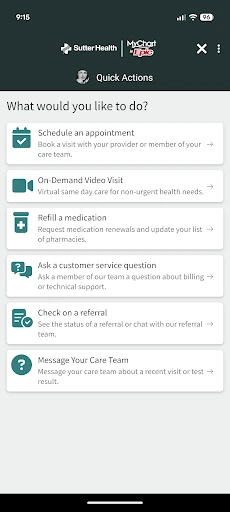
In daily use, the app’s strongest idea is convenience across several ordinary patient tasks. You can review test results, send a message to your doctor or care team, request prescription refills, and manage appointments from the mobile device. Rather than focusing on one specialty, it covers a handful of common points of contact with care. That can make it a useful place to start when you need to take care of a routine account task.
I can imagine checking in after a visit to see whether a result is available, then returning later to confirm an appointment or send a follow-up question. The app also supports viewing and paying a bill, so it reaches beyond clinical information into a practical account chore. These are helpful options to have together, even though the app’s value naturally depends on which services and account features are relevant to a particular patient.
More Than Results
Test results are an obvious reason to open a patient portal, but My Health Online covers several other pieces of the routine. It lets users view medication information, immunization history, and health reminders. I like that these details sit alongside tools for appointments and messages, since a patient’s needs rarely arrive as one neat task at a time. The app’s role is to make those Sutter account details accessible from a mobile device.
Appointment management includes the ability to schedule and manage appointments, while the app also offers same-day video visits. Messaging gives patients a way to contact their doctor and care team. Family proxy access is another notable option: it allows access to family members’ health information. These features widen the app’s usefulness beyond checking one’s own results, while remaining centered on Sutter patient services rather than a general-purpose health platform.
A Practical Follow-Up Routine
A sensible routine might begin after a visit: open the app to review available test results, check any health reminders, and look over the appointment details. If something needs clarification, the messaging option gives you a way to contact the care team. This keeps follow-up tasks together and can make it easier to remember where to look, especially when several small details come up over the course of a week.
On another day, the same app might be useful for requesting a prescription refill or handling an appointment. If a same-day video visit is appropriate for the situation, that option is available too. I would treat these as convenient routes into Sutter services, rather than assuming every concern can be resolved through the app. Its practical strength is offering multiple ways to manage routine patient interactions in one account.
Keep the Scope in Mind
The main limitation is also clear from the app’s design: it is specific to Sutter Health and requires an active My Health Online account. Patients outside that system will not get the same value from it, and someone seeking a standalone wellness app should look elsewhere. This focus is not a flaw for its intended audience, but it does make the app less useful as a general health tool.
A second consideration is that convenience should not be confused with a replacement for care. The app provides messaging, results, appointments, and account information, but those features do not make it a medical reference or a substitute for contacting a clinician when appropriate. The app’s description offers a Contact Support option for feedback or help. For account-specific questions, that support route is a useful detail to keep in mind.
My Health Online makes the most sense as a practical mobile extension of Sutter Health’s patient services. I like the range of ordinary tasks it brings together, from test results and care-team messages to appointments, refills, bills, and family proxy access. It stays focused rather than trying to become a general health hub, which suits patients who already use the Sutter system.
I would recommend it to Sutter patients who want to manage routine health account tasks from a phone and already have an active account. I would not suggest it as a universal medical app or as a replacement for direct care. If you fit its audience, the combination of useful features makes it worth trying.
Sutter Health Frequently Asked Questions
What is Sutter Health My Health Online used for?
Sutter Health My Health Online lets patients with an active account access health information and manage common Sutter-related tasks. These include reviewing test results, messaging a doctor or care team, requesting prescription refills, managing appointments, booking same-day video visits, viewing and paying bills, and checking medication, immunization, and reminder information.
What devices can I use Sutter Health My Health Online on?
The app is available for Android devices through Google Play. The supplied details list Android 9 as the minimum requirement. Device compatibility can vary, so it is worth checking the Google Play entry for your particular phone or tablet before installing.
What Android version does Sutter Health My Health Online require?
The listed minimum requirement is Android 9. If you are unsure which Android version your device runs, check its system settings and compare that with the current Google Play information, since requirements and compatibility details can vary over time.
Does Sutter Health My Health Online cost money?
The app is free to download, and the supplied details indicate no in-app purchases or ads. You need an active My Health Online account to use the patient features. Check Google Play for current app details, since store information can change.
Who should use Sutter Health My Health Online?
It is intended for Sutter Health patients with an active My Health Online account. It may suit people who want mobile access to results, appointments, messages, refills, bills, or family information through proxy access. It is not a general health app, and people who receive care outside Sutter may not find it useful.
Pros
- Combines results, appointments, messages, refills, and billing in one Sutter patient app.
- Includes same-day video visits and family health information through proxy access.
- Shows medication details, immunization history, and health reminders alongside account tools.
- Free to download, with no in-app purchases or ads reported.
Cons
- Requires an active My Health Online account before patients can use its features.
- Its Sutter-specific focus makes it unsuitable as a general health or wellness app.
- Mobile account tools do not replace direct care when a concern needs attention.
- Category
- Medical
- Version
- 11.4.5











