Spruce: Medical Communication
- 16.34K
- 4.9
- Installs
- 500.00K
- Price
- Free

Screenshots



Analysis by Reviewed APKs
Spruce: Medical Communication gives healthcare teams and their patients a place to handle communication beyond the exam room, from secure messages to video calls. I see its appeal for practices that want patient contact and team coordination in one service, while patients can use it to stay in touch with an invited care team. It is a focused healthcare tool, not a general-purpose chat app, and that focus shapes both its strengths and its limits.
When messages need a home
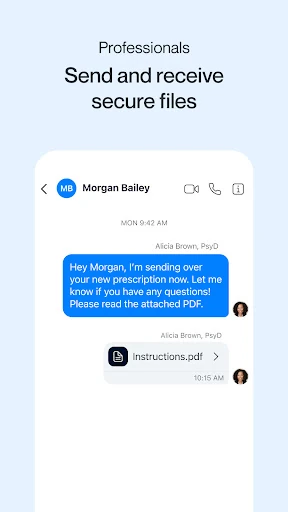
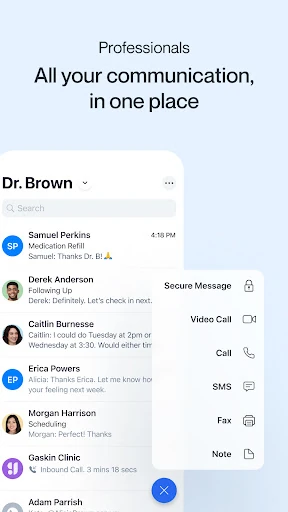
Picture a clinic’s busy afternoon: a patient sends a question and a photo, a staff member needs to loop in a colleague, and someone else is returning a call. Spruce brings several kinds of communication together, including secure messaging, calls, fax and video chat. The unified team inbox is central to that idea. Rather than treating every exchange as a separate task, the app is designed to help care teams manage conversations in one place.
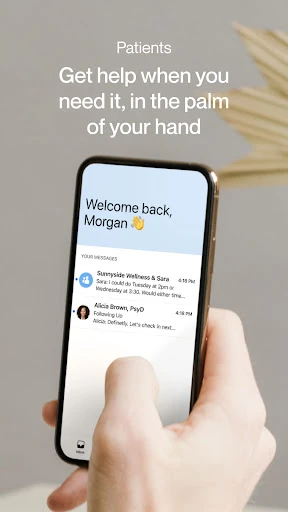
As a patient, I’d use Spruce when my care team invited me to connect, then return to it when I needed to send a secure message or receive a video call. Patients can also send photos in messages and get alerts about new activity. That makes it a practical companion for ongoing communication between visits, though it is still the care team that determines how it fits into its own patient workflow.
A focused alternative to chat
Spruce is not trying to replace every tool a clinic uses. Its particular strength is bringing patient communication and team coordination into a healthcare-oriented service: secure individual and group messages sit alongside phone features, fax, video calling and a shared inbox. For teams, tools such as internal notes and conversation routing address work that an ordinary personal messaging app is not built to organize.
That focus is also why I wouldn’t pick Spruce as a general social chat app or assume it handles every part of running a practice. The description emphasizes communication, telehealth, panel management and related operations; it does not present the app as a broad medical-records system. Patients also need an invitation from a care team using Spruce, so its usefulness depends on whether their provider is part of the service.
Small habits that help
For a care team, it makes sense to decide who watches the shared inbox and how conversations should be routed before the day gets hectic. Spruce supports team inbox configuration, communication routing, tags, internal notes and @-paging. Used consistently, those tools can help staff keep a conversation moving without turning every handoff into a fresh round of messages asking who is handling it.
I’d also make use of the features that reduce repetitive communication. Teams can save messages for reuse, schedule messages for later and set automatic responses for common needs. After-hours schedules can adjust phone and messaging behavior to business hours. These are workflow aids rather than a substitute for thoughtful replies, but they could make a routine feel more orderly when the same kinds of questions arrive throughout the week.
More From Our News Desk

Zoom Meetings, Google Meet, or Teams: Which Is Easiest to Join?

How I Build a Free Streaming Lineup With Tubi

Why Crunchyroll Is the Default Anime App for So Many Fans

YouTube TV: A Practical Guide to Cutting Cable

Rummikub and the Small Comfort of Phone Games

TeamViewer Remote Control or AnyDesk for Helping Family?
Who may find it useful
I’d recommend Spruce to healthcare professionals who want patient communication, team collaboration and telehealth tools together, especially if a shared inbox and business phone functions would help their day. Its provider features include secure messaging, two-way SMS and fax, video calls, phone-system tools, intake questionnaires and ways to organize patient conversations. The service also has mobile and desktop apps, which gives teams more than one way to work with it.
Patients should consider it when their care team specifically invites them to connect. The patient app is described as free and supports secure messages, photo sharing, alerts and receiving video calls. It may not be useful to someone whose provider does not use Spruce, and it is not aimed at people looking for a general chat service. Practices needing a complete clinical record or appointment-booking system should check that their needs are covered before relying on it.
Spruce: Medical Communication is developed by Spruce Health and is available on Google Play for Android. It has more than 500,000 installs and a 4.9-star rating from around 16,000 ratings. The app is rated Everyone and lists Android 5.0 as its minimum requirement. The current version is 4.3.63.
The app is free to download, with no in-app purchases or ads shown in the supplied app facts. The description distinguishes between patients, for whom Spruce is always free, and healthcare professionals, who can start a free 14-day trial. It was released on February 25, 2016, and was last updated on February 3, 2026.
A closer look at Spruce in practice
A clear two-sided setup
When I first opened the idea of Spruce, what stood out was that it serves two different audiences: healthcare professionals and patients. That distinction matters. A patient does not need the whole clinic operations toolkit to receive messages or a video call, while a practice can use the broader set of communication and collaboration features. Keeping those roles in mind makes the service easier to understand than treating it as one identical app experience for everyone.
Getting started as a patient depends on an invitation from a healthcare team. Once connected, the described patient tools include messaging, sending photos, receiving video calls and getting alerts for new activity. Professionals have a free 14-day trial to start with, and the provider side includes additional communications and team functions. The setup is therefore tied to a real care relationship rather than simply creating an account for casual use.
Communication through the day
The everyday value is having multiple communication modes gathered around patient care. A team can use secure individual or group messages, phone calls, voicemail, fax and video calling. Spruce also describes two-way SMS texting and eFax for providers, along with a unified team inbox. I like that this recognizes how clinic communication rarely arrives in just one format, even if a team will need to decide which channel fits each situation.
On the patient side, the practical routine can be simple: check for an alert, open a message from the care team, reply or send a photo, and use a video call when one arrives. Spruce is meant to support communication outside the exam room, not turn every interaction into a complicated process. How promptly a team responds, of course, depends on its own practices and availability.
Tools for the whole team
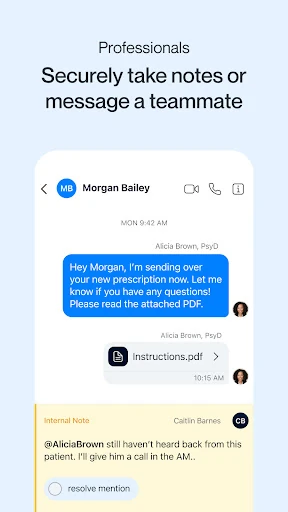
The provider feature set goes beyond one-to-one conversations. Shared inboxes, secure team chats, internal notes and @-paging are designed to help colleagues coordinate around patient communications. Tags, advanced search, patient list uploads and bulk messaging add ways to organize a panel. I can see why these options would matter to a practice where several people handle incoming questions and need a shared view of what is happening.
Phone functions are another distinctive part of the package. Providers can get new phone and fax numbers or transfer existing lines, and the listed phone tools include phone trees, multiple lines, voicemail, automated transcription, VoIP and number sharing. Spruce also describes after-hours schedules that adjust phone and messaging behavior to business hours. That makes it feel more like a communication system for a practice than a messaging app with a video button attached.
A practical clinic routine
I’d imagine a small team starting the morning by checking its shared inbox, using tags or routing to assign conversations, and adding internal notes when another staff member needs context. Later, a provider might use a secure video call or send a scheduled message. At closing time, the practice’s after-hours schedule can adapt the phone and messaging setup. Spruce includes these tools, although teams would need to decide how to use them in their own workflow.
For repeated questions, saved messages and automatic responses can reduce the need to write the same basic reply from scratch. Scheduled messages offer another way to prepare communication in advance. These features seem most useful when a team sets them up thoughtfully and keeps the messages relevant. They are small workflow conveniences, not a reason to send every patient the same response regardless of their circumstances.
Keep the scope in mind
Spruce offers a lot of communication options, which can also mean a team needs time to settle on sensible routines. Shared inboxes, multiple phone lines, routing, tags and automated messages are most helpful when staff know who owns each task. I would not assume that installing the app alone creates a smooth process; the practice still has to decide how incoming messages are handled and when patients should expect a response.
The patient experience also depends on the care team using Spruce and inviting the patient to connect. That makes it less useful as a standalone download for someone hoping to find a provider or manage care independently. The description focuses on communication and operational tools rather than presenting Spruce as a complete medical-records or appointment-booking solution, so practices should assess their needs accordingly.
Finally, the provider offer is a 14-day free trial, while the patient app is described as always free. Those are different use cases, and teams evaluating the service should pay attention to the terms that apply to their own setup. For patients, the key practical question is simpler: whether their clinic uses Spruce and has sent an invitation.
Spruce makes the most sense as a communication hub for healthcare teams and the patients they invite. Its combination of messaging, calls, fax, video visits and team tools is more tailored than a general chat app, and the patient side keeps the essentials easy to grasp. I’d be comfortable recommending it when a care team is already using the service.
For clinics, the breadth of phone, inbox and workflow options is appealing, but it takes a team willing to establish clear habits. For patients, the app is a straightforward way to message and receive video calls from a participating provider. If that describes your situation, Spruce is worth considering; if not, its usefulness will be limited.
Spruce Frequently Asked Questions
What is Spruce: Medical Communication used for?
Spruce is for communication between healthcare professionals and patients, as well as coordination among care teams. The described tools include secure messaging, calls, fax and video calling. Patients can message their care team, send photos, receive video calls and get activity alerts. Professionals also have team inbox, phone-system and panel-management features.
Which devices can run Spruce: Medical Communication?
Spruce is available for Android, and its description also says mobile and desktop apps are available for patients and healthcare professionals. The Android version requires Android 5.0 or later. For current device compatibility and availability, check the Google Play store information for the app.
Is Spruce: Medical Communication free?
The Android app is free to download, and the app facts show no in-app purchases or ads. Spruce describes the patient app as always free. Healthcare professionals can start a free 14-day trial. If you are evaluating the provider service, check the store or Spruce’s current service information for terms that apply to your situation.
What Android version does Spruce require?
The stated minimum is Android 5.0. The app facts identify version 4.3.63 as the current version and give February 3, 2026, as its last update date. Device compatibility can change as the app is updated, so it is worth checking the Google Play store before installing.
Is Spruce: Medical Communication suitable for patients?
Yes, if your healthcare team uses Spruce and invites you to connect. Patients can use it for secure messages, photo sharing, alerts and receiving video calls from their care team. It is not a general-purpose chat app, and without a participating provider the patient features may not have much use.
Pros
- Brings secure messaging, calls, fax and video communication into one healthcare-focused service.
- Patient tools include messaging, photo sharing, activity alerts and video calls.
- Team features include shared inboxes, internal notes, routing and reusable messages.
- Patient access is described as free, with no ads shown in the app facts.
Cons
- Patients need an invitation from a healthcare team that uses Spruce.
- The range of team tools may require practices to establish clear workflows.
- It is focused on communication, not presented as a complete medical-records system.
- Category
- Medical
- Version
- 4.3.63











