- 11.32M
- 4.3
- Installs
- 1.00B
- Price
- Free

Screenshots

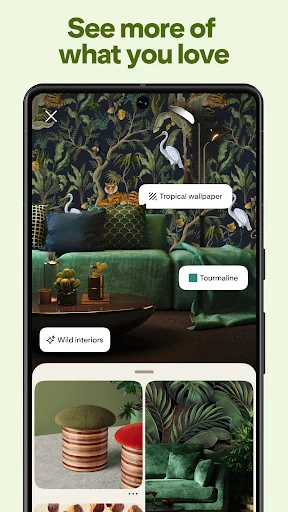
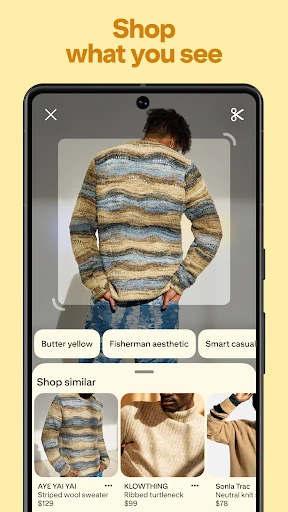
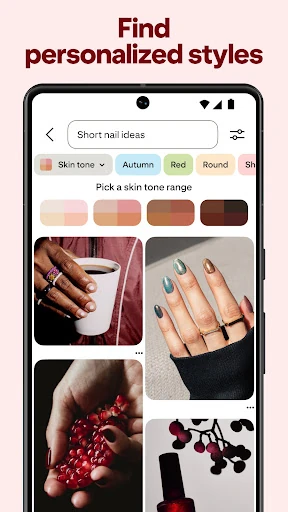
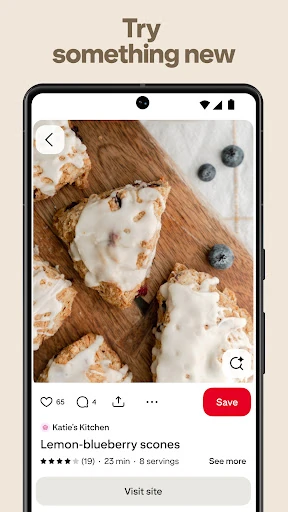

Analysis by Reviewed APKs
Pinterest is a visual discovery app for collecting ideas around everyday interests, from recipes and outfits to DIY projects and room updates. I see it as a useful place to browse when I have a loose idea but need examples before deciding what to try. Its boards make saved inspiration easier to gather, though the sheer amount of browsing can make a quick visit stretch longer than planned.
Turning a vague idea into a plan
When I first opened Pinterest, I thought of the moments when I know the general direction of a project but not the details. Maybe I want a brighter living room, a weeknight dinner idea, or a simple craft for a free afternoon. Browsing images gives me concrete options to compare, and I can save the ones that feel relevant rather than trying to remember them later.
The app works best when I treat discovery as the first step, not the whole project. I can collect Pins into boards and return to them when I’m ready to make a shopping list, choose a recipe, or settle on a design direction. That makes Pinterest handy for the early, visual part of planning, even if the actual work happens elsewhere.
Inspiration, not the whole toolkit
Pinterest sits somewhere between a visual search destination and a personal scrapbook. Compared with a general web search, it puts images and ideas front and center. Compared with a conventional social feed, its strongest use is collecting things I may want to revisit, rather than keeping up with friends’ daily updates. That distinction makes it useful when I arrive with a topic, but still want room to explore.
I wouldn’t use it as a substitute for a dedicated recipe manager, project tracker, or shopping service. The description supports discovering ideas, saving Pins, making boards and collages, shopping styles, and learning something new; it doesn’t position Pinterest as a complete system for carrying out every task. I use it to shape a direction, then look elsewhere when I need the practical details of execution.
Small habits that help
A little organization makes a large collection more useful. I like the idea of making boards around real intentions, such as easy dinners or a room refresh, instead of keeping every saved idea in one undifferentiated pile. When I’m browsing casually, saving only Pins I can imagine using later keeps the board from becoming a museum of attractive images I never revisit.
It also helps to search with a specific question in mind. A broad topic is fine for an exploratory session, but narrowing the subject gives me a better chance of finding a useful recipe, style direction, or DIY idea. I can come back to a board when I have time to compare saved options, rather than expecting to make every decision while scrolling.
More From Our News Desk

Zoom Meetings, Google Meet, or Teams: Which Is Easiest to Join?

How I Build a Free Streaming Lineup With Tubi

Why Crunchyroll Is the Default Anime App for So Many Fans

YouTube TV: A Practical Guide to Cutting Cable

Rummikub and the Small Comfort of Phone Games

TeamViewer Remote Control or AnyDesk for Helping Family?
Who will enjoy Pinterest
I’d recommend Pinterest to people who think visually and like gathering examples before they make something, buy something, or change a space. It suits casual browsing as well as focused planning: a few minutes can produce a dinner idea, while a longer session can build a collection around a project. The mix of fashion, recipes, DIY, and home inspiration gives different interests a natural place to start.
It may be less satisfying for someone who wants a tightly structured task app or a short, linear path to one answer. Pinterest encourages exploration, so it takes a little self-direction to keep browsing focused. If you enjoy collecting visual references and returning to them later, that open-ended quality is a plus. If you want a tool that manages the work from start to finish, this is not that kind of app.
Pinterest is developed by Pinterest and is listed in the Lifestyle category on Google Play. The store shows over one billion installs and a 4.3-star rating from around 11.3 million ratings. It is free to download, contains ads, and has a Teen content rating. The app’s release date is August 14, 2012.
The current Android version and minimum Android requirement can vary by release and device. Google Play shows the latest update as February 2, 2026. Pinterest is described as a place to discover ideas, save Pins, create boards and collages, explore styles, and find recipes or DIY inspiration. Store details are the best place to check the version and requirements for a particular device.
How Pinterest Fits Into Everyday Planning
A visual first impression
My first impression of Pinterest is that it makes browsing feel like looking through a wall of possibilities. The subject matter can be practical or purely aesthetic: a recipe might sit alongside an outfit idea or a room makeover. That range is appealing when I’m not yet sure what I want, but it also means I benefit from having a loose purpose before I start.
Getting value from the app does not require a complicated setup. The core actions described are straightforward: discover ideas, save Pins, and organize them into boards or collages. I’d begin with one current interest and build from there. That gives the app a personal reference collection to work with instead of making the first session a hunt through every possible category.
Browsing through the day
Day to day, Pinterest makes sense in the small gaps when I want visual input. I might browse a few ideas during a break, save a couple of possible dinners, then revisit them when I’m deciding what to cook. For home projects, the same pattern lets me collect different looks before choosing a direction. The app’s role is to make those ideas easy to gather and return to.
There is a trade-off: image-led browsing can keep producing new things to look at. I try to separate collecting from deciding. A quick browse can be for inspiration, while a later visit to a board can be for comparing what I saved. That simple split helps keep the app useful without expecting every attractive Pin to become a real-world plan.
Boards and collages
Boards are the feature that turns Pinterest from a stream of images into something I can use as a reference. I can group Pins around a theme or project and return to that collection when I need a reminder of what caught my eye. Even a basic board for recipes or DIY ideas gives saved inspiration more context than leaving everything in one broad collection.
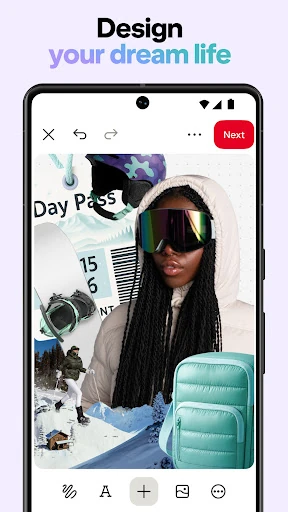
Collages offer another way to bring inspiration together. The description presents them as a way to combine ideas, which fits naturally with visual planning: I can think about how styles or elements might work alongside one another. I’d use that kind of collection to clarify a mood or direction, while keeping in mind that it is still an inspiration tool rather than a finished project plan.
A practical planning routine
For a small room refresh, I’d start with a defined question, such as what colors or furniture styles might suit the space. I would browse related ideas, save the strongest examples to a dedicated board, and leave the collection alone for a while. Coming back later makes it easier to spot which looks still appeal to me and which were just interesting in the moment.
The same routine works for meals or a new skill: explore, save a handful of promising ideas, then revisit the board when it is time to choose. Pinterest also supports discovering ways to shop styles and learn something new, so the collection can be a starting point for those interests. I find this browse-now, decide-later rhythm more useful than trying to plan everything in one sitting.
Keep its role in view
Pinterest’s open-ended format is both its strength and its main limitation. It offers a broad range of ideas, but browsing can become the activity itself if I don’t arrive with a question or stop when I’ve found enough options. A board helps me keep useful discoveries, yet the app does not turn those saved images into a complete schedule or checklist.
I also keep the difference between inspiration and reliable practical details in mind. A Pin can show me a style or point toward a recipe or project, but I may need other sources when I’m ready to act. The app is most satisfying when I use it for what it does well: visual discovery, collecting ideas, and giving a vague interest a clearer shape.
Pinterest earns a place in my routine when I want a visual starting point for a meal, a style, a DIY project, or a home update. Boards and collages help turn browsing into a collection I can revisit, and the range of ideas leaves plenty of room to explore. The experience is most useful when I give it a purpose and keep my saved ideas selective.
I’d recommend it to curious, visually minded users who enjoy collecting inspiration and are comfortable taking the next practical steps elsewhere. It is less suited to anyone looking for a tightly managed project or a single definitive answer. Used as a discovery and reference app, Pinterest can make early planning feel more concrete without pretending to do the whole job.
Pinterest Frequently Asked Questions
What is Pinterest used for?
Pinterest is used to discover visual ideas and save them for later. Its themes include fashion, recipes, DIY projects, and ways to update a space. You can organize saved Pins into boards and create collages, making it useful for collecting inspiration around a hobby or a project.
Which devices can run Pinterest?
Pinterest is available as an Android app on Google Play. The Android version and device requirements can vary over time, so check the Google Play listing for the current details that apply to your phone or tablet.
What Android version does Pinterest require?
The minimum Android version can vary by release and device. Check Pinterest’s Google Play listing for the requirement shown for your particular device, along with the current app version before installing or updating.
Does Pinterest cost money to use?
Pinterest is free to download on Google Play and contains ads. Store details can change, so it is worth checking the current listing for any changes to its cost or available purchase options.
Is Pinterest a good fit for casual users?
It can suit casual users who enjoy browsing visual inspiration and saving ideas for later. Boards help organize Pins around interests such as meals, fashion, or home projects. If you prefer a focused task manager or a single direct answer, Pinterest’s open-ended discovery style may be less appealing.
Pros
- Broad mix of visual inspiration, from recipes and fashion to DIY and home ideas.
- Boards make it easier to group saved Pins around interests or projects.
- Collages offer another way to bring inspiration together visually.
- Useful for collecting ideas before making decisions or starting a project.
Cons
- Open-ended browsing can take more time than intended without a clear purpose.
- Saved inspiration is not a complete project plan or task-management system.
- Ads are present in the free app experience.
- Category
- Lifestyle
- Version
- VARY