Life360: Family Safety & GPS
- 2.51M
- 4.8
- Installs
- 100.00M
- Price
- Free

Screenshots
Analysis by Reviewed APKs
Life360: Family Safety & GPS is a location-sharing and safety app for families, friends, and other groups who want to stay in touch as they go about their day. Its mix of place alerts, location history, crash detection, and driving summaries gives it more depth than a simple check-in tool. After looking at how those pieces fit together, I see it as most useful for groups that welcome shared visibility and clear boundaries.
A Busy Day, One Shared View
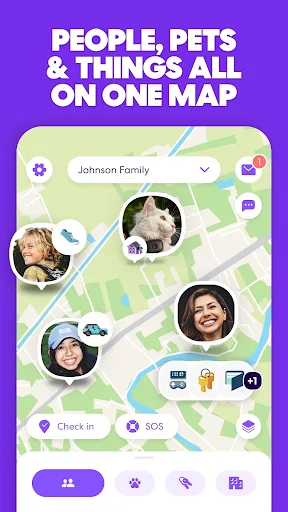
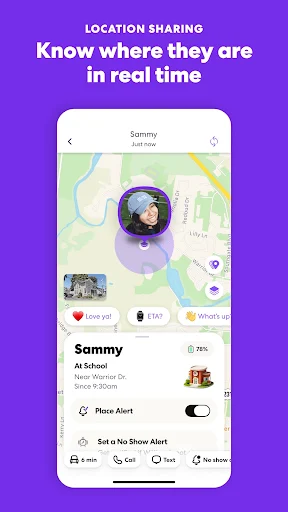
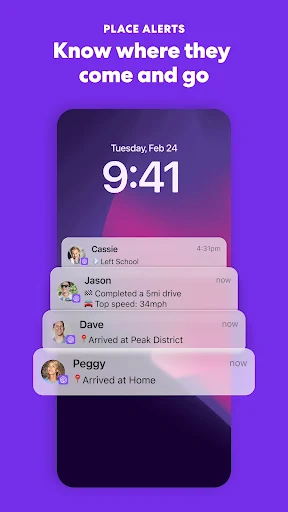
Picture a weekday when people are heading to school, work, and errands at different times. Instead of sending a string of “Are you there yet?” messages, a family can use Life360’s location sharing to see where its members are. Place alerts can help with arrivals and departures from familiar spots such as home, school, or work. The appeal is practical: a quick glance may answer the routine question without interrupting someone mid-commute.
I’d treat that shared view as a convenience, not a substitute for talking. When plans change, a direct conversation still matters; the app’s listed features are about location and safety updates, not replacing family communication. Location history can also provide context after a busy day, while crash detection and SOS help alerts add a safety-oriented layer. The app makes the most sense when everyone understands what is being shared and why.
More Than Basic Location Sharing
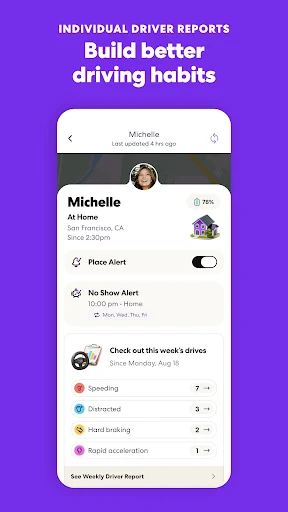
The obvious alternative is a basic location-sharing feature built into a phone or a one-off text asking someone to check in. Life360 goes further by combining location sharing with place alerts, location history, crash detection, and family driving summaries. Depending on membership, the description also includes features such as roadside assistance and emergency dispatch. That breadth is useful if a group wants several safety-related tools in one app rather than only a map.
Still, Life360 is not a general-purpose social network, nor is it a replacement for emergency services or a personal conversation. Some features are tied to paid memberships, and the description distinguishes between Silver, Gold, and Platinum benefits. That means the experience a household gets can depend on its plan. If all you need is an occasional location check, the added safety features may feel like more app than your routine requires.
Make Alerts Work for You
The easiest way to get value from Life360 is to start with a small number of places that genuinely matter to your routine. Home, school, or work are natural examples because the app’s place alerts are designed around arrivals and departures. I’d avoid turning every possible destination into a notification point. A few useful alerts are easier to notice than a steady stream of updates that quickly become background noise.
It also helps to make location sharing a shared habit rather than an assumption. Talk through who is in the group, what alerts are useful, and when a quick message is still better. If the group uses driving features, look at the family driving summary as a way to review patterns, not as a reason to scrutinize every trip. Keeping the setup purposeful can make the app feel like a practical tool instead of a constant presence.
More From Our News Desk

Zoom Meetings, Google Meet, or Teams: Which Is Easiest to Join?

How I Build a Free Streaming Lineup With Tubi

Why Crunchyroll Is the Default Anime App for So Many Fans

YouTube TV: A Practical Guide to Cutting Cable

Rummikub and the Small Comfort of Phone Games

TeamViewer Remote Control or AnyDesk for Helping Family?
Who May Find It Useful
I’d recommend Life360 to families and close groups that regularly coordinate arrivals, commutes, and everyday outings. It has a clear role when people want to see shared locations and receive alerts around selected places. The driving and crash-related features may also appeal to households looking for more than a basic location view. With several membership tiers, groups can consider whether the additional benefits match how they actually travel and communicate.
It may be a poor fit for anyone who dislikes ongoing location sharing or whose group has not agreed on its boundaries. The app’s usefulness depends on people participating and sharing location information, so it is not a magic fix for unreliable plans. It may also be unnecessary for someone who only needs to send an occasional check-in. I’d choose it when the group wants the added features, not simply because a location app sounds reassuring.
Life360: Family Safety & GPS is developed by Life360 and is available on Google Play for Android. It has more than 100 million installs and a 4.8-star rating from around 2.5 million ratings. The app is rated Everyone. Its listed version is 26.41.0, with a release date of April 7, 2010, and a last update date of November 2, 2026.
The app is free to install and includes ads and in-app purchases. Google Play lists in-app products at $1.49 to $249.99 per item. The supplied facts do not give a minimum Android version, so check the Google Play details on your device before installing. Membership features vary: the description separates benefits across Silver, Gold, and Platinum plans, so compare the current options with your household’s needs.
How Life360 Fits Into Everyday Routines
A Clear Safety Focus
When I first consider an app like Life360, I want to know what its central job is before thinking about extra features. Here, that job is helping a group share locations and stay informed about important movements. The description keeps coming back to family connection and safety, with location sharing at the center. That focus is easy to understand, even if a household may not need every feature the app offers.
The feature list gives the app a broader purpose than simply finding someone on a map. Place alerts and location history can support everyday coordination, while crash detection and SOS alerts speak to less routine situations. I’d approach the app as a bundle of tools with different uses, rather than expecting each one to become part of a daily habit. That distinction helps keep the experience grounded.
The Daily Check-In
In ordinary use, location sharing is the feature most likely to matter repeatedly. If a family member is on the way home, being able to check their shared location can save a needless interruption. Place alerts offer another way to keep track of arrivals and departures at selected places. These functions suit the small coordination questions that crop up during a normal day, when everyone is moving on a different schedule.
There is a balance to strike. Constantly checking a person’s location can become a habit that creates more tension than reassurance, especially if the group has not agreed on how to use it. I’d set expectations first and use alerts for specific practical needs. Life360 provides the information-sharing tools; a family still has to decide what respectful, useful sharing looks like in its own routine.
Features Beyond the Map
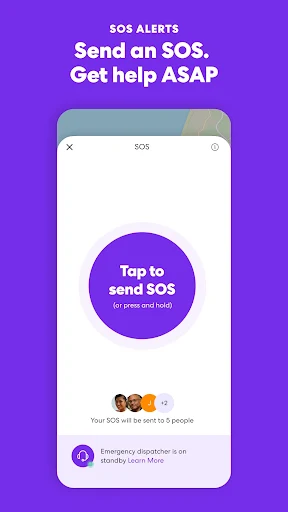
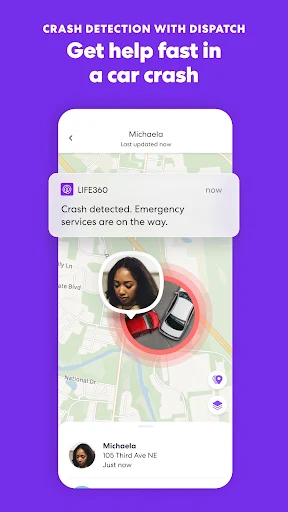
Crash detection, SOS help alerts, and driving summaries are the features that most clearly distinguish Life360 from a simple shared-location tool. The description also lists location history and flight landing notifications. These features cover different moments: some can support everyday awareness, while others are intended for emergencies or travel. I appreciate that the app’s identity is not limited to watching a moving dot on a screen.
Membership levels shape which extras are included. Silver lists crash detection, a family driving summary, SOS alerts, and a limited number of places and days of location history. Gold and Platinum add further benefits, including expanded history or alerts and services such as roadside assistance or travel support. Those differences make it worth checking the current plan details before assuming a feature is available to every user.
A Simple Weekly Routine
A household could keep Life360 manageable by using it around the moments it already coordinates. For example, members might rely on a place alert for a regular school or work arrival, then use location sharing when someone is traveling home later than usual. That is a straightforward routine: let a small number of useful updates do the work, rather than opening the app repeatedly just to see whether anything has changed.
Once in a while, the group can revisit whether its selected places and alerts still make sense. A school schedule changes, a commute shifts, or a family member no longer needs the same updates. If driving summaries are part of the chosen membership, they can be reviewed as a periodic overview rather than a running commentary on every trip. A little restraint keeps the app tied to real needs.
Limits to Keep in Mind
The first limitation is that the app works best when its users are willing to share location information. That is a personal and household choice, not just a technical setting. Optional permissions can also affect features that rely on them; the description says the app may still be used when optional permissions are withheld, though features requiring those permissions may not be available. It is sensible to review permissions with the app’s purpose in mind.
The second limitation is the difference between the free app and membership benefits. The description assigns some features to specific paid tiers, and in-app purchases are offered. A group should check which plan includes the tools it wants rather than assume every safety feature comes with installation. Finally, Life360’s location and alert functions can help people stay informed, but they cannot remove the need for judgment, communication, or appropriate help in a serious situation.
Life360 is a capable option for families and close groups that want location sharing alongside place alerts, location history, and selected driving or emergency features. Its strongest point is the way it brings these tools together. The main trade-offs are the need for group agreement around sharing and the fact that some benefits depend on a paid membership.
I’d try Life360 if your household has a practical reason to coordinate locations and will use the features thoughtfully. If you only need the occasional check-in, a simpler option may be enough. Before choosing a membership, compare its included tools with the routines you want to support, and make sure everyone in the group is comfortable with the arrangement.
Life360 Frequently Asked Questions
What is Life360: Family Safety & GPS used for?
Life360 is used for sharing locations with family or friends and staying informed through features such as place alerts and location history. Its description also includes crash detection, SOS help alerts, driving summaries, and other membership benefits. The exact set of available features can depend on the membership, so check the current Google Play details and plan information.
Which phones and platforms support Life360?
The supplied app information is for the Android version of Life360, available through Google Play. It uses location sharing and describes optional permissions that support certain functions. Requirements and availability can vary by device and store details, so check the Google Play page on the phone you plan to use. The supplied information does not describe an iOS version.
What Android version does Life360 require?
The minimum Android version is not included in the supplied app facts. Check Life360’s Google Play details from your device, where compatibility information may reflect your particular phone and current app version. The listed version is 26.41.0, but that does not by itself indicate the minimum Android requirement.
Does Life360 cost money to use?
Life360 is free to install and includes ads and in-app purchases. Google Play lists in-app products from $1.49 to $249.99 per item. The description outlines Silver, Gold, and Platinum memberships with different benefits. Prices and available options may vary, so check the current store information and membership details before purchasing.
Is Life360 right for my family?
It may suit a family or close group that wants shared location information, place alerts, and safety-related features such as crash detection or SOS alerts. It may be less appealing to people who prefer not to share their locations or only need occasional check-ins. The group should discuss expectations and review which features are included in its chosen membership.
Pros
- Combines location sharing with place alerts and location history for everyday coordination.
- Includes safety-focused options such as crash detection and SOS help alerts.
- Membership tiers offer different sets of driving, travel, and assistance features.
- Can support family routines without relying on repeated location-check messages.
Cons
- Some listed safety and assistance features require a paid membership tier.
- Location sharing works best when everyone agrees on how it should be used.
- Optional permissions may be needed for particular features to work.
- Category
- Lifestyle
- Version
- 26.41.0