Great Clips Online Check-in
- 654.12K
- 4.8
- Installs
- 10.00M
- Price
- Free

Screenshots
Analysis by Reviewed APKs
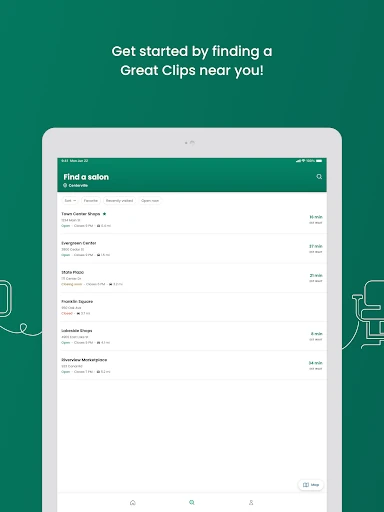
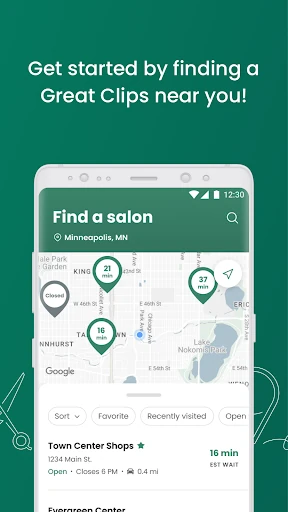
Great Clips Online Check-in is for people who want to see salon wait estimates and join a Great Clips waitlist before arriving. I find its appeal refreshingly practical: choose a nearby salon, check in with basic contact details, then use the estimate to plan when to head over. It suits flexible haircut visits better than appointments built around a specific stylist or service.
A Less Aimless Haircut Errand
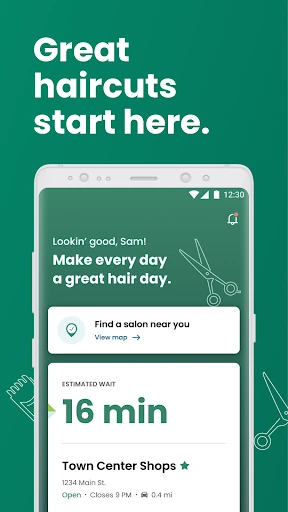
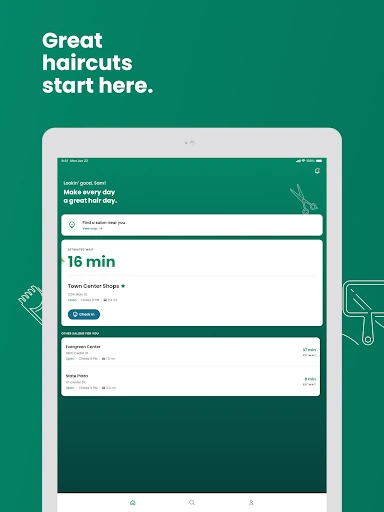
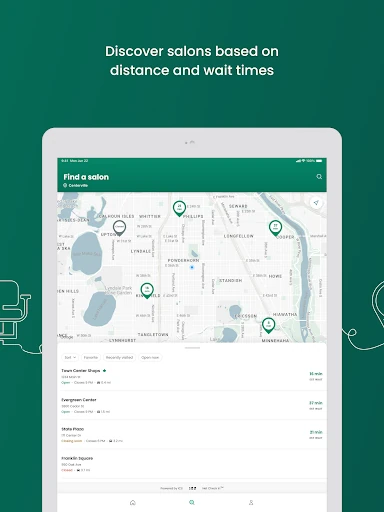
When I first opened Great Clips Online Check-in, I pictured using it on an ordinary errand day: I had time for a haircut, but I did not want to spend that time sitting in a salon lobby. The app lets me look at estimated waits for nearby salons, choose one, and put my name on its waitlist from wherever I am. That turns a vague trip into something I can fit around the rest of the afternoon.
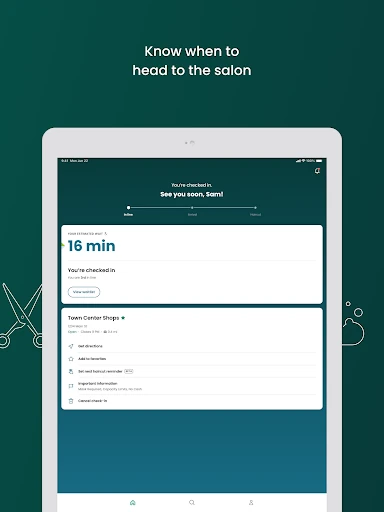
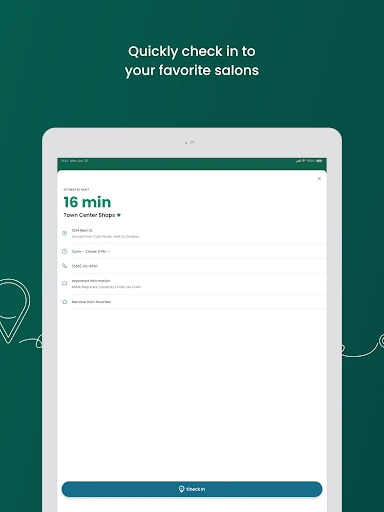
The basic flow is straightforward. I search for a salon, tap Check In, and enter my name and phone number. There is no login, email address, or profile setup in the described process. After checking in, I can watch the estimated wait and my place in line, then head over before I am next. When I arrive, I still need to let the salon staff know so they can confirm my details.
A Waitlist, Not an Appointment
The app is best understood as a way to join a salon waitlist ahead of time, not as a traditional appointment calendar. That distinction matters if I am trying to fit in a straightforward haircut without choosing an exact time. The estimate reflects current salon conditions and assumes the next available stylist. If I ask for a particular stylist when I arrive, the wait may be longer.
Compared with simply walking in, checking in early gives me a better sense of the queue and lets me wait elsewhere until it is nearly my turn. It does not promise a fixed start time, and it is not designed for every service: perms and formal updos are excluded from online check-in. Those services may need appointments, so the app points customers toward calling the salon to ask.
Small Ways to Save a Step
A useful habit is to check the wait estimate before leaving home or work, rather than treating it as a number to glance at once. If the chosen salon is one I visit often, saving it as a favorite can make the next check-in quicker. I would also pay attention to the place in line and keep the app handy, since the estimate is a guide for when to head over, not a fixed appointment time.
ReadyNext text alerts can help when I would rather not keep checking the screen. The service can send a text when the estimated wait reaches 15 minutes, giving me a cue to start toward the salon. I still need to arrive before my turn and tell staff I am there. If plans change, I can cancel the check-in from the home screen where the salon appears.
More From Our News Desk

Zoom Meetings, Google Meet, or Teams: Which Is Easiest to Join?

How I Build a Free Streaming Lineup With Tubi

Why Crunchyroll Is the Default Anime App for So Many Fans

YouTube TV: A Practical Guide to Cutting Cable

Rummikub and the Small Comfort of Phone Games

TeamViewer Remote Control or AnyDesk for Helping Family?
Who Will Find It Useful
I would recommend Great Clips Online Check-in to people who use Great Clips and are comfortable with a flexible wait rather than a scheduled appointment. It is especially handy for a haircut squeezed between errands, after work, or during a day when I can adjust my timing. Seeing the estimated wait and joining the list remotely makes it easier to decide whether a particular salon fits the moment.
It may be less useful if I need a precise appointment time, want to choose a stylist in advance, or am arranging a service that requires booking. The estimate assumes the next available stylist, and requesting someone in particular can mean waiting longer. People without a mobile device can use the website from another internet-connected device, while anyone without internet can still walk in and join the list at the salon.
Great Clips Online Check-in is a free Android lifestyle app from Great Clips, Inc. Google Play shows over 10 million installs and a 4.8-star rating from around 654,000 ratings. The app is rated Everyone. The provided version is 6.91.0 (2026102002), and its release date is May 1, 2011.
The app is free to download, with no in-app purchases and no ads. Its last update date is October 23, 2026. The minimum Android version was not supplied in the app facts, so check Google Play for the requirement that applies to a particular device.
How the Waitlist Fits Real Life
A Simple First Visit
My first impression is that the app asks for little before getting to its main job. I can search for a salon, pick one, and check in using my name and phone number. The described flow does not require creating a profile or supplying an email address, which keeps the initial task focused on choosing a location and joining its queue.
The timing rules are worth knowing before I plan around a visit. Online check-in is available during a salon's open hours, except for the first five minutes after opening, and closes 30 minutes before the salon closes. So I would check in before leaving rather than assume I can add my name right up to closing.
Following the Wait
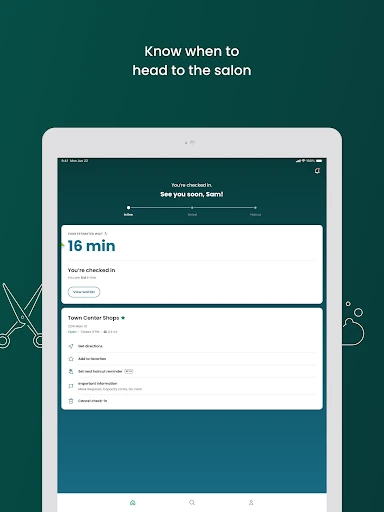
Once I am on the waitlist, the app shows my place in line and a changing estimated wait. That gives me something more useful than guessing from the parking lot, though it remains an estimate based on current salon conditions. I can go about nearby tasks while keeping an eye on the countdown instead of spending the whole wait in the lobby.
When the estimate reaches 15 minutes, ReadyNext text alerts can serve as a prompt to head over. I like that this addresses a real practical problem: leaving too late because I lost track of time. The alert does not replace checking in with staff on arrival, and I would leave enough flexibility to get to the salon before my turn.
Favorites and Service Details
Saving a favorite salon is a small feature with a clear payoff for repeat visits. Rather than searching from scratch every time, I can make a familiar location quicker to find when I am ready to join its waitlist. The app also makes estimated waits available for nearby salons, which helps when my usual location is busy and I am willing to consider another one.
Online check-in covers services other than perms and formal updos. The description notes that not every salon offers perms and that these services often require an appointment, so calling the salon is the sensible next step for those cases. I appreciate that this boundary is clear: the app is built around joining a waitlist, not arranging every kind of salon visit.
A Practical Visit Routine
A routine I would use starts with checking the estimated waits before I commit to a location. Once I choose a salon, I check in and note my place in line. If I have opted into ReadyNext texts, I can use the 15-minute alert as a reminder to head out. Otherwise, I can watch the estimate in the app and leave enough time to reach the salon.
On arrival, I need to tell the stylists I am there so they can confirm my information and complete the check-in. If the day changes and I no longer plan to go, the salon appears on the app's home screen and I can cancel the check-in there. That makes the process feel manageable, provided I treat it as a live queue rather than a booked time slot.
Limits to Keep in Mind
The main limitation is that a wait estimate is not the same as a precise appointment time. The app calculates it on the assumption that I will take the next available stylist. Asking for a specific stylist at the salon may extend the wait, and stylist schedules are not published. I would avoid making tight plans that depend on the countdown being exact.
Online check-in also has operating-hour cutoffs, and it is unavailable during the opening salon's first five minutes and the final 30 minutes before closing. Perms and formal updos are outside its online check-in options. If I arrive late, the salon keeps my name on the list for a short period, but the description does not give an exact duration, so I would not plan on a long delay.
Great Clips Online Check-in does one everyday job well: it lets me check salon wait estimates, join a queue remotely, and plan when to arrive. Favorites and ReadyNext text alerts make repeat use more convenient, while the simple check-in flow avoids a profile setup. Its strongest value is for flexible, walk-in-style haircut visits.
I would try it if I regularly visit Great Clips and want a better sense of the wait before heading out. I would not rely on it for an exact appointment time or a service that needs advance booking. Treat the estimate as a planning aid, arrive before your turn, and remember to check in with staff when you get there.
Great Clips Online Check-in Frequently Asked Questions
What is Great Clips Online Check-in used for?
Great Clips Online Check-in lets customers view estimated waits at nearby Great Clips salons and join a selected salon's waitlist ahead of arrival. After checking in, you can watch your place in line and estimated wait. ReadyNext text alerts can notify you when the estimated wait reaches 15 minutes. You still need to tell salon staff when you arrive.
Which devices can I use with Great Clips Online Check-in?
Great Clips Online Check-in is an Android app. The service can also be used from an internet-connected smartphone, tablet, or computer through the Great Clips website. If you do not have an internet connection, the description says you can walk into a salon and add your name to the list there. Check the store for device compatibility.
What Android version does Great Clips Online Check-in require?
The minimum Android version can vary by device and app release. Check the Google Play store page for the current requirement before installing. The supplied app facts identify version 6.91.0 (2026102002), but do not give a minimum Android version.
Does Great Clips Online Check-in cost money?
The app is free to download on Google Play. The supplied facts say it has no in-app purchases and contains no ads. Salon services are separate from the app itself. Store details can change, so check Google Play for current app information before downloading.
Is Great Clips Online Check-in right for every salon visit?
It suits customers who want to join a Great Clips waitlist for a flexible visit. The estimated wait assumes the next available stylist, and asking for a particular stylist may mean a longer wait. Online check-in excludes perms and formal updos, which may require an appointment. For those services, the app recommends contacting the salon.
Pros
- Shows estimated waits and lets customers join a Great Clips waitlist remotely.
- No login, email address, or profile is required for the described check-in.
- ReadyNext text alerts can signal when the estimated wait reaches 15 minutes.
- Saved favorite salons can make repeat check-ins quicker.
Cons
- Wait estimates are not appointment times and may change with salon conditions.
- Requesting a specific stylist can mean a longer wait than the estimate.
- Online check-in excludes perms and formal updos and has closing-time limits.
- Category
- Lifestyle
- Version
- 6.91.0 (2026102002)