ReSound Smart 3D
- 49.15K
- 4.5
- Installs
- 1.00M
- Price
- Free
Screenshots

Analysis by Reviewed APKs
ReSound Smart 3D is a companion app for people who use compatible ReSound hearing aids. It puts everyday controls, sound adjustments and support options on a mobile device, so you can adapt your settings without reaching for the hearing aids themselves. After looking through its feature set, my take is that it’s a practical tool for personalizing listening, provided you already have the right ReSound equipment.
A Listening Day, Made Easier
Picture a day that starts with a quiet breakfast, moves into a busy commute and ends with conversation at a crowded restaurant. With ReSound Smart 3D, the idea is to make small adjustments from your phone as those surroundings change. You can switch hearing-aid programs, adjust volume, or mute the aids, rather than treating one setting as the answer for every part of the day.
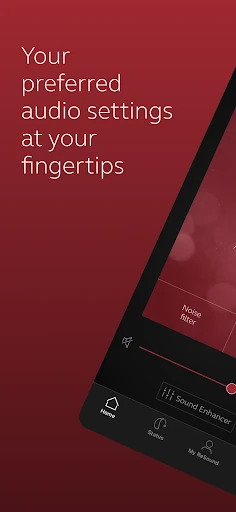
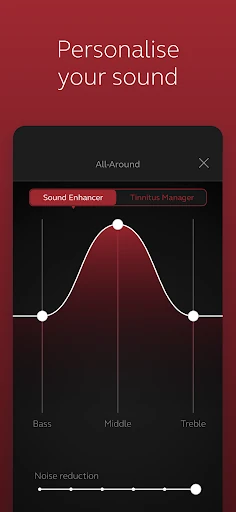
When I first looked at the controls, what stood out was how many adjustments are aimed at real listening situations. Sound Enhancer can change speech focus and noise or wind-noise levels on supported hearing aids. You can also adjust treble, middle and bass. The exact options depend on the hearing-aid model and its fitting, but the basic promise is straightforward: useful controls close at hand.
A Companion, Not a Replacement
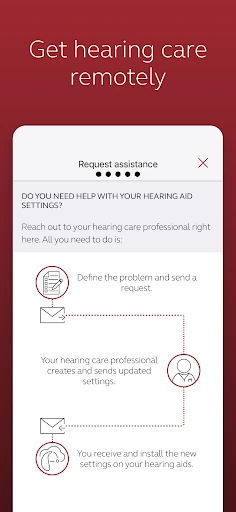
The obvious comparison is with adjusting hearing aids directly or asking a hearing care professional to change their settings. This app gives compatible ReSound users a mobile way to handle everyday controls and request help remotely. ReSound Assist can be used to ask a hearing care professional for setting support and receive new settings or software updates, which may save a trip when that kind of adjustment is appropriate.
This is not a general sound equalizer for any headphones, nor is it a standalone hearing test or a substitute for hearing care. Its controls are designed around ReSound hearing aids, and some features rely on the specific model and professional fitting. If you do not use compatible ReSound equipment, the app’s central purpose is unlikely to be useful, no matter how appealing the adjustment options sound.
Build Small, Useful Habits
A sensible way to approach the app is to make one adjustment at a time. If a setting works well in a familiar place, you can save it as a Favorite and tag it to a location. That makes the saved option easier to relate to a routine, such as a regular stop or commute, instead of trying to remember which combination of tone and volume felt right.
I’d also make the app part of a quick check-in rather than something to fiddle with constantly. You can look at battery status on rechargeable hearing aids, confirm the selected program, and use the locating help if an aid is misplaced. For more involved changes, ReSound Assist offers a route to your hearing care professional. The app’s own learning guidance can help you get familiar with its controls.
More From Our News Desk

Zoom Meetings, Google Meet, or Teams: Which Is Easiest to Join?

How I Build a Free Streaming Lineup With Tubi

Why Crunchyroll Is the Default Anime App for So Many Fans

YouTube TV: A Practical Guide to Cutting Cable

Rummikub and the Small Comfort of Phone Games

TeamViewer Remote Control or AnyDesk for Helping Family?
Who Will Get the Most From It
I’d recommend ReSound Smart 3D to people who already use compatible ReSound hearing aids and want convenient access to everyday adjustments. It is especially relevant if you like having the option to save preferred settings, check rechargeable battery status, or contact your hearing care professional about settings through ReSound Assist. The app brings several useful companion controls together on a mobile device rather than asking you to manage each adjustment at the hearing aid.
It may not suit someone who does not have compatible ReSound hearing aids, or someone expecting a general audio app that works with any listening device. Some features depend on the hearing-aid model and fitting, and mobile compatibility can vary. I’d also be cautious about expecting every control to appear on every setup. The app makes most sense when its available options match the specific hearing aids you use.
ReSound Smart 3D is developed by GN Resound and is listed on Google Play as a Medical app. It has over one million installs and a 4.5-star rating from around 49,000 ratings. The app is free to download, and the supplied store information says it has no in-app purchases and contains no ads.
The content rating is Everyone. The current supplied version is 1.43.1, with a release date of April 27, 2017, and a last update dated March 5, 2026. A minimum Android version was not included in the supplied facts, so check the Google Play listing for the requirement that applies to your device.
Everyday Control for ReSound Hearing Aids
Getting Connected
My first impression is that this is a purpose-built companion rather than a broad wellness dashboard. Its job is to give ReSound hearing-aid users direct controls and practical support options. That focus is useful: volume, programs and sound adjustments all relate to the equipment the app is meant to manage, rather than competing for attention with unrelated tools.
Setup depends on having compatible hearing aids and a compatible mobile device. ReSound advises users to check current device compatibility and recommends that hearing aids run the latest software. Since available controls can depend on both the hearing-aid model and its professional fitting, it’s worth treating the connected setup—not just the app—as part of the experience.
Controls for the Day
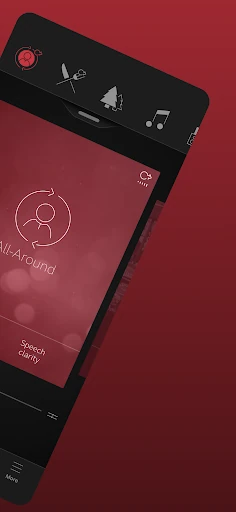
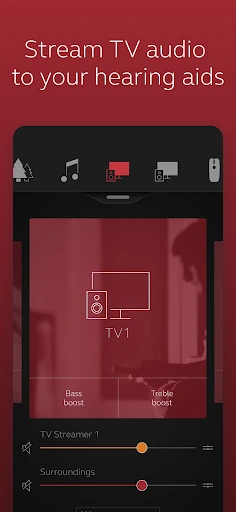
The central experience is adjusting hearing aids from the phone. You can change volume, mute the aids and switch manual or streamer programs. If you use ReSound streaming accessories, the app can also adjust their volume. These are the sorts of controls that matter in ordinary moments: a change in surroundings, a quick pause, or a need to move between listening modes.
Personalization goes beyond a single volume slider. The app includes treble, middle and bass adjustments, plus Sound Enhancer controls for speech focus and noise or wind-noise levels on supported setups. I like that these options are described as dependent on the model and fitting; it sets a realistic expectation that your own available controls may differ.
Favorites and Support
Saving preferred settings as Favorites is one of the more practical touches. You can tag a Favorite to a location, giving a saved setup a real-world context rather than leaving it as an unnamed combination of adjustments. If you find a setting that suits a regular environment, that can make it easier to return to without rebuilding it each time.
ReSound Assist adds a support channel to the app. You can request help with hearing-aid settings from your hearing care professional and receive new settings or software updates. That does not mean every adjustment happens automatically, but it does give users an option for remote support when available and appropriate. The app also includes guidance to help users learn what its controls do.
A Practical Check-In
A low-effort routine could be to open the app before heading out, check the selected program and make a small volume adjustment if needed. If the same place tends to call for the same preferences, saving a Favorite and attaching a location gives that routine a little structure. The goal is not to spend the day tuning settings, but to make familiar adjustments easier to repeat.
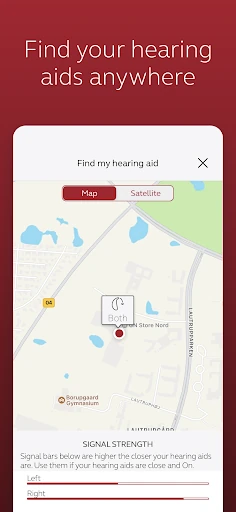
For rechargeable hearing aids, battery status is another reason for a quick check. If an aid goes missing, the app can help locate lost or misplaced hearing aids. These are modest features, but they fit naturally into everyday use: a glance before leaving, a saved preference in a familiar spot, or help when something is misplaced.
Know the Boundaries
The biggest limitation is compatibility. ReSound Smart 3D is built for ReSound hearing aids, not as a universal controller for unrelated devices. Even within the intended audience, Sound Enhancer and Tinnitus Manager options depend on the hearing-aid model and professional fitting. The actual experience can therefore vary from one user’s setup to another.
The Tinnitus Manager can adjust sound variation and frequency for the Tinnitus Sound Generator, and some setups can select Nature Sounds. Those options are not universal, so I would not assume they will be available on every hearing aid. For product or feature availability in a particular market, ReSound advises contacting a local representative; for setup questions, it points users toward their hearing care professional.
ReSound Smart 3D makes the most sense as a practical remote control and support companion for compatible ReSound hearing aids. Its mix of program changes, sound adjustments, Favorites, battery status and help options covers useful everyday tasks without trying to be more than it is.
If you use compatible ReSound hearing aids, I’d give it a try and see which controls your setup supports. If you are looking for a general audio tool or do not use ReSound equipment, this is not the right fit. Check device compatibility and feature availability before relying on a particular option.
ReSound Smart 3D Frequently Asked Questions
What is ReSound Smart 3D used for?
ReSound Smart 3D lets users control compatible ReSound hearing aids from a mobile device. Its features include changing programs and volume, muting, making sound adjustments, saving Favorites, checking rechargeable battery status and getting help locating misplaced hearing aids. ReSound Assist can also be used to request hearing-aid setting support from a hearing care professional.
Which phones and hearing aids work with ReSound Smart 3D?
The app is for mobile devices and compatible ReSound hearing aids. Device compatibility and available features can vary by hearing-aid model, fitting and market. ReSound recommends checking its current compatibility information and keeping hearing-aid software up to date. Check the Google Play listing and ReSound’s compatibility guidance for details about your device.
What Android version does ReSound Smart 3D require?
The Android version requirement can vary with the current app and device compatibility. Check the Google Play listing for the minimum version shown for your phone before installing. ReSound also recommends checking compatibility for the mobile device and hearing aids you plan to use together.
Does ReSound Smart 3D cost money?
ReSound Smart 3D is free to download on Google Play. The supplied store facts say it has no in-app purchases and contains no ads. App availability and store details can change, so check the Google Play listing for current information in your region.
Is ReSound Smart 3D right for me?
It may suit you if you use compatible ReSound hearing aids and want phone-based controls, saved settings or app-based contact with your hearing care professional. It is not a general-purpose controller for unrelated audio devices. Some features depend on the specific hearing-aid model and fitting, so check what your setup supports.
Pros
- Puts everyday volume, mute and program controls on a mobile device.
- Lets users save preferred settings as Favorites and tag them to locations.
- Includes battery status and help locating misplaced hearing aids.
- Offers a route to request hearing-aid setting support through ReSound Assist.
Cons
- Designed for compatible ReSound hearing aids rather than general audio devices.
- Some adjustments and Tinnitus Manager options depend on model and fitting.
- Mobile device and feature compatibility can vary.
- Category
- Medical
- Version
- 1.43.1











