Publix Pharmacy
- 11.98K
- 4.8
- Installs
- 1.00M
- Price
- Free

Screenshots
Analysis by Reviewed APKs
Publix Pharmacy is a prescription-management app for people who use Publix pharmacies and want refills, pickup details, and family prescriptions in one place. I found its appeal is practical rather than flashy: it helps turn a pharmacy errand into a few small tasks I can handle before leaving home. It should suit regular Publix customers especially well, though it is not a general health or medication-advice app.
A Refill Before Errands
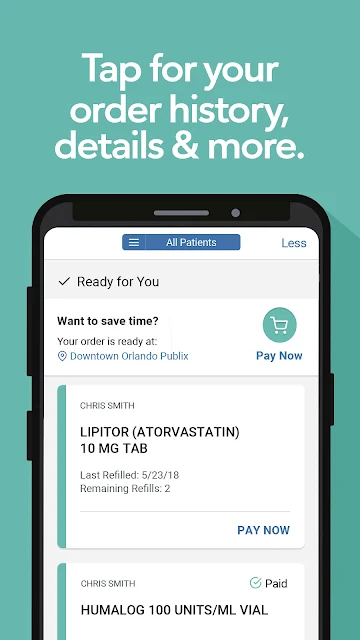
Picture a weekday morning when I notice a prescription bottle is getting low while I am packing my bag. With Publix Pharmacy, I can scan the bottle to request a refill rather than setting it aside and hoping I remember at the store. Once signed in, I can check whether the prescription is ready for refill, in progress, or ready for pickup. That status view gives me a useful sense of what still needs attention.
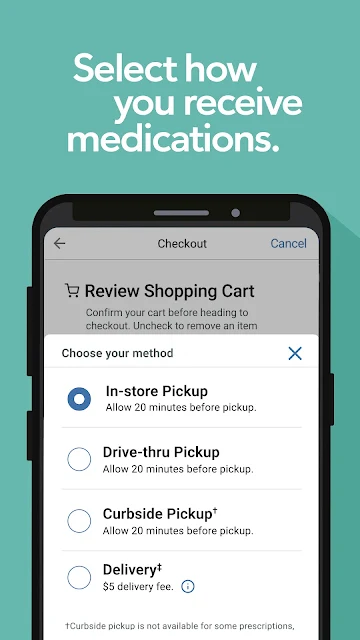
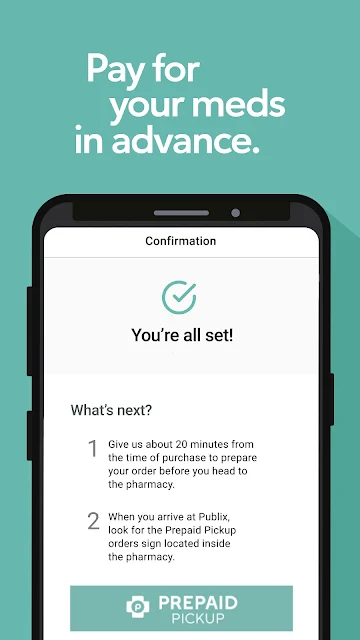
The handoff to a real-world errand is the app’s strongest everyday quality. I can receive a notification when a prescription is ready, pay in advance, and choose from available pickup options, including curbside pickup, delivery, or drive-thru at select locations. I would still check which services my pharmacy offers, but having those choices in the same prescription workflow can make a busy day easier to plan.
A Pharmacy Companion, Not a Health Hub
The obvious alternative is calling the pharmacy or handling a refill in person. Those routes remain useful, but the app gives me a place to review prescription status, history, and details without starting every task from scratch. It also supports transferring prescriptions to a nearby Publix Pharmacy, which can help someone moving their regular pharmacy routine over. Its focus is narrow in a good way: getting prescriptions organized and moving.
I would not treat Publix Pharmacy as a broad medical resource or a replacement for a conversation with a healthcare professional. Its described tools center on prescriptions, accounts, refills, pharmacy locations, and pickup arrangements. That makes it more useful for someone already connected to Publix than for someone comparing pharmacies or looking for general wellness information. If I use several pharmacy chains, I should expect this app to cover only the Publix part of my routine.
Small Habits That Help
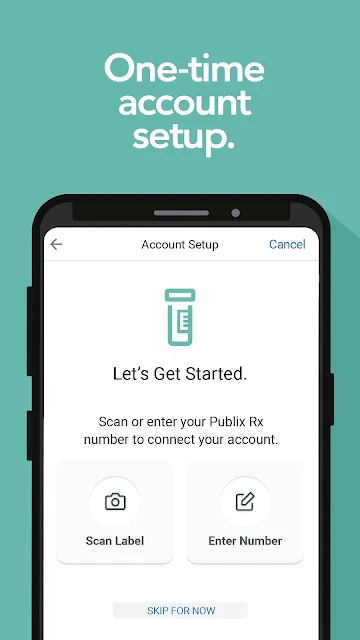
The first useful habit is setting up an account while I have a recently filled Publix prescription bottle nearby. I can scan it or enter the number from its label, and the app uses that to fill in account details. After that, signing in gives access to more features, including prescription details and helpful notifications. Doing this before I need an urgent refill seems much less stressful than trying to set everything up at the last minute.
I would also check the app when a prescription changes or a pickup is coming up, rather than relying on memory alone. Order history and prescription details make it easier to review what has been handled, while family profiles can keep eligible minors and pets organized alongside my own prescriptions. If another person needs access, profile sharing can make that arrangement simpler. These are modest conveniences, but they work best when I keep the account current.
More From Our News Desk

Zoom Meetings, Google Meet, or Teams: Which Is Easiest to Join?

How I Build a Free Streaming Lineup With Tubi

Why Crunchyroll Is the Default Anime App for So Many Fans

YouTube TV: A Practical Guide to Cutting Cable

Rummikub and the Small Comfort of Phone Games

TeamViewer Remote Control or AnyDesk for Helping Family?
Who May Find It Useful
I would recommend Publix Pharmacy to people who regularly fill prescriptions at Publix and want a quicker way to request refills, monitor progress, and prepare for pickup. It is particularly appealing if you manage several prescriptions or coordinate medication errands for family members. The ability to add minors under 13 and pets, organize prescription cards, and share profiles with others gives the app a practical household angle.
It may be less useful if you do not use Publix Pharmacy, need one app to manage prescriptions across multiple unrelated pharmacies, or are looking for detailed health education. The app’s job is pharmacy logistics, not medical guidance. I also would not assume every pickup or delivery option is available everywhere: delivery, curbside pickup, and drive-thru are offered at select locations, so the services at your pharmacy matter.
Publix Pharmacy is an Android app from Publix Super Markets Inc. Google Play shows over 1 million installs and a 4.8-star rating from about 12,000 ratings. It is free to download, has no in-app purchases, and contains no ads. Its content rating is Everyone, which fits a utility focused on managing prescriptions and pharmacy errands.
The app’s current version is 3.1.17. It was released on May 31, 2017, and its latest recorded update is September 2, 2026. A minimum Android version is not included in the available app details, so I would check Google Play on the device I plan to use. The app’s described features include prescription refills, status and history, account access, and pickup choices at select locations.
How Publix Pharmacy Fits Daily Routines
Getting Started
When I first opened Publix Pharmacy, the premise felt refreshingly clear: it is for handling prescription tasks, not browsing a maze of unrelated services. The easiest setup route is to scan a recently filled Publix prescription bottle or enter the number printed on its label. That gives the app information to fill in account details. I like that the setup is tied to something a regular customer is likely to have nearby.
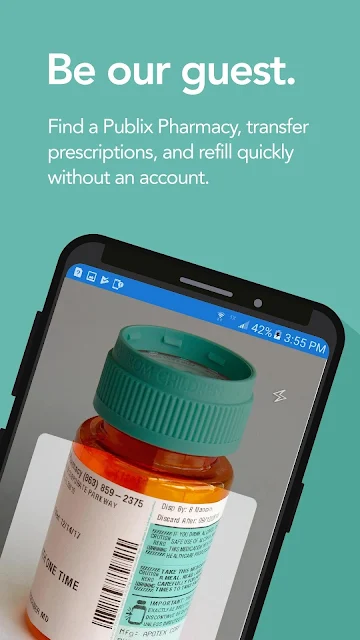
There is also a way to find a Publix Pharmacy, transfer prescriptions, or request a refill without creating an account. That makes the app approachable for a one-off task or someone deciding whether to move prescriptions over. Logging in is the step that opens up more of the experience, including prescription details, notifications, and reminders. I would get that part done early if I expected to use the app regularly.
The Everyday Flow
The core routine is straightforward: check a prescription, request a refill, and follow its status as it moves along. The app distinguishes prescriptions ready for refill, in progress, and ready for pickup, which is more useful than a vague confirmation that a request was sent. I can also look through order history and prescription details, so a quick check does not have to become a call just to find out what happened.
Scanning a prescription bottle is a particularly practical shortcut. When I am putting away groceries or sorting through a medicine cabinet, I can use the camera to start a refill request without typing the label number. That small convenience matters most when I am dealing with several bottles or trying to finish the task between other errands. It is not a dramatic feature, but it removes an annoying bit of friction.
Notifications add a helpful nudge when the pharmacy has an update, and the app can provide reminders. I would use those as prompts to check the prescription workflow rather than assuming they replace my own attention. Once I know a prescription is ready, prepaid pickup can help me plan a faster stop. The sequence feels designed around getting from a refill request to collecting the medication with fewer loose ends.
Useful Family Tools
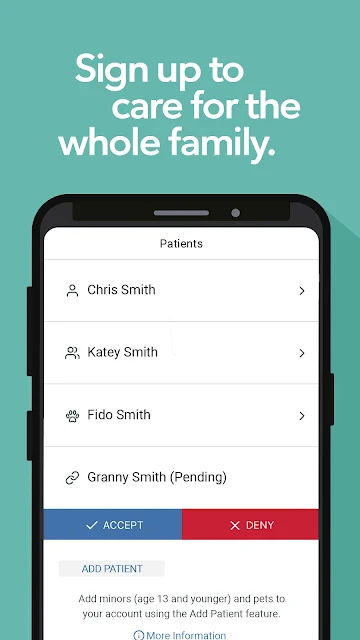
The feature that stands out beyond basic refills is its support for multiple prescriptions and patients. I can add minors under 13 and pets to a profile, while members can share profiles with others so they can access prescription details and order history. That is a useful arrangement for a household where one person often coordinates pharmacy runs, without pretending that every family member’s needs are identical.
The app also keeps patients’ prescription cards organized in one place. I can see the appeal when I am handling more than one person’s prescriptions and would rather not hunt through separate pieces of information. Combined with history and status, this gives the app a role as a small record-keeping aid for Publix pharmacy activity. It remains focused on those records, rather than offering a broad personal health dashboard.
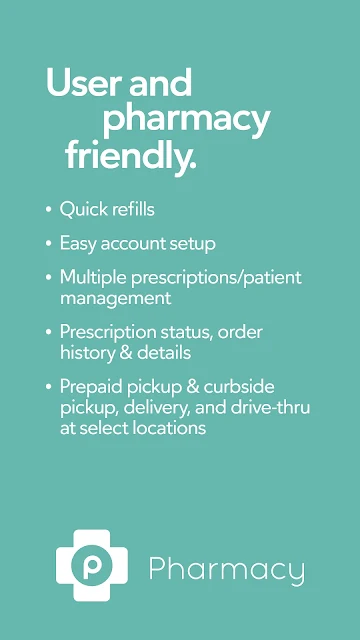
A second notable convenience is choice at pickup. The description includes prepaid pickup, curbside pickup, delivery, and drive-thru at select locations. I would choose based on what my local pharmacy provides and what suits the day, instead of assuming every option is available everywhere. Having those alternatives described alongside refill management makes the app feel connected to the actual errand, not just the request that starts it.
A Routine That Sticks
For a practical weekly routine, I would use the app when checking household prescriptions and note which ones are ready for refill. If I have the bottle, scanning is the quick route; otherwise, the account gives me access to prescription details and history. I can then watch for a status update and decide when to collect the order. It is a simple check-in, not something that needs to take over my day.
When a prescription is called in by a doctor, the app says it will appear automatically in the account. That makes signing in occasionally worthwhile, especially if I am expecting a new prescription or need to keep track of several orders. I would also make sure the right family profiles are shared with the people who help manage pickup. A little setup can save repeated explanations and last-minute searches later.
If I am new to Publix Pharmacy, transferring prescriptions is another possible starting point. I can use the app to find a nearby Publix Pharmacy and begin the transfer process, or refill without an account when that is enough for the immediate task. The app is most helpful when I treat it as the front end for pharmacy errands: organize, request, check progress, and then follow through with the available pickup method.
Limits to Keep in Mind
The main limitation is that this is a Publix-specific tool. Its convenience depends on using a Publix Pharmacy, and someone splitting prescriptions among different pharmacy chains may still need other apps or phone calls. The app does support transfers to a nearby Publix Pharmacy, but that does not make it a universal prescription manager. I would judge it by how much of my routine actually happens at Publix.
Some options depend on location. Curbside pickup, delivery, and drive-thru are described as available at select locations, so I would check what my pharmacy offers before planning around one of them. The app can make status and history easier to review, but it does not turn those details into medical advice. For questions about a prescription itself, the app’s customer care information provides a route to contact Publix.
There is also a difference between using the app without an account and getting the full account experience. The guest route covers finding a pharmacy, transferring prescriptions, and quick refills, while signing in unlocks more prescription details and notifications. That is reasonable, but users who want the simplest possible one-time interaction may not need every account feature. I would set it up if I expected to return.
Publix Pharmacy does a focused job well: it brings refills, status checks, prescription history, and pickup planning together for Publix customers. I especially like the bottle scan and the household profile options, because both address small tasks that can otherwise pile up. The experience is most convincing when the user already relies on a Publix Pharmacy.
I would recommend giving it a try if you want a more organized way to handle recurring pharmacy errands, particularly for multiple prescriptions or family profiles. If you need one manager for several pharmacy chains or broader health information, this is not that app. For a Publix-centered routine, though, it offers useful convenience without much fuss.
Publix Pharmacy Frequently Asked Questions
What is the Publix Pharmacy app used for?
Publix Pharmacy helps users manage prescriptions through tasks such as scanning a bottle to request a refill, checking prescription status and history, and viewing prescription details. Signed-in users can receive helpful notifications and set reminders. The app can also help locate a Publix Pharmacy, transfer prescriptions, and arrange available pickup choices.
Which devices can run Publix Pharmacy?
Publix Pharmacy is an Android app available through Google Play. The minimum Android version can vary by device and app compatibility, so it is worth checking the Google Play page on the phone or tablet you plan to use. The app’s described features include account access, refill requests, and prescription status checks.
Does Publix Pharmacy cost money?
The app is free to download on Google Play. It has no in-app purchases and contains no ads. Prescription costs and pharmacy services are separate from the app itself; the app is a tool for managing prescriptions and related pharmacy tasks. Check with your pharmacy for details that apply to a particular prescription or service.
Can I use Publix Pharmacy without an account?
Yes. The app describes guest access for finding a Publix Pharmacy, transferring prescriptions, and refilling quickly without an account. Creating an account and signing in provides access to more features, including prescription details, notifications, and reminders. Scanning a recently filled Publix prescription bottle or entering its label number can help set up an account.
Is Publix Pharmacy a good fit for my household?
It may suit households that use Publix Pharmacy and want to keep multiple prescriptions organized. The app supports adding minors under 13 and pets to a profile, and members can share profiles to provide access to prescription details and order history. People who use other pharmacy chains or want general health information may find its focus too narrow.
Pros
- Bottle scanning makes requesting a refill quicker than typing label details.
- Prescription status, history, and details are grouped in one account.
- Family profiles can include minors under 13 and pets.
- Pickup choices include curbside, delivery, and drive-thru at select locations.
Cons
- Its usefulness is tied to managing prescriptions through Publix Pharmacy.
- Pickup and delivery options depend on what a local pharmacy offers.
- More prescription details and notifications require signing in.
- Category
- Medical
- Version
- 3.1.17











