PRISM Live Studio: Games & IRL
- 100.42K
- 4.5
- Installs
- 5.00M
- Price
- Free

Screenshots
Analysis by Reviewed APKs
PRISM Live Studio: Games & IRL is a mobile broadcasting app for people who want to stream camera video, gameplay, or a VTuber avatar. It connects with services such as YouTube, Twitch, Facebook, and BAND, then adds tools for chats, media, and visual effects. After reviewing its feature set, I see a flexible option for creators who want more than a basic phone-camera stream, though it asks for some setup.
A Stream From Your Phone
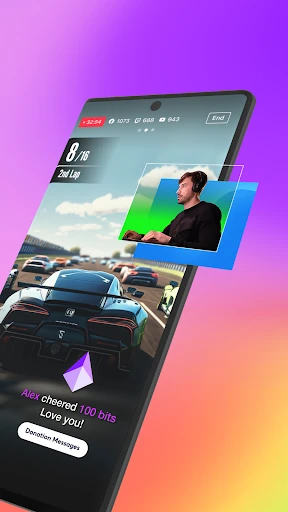
Picture a casual evening game session: your phone is already in hand, and you want friends or viewers to see the action. PRISM Live Studio can broadcast your screen or gameplay, while its chat widget lets you keep an eye on messages and highlight one on screen. That puts the basic job—sharing what you are doing live—in one app, rather than making a simple screen capture and a separate broadcast tool do the work.
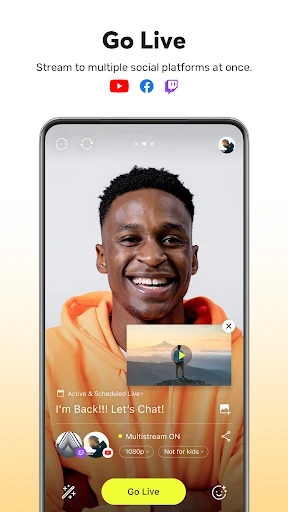
For a camera stream, I can also imagine setting the phone on a stand before a hobby update or a small event. Camera mode provides effects, animated text, and media overlays, so a photo or short video can become part of the broadcast. The app supports live title edits and sharing the live link while streaming, which is useful when plans change and I want to update viewers without ending the session.
More Than Screen Capture
A basic screen recorder is enough when I only need a clip saved for myself. PRISM Live Studio is aimed at the next step: broadcasting live, linking a streaming account, and adding elements for viewers to see. It supports camera, screen, and VTuber modes, as well as real-time chat display. That breadth makes it more suited to an active stream than a quick recording app, even if a straightforward recorder would feel simpler for one-off captures.
It is also not a full desktop production suite in your pocket. The app does offer detailed camera controls, web widgets, overlays, and simultaneous streaming to multiple channels, but the focus remains mobile broadcasting. It can connect with the PRISM PC app as a video and audio source, rather than replacing a computer-based workflow. I would choose it for a phone-led broadcast, not for editing a finished video or managing an entire studio production.
Small Habits, Smoother Lives
A little preparation should make a phone stream feel less improvised. Before going live, I would choose the mode, connect the relevant platform account, and decide whether chat, media, or text belongs on screen. If I use a Bluetooth microphone, the app's nearby-device permission supports that connection. Checking these pieces before the audience arrives can reduce the small distractions that otherwise pull attention away from the broadcast.
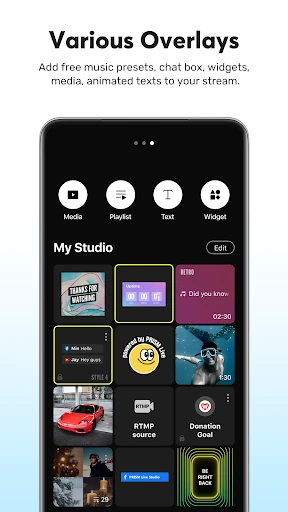
For recurring streams, reusing the most recent live title is a practical time-saver, and PRISM can also update live information without stopping the broadcast. I would keep media and playlists ready in My Studio, then use My Page afterward to revisit past broadcasts and share their video links. Those small routines suit a regular creator better than opening the app only when an idea strikes.
More From Our News Desk

Zoom Meetings, Google Meet, or Teams: Which Is Easiest to Join?

How I Build a Free Streaming Lineup With Tubi

Why Crunchyroll Is the Default Anime App for So Many Fans

YouTube TV: A Practical Guide to Cutting Cable

Rummikub and the Small Comfort of Phone Games

TeamViewer Remote Control or AnyDesk for Helping Family?
Who Will Get the Most From It
I would recommend PRISM Live Studio to mobile creators who want to stream games, talk to viewers, or try VTubing without making a computer the center of every session. The mix of camera and screen modes is useful for changing formats, while account integration and chat display keep the broadcast tied to familiar services. Its range of visual touches also gives a creator room to develop a recognizable look without needing a separate overlay workflow.
It may be less appealing if all you want is a quick recording, a minimal camera app, or a polished desktop production setup. There are many controls and optional effects to consider, so a first stream may take more preparation than simply tapping record. I would also be cautious about relying on the highest video quality in every situation: 1080p at 60fps depends on the device and environment.
PRISM Live Studio: Games & IRL is made by NAVER Corp. On Google Play, it has more than 5 million installs and a 4.5-star rating from about 100,000 ratings. The app is free to download and contains no ads. It does offer in-app purchases, with listed items ranging from $9.99 to $79.99.
Google Play rates the app Teen, and it requires Android 10 or later. The current version in the supplied app details is 5.1.4. It was released on November 30, 2017, and was last updated on February 9, 2026.
How PRISM Handles a Mobile Broadcast
A Setup With Options
When I first opened the feature list, what stood out was that PRISM does not treat “live streaming” as one fixed activity. You can choose camera, screen, or VTuber mode, depending on whether you are showing yourself, gameplay, or an avatar. That makes the app easier to picture in different routines, although it also means it helps to know what kind of stream you want before digging into the tools.
The account connection is designed around logging in to supported services, including YouTube, Facebook, Twitch, and BAND. Camera, microphone, storage, notification, and nearby-device permissions each have a stated role in broadcasting or using connected audio. I would grant the permissions that match my setup and make time for a short test before a planned stream, especially if I am adding a Bluetooth microphone or saved media.
The Everyday Broadcast
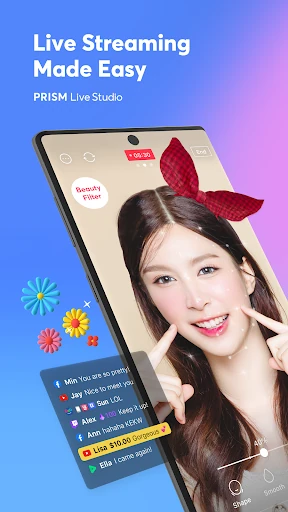
Day to day, the appeal is having the stream and its on-screen extras together. During a screen broadcast, viewers can see gameplay or other phone activity, while the PRISM chat widget can show messages and bring selected ones forward. In camera mode, effects and text can give a casual stream a little structure. These tools do not remove the need to pay attention to the audience, but they can make the phone itself the center of a more complete broadcast.
I like that live information is not frozen once a stream begins. The app lets you edit the title and share the live link during a broadcast, and background streaming is intended to keep the live session going through incoming calls or messages. That is a thoughtful fit for real phone use, where interruptions happen. It still makes sense to check the broadcast after a disruption rather than assume every moment went exactly as planned.
Tools With Personality
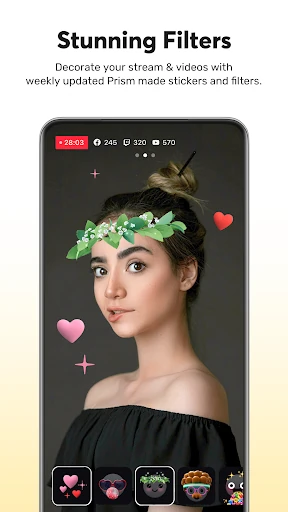
The visual options go beyond a single filter. PRISM includes beauty effects, masks, background and emotion filters, touch reactions, and animated text themes for titles, social notes, captions, and other elements. It also supports photos, videos, music, and playlists through My Studio. I can see these being useful for a themed stream or a recurring show, though restraint matters: stacking every effect at once could make the screen harder to follow.
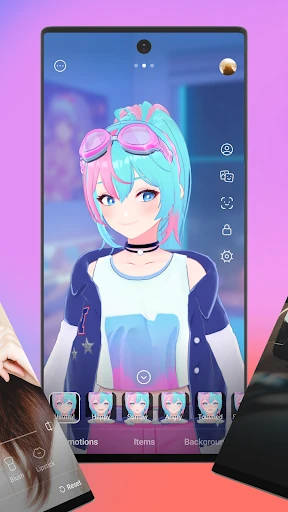
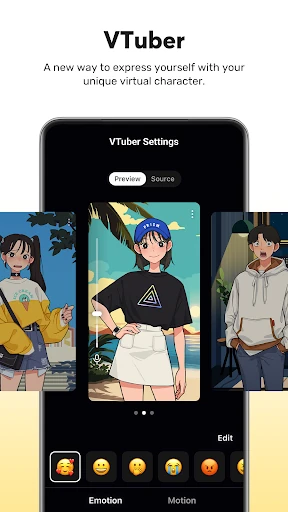
VTuber mode is another distinctive route. The app supports custom avatars and includes 2D and 3D VRM avatars, letting a creator broadcast through a character rather than a camera-facing appearance. For people curious about VTubing, that is a more direct starting point than a camera-only app. Camera-focused creators also get controls for focus, exposure, ISO, white balance, and shutter speed, plus chroma key for more deliberate backgrounds.
A Repeatable Stream Routine
For a weekly gaming stream, I would start by picking screen mode and confirming the account I intend to use. Then I would set a title, check whether chat should appear, and choose any media or animated text before going live. A quick glance at the available camera or audio options can help avoid discovering a misplaced setting in front of viewers. The app supports 1080p at 60fps, but actual availability depends on the device and environment.
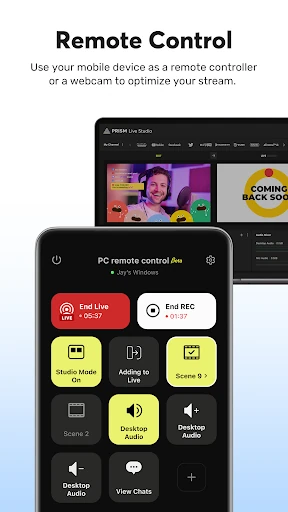
After the stream, My Page offers a place to review broadcast history and share video links. For the next session, I could reuse the most recent title where it still fits, then adjust the live information as needed. If I sometimes work at a computer, CONNECT mode links the mobile app as a video and audio source for the PRISM PC app through a QR code scan. That creates a useful bridge without making desktop use mandatory.
Limits to Keep in Mind
The feature range is also the main source of complexity. A person who only wants to show a screen or turn on a camera may not need overlays, web widgets, avatar options, advanced camera settings, and chat highlights. I would expect some experimentation before a stream feels tidy, especially when combining multiple visual elements. If low-friction recording is the priority, this app's broadcasting emphasis may be more than the job requires.
Some capabilities depend on practical conditions. The advertised 1080p, 60fps option depends on the device and environment, and simultaneous streaming is a more ambitious setup than sending one broadcast to one service. As with any live app, I would test the chosen mode and audio arrangement before an important session. The free download also has optional in-app purchases, so it is worth checking the current store details before buying anything.
PRISM Live Studio stands out as a broad mobile streaming toolkit rather than a simple record button. Camera, gameplay, and VTuber modes give it range, while chat, media overlays, live title changes, and broadcast history support the practical work around going live. The trade-off is a busier experience that rewards preparation and may be unnecessary for casual recording.
I would try it if I wanted to build a regular phone-based stream or experiment with different live formats. It is less compelling for someone who wants the fewest possible controls or a computer-first production setup. For mobile creators willing to spend a little time arranging a broadcast, PRISM offers a capable set of tools in one place.
PRISM Live Studio Frequently Asked Questions
What is PRISM Live Studio: Games & IRL used for?
PRISM Live Studio is used to broadcast live from a phone in camera, screen, or VTuber mode. It supports gameplay and screen sharing, viewer chat display, media and text overlays, and connections to services such as YouTube, Facebook, Twitch, and BAND. It can also show broadcast history and video links in My Page.
Which devices can run PRISM Live Studio: Games & IRL?
The supplied app details cover the Android version, available through Google Play, and specify Android 10 or later. The app can connect to the PRISM PC app as a video and audio source, but that does not make the mobile app a desktop version. Device capability can affect features such as high-resolution streaming, so check the store details for your device.
Does PRISM Live Studio: Games & IRL cost money?
PRISM Live Studio is free to download and contains no ads. It offers optional in-app purchases, with listed items ranging from $9.99 to $79.99. Prices and purchase options may vary, so check the Google Play store details before buying.
What Android version does PRISM Live Studio: Games & IRL require?
The supplied requirements specify Android 10 or later. A compatible device is also needed for the app's streaming modes, and availability of 1080p at 60fps depends on the device and environment. Check Google Play for the current compatibility details for your phone or tablet.
Is PRISM Live Studio: Games & IRL good for beginners?
It can suit a beginner who wants to try mobile streaming, since it offers camera, screen, and VTuber modes along with account connections and chat display. There are also many optional effects and controls, so a first broadcast may take some setup. If you only need a basic recording tool, a simpler app may fit better.
Pros
- Camera, gameplay, and VTuber modes cover several styles of mobile broadcasting.
- Chat display, media overlays, and live title edits support active streams.
- My Page keeps broadcast history and video links accessible in the app.
- Can connect with the PRISM PC app as a video and audio source.
Cons
- The many modes and effects may take time to set up comfortably.
- 1080p at 60fps depends on the device and streaming environment.
- Optional in-app purchases range from $9.99 to $79.99 per item.
- Category
- Video Players & Editors
- Version
- 5.1.4