Planet Fitness
- 80.06K
- 4.7
- Installs
- 10.00M
- Price
- Free

Screenshots




Analysis by Reviewed APKs
Planet Fitness is a companion app for people who want workout guidance, activity tracking, or an easier way to manage visits to a Planet Fitness club. Its free workout library is available to non-members too, while member tools add digital check-ins, a gym crowd meter, and other perks. After looking through what it offers, I see it as a practical fitness sidekick rather than a complete training program.
A Workout, Wherever You Are
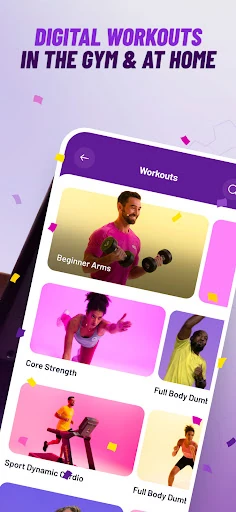
When I first opened the app, I pictured using it on an ordinary evening when I had time to exercise but no firm plan. The on-demand workouts are designed for home or gym use, and I can browse by type, length, target, and other categories. That makes it easier to choose something that fits the time I have instead of scrolling through an unfiltered collection and hoping for inspiration.
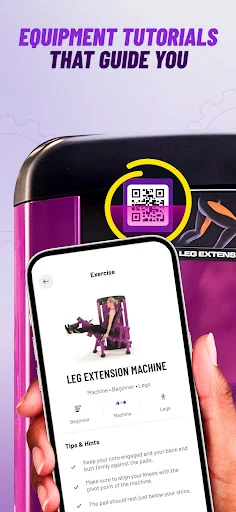
The exercise and equipment tutorials are a useful companion when I want a little more guidance before trying a movement or using unfamiliar equipment. I can also record activities with the Activity Tracker, including movement outside the gym. Together, those tools make the app useful on days when I am not visiting a club, whether I am following a workout video or simply keeping a record of activity.
More Than a Gym Pass
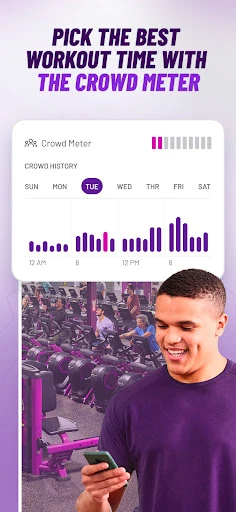
The obvious comparison is a general workout app, but Planet Fitness has a club-specific side that those apps may not provide: members can use a digital Club Pass for check-ins and consult a Crowd Meter when choosing a time to visit. Non-members can still access workouts, tutorials, and activity tracking, so the app is not only a digital key for people already enrolled.
I would not treat it as a substitute for every kind of fitness tool. Its described strengths are on-demand workouts, exercise guidance, tracking, and Planet Fitness membership features, rather than a promise of a fully personalized coaching program. If I wanted a detailed plan built around individual goals, I would look carefully at what the available recommendations cover and decide whether they meet that need.
Small Habits That Help
A simple way to get more from the app is to fill in the About Me section. The app uses that fitness profile to provide personalized workout video recommendations, and this step gives the workout library a more relevant starting point. I would also browse by available time before beginning a session; choosing a workout that fits the evening is more realistic than saving an ambitious routine for a day that never opens up.
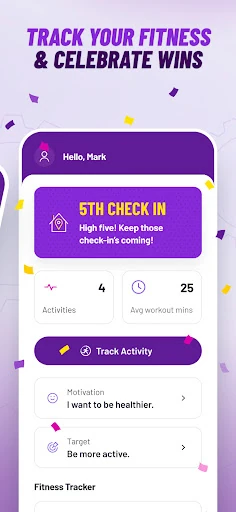
I would use the Activity Tracker as a light record of movement, not as a reason to judge every day. Members can also use My Journey to track club check-ins and recognize consistency. Before a gym visit, checking the Crowd Meter can help with choosing a time. These small actions connect the app’s home, activity, and club features without requiring an elaborate routine.
More From Our News Desk

Zoom Meetings, Google Meet, or Teams: Which Is Easiest to Join?

How I Build a Free Streaming Lineup With Tubi

Why Crunchyroll Is the Default Anime App for So Many Fans

YouTube TV: A Practical Guide to Cutting Cable

Rummikub and the Small Comfort of Phone Games

TeamViewer Remote Control or AnyDesk for Helping Family?
Who May Find It Useful
I would recommend Planet Fitness to people who want approachable workout videos and tutorials, especially if they are still getting comfortable with exercise or equipment. The fact that non-members can use the workout library and Activity Tracker gives it a low-pressure way to explore those resources. Members get the clearest club-specific value from digital check-ins, the Crowd Meter, My Journey, discounts, and the referral program.
It may be less appealing to someone who wants a standalone, highly structured coaching system or has no interest in Planet Fitness and its membership tools. The app offers a range of workout and tracking features, but its most distinctive extras are tied to being a member. I would also keep in mind that the Play version contains ads and in-app purchases, which may matter to people who prefer an entirely ad-free app.
Planet Fitness is developed by Planet Fitness and is available on Google Play for Android 10 and newer. The app is free to download, with in-app purchases listed at $1.99 to $5.99 per item, and it contains ads. Google Play shows a 4.7-star rating from about 80,000 ratings and over 10 million installs. Its content rating is Everyone.
The current version is 9.11.9. Planet Fitness was released on February 5, 2015, and was last updated on February 5, 2026. The recent update notes mention bug fixes and performance improvements. Those details offer a quick snapshot of the app’s availability and maintenance, while the app’s actual usefulness will depend on whether its workouts and member features fit the way you exercise.
How the App Fits Into Real Routines
A Straightforward Start
My first impression is that Planet Fitness has two clear audiences sharing one app: people looking for accessible digital workouts and existing members who want club tools. The workout library, tutorials, and Activity Tracker are described as available to non-members, which makes it possible to explore useful basics without joining first. That separation is sensible, since not everyone who wants exercise guidance is ready to commit to a gym.
I would start by deciding which side I expect to use most. If I mainly want a video workout at home, I can browse the on-demand options and look for a suitable type or duration. If I am already a member, I would also look for the digital Club Pass and Crowd Meter. Having a clear first task keeps the app from feeling like a pile of unrelated fitness extras.
The Everyday Workout
For day-to-day use, the most practical feature is the ability to choose workouts by type, time, target, and other categories. I like that this supports a quick decision: I can look for something that suits the time available rather than needing to plan a full week in advance. The videos are designed for both home and gym settings, so the same app can remain useful when my location changes.
The tutorials provide another kind of everyday help. If I am uncertain about a movement or piece of equipment, an easy-to-follow explanation can make the next step feel less intimidating. I would treat that as general guidance, not a substitute for every form of instruction. Still, having exercise movements and equipment tutorials alongside workouts gives the app a useful role before and during a session.
Features With a Purpose
The Activity Tracker stands out because it is available to both members and non-members and covers a variety of in-gym and out-of-gym activities. That gives the app a reason to stay relevant even on a day without a video workout or club visit. The About Me profile adds another layer by helping tailor workout video recommendations, so filling it in can make browsing feel less generic.
For members, the app shifts from general fitness companion to club utility. The digital Club Pass supports check-ins at a home club, and the Crowd Meter is intended to help choose a convenient time to visit. My Journey can track check-ins, while discounts and Refer-a-Friend benefits add membership-related extras. I see these as practical additions rather than the main reason a non-member would download the app.
A Routine I Would Use
A realistic routine might begin with a quick browse for a workout that fits the day, followed by a video session at home or at the gym. I could record the activity afterward and use that simple history to notice that I have been moving regularly. On another day, I might open a tutorial before trying an exercise, especially if the equipment is unfamiliar.
If I were a Planet Fitness member, I would add two checks before heading out: use the Crowd Meter to help pick a time and keep the digital Club Pass ready for entry. After the visit, My Journey offers a way to track the check-in. None of this requires turning fitness into a complicated project; the value is in putting a few relevant tools within reach when I need them.
Limits to Keep in Mind
The app’s strongest advantages are also fairly specific. Its member perks make most sense if I use Planet Fitness clubs, while its workout library and basic tracking are more broadly useful. Someone looking for a feature-rich coaching experience may want to assess the available workouts and recommendations before relying on it as their only fitness resource. The app describes useful guidance, but that is not the same thing as a personal trainer.
There are also practical details to weigh. Planet Fitness is free to download, but Google Play lists in-app purchases and ads. Some membership offers and perks have restrictions or depend on participating locations, so I would read the relevant terms before counting on a particular benefit. For a person who wants only an uncluttered workout video app, the membership extras may be more than they need.
Planet Fitness works best as a flexible companion: free workouts and tutorials for anyone, plus useful club tools for members. I appreciate that it can support a home session, an equipment question, or a planned gym visit without asking every user to be a member first.
I would recommend giving it a try if you want approachable workout guidance or already visit Planet Fitness and would use digital check-ins and the Crowd Meter. If you need deep coaching or have no interest in the club ecosystem, its more focused mix may not be the right fit.
Planet Fitness Frequently Asked Questions
What is the Planet Fitness app used for?
Planet Fitness offers on-demand workouts, exercise and equipment tutorials, and an Activity Tracker for members and non-members. Members also have access to features such as a digital Club Pass for check-ins, a Crowd Meter for choosing a time to visit, and My Journey check-in tracking. It can support exercise at home or in a gym, as well as club-related routines.
Which devices can run the Planet Fitness app?
Planet Fitness is available on Android through Google Play. The listed minimum requirement is Android 10. The app description covers workouts for home or gym use, but the store information provided here is for Android. If you are checking compatibility for a particular device or operating system, details can vary, so it is worth checking the Google Play store listing.
What Android version does Planet Fitness require?
The listed minimum is Android 10. Planet Fitness is an Android app available through Google Play, where device compatibility can depend on the particular device and its software. Before downloading, check the store page on the device you plan to use. That is the best place to confirm whether the current app version is available for your setup.
Does Planet Fitness cost money to download?
The app is free to download on Google Play. It also contains ads and offers in-app purchases listed at $1.99 to $5.99 per item. The app description says non-members can use workouts, tutorials, and activity tracking, while certain features and benefits are for members. Membership-related offers can have restrictions, so check the app or store for current details.
Is Planet Fitness suitable for beginners?
It may suit beginners who want workout videos and easy-to-follow exercise or equipment tutorials, since the app describes guidance for different stages of a fitness journey. Workouts can be browsed by categories such as type and time, and non-members can access them too. Whether its selection meets a particular person’s needs depends on the workouts and guidance they want.
Pros
- Non-members can access workouts, tutorials, and activity tracking.
- Workout browsing includes categories such as type, time, and target.
- Members get convenient digital check-ins and a Crowd Meter.
- Tutorials offer guidance on exercises and equipment.
Cons
- Some of its most distinctive club features require Planet Fitness membership.
- The Google Play version contains ads and offers in-app purchases.
- It may not meet the needs of users seeking detailed personal coaching.
- Category
- Health & Fitness
- Version
- 9.11.9











