Panasonic Image App
- 32.85K
- 2.8
- Installs
- 5.00M
- Price
- Free
Screenshots
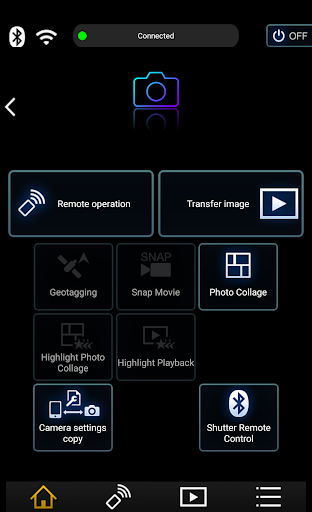
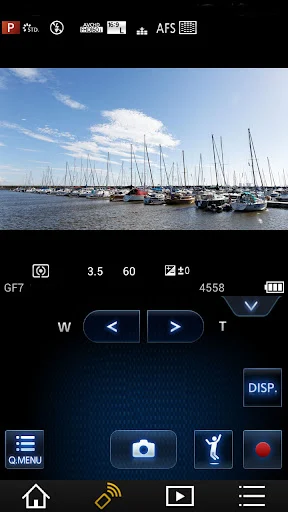
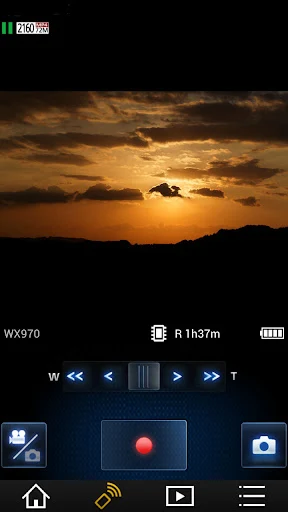
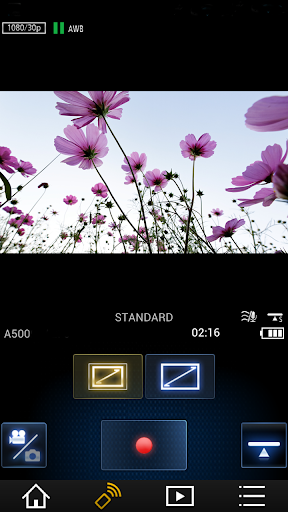
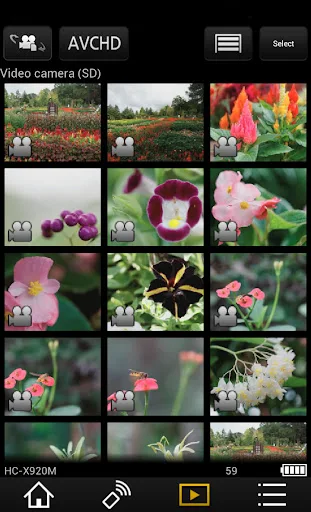
Analysis by Reviewed APKs
Panasonic Image App turns a compatible Panasonic Wi-Fi camera or camcorder into a device you can view and control from your phone. I see it as a practical companion for camera owners who want to frame shots remotely, check images on a larger phone screen, or move pictures over for sharing. Its appeal is focused rather than broad: it helps bridge camera and phone, though compatibility and feature changes matter.
A Camera Companion in Use
Imagine setting up a family photo with everyone in the frame, then stepping into position without rushing back to the camera. With a compatible model, Panasonic Image App shows the camera’s live view on your phone and lets you control shooting remotely. I like the usefulness of that simple handoff: the camera stays where it is, while I can check the composition and take the picture from across the room.
The same connection can help after a walk or day out. I can browse still pictures and videos recorded on the camera from my phone, copy supported images to the phone, and upload content to social networking services. That makes the app a bridge between taking a picture with a dedicated camera and getting it onto a phone for everyday use, without turning the phone itself into the camera.
A Companion, Not an Editor
Compared with using a camera’s physical controls alone, the app adds a phone-based live view and remote operation. Compared with handling pictures only on the phone, it lets me reach back to images on a compatible Panasonic camera or camcorder. Its purpose is specific: connect supported Panasonic equipment with a smartphone for camera control, playback, copying, and sharing.
I would not treat it as a general photo editor, a replacement for a camera’s own controls, or a universal tool for every camera brand. The described functions focus on remote operation and moving or viewing recorded media; there is no basis to expect editing tools. Model support also affects what works. Some listed cameras, for example, have playback limited to still pictures, and some cannot record video remotely.
Small Habits That Help
Before relying on the app for a particular shot, I would check that the camera model supports the function I want. The compatibility notes make clear that remote video recording and video playback are not available on every model. A quick check before a group photo or a day trip is more useful than discovering a limitation when the camera is already set up.
For camera models with Bluetooth support, the app can maintain a continuous connection and use Wi-Fi for remote operation. Supported models can also automatically transfer still pictures and add location information from the phone. I would treat those as optional conveniences rather than assume every camera offers them, and keep an eye on phone battery use when location recording is active because GPS can drain it.
More From Our News Desk

Zoom Meetings, Google Meet, or Teams: Which Is Easiest to Join?

How I Build a Free Streaming Lineup With Tubi

Why Crunchyroll Is the Default Anime App for So Many Fans

YouTube TV: A Practical Guide to Cutting Cable

Rummikub and the Small Comfort of Phone Games

TeamViewer Remote Control or AnyDesk for Helping Family?
Who Will Find It Useful
I would recommend Panasonic Image App to someone who already owns a compatible Panasonic Wi-Fi camera or camcorder and wants to use a phone as a remote viewfinder or a simple way to browse and copy images. It is especially relevant for group pictures, shots from awkward angles, and moments when I want to check camera content on my phone before sharing it.
It is less suitable if you want a broad editing and organizing suite, support for cameras from many manufacturers, or functions that have been discontinued. It also asks you to pay attention to device and model compatibility, so it is not an app I would install expecting every feature to work with any Panasonic camera. For supported gear and a focused workflow, its narrow role can still be useful.
Panasonic Holdings Corporation develops Panasonic Image App, which is listed in the Photography category. Google Play shows over 5 million installs and a 2.8-star rating from around 32,850 ratings. That rating suggests a mixed reception, so I would weigh it alongside the app’s specific compatibility notes and the camera features I actually need rather than treating the score as a complete picture.
The app is free, has no in-app purchases, and contains no ads; its content rating is Everyone. The listed version is 1.10.30, released January 15, 2013, with a last update dated July 9, 2026. The described compatible operating systems are Android 11 through 16. Bluetooth functions require a compatible phone with Bluetooth 4.0 or later; the notes also specify Android 5.0 or later for those functions.
A Focused Link Between Camera and Phone
Getting Connected
My first impression is that this is an accessory app, not a standalone photography destination. Its value begins with a compatible Panasonic camera or camcorder, since the central functions depend on connecting to that device. Once connected, the phone can show the camera’s live view and act as a wireless remote for shooting and other camera operations.
I would start by checking the camera model and the particular function I want to use. Panasonic’s own notes describe model-specific restrictions, so compatibility is more than a small technical footnote. The app also supports Android 11 through 16 according to its compatibility information. That makes the basic preparation clear: confirm both the phone’s software and the camera’s capabilities before planning around remote control or playback.
Everyday Camera Control
The everyday appeal is being able to see the camera’s live image on my phone and operate it remotely. That is handy when I want to be included in a group shot, position a camera somewhere inconvenient, or check framing without standing behind the camera. It is a practical extension of the camera rather than a new way to take pictures with the phone.
After shooting, the app can play back still pictures and videos recorded on supported devices, and copy them to the smartphone. That gives me a straightforward route from camera capture to having an image on hand for viewing or sharing. Playback capabilities vary by camera model, though, and the description calls out models restricted to still-image playback. It is worth knowing that before expecting to review every clip.
Transfer and Location Tools
A useful extra for supported digital cameras is automatic transfer of still pictures to the smartphone. Rather than treating every transfer as a separate task, I can use that option to make selected camera images available on the phone. The app also allows location information acquired by the phone to be added to recorded pictures, which can help keep a sense of where a photo was taken.
Bluetooth-capable camera models can use a continuous connection, with Wi-Fi connections and remote operation handled through the smartphone. These features depend on compatible equipment and Bluetooth requirements, so I would not assume they are available across the whole camera range. Location recording has a practical trade-off too: continued GPS use can significantly reduce phone battery capacity, a detail I would keep in mind on a long outing.
A Simple Sharing Routine
For a relaxed weekend outing, I would use the app in two stages. First, I could use the phone’s live view to check a composition or take a group picture remotely. Later, I could browse supported camera images, copy a favorite to the phone, and share it from there. That keeps the camera as the capture tool while making the phone the convenient place to review and pass along a photo.
The app also supports uploads to social networking services. Panasonic’s notes say that using the SNS upload functions or Cloud Sync service requires a free Panasonic LUMIX CLUB service user ID. I would therefore set up that account before counting on those upload options. The phone-copy route is a more direct alternative when I simply want an image on the device.
Check the Boundaries
The biggest limitation is that features depend on the camera model. Panasonic’s notes list devices that cannot remotely record video and others where playback is limited to still pictures. The app’s transfer-to-AV-device function is no longer available, and image deletion from the app has also been discontinued. Those changes make it sensible to think of the app as a focused connection tool, not a complete camera-management hub.
Home Monitor and Baby Monitor functions are no longer available either. That is a meaningful boundary for anyone coming across older descriptions of the app, since those uses should not shape expectations today. My practical advice is to check the current app information and camera compatibility before building a routine around a particular feature.
The low Google Play rating is another reason to set expectations carefully. I would judge the app by whether its remaining functions match my camera and routine, rather than assume it will be a polished all-purpose photo app. If remote shooting and basic image access are the goal, the focused feature set may be enough; if I need broad editing or organization, I would look elsewhere.
Panasonic Image App has a clear job: connect a compatible Panasonic camera or camcorder with a phone for remote viewing and shooting, playback, image copying, and supported sharing. I appreciate that practical link, especially for group photos and quick access to camera pictures. Its limitations are just as clear: model support varies, some functions have been removed, and it is not an editing suite.
I would try it if I owned a supported Panasonic camera and wanted phone-based control or transfers. I would check compatibility first, particularly for video and Bluetooth features, and avoid expecting it to replace broader photo tools. For the right camera owner, it can make a familiar camera workflow more flexible; for everyone else, its narrow purpose is unlikely to be compelling.
Panasonic Image App Frequently Asked Questions
What is Panasonic Image App used for?
Panasonic Image App connects a smartphone with a compatible Panasonic Wi-Fi camera or camcorder. It can show the camera’s live view, provide remote shooting controls, play back supported photos and videos, copy images to the phone, and support uploads to social networking services. Some additional functions, such as automatic transfer and location information, depend on camera compatibility.
Which phones and devices work with Panasonic Image App?
The app is for Android, and its compatibility information names Android 11 through 16. It also requires a compatible Panasonic Wi-Fi camera or camcorder for its camera functions. Bluetooth features require a phone with Bluetooth 4.0 or later; the store information is worth checking for current device and model compatibility.
What Android version does Panasonic Image App require?
The described compatible operating systems are Android 11 through 16. Bluetooth functions have an additional note: they require Android 5.0 or later and Bluetooth 4.0 or later on the smartphone. Because device support and requirements can vary by function, check the Google Play information and camera compatibility details before installing.
Does Panasonic Image App cost money?
Panasonic Image App is free on Google Play, with no in-app purchases or ads. Panasonic’s LUMIX CLUB user ID is required to use the SNS upload functions or Cloud Sync service, and the description says that service user ID is free. Check the store for current details, since app terms can change.
Is Panasonic Image App a good fit for every camera owner?
It is aimed at people with a compatible Panasonic Wi-Fi camera or camcorder who want remote control, playback, or image transfer on a phone. It is not a universal camera app, and functions differ by model; some features have also been discontinued. Check the store and Panasonic’s camera compatibility information to see whether your device supports the functions you need.
Pros
- Shows a compatible camera’s live view on a smartphone for remote shooting.
- Lets users browse and copy supported camera images to a phone.
- Offers automatic still-image transfer and location tagging on compatible cameras.
- Free to use, with no ads or in-app purchases.
Cons
- Camera model compatibility affects playback and remote recording features.
- Several functions, including Home Monitor and image deletion, are discontinued.
- Ongoing GPS use for location information can drain phone battery.
- Category
- Photography
- Version
- 1.10.30











