MyQuest for Patients
- 50.89K
- 4.6
- Installs
- 1.00M
- Price
- Free
Screenshots
Analysis by Reviewed APKs
MyQuest for Patients brings Quest Diagnostics lab results and appointments together in a phone app, with added tools for finding locations and managing some family health information. I see it as a practical companion for people who already use Quest and want less paper and fewer details to track from memory. It is focused rather than a complete health record, but its everyday conveniences make sense for Quest patients.
After a lab appointment
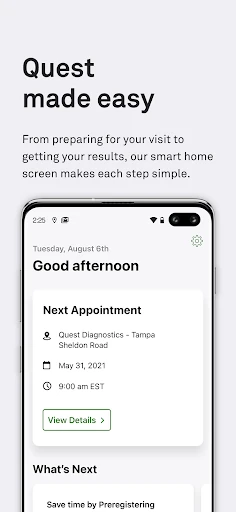
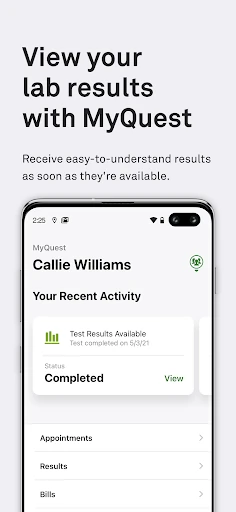
When I picture using MyQuest, it is the day after a routine lab visit: I want to check whether results are ready, find the appointment details I need, and avoid digging through old messages. The app puts lab results and appointments in one place, which gives the visit a useful follow-through beyond the time spent at the clinic. For someone who gets tests through Quest, that is the core job, and it is easy to understand.
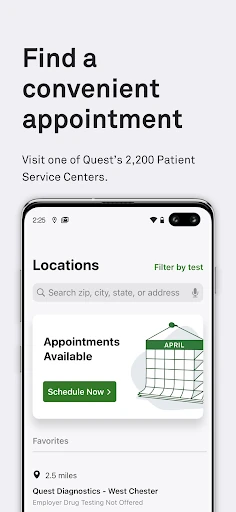
I would also use it when planning the next visit. Finding a nearby Quest location and scheduling or managing an appointment can keep those errands in the same routine as checking results. If I help coordinate health matters for a loved one, MyCircle adds another reason to open the app. The practical appeal is not dramatic; it is having a few recurring tasks gathered together instead of scattered across reminders and paperwork.
A Quest-focused companion
Compared with a general health notebook or a broad record-keeping app, MyQuest is closely tied to Quest Diagnostics. Its strongest use is seeing Quest lab results and handling related appointments, with location search and sharing tools alongside them. That makes it a natural fit for an existing Quest patient, rather than a universal dashboard for every doctor, clinic, or health service a person might use.
I would not treat it as a substitute for a healthcare provider or as a place to interpret results on my own. The app can make information easier to access and share, but its description centers on viewing results, appointments, tests, and connections to providers. If most of your care happens outside Quest, the app may play a smaller role in your routine. Its value depends on how often Quest is part of that routine.
Make it a small habit
A simple habit is to open MyQuest after booking a lab visit and keep the appointment information handy, then return when you want to check for results. I would also use the location finder before setting out, especially when choosing between convenient Quest locations. These are small steps, but they make the app more useful than a one-time download that gets forgotten after a test.
The sharing options can fit into a separate, deliberate workflow: access the information you need, then share it with a healthcare provider when appropriate. People managing health details for loved ones can explore MyCircle, while those interested in tests can browse QuestDirect. I would start with whichever task comes up most often and add the other tools only when they solve a real need. That keeps a focused app feeling manageable.
More From Our News Desk

Zoom Meetings, Google Meet, or Teams: Which Is Easiest to Join?

How I Build a Free Streaming Lineup With Tubi

Why Crunchyroll Is the Default Anime App for So Many Fans

YouTube TV: A Practical Guide to Cutting Cable

Rummikub and the Small Comfort of Phone Games

TeamViewer Remote Control or AnyDesk for Helping Family?
Who will find it useful
I would recommend MyQuest to people who use Quest Diagnostics and want lab results and appointment management close at hand. It should also appeal to anyone who regularly needs to find a Quest location, share health information with a provider, or coordinate health details for a loved one through MyCircle. The most convincing reason to install it is having a recurring Quest-related task that would be easier to handle on a phone.
It may be less useful if you rarely visit Quest or want one app to organize care from many unrelated providers. It is also not a replacement for speaking with a clinician about what a result means. People who prefer not to manage health information on a smartphone may be happier with their existing approach. For everyone else, I would judge it by whether its appointment and result tools fit naturally into their care routine.
MyQuest for Patients is made by Quest Diagnostics Incorporated. On Google Play, it has more than one million installs and a 4.6-star rating from about 50,900 ratings. The app is free to download, has no in-app purchases, and contains no ads. Google Play gives it an Everyone content rating.
The current version is 6.0. MyQuest was released on March 27, 2014, and its most recent listed update was August 31, 2026. A minimum Android version is not included in the available app details, so check the Google Play listing for the requirement that applies to your device.
A closer look at everyday use
A focused first impression
When I first opened MyQuest, the purpose was immediately clear: it is for keeping Quest-related results and appointments within reach. That focus is helpful. Rather than presenting itself as a catch-all health platform, it brings together a short list of tasks that can come up around testing and care.
I would begin by thinking about the task I need most—checking lab results, handling an appointment, or finding a location—and use the app for that first. The description also includes MyCircle, QuestDirect, provider sharing, and Apple Health integration. Those options broaden the app, but the core reason to try it remains straightforward.
Useful between visits
Day to day, the most relevant feature is access to lab results, paired with tools for scheduling and managing appointments. That combination can help with the ordinary gaps between arranging a test and following up on the information it produces. The app also gives patients a way to find nearby Quest locations, which is useful when the convenient place changes from one visit to another.
I like that these tasks are related rather than a random bundle. They all connect to being a Quest patient, whether I am preparing for a visit, looking for information afterward, or sharing details with a provider. That makes MyQuest easier to understand than an app that asks me to maintain a large health profile without a clear reason to return.
More than result access
MyCircle is the feature that stands out for people who help manage a loved one's health information. It gives the app a use beyond a single person's own test history, though its value will depend on whether that kind of coordination is part of your life. I would treat it as a practical option to explore rather than assume every user needs it.
QuestDirect adds the ability to browse and buy tests, while provider sharing can make health information easier to pass along. The app also supports integrating results with Apple Health. These features are described as part of MyQuest, but the central experience remains connected to Quest services. Together, they add useful paths around the main task without changing the app's basic focus.
A routine around testing
For a straightforward routine, I would use MyQuest when setting up a lab appointment, check the location before leaving, and return later to look for results. If I need to discuss information with a provider, I can use the sharing option rather than relying only on a paper copy. The app's tools fit into the natural sequence around a test, so there is no need to invent a complicated system.
Someone supporting a family member could make MyCircle part of a separate check-in routine, while a patient who uses Apple Health may want to explore the integration. I would keep the routine personal: use the feature that solves the current problem, and leave the rest alone until it becomes relevant. That makes the app more like a convenient utility than another daily obligation.
Keep the scope in mind
MyQuest is built around Quest Diagnostics, so its usefulness is tied to whether you get care or testing through Quest. It should not be mistaken for a general-purpose record covering every provider, and the available description does not position it as a tool for interpreting results or making care decisions. I would use it to access and manage information, then turn to a healthcare provider for context.
The app includes several different tools, from appointments to family health management and test browsing. That range is handy, but not every user will need each part. I would focus on the tasks that come up in my own routine rather than expecting every feature to matter. For an infrequent Quest patient, the benefits may be occasional; for a regular one, the central tools could earn a more frequent place on the phone.
MyQuest for Patients is a practical, Quest-centered app for checking lab results, managing appointments, and handling a few related health tasks. I appreciate the clear purpose and the options for location search, provider sharing, and loved-one support. Its limits are also clear: it is most useful when Quest is already part of your care.
I would recommend giving it a try if you regularly use Quest and want results and appointment tools on your phone. If you rarely use Quest or need a broader health organizer, it may not become essential. For its intended audience, MyQuest offers a sensible way to keep recurring lab-related tasks together.
MyQuest for Patients Frequently Asked Questions
What is MyQuest for Patients used for?
MyQuest for Patients lets Quest Diagnostics users view lab results, find nearby locations, and schedule or manage appointments. It also includes MyCircle for managing loved ones' health information, QuestDirect for browsing and buying tests, options to share information with healthcare providers, and integration with Apple Health.
Which devices can run MyQuest for Patients?
MyQuest for Patients is an Android app available through Google Play. Its description also mentions integration with Apple Health, but that does not change the platform of the app itself. Check the store listing for supported devices and the current requirements before installing.
What Android version does MyQuest require?
The minimum Android version can vary with the app and device, and the available details do not give a specific requirement. Check the MyQuest for Patients Google Play listing for the Android version currently supported by your phone.
Does MyQuest for Patients cost money?
MyQuest for Patients is free to download, with no in-app purchases and no ads. The app description says users can browse and buy tests through QuestDirect; check the store or Quest information for details that may apply to any test you choose.
Is MyQuest for Patients right for me?
It is best suited to people who use Quest Diagnostics and want lab results, appointment tools, or nearby location search on a phone. MyCircle and provider sharing may help some users as well. If you do not use Quest, or want a general health organizer for many providers, it may be less useful.
Pros
- Puts Quest lab results and appointment management together in one app.
- Includes nearby location search and options to share health information with providers.
- MyCircle and Apple Health integration extend its usefulness for some routines.
- Free to download, with no ads or in-app purchases.
Cons
- Its usefulness is closely tied to getting tests or care through Quest Diagnostics.
- It is not presented as a general health record for every provider.
- Some users may have little reason to use its extra tools.
- Category
- Medical
- Version
- 6.0











