Microsoft Power BI
- 75.86K
- 4.5
- Installs
- 5.00M
- Price
- Free

Screenshots
Analysis by Reviewed APKs
Microsoft Power BI is a mobile companion for viewing and exploring business reports and data visualizations while away from a desk. It suits people who already use Power BI and want to check figures, filter a report, or share a marked-up view on the go. My overall take is that it makes mobile access practical without pretending a phone is a replacement for the full analytics suite.
A quick check between meetings
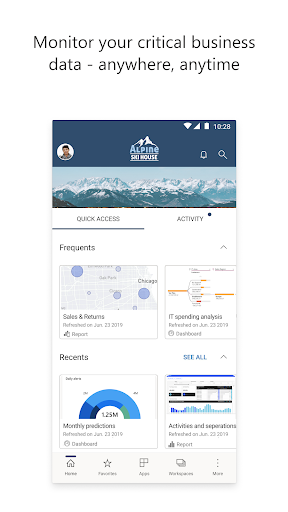
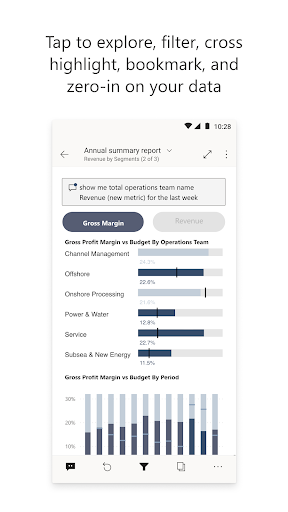
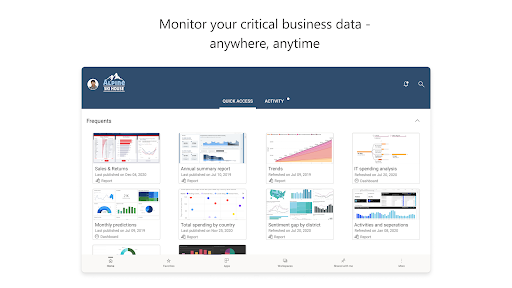
When I first opened Power BI, I pictured the familiar workday moment: someone asks about a figure just before a meeting, and the relevant report is easier to check on a phone than to find a laptop. The app is built around that kind of access. It lets me view important data, then tap into a report to explore, filter, and focus on what matters for the question at hand.
That changes the app from a dashboard I only open at a desk into something I can consult during a commute, between appointments, or while waiting for a call to start. I can annotate a report and share the visualization, which gives a conversation some useful context. The point is not to recreate a whole work session on a small screen; it is to make a timely check less cumbersome.
A companion, not a workbench
Power BI Mobile makes the most sense as part of the broader Power BI suite. The desktop app and web service are part of that larger offering, while this app puts reports and visualizations within reach on a mobile device. I would choose it when I need to review or share information away from my usual setup, rather than when I want to do the deeper work of building an analysis.
That distinction matters if you are comparing it with a spreadsheet app or a general-purpose note-taking tool. Power BI is centered on data reports, filters, alerts, and visualizations, not writing documents or managing a general task list. The mobile app is also not presented as a standalone way to create a complete analytics workflow; it is most useful when there is Power BI data to access and explore.
Make mobile checks count
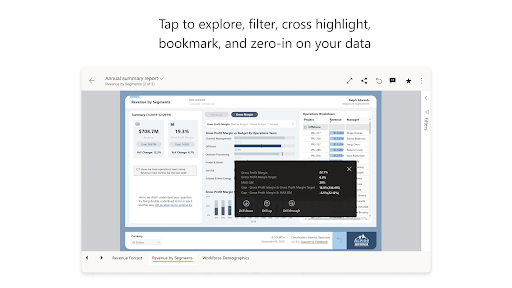
A useful habit is to open a report with a specific question in mind. Rather than scrolling aimlessly, I can tap to filter or focus on the part that relates to the decision in front of me. That keeps a quick phone check from turning into a distracting tour of every chart, especially when I only need one comparison or a particular data point.
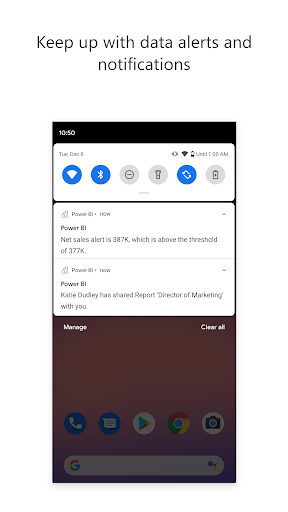
Alerts can also shape a lightweight routine. The app supports data alerts and real-time notifications, so I can use a notification as a prompt to look at the relevant report instead of repeatedly checking for a change. If a visualization needs explanation, annotating and sharing it can carry that context along. Those small actions make the app more useful than simply keeping a dashboard open.
More From Our News Desk

Zoom Meetings, Google Meet, or Teams: Which Is Easiest to Join?

How I Build a Free Streaming Lineup With Tubi

Why Crunchyroll Is the Default Anime App for So Many Fans

YouTube TV: A Practical Guide to Cutting Cable

Rummikub and the Small Comfort of Phone Games

TeamViewer Remote Control or AnyDesk for Helping Family?
Who should give it a try
I would recommend Power BI to people who already rely on Power BI reports and want to review them away from a computer. Managers checking a figure before a meeting, colleagues discussing a visualization, and people who want alerts about data changes all have a clear reason to keep the mobile app handy. Its focus on viewing, filtering, annotating, and sharing suits short, purposeful sessions.
It may be a poor fit for someone who wants a general spreadsheet editor, a full desktop-style analytics workspace, or an app that is useful without Power BI data to access. A small phone display can also make detailed charts less comfortable to inspect than a larger screen. I see the mobile app as a practical extension for review and quick decisions, not a replacement for every part of the wider Power BI suite.
Microsoft Power BI is a free business app from Microsoft Corporation. On Google Play it has over five million installs and a 4.5-star rating from around 76,000 ratings. The app is marked for Everyone. Google Play shows no in-app purchases and no ads, making the basic cost straightforward for someone deciding whether to install it.
The listed version is 2.2.261019.21330631. The app was released on July 7, 2015, and its listed last update is October 25, 2026. An Android minimum version is not included in the available app details, so check Google Play on your device for current compatibility information.
A closer look at Power BI on mobile
Opening the reports
My first impression is that Power BI Mobile has a focused job: get me to the data I need, then give me ways to inspect and pass it along. The app description says users can start exploring Power BI data instantly, without setup. That is appealing for a quick visit, though the reports themselves still need to be relevant to the work I am trying to do.
I like that the first step does not have to be a complicated analysis session. If I am checking a report before a discussion, I can open the data, tap into a view, and concentrate on the question at hand. That simple entry point fits mobile use well. The app's value depends less on an elaborate setup ritual and more on having useful Power BI information available when I need it.
The everyday rhythm
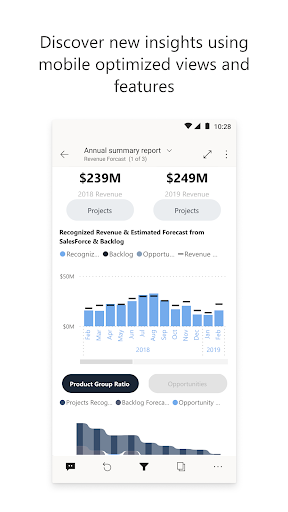
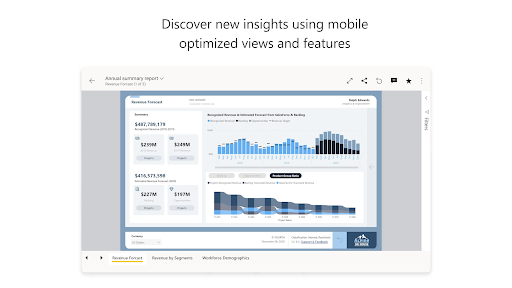
Day to day, the strongest use is short bursts of attention. I might check a visualization before a call, filter it to focus on one aspect, and return to the conversation with a clearer view. A phone is well suited to that kind of quick review, and the app's tap-to-explore approach is easier to imagine using in a hallway than a dense desktop workflow.
There is a natural limit to those sessions. Detailed analysis can demand more room and concentration than a mobile screen offers, so I would not force every report task onto the phone. The app is more convincing when I treat it as a convenient window into data than when I expect it to handle every part of a longer work session.
Useful mobile tools
Filtering and focusing are central to making a report manageable on the go. Rather than treating a visualization as a static picture, I can interact with it and narrow attention to the information that answers my immediate question. That small amount of exploration is a meaningful difference from simply opening a file to glance at it.
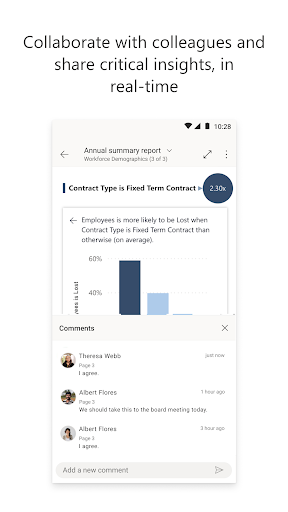
The app also supports annotations and sharing, which can help make a chart understandable to someone else. Data alerts and real-time notifications offer another useful layer: a change can prompt a closer look. The description also calls out secure access to on-premises data and scanning QR codes to bring real-world data into context, extending its role beyond a simple dashboard viewer.
A practical work routine
A sensible routine might start with a notification about a data alert. I can open the app, find the relevant view, and use filters to focus on the change rather than trying to remember every number in a report. If the issue needs a second opinion, I can annotate the visualization and share it so the other person has the same context.
For an in-person discussion, QR code scanning is another described way to connect real-world context with data. That could be handy when the code is part of a work setting and a report is relevant to what I am looking at. These tools work best as steps in a specific task, not as reasons to keep checking the app without a question in mind.
Keep expectations grounded
The biggest constraint is also the obvious one: reports are not always comfortable to inspect on a phone. A compact screen is convenient for checking a figure, but less inviting for a long session spent comparing several detailed visualizations. I would move to a larger screen when the work calls for sustained analysis, rather than expecting the mobile version to offer the same working space.
Power BI Mobile is also most relevant to people who have Power BI data and reports to access. Its features are about viewing, exploring, alerting, annotating, and sharing, not broad productivity tasks. The app description places it alongside Power BI Desktop and the web service, which is a helpful frame: it fills in mobile access rather than replacing the other parts of the suite.
Microsoft Power BI is a practical mobile companion for checking reports, narrowing a view, and sharing a visualization when I am away from a desk. Alerts and QR code scanning give it a few useful mobile-specific angles, while the core experience stays focused on data access rather than trying to be an all-purpose business app.
I would recommend it to people who already use Power BI and want a convenient way to keep reports close. If your work involves building or deeply analyzing reports for long stretches, the phone app is better treated as a supplement than your main workspace.
Microsoft Power BI Frequently Asked Questions
What is Microsoft Power BI used for?
Microsoft Power BI Mobile is used to access and explore Power BI data, reports, and visualizations while away from a desk. It supports filtering and focusing on information, annotating and sharing visualizations, setting data alerts, and receiving notifications. The description also mentions accessing on-premises data and scanning QR codes to bring data into context.
Which devices can run Microsoft Power BI?
The app is available on Android through Google Play. The available details do not give a minimum Android version, so compatibility can vary by device and software version; check Google Play for the current requirements. Power BI is also described as a broader suite that includes a desktop app and a web service.
Does Microsoft Power BI cost anything?
The Google Play app is listed as free, with no in-app purchases and no ads. The app is part of a broader Power BI offering that includes Desktop and a web service, so the cost or access terms for other parts of that suite may vary. Check the relevant store or service information for current details.
What Android version does Microsoft Power BI require?
A minimum Android version is not provided in the available app details. Requirements can change, and compatibility can depend on the device, so the best place to check is the Microsoft Power BI page in Google Play before installing or updating.
Is Microsoft Power BI suitable for casual users?
It can suit someone who needs to check Power BI reports, filter data, or share a visualization during the workday. It is less useful as a general spreadsheet or productivity app, and a phone is not ideal for every detailed analysis task. Its best fit is people with Power BI information they want to access on the go.
Pros
- Makes Power BI reports and visualizations accessible for quick checks away from a desk.
- Filtering and focus tools help narrow attention to relevant data.
- Annotations, sharing, alerts, and notifications support practical follow-up.
- QR code scanning can connect real-world context with data.
Cons
- A phone screen is less comfortable for sustained, detailed report analysis.
- Its usefulness depends on having relevant Power BI data and reports to access.
- It is a companion to the wider suite, not a general-purpose business workspace.
- Category
- Business
- Version
- 2.2.261019.21330631