Meta Business Suite
- 5.38M
- 4.6
- Installs
- 100.00M
- Price
- Free

Screenshots


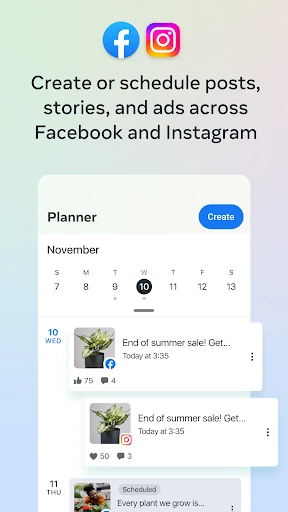

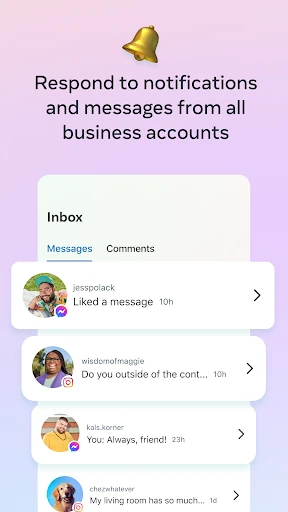
Analysis by Reviewed APKs
Meta Business Suite is a business-focused companion for managing a Facebook Page and Instagram account from one app. I see it as most useful for small businesses and people who handle their own social presence, especially when messages and posting compete with other work. It brings several routine tasks together without pretending to replace a full business-management system. My overall take: practical for keeping up, with a clear focus on Meta’s platforms.
A Busy Day, One Inbox
When I picture using Meta Business Suite on a busy day, the clearest scenario is a small shop owner checking messages between other tasks. Rather than switching between a Facebook Page and an Instagram account to see what needs a reply, I can use the app to respond to messages and comments in one place. That makes it easier to notice a customer question while there is still time to answer it.
I can also check notifications and a to-do list, then fit a post or story into the same work session. If I have content ready but cannot publish it right away, the app can schedule it for later. The appeal is less about a dramatic transformation and more about reducing the number of small social-media jobs I have to remember as the day moves along.
A Social Tool, Not Everything
The obvious alternative is handling a Facebook Page and Instagram account separately, moving between their apps whenever I need to publish or answer someone. Meta Business Suite makes more sense when those two channels are both part of my routine and I want a shared place for posts, stories, messages, comments, notifications, and insights. It is designed around managing those social accounts, not every part of running a company.
I would not treat it as a general operations or finance app. Its stated purpose is social publishing, customer conversations, and understanding interactions with posts, stories, and ads. That distinction matters: someone looking for inventory, invoicing, or expense tools should look elsewhere. For a business that mainly needs a reliable way to stay present on Facebook and Instagram, the narrower focus is a strength rather than a missing feature.
Make Small Check-Ins Count
I get more value from a tool like this by using it in short, predictable check-ins rather than waiting for a long catch-up session. I can review notifications and the to-do list, handle the comments and messages that need attention, and then move on. Keeping those tasks together gives me a simple rhythm: check what is urgent first, then spend time on content instead of letting replies and publishing blur together.
Scheduling is useful when I already know what I want to share but my day is likely to get busy. I can prepare a post or story and arrange its timing in advance, then return later to see how people interacted with it. Insights can inform what I choose to make next, while automated responses may help with repeat conversations. Those tools work best as support for attention, not a substitute for it.
More From Our News Desk

Zoom Meetings, Google Meet, or Teams: Which Is Easiest to Join?

How I Build a Free Streaming Lineup With Tubi

Why Crunchyroll Is the Default Anime App for So Many Fans

YouTube TV: A Practical Guide to Cutting Cable

Rummikub and the Small Comfort of Phone Games

TeamViewer Remote Control or AnyDesk for Helping Family?
Who Will Get the Most From It
I would recommend Meta Business Suite to a small-business owner, creator, or staff member who regularly looks after both a Facebook Page and an Instagram account. It is especially useful when the same person handles customer replies and content planning, because both kinds of work can be managed in one place. The notifications and to-do list also suit anyone who wants a quick way to see what needs attention without relying on memory.
It may be less appealing if you rarely use Meta’s social platforms, or if you need a broad business dashboard for tasks beyond social communication and publishing. The app’s value depends on having a reason to manage a Page and Instagram account together. I would also temper expectations if you want a completely hands-off presence: scheduling and automated responses can save time, but the app is still a tool for managing ongoing conversations and content.
Meta Business Suite is published by Meta Platforms, Inc. On Google Play, it has over 100 million installs and a 4.6-star rating from around 5.4 million ratings. The app is free to download, and the provided store facts say it has no in-app purchases and contains no ads. Its content rating is Everyone, making the store’s age classification broad.
The current version in the supplied app facts is 577.0.0.59.104. Meta Business Suite was released on January 28, 2014, and its last update date is November 2, 2026. A minimum Android version is not provided in the available facts, so it is sensible to check the Google Play details for device compatibility before installing.
A Closer Look at the Daily Workflow
A Focused First Impression
When I first open Meta Business Suite, the central idea is easy to grasp: it is for managing a Facebook Page and Instagram account, rather than for general business administration. That focus gives the app a clear job. The listed tools cover publishing, conversations, insights, notifications, and a to-do list, so the everyday appeal is having those social tasks within one working space.
Getting started depends on having the Page and Instagram account you intend to manage. The app’s purpose is clear even before I settle into a routine: prepare content, keep up with responses, and see how people are interacting with what I share. I would approach it as a practical working tool, not as a separate social network or a replacement for the accounts themselves.
Keeping Up Day to Day
The core daily experience is a cycle of checking, responding, and planning. I can look at notifications and the to-do list to decide what needs my attention, then respond to messages and comments from the shared conversations area. That arrangement is particularly helpful when a question arrives on one account while I am already working on the other.
On a quieter day, I can turn to creating or scheduling a post or story rather than just reacting to incoming activity. The app gives the routine a useful balance: customer communication can be handled alongside publishing, instead of being an afterthought. It still asks me to make the decisions and produce the content; the convenience is in bringing the tasks together.
Tools With a Clear Purpose
Scheduling stands out because it helps separate the moment I prepare content from the moment it goes out. I can create a post or story when I have the time, then schedule it for later. For anyone trying to maintain a more consistent presence around an unpredictable workday, that is a concrete convenience rather than an abstract promise.
The shared handling of messages and comments is another strong part of the package. Automated responses are available as an option, which may save time on recurring replies, while real-time calls to customers and contacts add another way to communicate from the app. Insights about interactions with posts, stories, and ads provide a way to review how content is landing.
A Practical Weekly Rhythm
A routine I would use is a brief daily pass through notifications, the to-do list, and customer conversations, followed by a longer content session when I have something useful to share. During that session, I can create or schedule posts and stories instead of trying to publish at the exact moment I think of them. This helps keep reactive work from taking over every spare minute.
Later, I can look at the available insights to see how people interacted with recent posts, stories, or ads. That information can help guide what I prepare next, without turning every post into a numbers exercise. The app also supports automated responses, so a business with recurring questions can consider using them to save time while still keeping an eye on the conversations that need a personal reply.
Limits to Keep in Mind
The biggest limit is also the app’s defining choice: Meta Business Suite concentrates on a Facebook Page and Instagram account. If a business’s daily work depends on other platforms or on tools for finances, stock, or broader operations, this app is not meant to cover those needs. Its usefulness will vary with how much of your customer communication and publishing already happens on Meta’s services.
Bringing tasks together can make them easier to find, but it does not make them disappear. Content still needs planning, messages still need judgment, and insights need to be considered in context. Automated responses may help with routine exchanges, but they are not a reason to ignore customer conversations. I would see the app as a useful organizer for social work, not a fully hands-off way to run it.
Meta Business Suite earns its place when Facebook and Instagram are both part of a business’s regular customer communication. Combining scheduled content, messages, comments, notifications, and insights makes everyday social work easier to keep track of. Its focus is specific, and that is exactly why it can be useful.
I would recommend it to people who manage a Page and Instagram account themselves and want fewer separate places to check. If you need a wider business-management toolkit, it will not be the answer on its own. For social publishing and follow-up, though, it is a practical option worth trying.
Meta Business Suite Frequently Asked Questions
What is Meta Business Suite used for?
Meta Business Suite is for managing a Facebook Page and Instagram account. It can be used to create, schedule, and manage posts and stories; respond to messages and comments; review notifications and a to-do list; and view insights about interactions with posts, stories, and ads. It also supports automated responses and real-time calls to customers and contacts.
Which platforms and devices support Meta Business Suite?
The app is available on Android through Google Play. The supplied information describes its use with a Facebook Page and Instagram account. Device compatibility can depend on the Android version and device, so check the Google Play details for the requirements that apply to your phone or tablet.
What Android version does Meta Business Suite require?
The minimum Android version may vary, and it is worth checking the Google Play details for the current requirement before installing. The app’s supplied version is 577.0.0.59.104, but that version number does not indicate which Android releases a particular device supports.
Does Meta Business Suite cost money?
Meta Business Suite is free to download on Google Play. The supplied store facts say it does not contain ads and has no in-app purchases. Store details can change over time, so check the Google Play page for current information before downloading.
Is Meta Business Suite a good fit for my business?
It is a good fit if you manage a Facebook Page and Instagram account and want one app for social content, customer messages, comments, and insights. It may not suit someone looking for tools beyond social-media work, such as a general business-management system. The best fit depends on how much of your routine takes place on those two Meta platforms.
Pros
- Brings Facebook Page and Instagram post and story management into one app.
- Combines messages and comments with notifications and a to-do list.
- Scheduling and automated responses can make recurring social tasks easier to handle.
- Insights help review interactions with posts, stories, and ads.
Cons
- Its focus is limited to managing a Facebook Page and Instagram account.
- Scheduling and automation still require someone to plan content and monitor conversations.
- It is not a general-purpose business operations or finance tool.
- Category
- Business
- Version
- 577.0.0.59.104