Letsfit
- 6.26K
- 4.3
- Installs
- 500.00K
- Price
- Free

Screenshots
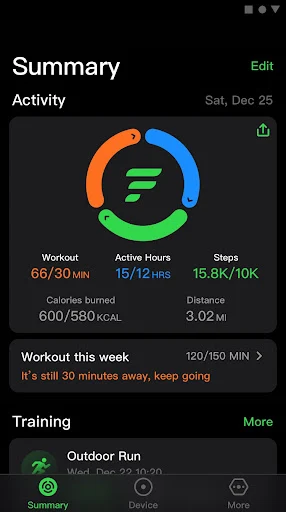
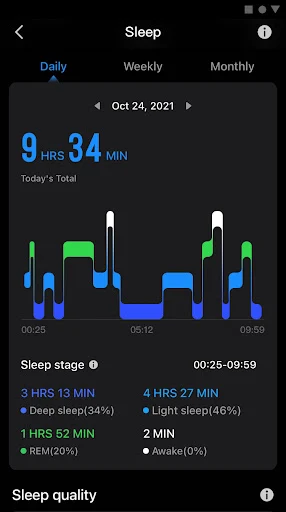
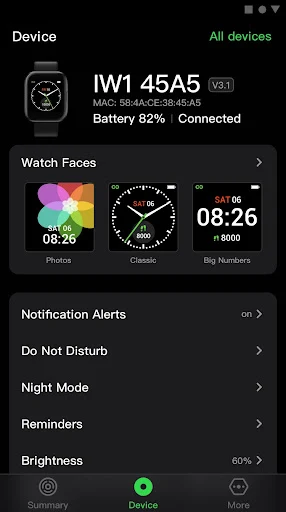
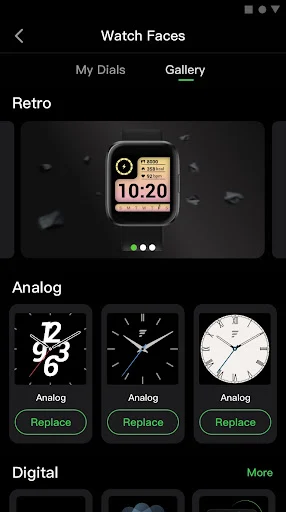
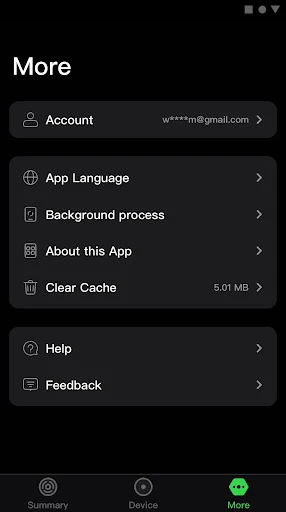
Analysis by Reviewed APKs
Letsfit is a fitness and wellness companion app for people using a connected smartwatch, bringing daily activity, sleep, heart-rate and calorie information together with exercise records and watch notifications. I found its appeal in the way it can make everyday movement easier to notice without turning a walk into a complicated training project. It suits casual trackers best, though the experience depends on having a compatible device.
A Walk With More Context
Imagine taking the same neighborhood walk you do most evenings. With a compatible smartwatch connected, Letsfit can show steps and calories alongside other health information, and it can record an exercise session with a route map and related workout data. Afterward, you have more to look at than a vague sense that you got outside. That kind of record can make a regular routine feel visible without requiring you to plan an elaborate training program.
When I first considered how I would use it, the most natural fit was checking in after a walk or a busy day. Steps and sleep hours are the sort of figures I might glance at while deciding whether I have been moving much lately; heart-rate information and calories add further context. Letsfit also provides interpretations of recorded data. I would treat those as general context, not as a substitute for professional health guidance or a precise diagnosis.
A Companion, Not A Coach
Letsfit makes the most sense alongside its connected smartwatch. It brings selected health information, recorded workouts and notifications into one phone app, while the watch can handle some incoming-call actions. That is a different job from a dedicated workout-planning service or a general-purpose messaging app. Its strength is the practical bridge between wearable data and a quick phone check, rather than a promise to build a training plan or coach every session.
If you want a place to compare exercise routes and everyday readings, the app has a clear role. If you are looking for a detailed training curriculum, social competitions or a manually maintained food diary, those are not features described here, so I would not choose Letsfit on that assumption. It is also not a standalone replacement for a smartwatch: the app’s useful health and notification features are tied to a connected device, and supported features can differ between devices.
Small Habits That Help
A simple way to get more from Letsfit is to make a quick check part of an existing routine. I would look at steps and sleep when I am already checking my phone in the morning, then review a recorded workout after getting home. That keeps the app connected to ordinary moments instead of making fitness tracking another task that needs a special time slot. The point is to notice patterns over time, not to react to every single number.
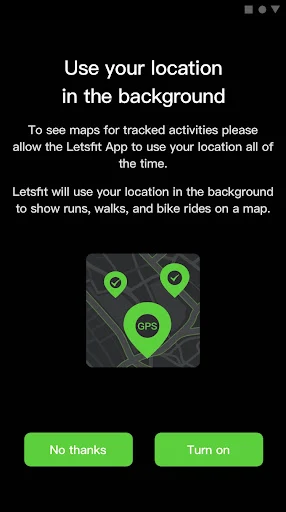
For a walk or other exercise session, starting a recorded activity gives the app a chance to collect workout data and draw a route map. Because background location is used for this mapping during workouts, I would consider whether I want that feature before heading out. Afterward, a brief review of the route and exercise information can be more useful than repeatedly opening the app mid-session. A steady, occasional check-in feels like the least fussy approach.
More From Our News Desk

Zoom Meetings, Google Meet, or Teams: Which Is Easiest to Join?

How I Build a Free Streaming Lineup With Tubi

Why Crunchyroll Is the Default Anime App for So Many Fans

YouTube TV: A Practical Guide to Cutting Cable

Rummikub and the Small Comfort of Phone Games

TeamViewer Remote Control or AnyDesk for Helping Family?
Who Will Get The Most From It
I would recommend Letsfit to someone who already owns a compatible smartwatch and wants a straightforward place to review everyday activity, sleep, heart-rate readings and exercise records. It may be especially handy if you like seeing a route after a walk or want selected phone notifications to reach your wrist. The app’s combination of daily measurements and workout recording makes it more relevant to casual, routine-focused tracking than to a single narrow exercise use.
It may not suit someone without a compatible wearable, or anyone expecting an advanced training system with customized plans and coaching. The description also makes clear that not every device supports every feature, so I would check compatibility before making it part of a routine. People who prefer to minimize background location use may also want to skip route mapping. For the right wearable owner, though, Letsfit offers a practical overview without asking for a complicated fitness workflow.
Letsfit is a free Health & Fitness app from LETSFIT LLC. On Google Play it has over 500,000 installs and a 4.3-star rating from about 6,300 ratings. The app is listed without in-app purchases or ads, and its content rating is Everyone. Those details make the price structure easy to understand, although the supported features still depend on the connected smartwatch.
The current version is 4.5.21. Letsfit was released on July 24, 2020, and was last updated on December 25, 2024. The minimum Android version is worth checking on Google Play, since it can vary with the device and current app requirements. I would also check the store’s compatibility information before relying on a particular watch feature.
How Letsfit Fits Into A Fitness Routine
First Look And Setup
When I first opened the idea of using Letsfit, what stood out was its practical scope: everyday health information, exercise recording and smartwatch notifications, rather than a long list of training promises. It is meant to work with a connected smartwatch, so pairing the right device is central to getting useful information. The app description notes that device support varies, which is worth keeping in mind before expecting every feature to appear.
The core information is familiar enough to understand at a glance: steps, sleep hours, heart rate and calories burned. That is a sensible starting point for someone who wants a broad snapshot rather than a technical dashboard. The app also offers interpretations of recorded data, giving the numbers some context. I would still treat those interpretations as informational, especially when looking at health-related readings.
Everyday Checks
In day-to-day use, Letsfit is best suited to short check-ins. A look at steps can add context to a desk-heavy day, while sleep hours may be interesting to review alongside other daily readings. Heart rate and calories are included too. These measures are most useful when considered as part of a longer routine; one isolated reading does not tell the whole story, and the app’s role is to display and interpret recorded data.
What I liked about this kind of setup is that it can keep activity tracking close to the wearable I am already carrying. I would not want to spend a lunch break hunting through a maze of screens just to see whether I walked much. The app’s described focus is clear enough: display health data, record exercise and handle notifications. That makes it easier to understand what to open it for, even if a particular watch determines which features are available.
Routes And Watch Alerts
Workout recording is one of the more concrete reasons to open Letsfit before exercising. The app can record while you work out, then show a detailed route and exercise analyses afterward. For a familiar walking loop, a route can help make the session feel like a real entry in your activity history rather than a workout that disappears as soon as you get home. The app uses location in the background during workouts to draw that map.
The notification assistant is another useful part of the package. Calls, SMS messages and other app notifications can be pushed to a connected smartwatch. For incoming calls, the description says users can mute, answer or hang up from the device, and quickly reply to the caller by SMS. I can see that being handy when my phone is tucked away during a walk, though the available controls depend on the smartwatch.
A Routine That Sticks
A realistic routine might start with checking the previous night’s sleep and the day’s steps at a convenient moment, then recording a walk when it happens. Later, I would review the route and exercise information once I was back indoors. This sequence uses the app as a record of things I was already doing, rather than turning every workout into a data-entry session. Keeping the review brief also makes it easier to repeat.
I would avoid making a habit of checking every metric several times a day. A periodic look at steps, sleep and exercise records is a calmer way to spot whether a routine is changing. If a walk is one of the activities I record, the map provides a concrete detail to revisit afterward. And if I do not need route information, I can consider whether background location is necessary for that session.
Keep Expectations Grounded
The biggest practical limit is the connection to a compatible smartwatch. Letsfit’s described features are not guaranteed to work the same way across every device, and the app says some devices may lack features shown in its materials. I would check watch compatibility before counting on call controls, quick replies or a particular kind of health reading. That is a more important consideration than the app’s broad feature list.
Location is another detail to factor into a workout routine. Letsfit uses it in the background during exercise so it can draw an activity map and provide exercise data. That makes sense for route recording, but it is still a permission worth considering deliberately. Finally, the app displays health-related information and interpretations; I would use it as a personal tracking aid, not as medical advice or a definitive measure of wellbeing.
Letsfit offers a useful mix of everyday health readings, workout routes and smartwatch notifications, with a clear focus on supporting an existing wearable. Its best moments are modest ones: checking activity after a busy day, reviewing a walk, or seeing a call alert without reaching for a phone. Compatibility and background location are the main details to think through before settling into that routine.
I would try Letsfit if I had a compatible smartwatch and wanted a convenient record of daily movement and exercise. I would look elsewhere if I needed structured coaching or a feature-rich training plan. For casual wearable owners, it is a practical companion, provided expectations stay grounded in what the particular watch supports.
Letsfit Frequently Asked Questions
What is the Letsfit app used for?
Letsfit displays health information such as steps, sleep hours, heart rate and calories burned, and can record exercise with route and workout details. It also sends calls, SMS and other app notifications to a connected smartwatch. The exact set of features can depend on the device, so it is worth checking compatibility in the Google Play information.
Which phones and devices support Letsfit?
Letsfit is an Android app on Google Play and is designed to work with a connected smartwatch. The app description says device support can differ, and some watches may not have every feature. Check the Google Play information and your smartwatch’s compatibility details before relying on a specific function such as route recording or call controls.
What Android version does Letsfit require?
The minimum Android requirement can vary with the app and device. Check the current Google Play information for the requirement that applies to your phone before installing or updating Letsfit. A compatible smartwatch is also relevant if you want to use its connected health tracking and notification features.
Does Letsfit cost money or include purchases?
Letsfit is free on Google Play and is listed without in-app purchases or ads. Store details can change over time, so it is sensible to check the current Google Play information before downloading. The app’s functionality also depends on the connected smartwatch and the features that device supports.
Is Letsfit suitable for a beginner?
Letsfit can suit someone who wants to start by checking basic activity, sleep and exercise information, especially if they already use a compatible smartwatch. Its described features do not make it a substitute for a structured coaching program. If you want a particular watch function, check device compatibility first, since available features can vary.
Pros
- Combines steps, sleep, heart-rate readings and calories in one wearable-focused app.
- Can record exercise and show a route map afterward.
- Smartwatch notifications include call controls and quick SMS replies on supported devices.
- Free to use, with no listed in-app purchases or ads.
Cons
- The experience depends on having a compatible smartwatch.
- Some watches may not support every feature described.
- Route mapping uses background location during workouts.
- Category
- Health & Fitness
- Version
- 4.5.21











