MyLabcorp
- 20.10K
- 4.7
- Installs
- 1.00M
- Price
- Free

Screenshots
Analysis by Reviewed APKs
MyLabcorp brings Labcorp test results, appointments, bills, and health information together in one app. It suits people who already use Labcorp and want to review results or handle routine visit details on their phone. I like the practical focus: it pairs familiar patient-portal tasks with plain-language explanations and an AI chat for questions, while making clear that it is not a substitute for medical care.
Between Results and Appointments
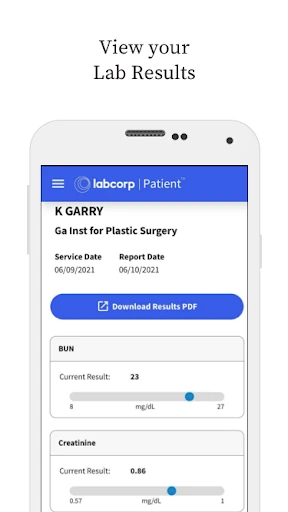
Imagine getting a notification that a recent lab result is ready while you are between errands. MyLabcorp gives you a place to review current and past Labcorp results, see standard result ranges, and explore explanations of your health data. If something raises a question, the app’s AI experience can provide information to help you understand the result and prepare a more focused conversation with your healthcare provider.
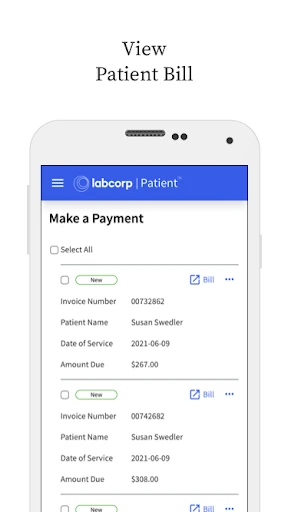
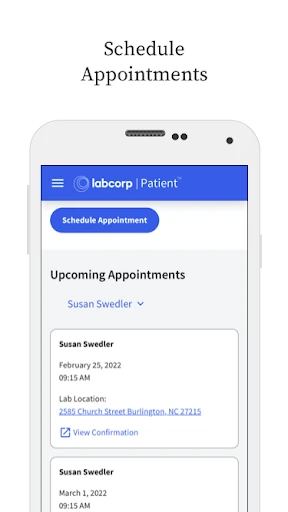
The same visit can involve practical follow-up, not just reading numbers. You can look for a Labcorp location, schedule an appointment, check its details, and check in online. If there is an open invoice, the app also lets you view and pay it. I appreciate having those connected tasks in one place, rather than needing to remember which portal handles results and which handles the next appointment.
A Patient Portal, Not a Doctor
The closest comparison is the Labcorp patient portal experience, because MyLabcorp brings those established tasks into a mobile app. It is also the replacement for the Labcorp Patient mobile app, and existing credentials can be used to sign in. The added emphasis on explanations and health insights makes it more than a place to retrieve a result, but the foundation is still managing Labcorp-related information and visits.
That distinction matters. MyLabcorp is not a general medical reference for every condition, and its AI feature does not diagnose or recommend treatment. It is designed to help with understanding and wellness, so I would use it to learn what questions to raise, not to make a medical decision on my own. People who do not use Labcorp services may find much less reason to keep it close at hand.
Make Follow-Up Easier
A useful habit is to check results when they become available, then note which details you want to discuss with your healthcare provider. MyLabcorp can show historical data dating back up to 15 years alongside standard ranges, which gives a longer view than a single result. The app also offers health information across 12 key areas, plus educational content authored by Labcorp’s clinical team.
I would also use the app as a small appointment organizer. Check the appointment details before leaving, use online check-in when it suits the visit, and review any open bill afterward. For questions about a result, the AI chat can help you explore the information and prepare for a discussion. Keeping those steps together may make follow-up feel less scattered, without turning the app into a replacement for professional guidance.
More From Our News Desk

Zoom Meetings, Google Meet, or Teams: Which Is Easiest to Join?

How I Build a Free Streaming Lineup With Tubi

Why Crunchyroll Is the Default Anime App for So Many Fans

YouTube TV: A Practical Guide to Cutting Cable

Rummikub and the Small Comfort of Phone Games

TeamViewer Remote Control or AnyDesk for Helping Family?
Who May Find It Useful
I’d recommend MyLabcorp to people who get tests through Labcorp and want a straightforward mobile place for results, appointments, and invoices. It should also appeal to anyone who likes seeing health data over time or wants accessible explanations before a healthcare visit. Existing Labcorp Patient app users have a particularly clear reason to try it: the app replaces that earlier mobile experience and accepts existing credentials.
It may be a poor fit if you want a diagnostic tool, treatment advice, or a complete record of care from providers outside Labcorp. The app’s explanations and AI chat are meant to support understanding, not settle medical questions. I’d also expect its everyday usefulness to depend on how often you use Labcorp services; if those visits are rare, its practical advantages may be occasional rather than part of a daily routine.
MyLabcorp is developed by Labcorp and is categorized as a medical app. On Google Play, it has over 1 million installs and a 4.7-star rating from 20,098 ratings. It is free to download, with no in-app purchases and no ads. Its content rating is Everyone, making the store’s age classification broad, although the app is centered on personal health information.
The current version is 11.3.1. MyLabcorp was released on April 19, 2018, and its most recent update is dated October 14, 2026. An Android minimum version is not included in the available app facts, so device compatibility is best checked on Google Play before installing. The app is designed for Labcorp patients and uses existing Labcorp credentials for people moving from the previous patient app.
A Closer Look at Labcorp on Mobile
A Familiar Starting Point
When I first opened MyLabcorp, the most useful thing to understand was its role as the successor to the Labcorp Patient mobile app. The transition is meant to be simple: existing users can sign in with their current credentials, with their secure Labcorp health data available in the new app. That makes it feel less like starting from scratch and more like bringing a familiar patient portal into a refreshed mobile experience.
The app’s scope is easy to grasp: results, appointments, health information, and bills are all tied to Labcorp services. I like that practical framing because it sets expectations before getting into the more ambitious AI feature. This is primarily a way to manage a patient relationship with Labcorp, with educational support alongside the everyday account tasks.
Results in Everyday Use
The core experience is about getting to your Labcorp information when it is useful. You can review current and past test results and look at a health profile through the mobile app. Historical results can reach back as far as 15 years, and standard result ranges are shown alongside the data. That longer view may help someone notice topics to bring up with a provider, rather than treating every result as an isolated event.
The practical tasks matter just as much. MyLabcorp lets you find a lab, schedule an appointment, check appointment details, and check in online. You can also view bills and pay open invoices. Having these items together is convenient for the small, ordinary moments around testing: checking where to go, confirming a visit, and dealing with the paperwork afterward.
Explanations Beyond the Numbers
What stands out is the built-in AI experience for questions about lab results, health trends, and general topics such as nutrition. It is intended to offer real-time information that helps users understand their data and prepare for conversations with a healthcare provider. For example, someone might use it to explore why cholesterol levels could be changing or which food groups are worth learning about.
The app also has educational overviews covering 12 key health areas, along with clinically guided content authored by Labcorp’s clinical team. I see these as ways to get context and learn the vocabulary around a result, rather than as instructions to act on. The description specifically says the app does not provide diagnoses or treatment recommendations, so professional care remains central.
A Simple Follow-Up Routine
A routine I can imagine is checking the app after a Labcorp visit, then returning when results are ready. I would compare a new result with earlier data where available, read the standard range, and use the educational material to identify anything I want clarified. If a question remains, the AI chat offers another way to explore it before speaking with a healthcare provider.
Before the next visit, I’d check the appointment details and use online check-in if that is convenient. Afterward, I’d look for any open bill and handle payment from the phone. This workflow keeps the app focused on useful follow-through instead of requiring a separate trip through different portal tasks. The point is not to spend more time in the app, but to make the necessary steps easier to find.
Keep Its Role in Perspective
Health results can be difficult to interpret, and an explanation in an app cannot account for every part of a person’s medical history. MyLabcorp describes its AI as a support for understanding and wellness, not a source of diagnosis or treatment recommendations. I would treat its responses and educational content as preparation for a conversation, especially when a result feels confusing or concerning.
The app is also specifically built around Labcorp services and Labcorp health data. That makes it useful for the people whose tests and visits run through Labcorp, but less compelling as a general health organizer for someone seeking records from many different providers. Its strongest value is having Labcorp results and related tasks in one place, not replacing the broader relationship with a healthcare professional.
MyLabcorp brings together the parts of Labcorp care that people often need between visits: results, historical data, appointments, and bills. Its educational content and AI chat add useful context, provided users keep their role in perspective. I find the combination practical, especially for people who already rely on Labcorp and want a clearer path from a result to a provider conversation.
I’d recommend it to Labcorp patients who want those services on their phone and are comfortable using an app to review health information. If you need diagnoses, treatment recommendations, or a portal for care beyond Labcorp, this is not that tool. For its intended audience, though, MyLabcorp is a sensible patient companion with helpful day-to-day conveniences.
Labcorp Frequently Asked Questions
What is MyLabcorp used for?
MyLabcorp lets Labcorp patients view current and past test results, review health data, schedule appointments, find a lab, check in online, and view or pay bills. It also offers educational information and an AI experience for questions about results and health trends. The app is designed to support understanding and preparation for conversations with a healthcare provider, not to diagnose or recommend treatment.
Which devices can run MyLabcorp?
MyLabcorp is an Android app available through Google Play. The available app details do not specify a minimum Android version, so check the Google Play store page for the current device requirements before installing. Existing users of the Labcorp Patient mobile app can use their current credentials to sign in to MyLabcorp.
Does MyLabcorp cost money?
MyLabcorp is free to download on Google Play, and the provided app facts show no in-app purchases or ads. Store details can change, so it is worth checking the current Google Play page before installing. The app is intended for managing Labcorp services and health information; its free download does not mean that other healthcare services are included.
What Android version does MyLabcorp require?
The minimum Android version is not specified in the available app details. Check MyLabcorp’s Google Play store page from your device for compatibility information, since requirements can vary as an app is updated. The current version is 11.3.1, and the app is developed by Labcorp.
Is MyLabcorp right for me?
MyLabcorp is most useful if you use Labcorp for testing and want to manage results, appointments, and bills from your phone. It may be less helpful if you do not use Labcorp or expect a diagnostic service. Its AI experience and educational content support understanding, but the app does not provide diagnoses or treatment recommendations; medical concerns should be discussed with a qualified healthcare professional.
Pros
- Keeps Labcorp results, appointments, and bills together in one mobile app.
- Shows historical Labcorp health data dating back up to 15 years.
- Offers educational explanations and AI-powered questions to support provider conversations.
- Existing Labcorp Patient app users can sign in with their current credentials.
Cons
- Focused on Labcorp services rather than records from multiple healthcare providers.
- AI explanations are not diagnoses or treatment recommendations.
- Minimum Android version is worth checking on Google Play before installing.
- Category
- Medical
- Version
- 11.3.1











