LA Fitness Mobile
- 13.80K
- 3.1
- Installs
- 1.00M
- Price
- Free

Screenshots
Analysis by Reviewed APKs
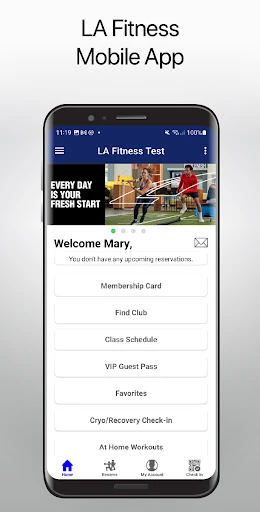
LA Fitness Mobile is a companion app for people who use LA Fitness clubs and want a few club tasks close at hand. It brings together a mobile membership card, club and class searches, saved favorites, personal-training bookings, court reservations and check-in history. After looking at how those pieces fit into a normal workout routine, my take is that it is most useful as a practical club-access tool, not a general fitness coach.
A Gym Visit, With Fewer Steps
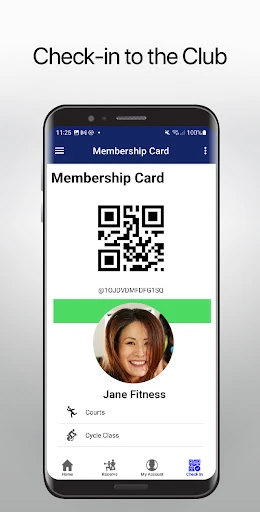
When I picture using LA Fitness Mobile, the most helpful moment is just before arriving at the club. I can open the app and use its Mobile Membership Card option to check in, rather than treating the app as something I need to explore during a workout. That gives it a clear job: keep a basic part of a club visit within reach and make it easier to stay connected to the LA Fitness routine.
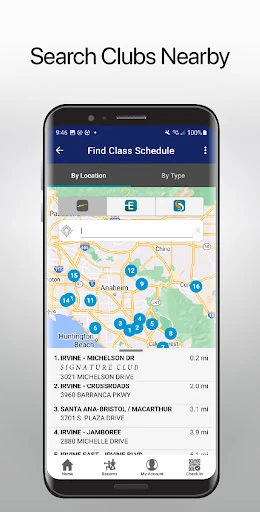
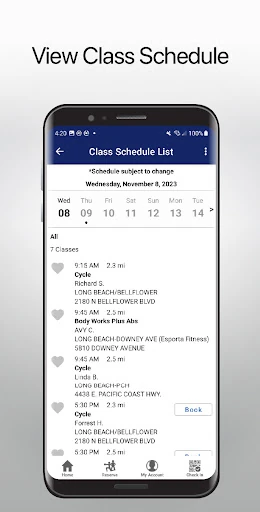
The rest of the visit can begin in the app, too. I can look for clubs and classes, then save favorites so the places, sessions or instructors I care about are easier to get back to. If I want a more planned appointment, I can book personal training or reserve a racquetball or squash court. It is a useful set of club-related tasks, rather than a promise to manage every part of my fitness life.
A Club Companion, Not a Coach
The obvious comparison is a general workout or health app, but LA Fitness Mobile has a narrower focus. Its listed tools center on LA Fitness clubs: finding locations and classes, keeping preferred clubs and instructors handy, arranging training or court time, and checking in. That focus suits someone whose exercise already happens through the club. I would reach for it to handle club logistics, not to replace a broader fitness service.
It is also not presented as a workout-plan builder or a standalone exercise tracker. The description does not make those the point; access and reservations are. That distinction matters if I want an app to guide a home workout or organize training across many gyms. For an LA Fitness member, though, a focused companion can be more convenient than keeping club tasks in memory or searching for each option from scratch.
Small Habits That Help
A little setup can make the app more useful over time. I would save my usual club, favorite classes and instructors once I know what I tend to choose, then revisit those favorites when planning the week. That is a modest habit, but it reduces repeat searching and gives the app a role before I head out, rather than only when I reach the front door.
I would also make a quick check of the relevant options part of planning a visit: look for a class, book a training session or reserve a court when that is what the day calls for. Afterward, the check-in history offers a way to review past club visits. None of this needs to become a complicated system; the payoff is having common club tasks gathered in one place.
More From Our News Desk

Zoom Meetings, Google Meet, or Teams: Which Is Easiest to Join?

How I Build a Free Streaming Lineup With Tubi

Why Crunchyroll Is the Default Anime App for So Many Fans

YouTube TV: A Practical Guide to Cutting Cable

Rummikub and the Small Comfort of Phone Games

TeamViewer Remote Control or AnyDesk for Helping Family?
Who Will Get the Most From It
I would recommend LA Fitness Mobile to people who already use LA Fitness and want a convenient way to handle the club-facing parts of their routine. The mobile membership card, club and class search, saved favorites, personal-training bookings and racquetball or squash reservations all make sense for someone who visits regularly or likes to arrange activities ahead of time. Check-in history is another practical extra for people who want to look back at their visits.
It may be less appealing if you are looking for a general-purpose fitness app, or if you do not use LA Fitness clubs. The features described are tied to the club experience, and the app is not framed as a source of workout plans or broad exercise tracking. I would treat it as an add-on to a membership routine, rather than a reason on its own to change how I exercise.
LA Fitness Mobile is a Health & Fitness app from Fitness International, LLC. On Google Play it has over 1 million installs and a 3.1-star rating from around 13,800 ratings. The app is free to download. Its Google Play content rating is Everyone, and the listed version is LAF_1.267.
The app was released on June 2, 2010, and its most recent update is dated August 27, 2026. The supplied app details do not specify a minimum Android version, so check Google Play for device compatibility before installing. The listed price is $0, with no in-app purchases or ads indicated in the supplied facts.
How It Fits Into a Club Routine
A Straightforward First Look
When I first opened the idea of LA Fitness Mobile, what stood out was how clearly it is tied to one setting: the LA Fitness club. Instead of trying to cover every kind of training, its stated purpose is to keep club access and related tasks close at hand. That gives a new user a simple way to judge whether it is relevant: do you visit LA Fitness and want help with the practical details?
The first useful step is thinking about which parts of a visit I actually need to arrange. Someone who mainly wants a mobile membership card may use it differently from someone who often looks for classes or books court time. The app’s listed options cover those needs without requiring me to treat every feature as essential. I can start with the task I came for and use other tools when they fit.
The Everyday Club Companion
Day to day, the Mobile Membership Card is the feature with the clearest immediate use: it provides an in-app option for checking in to a club. That makes the app relevant at the start of a visit, while club and class searches help with planning beforehand. I like that those uses belong to the same routine, from choosing where or when to go to arriving at the club.
The app also lets users review check-in history, which adds a small look-back feature to the more immediate tasks. I can see that being handy when I want to remember recent visits, without turning the app into a detailed training log. The practical value is in keeping a few club interactions together. If those are already part of my week, the app has a straightforward reason to stay on my phone.
Favorites and Reservations
Saving favorite clubs, classes and instructors is a useful detail because it reflects how people often settle into a routine. I might know which club I usually visit, or have a class and instructor I return to. Having favorites available gives those choices a more direct path next time. It is a small convenience, but one that makes more sense after I have started using the app regularly.
Reservations broaden the app beyond check-in and browsing. The description includes booking personal-training sessions and reserving racquetball or squash courts. Those tools are specific rather than universal, which is a good thing to keep in mind: they matter most if those are activities I want to arrange. For the right member, being able to handle them alongside club searches makes the app feel like a more complete club companion.
A Weekly Planning Habit
A realistic way I would use the app is to spend a moment planning club visits at the start of the week. I could look for classes, check the clubs I have saved, and decide whether a personal-training session or court reservation belongs in the schedule. This is not an elaborate fitness plan; it is simply using the app’s listed club tools before the day gets busy.
Before heading out, I would bring up the Mobile Membership Card for check-in. Later, I could look at the check-in history as a quick record of visits. The sequence is simple: plan, arrive, check in, and review if useful. I find that kind of modest workflow more convincing than expecting an app to change my habits by itself. Its role is to make club details easier to manage.
Keep Its Scope in Mind
The main limit is also the app’s defining choice: it is built around LA Fitness club activities. If I do not use those clubs, the core functions will have little relevance. And if my priority is a standalone workout planner or a broad exercise tracker, the described feature set does not position this app as a substitute. It is best judged on how well its club tasks match my own routine.
The Google Play rating is 3.1 stars from around 13,800 ratings, so the overall response is mixed rather than uniformly enthusiastic. That figure is useful context, but it cannot tell me whether the app will suit my particular club habits. I would focus on the features I expect to use, and check the store page for current device compatibility. The strongest case is practical convenience for an existing LA Fitness user.
LA Fitness Mobile makes the most sense when I see it as a companion for club logistics: check in, find clubs or classes, save favorites, arrange training or court time, and review visits. It keeps a specific set of tasks together without pretending to be a complete fitness platform. That focus is a strength for the right person and a limitation for everyone else.
I would recommend giving it a try if LA Fitness is already part of your routine and one or more of its listed tools would save you effort. If you want workout guidance or a fitness app independent of a club, I would look elsewhere. The app’s value comes down to whether its club-focused conveniences fit the way you exercise.
LA Fitness Mobile Frequently Asked Questions
What is LA Fitness Mobile used for?
LA Fitness Mobile is a companion app for LA Fitness club activities. It offers a Mobile Membership Card for club check-in, club and class searches, favorite clubs, classes and instructors, personal-training bookings, racquetball or squash court reservations, and check-in history. It is aimed at managing club-related tasks rather than serving as a general workout planner.
What devices can run LA Fitness Mobile?
LA Fitness Mobile is an Android app available through Google Play. The supplied app details do not give a minimum Android version, and device compatibility can vary. Check the Google Play page on your device for the current requirements before installing. Its listed version is LAF_1.267.
Is LA Fitness Mobile free, and does it have purchases?
The app is listed at $0 on Google Play. The supplied facts indicate no in-app purchases and no ads. Store details can change over time, so it is worth checking the Google Play page for the current price and any updated purchase information before downloading.
Does LA Fitness Mobile require Android 13?
The minimum Android version is not specified in the app details available here, so I would not assume a particular Android release is required. Check the Google Play page from the device you plan to use; it can show compatibility information for that device and may reflect current requirements.
Who should use LA Fitness Mobile?
It is best suited to people who use LA Fitness and want access to club check-in, searches, favorites, bookings or court reservations. It may not suit someone seeking a broad exercise tracker or workout-planning app, since its described tools focus on the club experience. Whether it is useful depends on which of those club tasks you use.
Pros
- Combines club check-in with searches, favorites, reservations and visit history.
- Supports personal-training bookings and racquetball or squash court reservations.
- Free to download, with no in-app purchases or ads indicated in the supplied facts.
- Favorite clubs, classes and instructors can make repeat choices easier to reach.
Cons
- Its club-focused tools have limited appeal for people who do not use LA Fitness.
- The described features do not make it a general workout planner or exercise tracker.
- Google Play ratings are mixed, with a 3.1-star average from around 13,800 ratings.
- Category
- Health & Fitness
- Version
- LAF_1.267











