Kasa Smart
- 140.11K
- 4.7
- Installs
- 5.00M
- Price
- Free
Screenshots
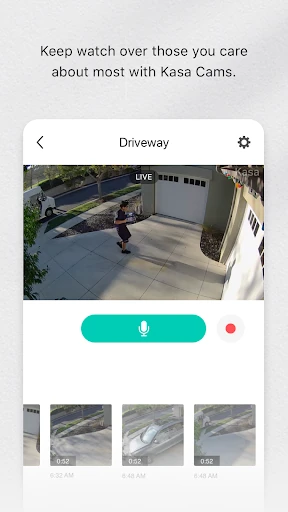
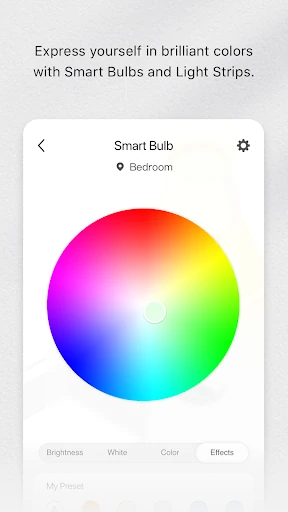
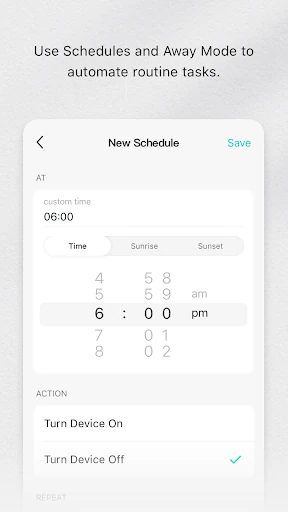
Analysis by Reviewed APKs
Kasa Smart is a companion app for setting up and managing compatible TP-LINK smart-home devices, including plugs, lights, switches, cameras, and routers. I’d recommend it to someone who already owns supported Kasa hardware and wants a straightforward way to control it remotely or put everyday tasks on a schedule. Its focus is practical home control, though its usefulness depends on having compatible devices.
A Quieter Evening Routine
Imagine leaving home in a rush and realizing later that a lamp or plugged-in appliance may still be on. With a compatible Kasa device set up, I can open the app and control it remotely rather than heading back to check. That simple job is the heart of Kasa Smart: it connects your phone to supported TP-LINK devices so you can monitor and control them from elsewhere.
The app also suits small routines that happen at the same time most days. I could schedule a compatible light or plug to switch on or off around my usual morning or evening routine, then make an adjustment when plans change. Away Mode offers another option when I’m out, turning devices on and off to make the home appear occupied. It’s a practical set of controls, not a complicated home-automation project.
A Companion, Not a Hub for Everything
Kasa Smart makes the most sense if your household already uses supported TP-LINK products, or if you are choosing among devices in its compatibility list. That list covers a range of plugs, switches, bulbs, cameras, a smart router, and range extenders. In that situation, the app gives you one place to configure and manage those devices instead of treating each one as a separate task.
It is not a general-purpose controller for every brand of smart-home gear. Compatibility is specifically tied to the TP-LINK models named in the app description, so I would check that list before building a setup around it. Nor is the app a replacement for the physical devices themselves: without compatible hardware, there is little for it to control. Its appeal is focused rather than universal.
Small Habits That Help
I’d start by adding and configuring one compatible device, then try its basic control before setting up a routine. That makes it easier to learn what the app can do with the hardware in my home and to catch a setup issue while there is only one device to check. Once the basics feel familiar, scheduling a recurring on-or-off time is a sensible next step.
A useful habit is to review schedules when the household routine changes. A setting that made sense during a workweek may not suit a weekend or a new daily timetable. Before leaving for a trip, I’d also check which devices are configured for Away Mode and whether their behavior suits the situation. These small checks keep the app’s controls aligned with how I actually use the home.
More From Our News Desk

Zoom Meetings, Google Meet, or Teams: Which Is Easiest to Join?

How I Build a Free Streaming Lineup With Tubi

Why Crunchyroll Is the Default Anime App for So Many Fans

YouTube TV: A Practical Guide to Cutting Cable

Rummikub and the Small Comfort of Phone Games

TeamViewer Remote Control or AnyDesk for Helping Family?
Who Will Find It Useful
I’d recommend Kasa Smart to people who own compatible TP-LINK devices and want to control them from a phone, set schedules, or use Away Mode while they are out. It can be especially handy for someone who likes a simple routine: set up a device, make a schedule, and adjust it when needed. The app’s value grows as there are more supported devices to manage.
It may not suit someone looking for a single app to control a mixed-brand smart home, or someone who does not plan to use compatible hardware. The model compatibility list matters, so I would compare it with the devices already in the home before relying on Kasa Smart. If you want a broad home-automation toolkit rather than device setup and everyday control, its focused role may feel limiting.
Kasa Smart is developed by TP-LINK SYSTEMS INC. On Google Play, it has over 5 million installs and a 4.7-star rating from about 140,000 ratings. The app is free to download, has no in-app purchases, and contains no ads. Its content rating is Everyone, making it suitable for a general audience.
The current version is 3.4.451, and the app requires Android 7.0 or later. Google Play gives its release date as November 7, 2015, with the latest update on January 14, 2026. Recent changes mention function optimizations and bug fixes. These details help set expectations, but the main compatibility question is whether your specific TP-LINK device model is supported.
Everyday Control for Compatible Kasa Devices
Getting Started
When I first opened Kasa Smart, the key thing to understand was its relationship to the hardware: it is a portal for compatible TP-LINK smart-home products, not a standalone utility. The app description says it can add and configure devices, so the natural starting point is to have a supported product ready and follow the setup process for it.
I’d check the device model before investing time in setup. The compatibility list includes multiple generations of smart plugs, switches, bulbs, and IP cameras, along with a smart router and range extenders. That breadth within the TP-LINK family is useful, but the exact model names matter. A quick comparison up front can prevent the frustration of discovering a mismatch after planning a routine around a device.
The Daily Controls
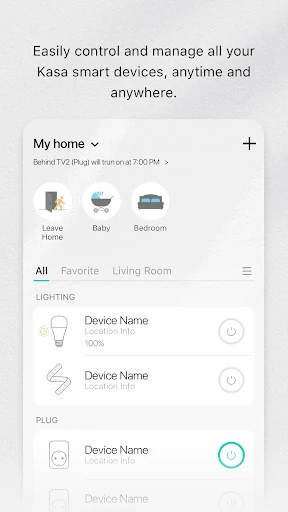
Day to day, the appeal is having device control and monitoring available through the phone, including when I’m away from home. If I remember an appliance after leaving, I can use the app to control a compatible plug or switch remotely. For lights, the same basic convenience means I can manage a supported bulb without walking over to its switch.
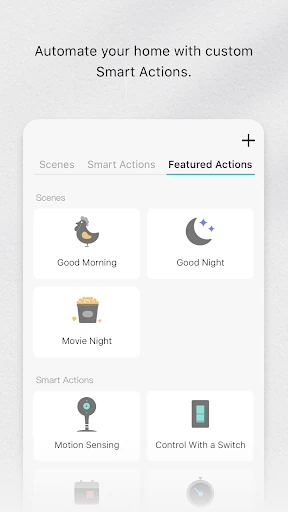
That convenience works best when the devices are configured in a way that reflects real household habits. A schedule can handle a predictable on-or-off task, while manual control covers the exceptions. I like that these are understandable jobs rather than a long list of elaborate automation features. The trade-off is that the experience depends on the supported Kasa hardware already being part of the setup.
Schedules and Away Mode
Scheduling is one of the clearest ways to make the app useful beyond occasional remote control. A device can be set to turn on or off according to a schedule, which helps with recurring tasks such as switching a light at a familiar time. It saves me from remembering the same manual action every day, while still leaving room to intervene when plans change.
Away Mode is aimed at a different moment: time spent out of the home. The app description says it can turn devices on and off to deter would-be burglars. I’d treat that as a way to vary device activity while away, not as a substitute for thinking through what each connected product should do. Its usefulness depends on the devices configured for that purpose.
A Simple Weekly Routine
For a practical routine, I’d choose one recurring task that a compatible plug, switch, or bulb can handle. After configuring the device, I’d set a schedule that matches the usual week and then see whether it fits in practice. A few days of ordinary use are more informative than setting several schedules at once, especially when different people in the home share control.
At the end of the week, I’d make a small adjustment if the timing is inconvenient, and remember that schedules may need another look when the household timetable changes. Before a trip, I’d check the devices and settings intended for Away Mode. This routine keeps the app useful without turning home control into another project to maintain.
Compatibility Comes First
The biggest limitation is the hardware boundary. Kasa Smart currently supports the TP-LINK models named in its description, rather than promising control of every smart device a person might own. The list is detailed and spans several product types, but it is still worth checking the exact model number before choosing the app as the center of a setup.
The app’s job is also relatively specific: add, configure, monitor, and control compatible devices, with scheduling and Away Mode as useful additions. Someone expecting a universal system for mixed brands may find that scope too narrow. I would judge it as a companion for a supported TP-LINK home, where its focused controls are a benefit, rather than as a complete answer to every smart-home need.
Kasa Smart is a practical companion when the devices in your home match its supported TP-LINK models. Remote control, schedules, and Away Mode cover useful everyday situations without asking the user to turn home management into a hobby. Its clearest drawback is the specific compatibility boundary, so checking model numbers is an important first step.
I’d recommend it to current or prospective owners of compatible Kasa hardware who want simple phone-based control. If your devices come from several brands, or you do not intend to buy supported products, this app is unlikely to be the right fit. For the audience it serves, it offers a focused way to manage routine tasks.
Kasa Smart Frequently Asked Questions
What is Kasa Smart used for?
Kasa Smart is used to add, configure, monitor, and control compatible TP-LINK smart-home devices from a phone. Supported product types include plugs, switches, bulbs, IP cameras, a smart router, and range extenders. It also offers scheduling and Away Mode for compatible devices. Check the model list to see whether a particular product works with the app.
Which phones and devices work with Kasa Smart?
Kasa Smart is an Android app and requires Android 7.0 or later. It works with the supported TP-LINK device models named in its compatibility information, rather than every smart-home product. Check the Google Play information and the model list for details that may vary by device or app release.
Does Kasa Smart cost money?
Kasa Smart is free to download on Google Play. The app has no in-app purchases and contains no ads. Using its controls does require compatible TP-LINK smart-home hardware, which is separate from downloading the app; device availability and prices can vary, so check the store before buying.
Can Kasa Smart control devices from other brands?
The app description specifies compatibility with a range of TP-LINK models, including plugs, switches, bulbs, cameras, a router, and range extenders. It does not describe itself as a controller for every smart-home brand. If you have a particular device, compare its model number with the compatibility details in the store.
Who should try Kasa Smart?
It is a good fit for people who own compatible TP-LINK devices and want remote control, schedules, or Away Mode in an app. It may be less suitable if you want one controller for a mix of different brands or do not plan to use supported hardware. The Google Play page is the place to check current compatibility details.
Pros
- Remote control makes compatible devices easier to manage when I’m away from home.
- Scheduling handles recurring on-and-off tasks without daily reminders.
- Away Mode offers a device-control option for time spent away.
- Free to download, with no in-app purchases or ads.
Cons
- Works with specified TP-LINK models, so checking compatibility is essential.
- Offers limited value without compatible smart-home hardware.
- May not suit households seeking one controller for mixed-brand devices.
- Category
- Lifestyle
- Version
- 3.4.451