Hik-Connect - for End user
- 172.05K
- 4.7
- Installs
- —
- Price
- Free

Screenshots
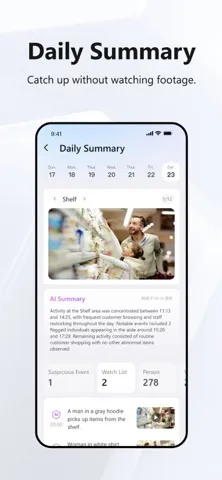
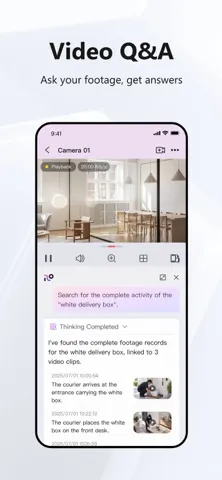
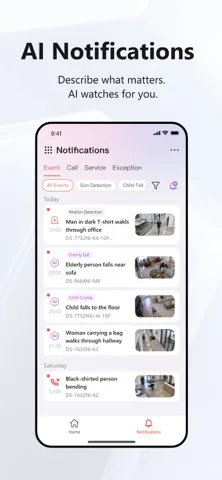
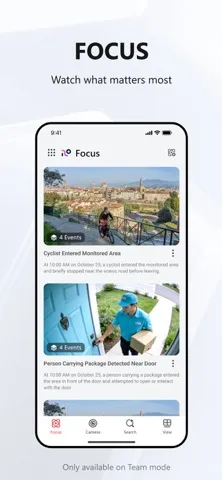
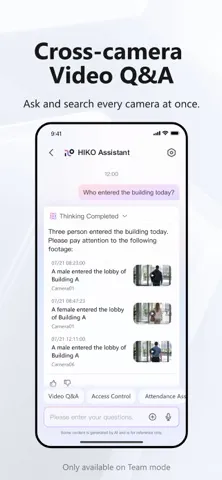
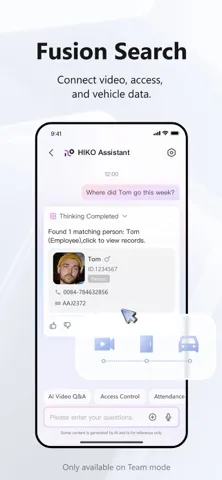
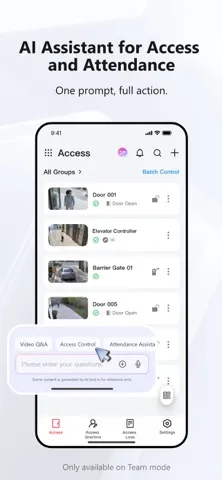
Analysis by Reviewed APKs
Hik-Connect - for End user is a companion app for viewing compatible Hikvision cameras and recorders remotely. It is aimed at people who already have a supported Hikvision DVR, NVR, or IP camera and want to check live video, review recordings, or receive motion alerts on an iPhone or iPad. I like its focused purpose, though it depends on having the right equipment in place.
A quick check from afar
Imagine leaving home for the day and wanting to check a camera without going back to the recorder. With Hik-Connect, the basic routine is to sign in, add a compatible device to the account, and open its live view. That makes the app useful for a quick look at home or another place you monitor. The appeal is practical: a phone becomes a viewing point for equipment you already own.
Recorded video is useful when a live check is not enough. If I wanted to revisit a particular moment, playback gives me a way to search through footage rather than relying only on what is happening now. Motion detection alerts add another layer: when the connected device triggers an alarm, the app can send a message notification. It is a straightforward combination of checking in, looking back, and being notified.
A companion, not a camera system
The key comparison is not with a standalone phone camera app. Hik-Connect is built around compatible Hikvision DVRs, NVRs, and IP cameras that support Cloud P2P. If that is already your setup, it can put remote viewing and playback within reach on a mobile device. If you do not have compatible equipment, the app does not replace the cameras or recording hardware you need.
It is also a focused monitoring tool, not a general photo editor or a broad home-management app. The described functions center on live video, recorded video playback, and motion alarm notifications. I would choose it for access to a supported camera system, not for organizing personal photos or setting up an unrelated brand of camera. That narrow scope is a benefit when it matches your equipment and a limitation when it does not.
Make checks more useful
A little preparation makes the app easier to use when you actually need it. Create an account and add the supported device before relying on a remote check, rather than waiting until you are away from the equipment. Once it is connected, take a moment to become familiar with opening the live view and reaching recorded playback. That small bit of orientation can save fumbling when you want to check something quickly.
It also helps to treat motion alerts as prompts to look, rather than as a substitute for reviewing footage. If a notification arrives, open the app and check the live view or recorded video as appropriate. For a routine check, use live monitoring; for a question about an earlier event, use playback. Keeping those two purposes separate makes the app's small set of tools easier to remember.
More From Our News Desk

Zoom Meetings, Google Meet, or Teams: Which Is Easiest to Join?

How I Build a Free Streaming Lineup With Tubi

Why Crunchyroll Is the Default Anime App for So Many Fans

YouTube TV: A Practical Guide to Cutting Cable

Rummikub and the Small Comfort of Phone Games

TeamViewer Remote Control or AnyDesk for Helping Family?
Who will find it useful
I would recommend Hik-Connect to an iPhone or iPad owner who already uses compatible Hikvision recording or camera equipment and wants remote access to it. The combination of live monitoring, playback, and motion notifications covers the main reasons I would want a camera companion app in an everyday routine. It is especially appealing if the alternative is having to be physically near the recorder to check a view.
It may not suit someone choosing a camera system from scratch, or anyone whose cameras and recorders are not compatible with the app. Its job is specific, and the required Hikvision hardware is central to the experience. If you only want a general camera viewer or a photo app, this is the wrong fit. I would also check the device and iOS requirements before deciding it works for your particular setup.
Hik-Connect - for End user is developed by Hangzhou Hikvision Digital Technology Co., Ltd. On the Apple App Store, it has a 4.7-star rating from around 172,000 ratings. The app is free to download, and it has a 4+ age rating. It is designed to work with supported Hikvision DVRs, NVRs, and IP cameras that support Cloud P2P.
The current version shown is 7.0.220. The app was released on March 9, 2016, and its latest update is dated October 28, 2026. It requires iOS 16.0 or later. The supplied store details do not give an install count or specify in-app purchases or advertising, so I have left those figures out.
Remote camera checks in practice
Getting connected
When I first approached Hik-Connect, its purpose was clear: it is the mobile side of a compatible Hikvision camera or recorder setup. The initial essentials are creating an account and adding the device to that account. That is a modest setup list, but it also means this is not an app I can judge in isolation from the hardware. The camera system has to support Cloud P2P.
I would sort out device compatibility before making the app part of a daily routine. Once a supported device is added, the main payoff is access to its video remotely. That sequence is easy to understand, even if the device requirement makes it less immediately useful than an app that works with any phone camera. The setup is best thought of as linking an existing system, not building one from scratch.
The everyday viewing loop
The main day-to-day task is opening a live view when I want to check what a connected camera can see. It is a simple use case, but a useful one: a quick look from a phone can answer whether a view needs attention without requiring me to stand beside the recorder. The app is built for remote access, so that check can happen while I am away from the equipment.
Playback provides a different kind of check. Instead of watching the present moment, I can use recorded video to look for a past event or milestone. That distinction matters in practice: live monitoring is for what is happening now, while playback helps investigate what already happened. Hik-Connect puts both jobs in the same companion app, so there is no need to treat them as separate purposes.
Alerts and playback
Motion detection notifications are the feature that can make the app feel less like a passive viewer. When the connected device triggers a motion detection alarm, Hik-Connect can send an instant message notification. That gives me a reason to open the app rather than checking every camera on a fixed schedule. The notification is tied to the device's alarm, so it depends on the connected equipment and its detection behavior.
I would use an alert as a cue to inspect, not as a complete account of what happened. A message can draw attention to activity, while live viewing and recorded video offer ways to look more closely. That pairing is the app's most practical feature combination: the alarm prompts a check, and the video tools help provide context. It stays within the app's core job rather than adding unrelated functions.
A simple monitoring routine
A sensible routine starts before there is anything to investigate. I would add the compatible device, make sure I can reach live video, and learn where playback fits into the process. Then a quick live check can become part of leaving home or checking in during the day. This is not a complicated workflow, but having tried the main steps in advance makes the app more useful when a prompt arrives.
If a motion notification comes through, I would open the app and decide whether a live look or a review of recorded footage is more relevant. For an event that has passed, playback is the natural next step; for an immediate check, live monitoring makes more sense. This routine uses only the app's stated tools, and it avoids treating notifications as a replacement for actually looking at the video.
Know the boundaries
The biggest limitation is compatibility. Hik-Connect is intended for Hikvision series DVRs, NVRs, and IP cameras that support Cloud P2P, so simply installing it does not make an unsupported camera system accessible. Anyone considering it should start with the equipment they own or plan to use. The app's value follows from that match, rather than from a broad collection of general-purpose phone features.
Its core feature set is also deliberately narrow: live monitoring, recorded video playback, and motion detection alarm notifications. That focus makes the purpose easy to grasp, but users looking for other kinds of camera tools should not assume they are included. It is an access point for a compatible surveillance system, not a replacement for the system itself. I would keep that distinction in mind when comparing options.
Hik-Connect does a clear, useful job for people who already have compatible Hikvision equipment: it brings remote live viewing, recorded playback, and motion alerts to an iPhone or iPad. I appreciate that its core tasks are easy to describe, though the hardware requirement defines who can benefit from it.
If your cameras or recorder support Cloud P2P, Hik-Connect is worth considering as their mobile companion. If you are starting without compatible equipment, it is not a standalone solution. Check the iOS requirement and device compatibility first, then decide whether its focused set of viewing tools fits your routine.
Hik-Connect Frequently Asked Questions
What is Hik-Connect - for End user used for?
Hik-Connect lets users remotely view compatible Hikvision cameras, play back recorded video, and receive message notifications when a connected device triggers a motion detection alarm. It is intended for Hikvision DVRs, NVRs, and IP cameras that support Cloud P2P. You add a supported device to an account to access its video through the app.
Which devices can run Hik-Connect - for End user?
The supplied platform information is for iOS, and the app requires iOS 16.0 or later. It is designed for use with compatible Hikvision DVRs, NVRs, and IP cameras that support Cloud P2P. Check the Apple App Store and your equipment details for current compatibility and device requirements.
Does Hik-Connect - for End user cost anything?
Hik-Connect is free to download on the Apple App Store. The available details do not specify whether it offers in-app purchases, so those may vary and are worth checking on the store page. The app also requires compatible Hikvision equipment to provide its camera viewing and playback functions.
Does Hik-Connect - for End user work on Android?
The supplied platform information identifies Hik-Connect - for End user as an iOS app, with an iOS 16.0 minimum requirement. I would not assume that this particular app listing applies to Android. For current platform availability, check the relevant store listing and confirm that it matches your device.
Is Hik-Connect - for End user right for me?
It may suit you if you already have a compatible Hikvision DVR, NVR, or IP camera and want remote live viewing, playback, or motion notifications. It is not a standalone camera system and is not intended for unrelated camera brands. Check Cloud P2P compatibility and the iOS requirement before relying on it.
Pros
- Combines remote live viewing and recorded video playback in one companion app.
- Motion detection alarms can prompt a timely check of connected camera video.
- A focused option for compatible Hikvision equipment rather than a generic camera viewer.
Cons
- Requires compatible Hikvision equipment that supports Cloud P2P.
- Its feature set centers on monitoring, playback, and motion alarm notifications.
- Requires iOS 16.0 or later.
- Category
- Photography
- Version
- 7.0.220











