GarageBand
- 118.20K
- 4.1
- Installs
- —
- Price
- Free
Screenshots
Analysis by Reviewed APKs
GarageBand is Apple’s mobile music-making app for turning an iPhone or iPad into a place to play instruments, record performances, build beats and arrange songs. It suits curious beginners as well as musicians who want a portable sketchpad. I like how it offers several ways into a song, from tapping a loop grid to recording a guitar, while still giving you room to shape a more detailed arrangement.
A song in spare minutes
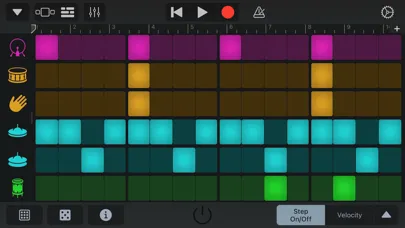
When I have an idea between errands, GarageBand gives me a way to catch it without waiting to get back to a full studio. I can tap out a beat with the Beat Sequencer, play a part on a Touch Instrument, or record a sound through the microphone. Live Loops offer another quick starting point: trigger cells in a grid and record the performance. It is a practical setup for turning a passing musical thought into something I can revisit.
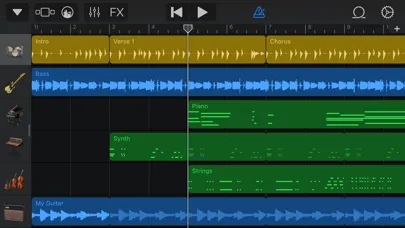
For a more deliberate session, I can combine instrument performances, audio recordings and loops, then trim and place musical regions to shape the song. GarageBand supports up to 32 tracks, so a small idea can grow into a layered arrangement. I also appreciate the integrated notepad for lyric ideas or reminders. It means the app can hold both the sound and a few notes about what I meant to do next.
A studio, not a shortcut
GarageBand sits between a simple loop toy and a traditional recording setup. Its Multi-Touch instruments and Smart Instruments make it approachable if I do not play an instrument confidently, while recording, arranging and mixing tools let me work beyond a single musical sketch. Live Loops bring a performance-oriented option, and the track view supports a more arranged song. That range is useful when I want to explore first and organize the result afterward.
It is not a general audio player or a replacement for learning an instrument, and the app does not promise to make musical decisions for me. I still need to choose sounds, listen back and decide what belongs in the arrangement. Some workflows also depend on compatible equipment or third-party apps: multitrack recording requires a compatible audio interface, and recording from other music apps requires Audio Unit Extensions. Those distinctions matter if I have a specific studio setup in mind.
Keep ideas moving
I get more from GarageBand when I treat it as a place to collect small pieces rather than expecting every session to produce a finished song. A quick loop, a chord idea or a vocal recording can each become a starting point. The notepad is handy for lyric fragments or arrangement reminders, and Multi-Take Recording gives me a way to record several passes over a section and choose a favorite later.
A simple routine is to start with one rhythm or instrument, add a contrasting part, then listen through the whole section before adding more. Live Loops can help me try combinations by triggering cells, while the regular arrangement tools give me a way to place parts precisely. When I am ready to share, I can export or share a song, and iCloud Drive can keep songs up to date across devices.
More From Our News Desk

Zoom Meetings, Google Meet, or Teams: Which Is Easiest to Join?

How I Build a Free Streaming Lineup With Tubi

Why Crunchyroll Is the Default Anime App for So Many Fans

YouTube TV: A Practical Guide to Cutting Cable

Rummikub and the Small Comfort of Phone Games

TeamViewer Remote Control or AnyDesk for Helping Family?
Who may enjoy GarageBand
I would recommend GarageBand to anyone who wants to experiment with making music on an iPhone or iPad, especially beginners who might find a blank recording timeline intimidating. Smart Instruments, loops and the Beat Sequencer offer inviting ways to get a musical idea moving. More experienced players may value the ability to record instruments, use virtual amps and effects, and build arrangements with multiple tracks.
It may be less appealing if I only want to listen to music, or if I expect the app to finish a song without choices and editing from me. People planning a hardware-heavy recording setup should also check that their intended interface and workflow are compatible. GarageBand is best suited to hands-on exploration, songwriting and portable recording, rather than a no-effort music generator or a substitute for every desktop studio task.
GarageBand is made by Apple Inc. and is available for iPhone and iPad through the Apple App Store. The app is free, carries a 4+ age rating, and its current listed version is 2.3.20. The App Store rating is 4.1 out of 5 from about 118,000 ratings.
The app was released on March 10, 2011, and its last update is dated October 22, 2026. The listed minimum requirement is iOS 27.0. GarageBand supports music creation and recording, with features including Touch Instruments, Live Loops and song sharing.
Making Room for Musical Ideas
A welcoming first look
My first impression of GarageBand is that it presents music making as something I can do with my hands, not just configure through settings. A keyboard, guitar, beat-making tools and Live Loops all offer different starting points. That variety helps when I have an idea but do not yet know whether it should become a melody, a rhythm or a layered loop performance.
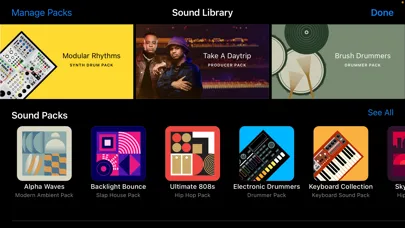
I can begin with a template in Live Loops or build a grid from scratch with Apple Loops. I can also pick a Touch Instrument and record a performance. The app’s Sound Library offers additional free instruments, loops and sound packs to download, so the initial set of options can be expanded when I want a different palette.
Building a track day to day
The core experience is a cycle of playing or recording, listening back, and adjusting the arrangement. I can use Touch Instruments, audio recordings and loops together, then trim and position musical regions where I want them. The up-to-32-track capacity gives a project room to develop, though I find it sensible to add parts with a purpose rather than fill every available track.
GarageBand also includes mixing effects such as Visual EQ, Bitcrusher and Overdrive. I can automate volume and record movements of controls on Touch Instruments, which gives a part more change over time than a static recording. For careful edits, the ability to place regions exactly where they should play is useful; for a quick idea, recording a performance can be enough.
Tools with personality
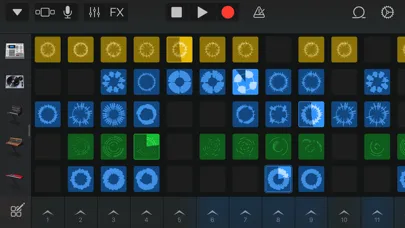
Live Loops are among the app’s most distinctive options. I can tap cells or groups of cells to trigger them, build a grid with Apple Loops, or record a custom loop directly into a cell using a Touch Instrument. Remix FX adds DJ-style effects, and I can record the performance. It is a lively way to explore combinations instead of starting with a conventional sequence of tracks.
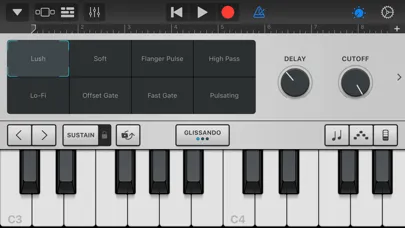
The virtual Drummer adds another kind of musical support. I can choose among acoustic and electronic drummers or percussionists, then direct the groove. Smart Instruments take a similarly accessible approach: Smart Strings can represent a string orchestra, while chord strips and autoplay patterns make it easier to perform with keyboard, bass or guitar sounds.
For players who want a more familiar instrument setup, GarageBand includes virtual guitar and bass amps and stompboxes. I can also plug in a guitar or bass to play through those effects. The Sound Library adds downloadable instruments and loops, and Audio Unit Extensions allow performances from compatible third-party music apps to be recorded directly into GarageBand.
A practical evening session
If I were turning a short evening into a songwriting session, I would start with a beat or a Live Loops template and record a few combinations. Once I had a direction, I could add a keyboard, guitar or microphone performance, then listen through the section before deciding what to keep. Multi-Take Recording is useful for trying several passes and selecting the one that fits best.
After the parts are in place, I can trim and position regions, adjust the mix and jot down lyric or arrangement thoughts in the notepad. I would keep the first pass simple and save the more detailed work for a return visit. When I am ready to share, GarageBand supports sharing songs by email or to social platforms such as SoundCloud; some destinations may need other apps.
Know the practical limits
GarageBand offers a lot of creative flexibility, but the feature list does not mean every recording setup works without extra gear. Multitrack recording requires a compatible third-party audio interface. Recording directly from other music apps depends on compatible Audio Unit Extensions. If I am planning a particular input or app-to-app workflow, I would check compatibility before building a session around it.
Some parts of the experience also depend on downloads. The Sound Library provides free additional instruments, loops and sound packs, while the Drummer’s acoustic and electronic options require a free download from that library. Sharing to certain social platforms may require apps such as iMovie or Clips. These are manageable details, but they can affect how smoothly a particular routine works.
Finally, GarageBand gives me tools rather than a finished musical direction. I still have to choose parts, edit them and decide when a song is ready to share. Its strongest appeal is the combination of accessible touch-based play and deeper arrangement options, not an automatic route from a tap to a polished track.
GarageBand makes a convincing portable studio because it welcomes quick experiments without stopping at simple loops. I can play, record, arrange and mix, then return to an idea with more tracks or effects. The range of instruments and workflows is a real strength, while compatible gear and some extra downloads are worth keeping in mind.
I recommend it to iPhone and iPad users who want to make music, learn by experimenting or capture song ideas wherever they are. Beginners have approachable ways in, and more practiced musicians have useful recording tools to explore. If I only wanted an automatic song maker, though, GarageBand would ask more of me than that.
GarageBand Frequently Asked Questions
What is GarageBand used for?
GarageBand is Apple’s music-making app for iPhone and iPad. It lets users play Touch Instruments, create beats and Live Loops, record performances, arrange and mix songs, and share their work. Its tools suit both quick musical sketches and more developed multitrack projects.
Which devices can run GarageBand?
GarageBand is available for iPhone and iPad through the Apple App Store. The listed minimum requirement is iOS 27.0. Device compatibility and current requirements can change, so check GarageBand’s App Store page for the details that apply to your device.
Does GarageBand cost money?
GarageBand is free to download. It also offers a Sound Library with additional free instruments, loops and sound packs. Availability and any store details can change, so the App Store page is the best place to check current information.
Does GarageBand need extra equipment?
You can use GarageBand’s Touch Instruments, microphone recording and loops for music creation. Some workflows have extra requirements: multitrack recording requires a compatible third-party audio interface, and recording from other music apps requires compatible Audio Unit Extensions. Check compatibility if you have a particular setup in mind.
Is GarageBand suitable for beginners?
Yes. Multi-Touch instruments, Smart Instruments, loops and the Beat Sequencer give beginners several ways to start making music, even without playing an instrument. It still involves choices and editing, so it may not suit someone looking for an automatic song generator or an app solely for listening.
Pros
- Offers several approachable ways to start, including Smart Instruments, loops and beat-making tools.
- Combines Live Loops with recording, arranging and mixing features for more developed songs.
- Includes a notepad and Multi-Take Recording for practical songwriting workflows.
- Provides free downloadable instruments, loops and sound packs through the Sound Library.
Cons
- Some multitrack recording workflows require a compatible third-party audio interface.
- Recording from other music apps depends on compatible Audio Unit Extensions.
- Certain sharing destinations may require additional apps.
- Category
- Music & Audio
- Version
- 2.3.20