Gallery for Samsung
Listed on App Store as “Gallery: Photo Vault & Cleaner”
- 4.64K
- 4.3
- Installs
- —
- Price
- Free

Screenshots

Analysis by Reviewed APKs
Gallery: Photo Vault & Cleaner is an iPhone app for browsing and organizing photos and videos, hiding private items, cleaning up storage, and making basic edits. It suits people who want several everyday media tools in one place rather than a dedicated editing or backup service. My overall take is that its broad mix is convenient, especially for tidying a crowded library, though its premium features and vault limits are worth considering.
A Tidy-Up for Busy Libraries
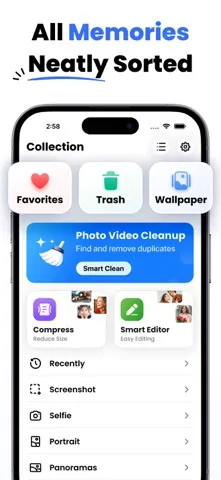
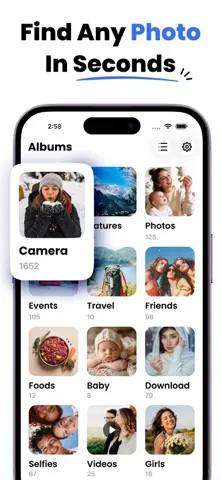
When I imagine using Gallery on an ordinary evening, the first job is simple: scroll through a packed camera collection and find the pictures from a particular day. The app describes a gallery that sorts photos and videos by date, with custom albums for grouping favorites or events. That gives the basic browse-and-organize routine a clear shape, without requiring me to start by learning a complicated cataloging system.
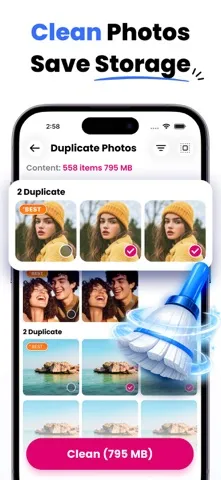
The cleanup tools make sense as a second step. If I have taken several near-identical pictures while trying to get one good shot, the duplicate and similar-photo finder is meant to help surface candidates to remove. I would review those suggestions before deleting anything, but having the search in the same app as the gallery could make a routine storage check feel less scattered.
A Utility, Not a Backup Service
The obvious comparison is the photo gallery already on an iPhone, or a separate editor or file-cleaning tool. Gallery: Photo Vault & Cleaner tries to cover more of that ground in one place: albums, a private vault, cleanup, compression, editing, and video playback. That breadth may appeal if I prefer one general-purpose media workspace over switching among several apps for small jobs.
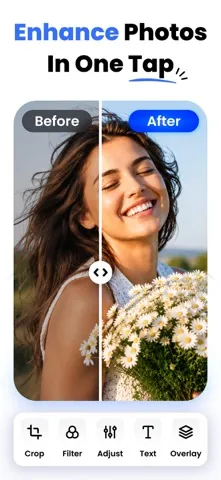
It is not presented as a cloud backup service, and I would not treat a hidden vault or a cleaner as a substitute for keeping another copy of important memories. Its editing tools are described as practical basics such as cropping, adjusting, and applying filters, rather than a specialized creative suite. People who need advanced editing or a dedicated backup workflow may be better served by tools built specifically for those needs.
Small Habits That Help
A little regular organization could keep the app useful without turning photo management into a weekend project. After an outing, I could browse the new photos by date, put the keepers into a custom album, and use the similar-shot finder to review obvious extras. The important part is making the final deletion decision myself, especially when a burst of nearly identical images may still contain a favorite.
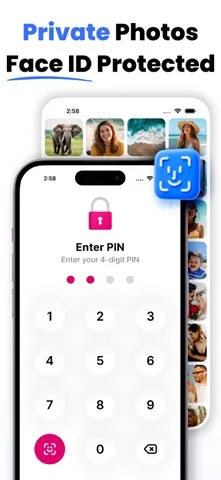
I would also keep the vault and compression tools focused on specific needs. A password-protected place for private media can be handy when I want those items separated from ordinary browsing, while compression could help when large files are taking up room. Since the description says unlimited vault storage and advanced cleaning are premium features, it is sensible to check the subscription details before building a routine around them.
More From Our News Desk

Zoom Meetings, Google Meet, or Teams: Which Is Easiest to Join?

How I Build a Free Streaming Lineup With Tubi

Why Crunchyroll Is the Default Anime App for So Many Fans

YouTube TV: A Practical Guide to Cutting Cable

Rummikub and the Small Comfort of Phone Games

TeamViewer Remote Control or AnyDesk for Helping Family?
Who Might Find It Useful
I would recommend Gallery to iPhone users who want a general-purpose place to browse photos and videos, sort memories into albums, and tackle some basic cleanup. The combination of a private vault, duplicate-finding, compression, editing, and a built-in video player gives it several practical jobs. It is especially appealing if your current routine involves jumping between different apps for simple gallery chores.
It may be less suitable if you want a focused professional editor, a cloud-based backup solution, or an automatic system that handles every deletion decision for you. The cleaner can help identify duplicates and similar shots, but I would still review what it proposes. People who want unlimited vault storage or all premium tools should also be comfortable checking the subscription terms before relying on those features.
Gallery: Photo Vault & Cleaner is a free Photography app for iPhone, developed by Yash Baraiya. On the App Store, it has a 4.3-star rating from 4,641 ratings and a 4+ age rating. The app is version 3.1.19. It was released on August 13, 2023, and its most recent update is dated July 31, 2026.
The app requires iOS 15.0 or later. Its description says premium features are available through an auto-renewable subscription, including advanced cleaning, unlimited vault storage, and premium tools. Subscription prices are not included in the supplied store facts, so check the App Store for current terms. The facts also do not specify whether the app contains ads.
A Closer Look at the Daily Tools
A Straightforward Starting Point
The app’s pitch is easy to understand: open one place to look through photos and videos, then use the extra tools when needed. I like that the central gallery job comes first. Sorting by date and creating custom albums are familiar ideas, so there is no need to reshape how I think about my collection just to get started.
The vault is a more deliberate part of setup. Gallery describes it as password-protected and intended to keep selected photos and videos hidden from ordinary browsing. I would decide what belongs there carefully rather than moving a large portion of my library without a plan. That small bit of thought helps keep the everyday gallery useful while reserving the private area for items that actually need it.
Useful Day-to-Day Browsing
For ordinary browsing, the appeal is having photos and videos together in a gallery that can be sorted by date. Custom albums add a simple way to collect items around an event, a trip, or another theme. I can see this being most useful when the camera roll has become long enough that scrolling back through everything is no longer a pleasant way to find one memory.
Video playback also stays within the app, according to its description, with a built-in player said to support many formats. That is a practical extra for someone who wants to watch clips while browsing a collection. The description does not spell out every format or playback control, so I would treat broad format support as a convenience claim rather than assume it covers every unusual file.
One App, Several Tools
The standout idea is the range of jobs gathered around the gallery. A user can sort and group media, put selected items in a password-protected vault, look for duplicate or similar photos, compress files, and make basic edits. That is more varied than a gallery that only displays a camera roll, and it gives the app a clear utility angle.
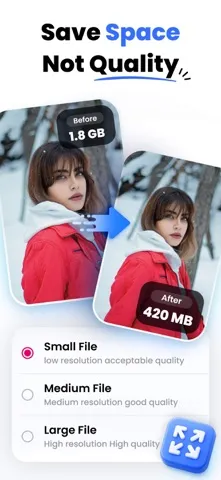
The editing tools are described in approachable terms: crop, adjust, apply filters, and enhance photos or videos. I would expect those to cover quick fixes rather than detailed creative work. Compression is another potentially useful addition when large files matter, though the promise of saving space without losing quality is the app’s own description; I would check the resulting file before deleting an original I care about.
A Manageable Weekly Routine
A practical routine could be short and occasional. I would open the gallery after a busy week, use date sorting to look over recent shots, and move the few I want to keep close at hand into custom albums. Then I could review the duplicate or similar-photo results and remove only the images I recognize as unnecessary. That keeps the cleanup step deliberate rather than automatic.
If storage is tight, compression and the cleaner offer additional options, while the editor can handle a quick crop or filter without leaving the gallery. I would use each tool for a defined task instead of trying to process the whole library at once. For private items, the vault is a separate choice; checking the premium limits first matters if unlimited storage is part of the plan.
Keep the Trade-Offs in View
The main limitation is that an all-in-one toolkit is not the same as a specialist app. The described editor focuses on basic adjustments, and the cleaner’s duplicate and similar-image suggestions still call for human judgment. Likewise, a private vault is useful for separation, but it does not replace a separate copy of important photos or videos.
There is also a subscription boundary around some of the more ambitious features. The description identifies advanced cleaning, unlimited vault storage, and all premium tools as part of a subscription, so the free download does not necessarily mean every tool is available without payment. I would check the current App Store terms and decide whether the features I expect to use justify that ongoing commitment.
Gallery: Photo Vault & Cleaner brings together familiar gallery organization and a useful spread of cleanup, privacy, compression, editing, and playback tools. Its best fit is someone who wants one practical media utility and is willing to review cleanup decisions personally. The subscription boundary is the main consideration, especially for anyone who needs extensive vault storage or advanced cleaning.
I would give it a look if your photo routine needs tidying and you value having several basic tools close together. If your priority is professional editing, dependable backup, or a free vault with unlimited capacity, this is not an obvious all-in-one answer. Check the current App Store details before committing to premium features.
Gallery for Samsung Frequently Asked Questions
What is Gallery: Photo Vault & Cleaner used for?
Gallery: Photo Vault & Cleaner is for browsing and organizing photos and videos, creating albums, and keeping selected media in a password-protected vault. It also describes tools for finding duplicate or similar photos, cleaning storage, compressing media, editing photos and videos, and playing videos in the app.
Is Gallery: Photo Vault & Cleaner available on Android?
The app in these store details is for iPhone and is distributed through the Apple App Store. It requires iOS 15.0 or later. If you are looking for an Android version or a version for another device, check the relevant store for current availability rather than assuming this iPhone app supports it.
What iOS version does Gallery: Photo Vault & Cleaner need?
Gallery: Photo Vault & Cleaner requires iOS 15.0 or later. You can check your iPhone’s software version in its settings before installing. Device compatibility and availability can change, so the App Store page is the best place to verify current requirements for your particular device.
Does Gallery: Photo Vault & Cleaner cost money?
The app is free to download, and its description says an auto-renewable subscription unlocks premium features, including advanced cleaning, unlimited vault storage, and premium tools. The subscription price and current offer can vary, so check the App Store for the latest cost and terms before subscribing.
Is Gallery: Photo Vault & Cleaner right for my photo routine?
It may suit someone who wants everyday gallery organization alongside basic cleanup, a private vault, compression, editing, and video playback. It may not suit someone who needs a specialist editing suite or expects a cleaner to decide deletions without review. Check the App Store details if premium limits are important to your use.
Pros
- Combines album organization, a private vault, cleanup, compression, editing, and video playback.
- Date sorting and custom albums offer simple ways to browse and group media.
- Duplicate and similar-photo tools can help make a crowded collection easier to review.
- Basic photo and video editing is built into the gallery.
Cons
- Advanced cleaning and unlimited vault storage are subscription features.
- Duplicate and similar-photo suggestions still need careful review before deleting files.
- The described editing tools may not satisfy users looking for a specialist editor.
- Category
- Photography
- Version
- 3.1.19











