FitCloudPro
- 74.13K
- 3.7
- Installs
- 10.00M
- Price
- Free

Screenshots

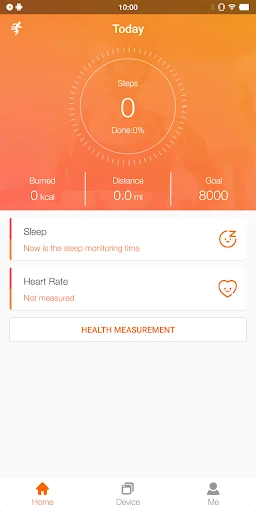
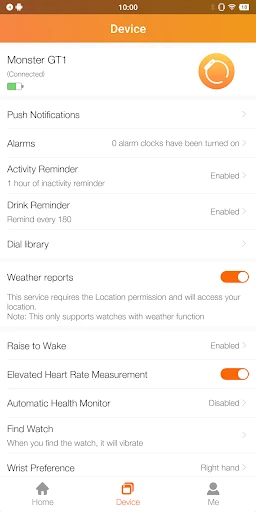
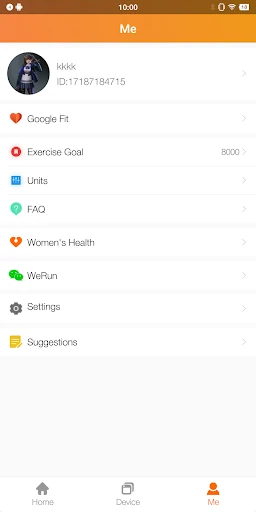
Analysis by Reviewed APKs
FitCloudPro is a companion app for connecting a compatible Kumi smartwatch to an Android phone and managing its health readings, reminders, notifications, and watch face. It suits people who want everyday activity information and a few useful wrist alerts without turning fitness tracking into a complicated project. My overall take is that it has a practical, focused job: it can make a supported watch more useful, but its value depends on owning one of the watches it supports.
A Day With Your Watch
When I imagine using FitCloudPro through an ordinary workday, the appeal is less about chasing a perfect fitness score and more about having basic information close at hand. The app can record steps, calories, sleep, heart rate, and blood oxygen from a connected watch. I could check activity after a walk, then glance at sleep information the next morning, using the phone as a place to keep track of those readings.
The other part of that routine is staying reachable without pulling out my phone every time it buzzes. FitCloudPro supports reminders for calls, SMS, Facebook, Twitter, and other notifications. It also describes options such as hanging up from the bracelet and quickly replying to text messages. Those are practical touches for a meeting, a commute, or a busy kitchen, though the actual experience depends on having a compatible watch connected.
A Companion, Not a Coach
FitCloudPro makes the most sense beside the smartwatch it manages. It is not a standalone phone-based fitness tracker in the usual sense: its listed purpose is connecting a watch and handling its functions. The supported models named in the app description are KUMI GT6 Pro, KUMI GW16T Pro, KUMI KU3 Max, and KUMI KU3 Meta. That compatibility list is the first thing I would check before installing.
Compared with a general workout-planning or nutrition app, this is a narrower tool. Its stated focus is watch connection, recorded health readings, notifications, watch faces, and reminders such as drinking water or moving after sitting. I would not choose it expecting meal guidance, training plans, or a social fitness community. It is best viewed as the phone-side companion for daily smartwatch use, not a complete fitness program.
Small Habits That Help
I would get the most from FitCloudPro by treating it as a companion to a regular routine rather than something to inspect constantly. A quick check of steps later in the day, for example, can give a simple sense of how active the day has been. Sleep and other recorded readings can add context over time, but they are general fitness information, not medical measurements or a substitute for professional guidance.
It also helps to choose reminders that match real habits. Someone who tends to stay seated for long stretches might use the sedentary reminder, while another person may find a drinking-water nudge more useful. I would keep notifications limited to the ones I genuinely want on my wrist, and choose a watch face that is easy to read at a glance. The goal is a useful signal, not another stream of interruptions.
More From Our News Desk

Zoom Meetings, Google Meet, or Teams: Which Is Easiest to Join?

How I Build a Free Streaming Lineup With Tubi

Why Crunchyroll Is the Default Anime App for So Many Fans

YouTube TV: A Practical Guide to Cutting Cable

Rummikub and the Small Comfort of Phone Games

TeamViewer Remote Control or AnyDesk for Helping Family?
Who May Find It Useful
I would recommend FitCloudPro to someone who owns one of its named Kumi watches and wants a single companion app for common watch settings and everyday readings. The combination of activity tracking, sleep information, notification reminders, selectable dials, and small routine prompts covers the basics many people want from a connected wearable. It may be especially handy if checking a wrist alert is easier than reaching for a phone.
It is a weaker fit for anyone without a supported watch, or for someone looking for structured exercise coaching, nutrition features, or a broader community experience. People who prefer not to receive phone notifications on a wearable may also have little reason to use its alert functions. And because the app explicitly frames health information as general fitness data rather than medical information, I would not rely on it for health decisions.
FitCloudPro is a free Android health and fitness app from topstep. Google Play shows over 10 million installs and a 3.7-star rating from about 74,000 ratings. It is rated Everyone, contains no ads, and the store facts show no in-app purchases. The app is intended to connect a phone with a supported smartwatch and manage its functions.
The listed Android requirement is Android 5.0 or later. The current version in the supplied store facts is 2.6.0; FitCloudPro was released on January 23, 2019, and was last updated on January 20, 2026. Those details give a useful snapshot of the app, while device compatibility still depends on whether the watch is among the supported models.
A Practical Watch Companion
First Connection
When I first opened an app like this, I would start with one basic question: is my watch among the supported models? FitCloudPro names four Kumi watches: GT6 Pro, GW16T Pro, KU3 Max, and KU3 Meta. That makes compatibility a more useful first step than browsing the feature list. If the watch is supported, the app's central purpose is clear: connect it to the phone and manage its functions.
FitCloudPro says it uses permissions related to Bluetooth, location, contacts, calls, messages, notifications, and background operation to support syncing and timely alerts. That is a meaningful consideration before setup. I would read each permission prompt and think about which watch features I want to use. Notifications, in particular, make more sense when I choose deliberately rather than treating every requested access as an automatic yes.
Everyday Tracking
The day-to-day appeal is having several familiar readings gathered through the watch: steps, calories, sleep, heart rate, and blood oxygen. That is a broad enough set for a casual check-in after a walk or a look at how sleep has been recorded. I would treat the information as a general snapshot, not a precise account of every movement or a diagnosis.
The app's role is to record and manage data from the connected smartwatch, so the watch is central to the experience. I would not expect a phone alone to provide the same wearable readings. A useful habit is to check the information at a consistent time, such as after getting home or the following morning, instead of opening the app repeatedly and overinterpreting every fluctuation.
Useful Watch Options
The most visible customization described is the choice of watch faces. Being able to select different dials is a small feature, but it can make the watch feel more personal and suit a change in mood or style. I would pick one that makes the information I care about easy to glance at, rather than choosing only for appearance.
The other standout group is reminders and wearable alerts. FitCloudPro supports call, SMS, and social app notifications, along with sedentary and drinking-water reminders. Its description also mentions brightness and vibration settings and a do-not-disturb option. These are practical controls for shaping how intrusive the watch feels, although the available options naturally depend on the connected device.
A Simple Daily Routine
A low-effort routine might begin with a glance at sleep information in the morning, followed by checking steps later in the day. If I spend a long stretch at a desk, a sedentary reminder could serve as a prompt to get up; if I am busy, a water reminder may be more useful. The point is to pick one or two nudges that fit an existing day.
I would also review which phone alerts I want to reach the watch. A call reminder can matter when the phone is tucked away, while social notifications may be less important during focused work. Setting up the watch around real situations makes its alerts feel intentional. It also avoids turning a useful companion into a constant source of wrist buzzes.
Keep Expectations Grounded
The biggest limitation is its dependence on compatible hardware. FitCloudPro is not presented as a universal smartwatch manager, and the description names specific Kumi models. If someone owns a different wearable, the app may not be the right companion. Checking the watch model before spending time on setup is the sensible first move.
The health readings also need modest expectations. FitCloudPro says its information is for general fitness and health purposes, not medical use. I would use it for broad personal awareness, not to make a medical judgment. Likewise, the app's described functions are about tracking, reminders, alerts, and watch management; people seeking detailed coaching or nutrition tools should look elsewhere for those needs.
FitCloudPro has a clear, everyday purpose: connect a supported Kumi watch and make its readings, alerts, and settings easier to manage from an Android phone. Its mix of basic health tracking, watch faces, and routine reminders should be useful for people who want a straightforward companion rather than a full training platform.
I would try it if I owned one of the named watches and wanted those functions in one place. I would skip it if my wearable is outside its supported range or I need coaching, nutrition planning, or medical insight. The best results come from keeping expectations practical and using the readings as general fitness information.
FitCloudPro Frequently Asked Questions
What is FitCloudPro used for?
FitCloudPro connects a compatible smartwatch to a phone and helps manage watch functions. Its described features include recording steps, calories, sleep, heart rate, and blood oxygen, as well as notification reminders, selectable watch faces, and prompts such as sedentary or drinking-water reminders. The health information is intended for general fitness use, not medical purposes.
Which phones and watches work with FitCloudPro?
FitCloudPro is an Android app. Its description names the KUMI GT6 Pro, KUMI GW16T Pro, KUMI KU3 Max, and KUMI KU3 Meta as supported watches. Compatibility can depend on the exact device and current app support, so it is worth checking the Google Play store information and your watch details before relying on a particular connection.
What Android version does FitCloudPro require?
The listed minimum requirement is Android 5.0. The app is described as connecting a smartwatch with a mobile phone, so having a compatible watch is also important to use its main functions. Device-specific compatibility details can vary, and the Google Play store information is worth checking for the latest requirements.
Does FitCloudPro cost money?
FitCloudPro is free on Google Play. The supplied store facts show no in-app purchases and no ads. Store details can change over time, so it is sensible to check the current Google Play information before installing if cost or purchase options are important to you.
Is FitCloudPro right for casual fitness tracking?
It may suit someone with a supported Kumi watch who wants everyday readings, call and message reminders, watch-face choices, and simple routine prompts. It is less suited to someone seeking workout plans, nutrition guidance, or medical monitoring. FitCloudPro describes its health information as general fitness data rather than information for medical purposes.
Pros
- Combines common watch readings, including steps, sleep, heart rate, and blood oxygen.
- Supports call and message reminders alongside sedentary and drinking-water prompts.
- Offers selectable watch faces and settings such as brightness, vibration, and do not disturb.
- Free to install, with no ads or in-app purchases in the supplied store facts.
Cons
- Its main functions depend on owning a compatible smartwatch, with specific Kumi models named.
- Health information is for general fitness use and should not be treated as medical data.
- It does not describe workout plans, nutrition guidance, or social fitness features.
- Category
- Health & Fitness
- Version
- 2.6.0











