Beltone HearMax
- 11.86K
- 4.6
- Installs
- 100.00K
- Price
- Free

Screenshots

Analysis by Reviewed APKs
Beltone HearMax is a companion app for people who use compatible Beltone hearing aids, putting everyday controls and personalization on a mobile device. I see its appeal in those small moments when you want to adjust volume, switch programs, or save a preferred sound setting without handling the aids directly. It is focused rather than a general hearing-health app, and that clear purpose makes it useful for the right person.
A quieter dinner adjustment
Imagine settling into dinner with friends and finding that the room sounds different from the quiet place where you started your day. With compatible Beltone hearing aids connected, HearMax gives you controls for volume and programs, along with sound adjustments that may be available for your model and fitting. I like the idea of making a modest change from my phone rather than treating every change in surroundings as a reason to visit the clinic.
The practical rhythm is straightforward: open the app, choose a program or adjust a setting, then see whether that feels better in the moment. You can also save preferred settings as Favorites, with the option to tag one to a location. That could make a familiar routine easier the next time you return to a place where you already know what kind of adjustment suits you.
A companion, not a clinic
HearMax makes most sense alongside compatible Beltone hearing aids. It offers direct controls and personalization, plus Remote Care options for requesting help with settings and receiving new settings or software updates from a hearing care professional. That gives it a different job from a general audio player or a broad health tracker: its focus is on controlling and supporting the hearing aids you already use.
It is not a replacement for a hearing care professional, nor does its description promise automatic sound changes based on every environment. The app lets you make adjustments, but which controls are available depends on the hearing aid model and professional fitting. If you do not use compatible Beltone aids, the central reason to install HearMax is missing. Product and feature availability can also differ by market.
Make settings easy to reuse
A useful habit is to save settings that work well instead of repeatedly starting from scratch. HearMax lets you store preferred adjustments as Favorites and can associate them with a location. I would keep those saved choices simple and tied to places or situations I recognize, so they are easy to identify when I need them rather than building a long list of nearly identical presets.
It is also worth taking a few minutes to learn the controls you actually use. The app includes help on what you can do and how to do it, while the available sound options can depend on your hearing aids and fitting. Checking rechargeable battery status is another handy part of a quick daily check. For more involved changes, Remote Care gives you a route to ask your hearing care professional for support.
More From Our News Desk

Zoom Meetings, Google Meet, or Teams: Which Is Easiest to Join?

How I Build a Free Streaming Lineup With Tubi

Why Crunchyroll Is the Default Anime App for So Many Fans

YouTube TV: A Practical Guide to Cutting Cable

Rummikub and the Small Comfort of Phone Games

TeamViewer Remote Control or AnyDesk for Helping Family?
Who may find it useful
I would recommend giving HearMax a look if you use compatible Beltone hearing aids and want convenient access to their controls from a mobile device. It may suit someone who often changes programs or volume, likes saving preferred settings, or wants to check the battery status of rechargeable aids. The option to request remote help from a hearing care professional could also be useful when a setting needs attention.
It may be a poor fit for someone without compatible Beltone hearing aids, or for anyone expecting a general hearing test, health tracker, or automatic solution to every listening situation. Some options depend on the aid model and professional fitting, so the experience is not necessarily identical for everyone. I would also check current compatibility information before relying on a particular phone or feature.
Beltone HearMax is developed by GN Hearing. On Google Play, it has over 100,000 installs and a 4.6-star rating from about 11,900 ratings. The app is free to download, with no in-app purchases or ads reported in its store facts. Its content rating is Everyone.
The current version is 1.43.1. Google Play records its release date as April 28, 2017, and its latest update as March 5, 2026. The minimum Android version is not included in the supplied version details, so check Google Play for the requirement that applies to your device.
Everyday control for Beltone hearing aids
Starting with the basics
When I first opened the idea of HearMax, what stood out was its specific job: bring hearing aid controls onto a mobile device. It is not trying to be a sprawling wellness dashboard. The first practical question is whether you have compatible Beltone hearing aids and a compatible phone, since the app is designed to work with the aids rather than function as a standalone listening tool.
From there, I would begin with the controls that sound most useful day to day: volume and program changes. The app also explains what its functions do and how to use them, which matters when small setting changes affect an important everyday device. Beltone recommends keeping hearing aids on the latest software, and suggests contacting a hearing care professional if you are unsure.
Controls for ordinary days
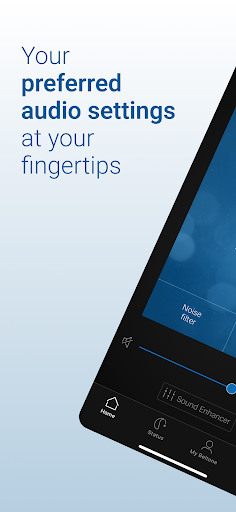
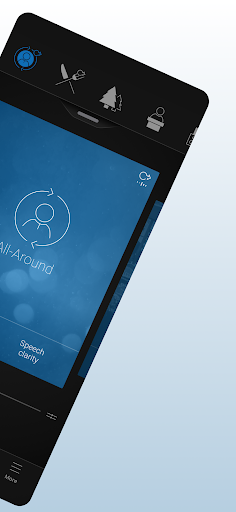
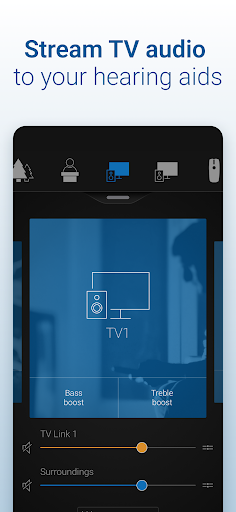
HearMax brings several direct controls together. You can change hearing aid volume, mute the aids, and switch manual or streamer programs. The app can also adjust the volume of Beltone streaming accessories. These are the kinds of options that make a companion app relevant in ordinary routines: a quick change at home, or a program switch when the activity changes.
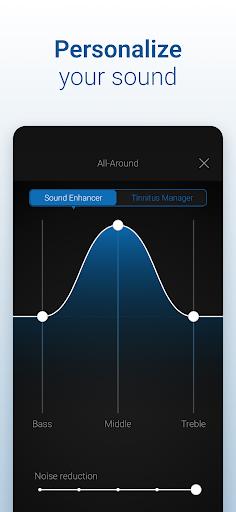
There is room to tailor sound as well. Users can adjust treble, middle, and bass, and the Sound Enhancer includes controls for speech focus and noise or wind-noise levels where supported. I would treat those as options to explore thoughtfully rather than settings everyone will necessarily have. Their availability depends on the hearing aid model and how a hearing care professional has fitted it.
Personal touches that matter
Favorites are one of the more practical features because they let you save settings you prefer instead of recreating them each time. HearMax can also let you tag a Favorite to a location. I can see that helping someone remember a useful setup for a regular stop on a walk or a familiar place to meet, without suggesting that the app automatically detects every listening environment.
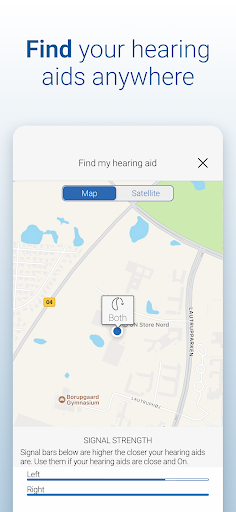
A few other capabilities make the app more than a basic volume remote. It can show battery status for rechargeable hearing aids and help locate lost or misplaced aids. Its Tinnitus Manager can adjust sound variation and frequency for Tinnitus Breaker Pro, and offers Nature Sounds on supported models and fittings. Those features are conditional, so the options you see can depend on your particular setup.
A routine that stays simple
A sensible everyday routine could start with a quick battery check for rechargeable aids, followed by choosing the manual or streamer program that suits the activity. If a setting works especially well, saving it as a Favorite gives you a shortcut for next time. I would keep the routine low effort: use the controls that solve a real problem, rather than feeling obliged to adjust every available sound option.
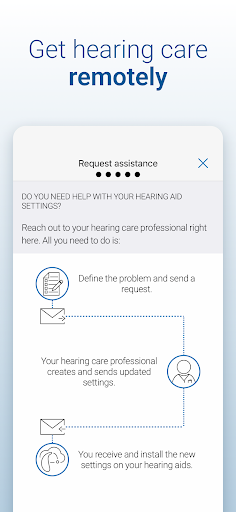
When a change needs more than a quick personal adjustment, Remote Care provides a way to request help with hearing aid settings from a hearing care professional. The professional can send new settings and software updates through the app, which may avoid a trip to the clinic for that kind of support. This is a useful option, though it is not a promise that every concern can be handled remotely.
Keep compatibility in mind
The biggest limitation is also the clearest: HearMax is for Beltone hearing aids, and feature availability varies with the model and professional fitting. Before counting on a particular control, confirm that it applies to your aids. Compatibility information can change, so checking Beltone's current device guidance is a sensible step before choosing a phone or planning around a feature.
The app gives users direct controls and a route to remote support, but that does not make it a substitute for professional care. Some users may prefer to make few adjustments themselves, while others may find a menu of sound options more involved than they need. I would start with simple changes, use the app's learning help, and ask a hearing care professional when the right setting is unclear.
Beltone HearMax is a focused companion rather than an all-purpose hearing app. For compatible Beltone users, its mix of everyday controls, Favorites, battery status, locating help, and Remote Care can make routine adjustments more convenient. The most valuable features will depend on the specific aids and fitting, so expectations should stay grounded in what your setup supports.
I would recommend it to Beltone hearing aid users who want practical phone-based control and are comfortable exploring a few settings. If you do not use compatible aids, it is unlikely to have much to offer. Check device compatibility and feature availability first, then start with the controls that make a noticeable difference to your own routine.
Beltone HearMax Frequently Asked Questions
What is Beltone HearMax used for?
Beltone HearMax is a mobile companion for controlling compatible Beltone hearing aids. It can adjust volume, change programs, personalize sound, and save preferred settings as Favorites. Other options include rechargeable battery status, help locating misplaced aids, and Remote Care requests to a hearing care professional. Specific sound tools depend on the hearing aid model and professional fitting.
Which phones and devices work with Beltone HearMax?
HearMax is an Android app intended to connect with compatible Beltone hearing aids. Compatibility depends on the mobile device and hearing aid setup, and current device guidance is worth checking before relying on a particular phone. The app's controls and features can also vary by hearing aid model and fitting, so not every user will see the same options.
What Android version does Beltone HearMax require?
The Android version requirement can vary with the app's current release and your device. Check the Google Play store page for the requirement that applies to your phone before installing or updating. Beltone also recommends that hearing aids use the latest software, and advises contacting a hearing care professional if you are uncertain about the aid software.
Does Beltone HearMax cost money?
Beltone HearMax is free to download on Google Play. Its store facts report no in-app purchases and no ads. You will need compatible Beltone hearing aids to use its main controls, and features can depend on the aids and their professional fitting. Check Google Play for current availability and any details that may change.
Is Beltone HearMax right for me?
It may suit you if you use compatible Beltone hearing aids and want to adjust settings from a mobile device or request remote help from a hearing care professional. It is less useful without those aids, and it is not a general hearing-health tracker. Before relying on particular controls, check that your hearing aid model and fitting support them.
Pros
- Puts volume, program, and sound adjustments within reach on a mobile device.
- Favorites can save preferred settings and associate them with a location.
- Includes rechargeable battery status, locating help, and Remote Care options.
- Free to download, with no in-app purchases or ads reported.
Cons
- Its main controls are useful only with compatible Beltone hearing aids.
- Some sound tools depend on the hearing aid model and professional fitting.
- Phone compatibility and available features are worth checking before relying on them.
- Category
- Medical
- Version
- 1.43.1











