Yi Home
- 372.82K
- 2.7
- Installs
- 5.00M
- Price
- Free
Screenshots
Analysis by Reviewed APKs
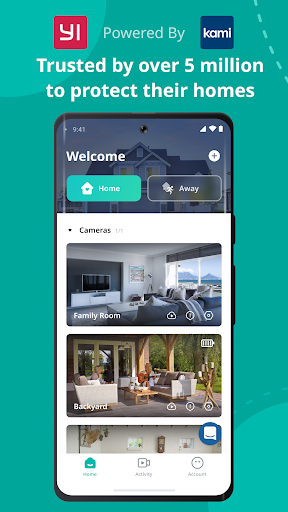
Yi Home is a companion app for viewing and interacting with YI-connected devices, especially cameras, from a phone. It suits people who want a quick way to check on family, pets, or a room while away. My overall take is that it brings useful live viewing, two-way audio, and motion alerts together, though its appeal depends on owning YI products and being comfortable with a feature-focused camera app.
A quick check from elsewhere
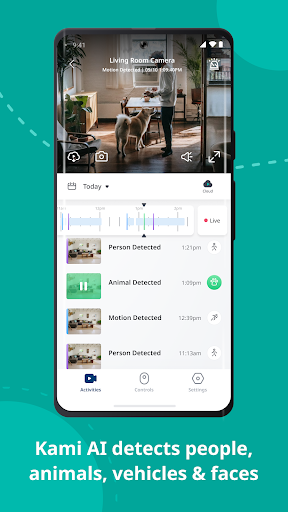
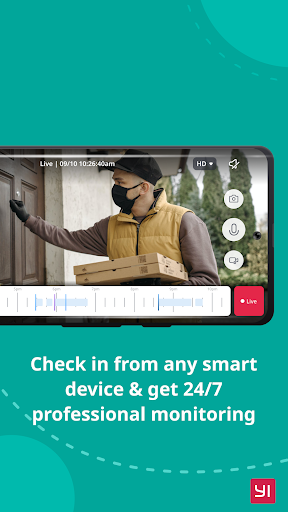
Imagine leaving home for the day and wanting to check whether your pet is settled. Yi Home is built around that small, practical moment: open the app, view a connected YI camera, and listen or speak through its audio. The app also supports panning around a panoramic view by moving the phone, which can make a quick look feel more useful than a fixed glimpse of one part of a room.
I can also see the value in a brief check-in with family. Two-way conversation lets you speak through the camera rather than simply watch in silence, and motion notifications can draw attention to activity without requiring a constant live view. Those features make Yi Home feel aimed at everyday awareness, not elaborate monitoring. It gives a household a way to stay connected to things at home while people are elsewhere.
A camera companion, not a general hub
Yi Home makes most sense if YI devices are already part of your home. Its central job is to bring those products together for viewing and interaction, rather than act as a general-purpose smart-home dashboard. Compared with relying on occasional phone calls or checking a camera separately, the app puts live video, audio, and movement alerts in one place. That focus is straightforward, but it also narrows who will find it useful.
This is not a replacement for a dedicated video-editing app, a social network, or a broad home-automation controller. The description centers on YI products and camera viewing, so I would not choose it expecting unrelated device controls or a larger set of household-management tools. If you do not have a compatible YI product, there is little reason to install it just to browse around.
Make alerts work for you
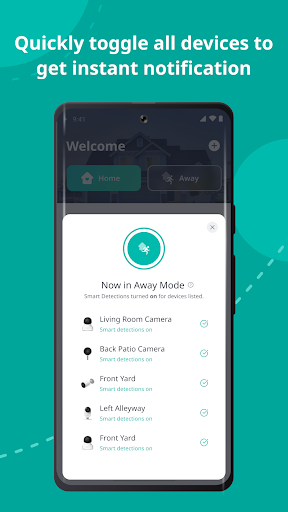
A useful habit is to treat motion notifications as prompts to check in, rather than leaving a live feed open all day. The camera can detect movement and send an alert to Yi Home, giving you a reason to open the app when something changes. That can make the experience feel more intentional: glance at the alert, view the camera, and use two-way audio if a conversation would help.
For a room with a wide view, try moving the phone to pan around the panorama instead of assuming the first angle shows everything. If your camera supports an SD card, stored video and audio can be indexed for later viewing, and the described image-change mode is intended to use storage efficiently. Small choices like these can make a quick check or later review easier to fit into a normal routine.
More From Our News Desk

Zoom Meetings, Google Meet, or Teams: Which Is Easiest to Join?

How I Build a Free Streaming Lineup With Tubi

Why Crunchyroll Is the Default Anime App for So Many Fans

YouTube TV: A Practical Guide to Cutting Cable

Rummikub and the Small Comfort of Phone Games

TeamViewer Remote Control or AnyDesk for Helping Family?
Who may find it useful
I would recommend Yi Home to people who own YI-connected cameras and want to check video, listen in, speak remotely, or receive movement alerts from a phone. It has clear everyday uses for checking on a pet, keeping an eye on a room, or having a brief conversation with someone at home. Its appeal is strongest for people who value those focused camera tasks over a wider collection of smart-home features.
It may not suit someone without YI products, or anyone looking for a broad home-control app rather than a camera companion. The Google Play rating is relatively low, so I would approach it with measured expectations and check recent user feedback before relying on it for an important routine. People who rarely need remote viewing may also find that a dedicated camera app is more than they need.
Yi Home is a Lifestyle app from Kami HK. On Google Play it has more than 5 million installs and a 2.7-star rating from about 373,000 ratings. It is free to download, with in-app purchases priced from $3.99 to $184.99 per item, and it contains ads. The content rating is Everyone.
The app first appeared on November 10, 2015, and its listed version is 6.9.9_20260921102458. Google Play gives September 21, 2026 as its last update date. The Android version requirement can vary by device and release, so it is worth checking the Google Play page for compatibility before installing.
A closer look at everyday camera checks
First impressions and setup
When I first opened Yi Home, its purpose came across as practical rather than broad: bring YI-connected devices into one mobile app. The idea is easy to understand if you already have a YI camera. The app is not presented as a place to discover unrelated services; it is meant to connect you with the devices and people you care about through video and audio.
The material describes a simple tap to start a two-way conversation, which suggests a direct path from opening the app to speaking through a camera. I would begin by checking that my YI product is supported, then focus on the camera view and the controls I actually expect to use. That is a sensible first session for an app whose value depends on connected hardware.
The everyday viewing experience
Day to day, the central experience is remote viewing with audio. I can picture opening Yi Home during a lunch break, checking a room, and closing it again rather than treating the camera feed as something to watch continuously. Two-way audio adds a useful human touch: a quick spoken check-in can be more direct than watching silently, especially when someone at home can hear the camera.
The app also adapts video streaming to network conditions, according to its description. That is a practical feature for a phone that moves between different connections, since the viewing quality is adjusted to suit the available network. It does not remove the need for a workable connection, but it makes the app's role clear: give users a way to view and communicate when they are away.
Features that make it distinct
The panoramic viewing option is one of the more hands-on details. Rather than relying only on a fixed angle, you can pan by moving the phone left or right, with gyroscope support following the phone's orientation. I like that this connects the physical motion of looking around with the camera view. It is a small interaction, but it may help when a broader view matters.
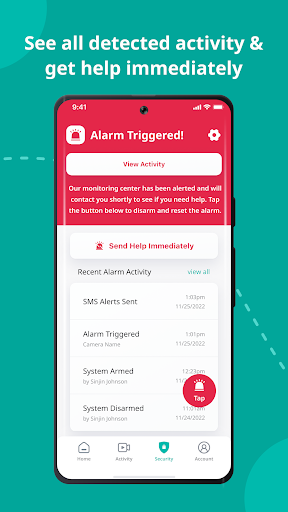
Motion detection and notifications are another notable part of the package. The camera can detect movement and send a notification describing the detected activity, so users can respond when something changes instead of checking constantly. The app also supports camera video and audio storage on an SD card up to 32GB, with indexed recordings and an image-change mode intended to make storage more efficient.
A simple home-check routine
A realistic routine might be to check the app once after leaving home, then rely on motion notifications for anything that needs attention. If an alert arrives, I would open the camera view, look around using the panoramic controls if needed, and speak through two-way audio when a quick conversation is appropriate. That keeps the app tied to specific moments rather than turning every spare minute into a monitoring session.
For someone who wants to revisit a moment, the supported SD-card recording option adds a second part to that routine. The app description says video and audio are indexed for later access, while the image-change mode is designed to optimize storage use. These details give the app a role beyond live viewing, though the available storage is capped at 32GB according to the description.
Limits worth keeping in view
The biggest limitation is also the clearest: Yi Home is built for YI products. That makes it a focused choice for existing owners, but a poor fit for someone hoping to manage a mix of devices from different brands. I would check product compatibility before making it part of a household routine, because the app's core features depend on having supported connected hardware.
Its Google Play score of 2.7 stars from about 373,000 ratings is worth weighing alongside the feature set. A low average does not explain any one person's experience, but it is a reason to read recent feedback and keep expectations grounded. The app is free to download, yet it includes ads and offers in-app purchases, so those are part of the overall experience to consider.
Yi Home brings several useful camera tasks into one place: live viewing, two-way conversation, phone-motion panning, movement alerts, and supported SD-card recording. I like how clearly it is aimed at quick checks rather than trying to be a complete smart-home platform. The trade-off is that its usefulness depends on YI devices, and its store rating calls for a little caution.
I would try it if I already owned a compatible YI camera and wanted remote access from my phone. If I were choosing an app before buying hardware, I would first check device support and recent Google Play feedback. For the right setup, Yi Home has a practical purpose; for everyone else, its narrow focus is a reason to look elsewhere.
Yi Home Frequently Asked Questions
What is Yi Home used for?
Yi Home is used to connect with YI products, including cameras, from a phone. Its described features include remote video and audio, two-way conversation, panoramic viewing by moving the phone, motion notifications, and supported SD-card recording. It is primarily a camera companion for checking on family, pets, or things at home while away.
Which devices and platforms support Yi Home?
Yi Home is an Android app available through Google Play, and its description says it supports YI products. The specific device compatibility can depend on the YI product you own, so check the Google Play page and product information before relying on a particular camera or feature.
What Android version does Yi Home require?
The Android requirement can vary by device and app release. Before installing, check Yi Home's Google Play page for the current compatibility details for your phone or tablet. The app's stated purpose is to connect with YI devices, so it is also worth confirming that your camera is supported.
Is Yi Home free, and does it have purchases?
Yi Home is free to download and contains ads. It also offers in-app purchases, with listed items priced from $3.99 to $184.99 each. The price of a particular item or offer may vary, so check the Google Play page for current purchase details before buying.
Is Yi Home a good fit for my household?
It may suit households with YI-connected cameras that want remote viewing, two-way audio, or motion alerts. It is less suitable if you do not own YI products or want a general smart-home controller. Google Play shows a 2.7-star rating from about 373,000 ratings, so reading recent feedback may help set expectations.
Pros
- Combines remote camera viewing and two-way audio for quick check-ins.
- Phone movement and gyroscope support help pan around panoramic views.
- Motion notifications can prompt a camera check when activity is detected.
- Supports indexed video and audio storage on SD cards up to 32GB.
Cons
- Its usefulness depends on owning supported YI-connected devices.
- Google Play shows a relatively low 2.7-star rating from about 373,000 ratings.
- The app contains ads and offers a broad range of in-app purchase prices.
- Category
- Lifestyle
- Version
- 6.9.9_20260921102458