Kami Home
- 11.89K
- 3
- Installs
- 100.00K
- Price
- Free

Screenshots
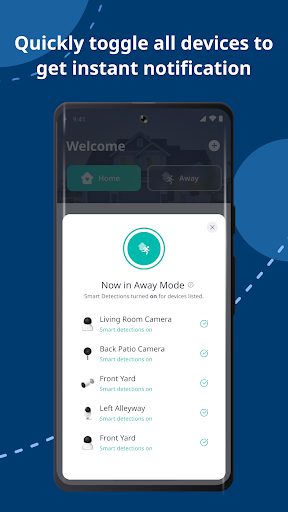
Analysis by Reviewed APKs
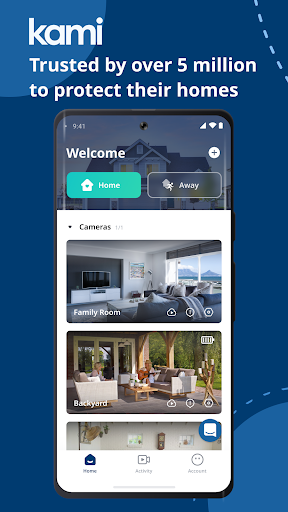
Kami Home is a companion app for viewing and managing Kami-connected devices, with a focus on home cameras and recorded footage. It suits people who want to check on a pet, family member, or home while they are away, then review motion activity when needed. My overall take is that it has a clear, practical purpose, though its usefulness depends on having compatible Kami devices.
A quick check from away
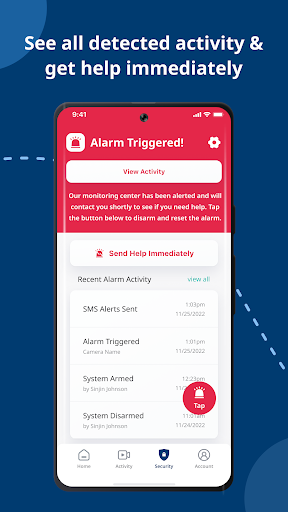
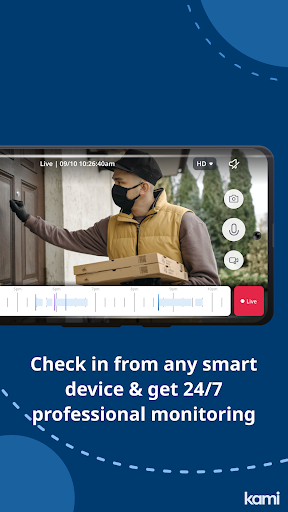
Imagine leaving home for the day and wondering whether your dog has settled down or whether there has been movement near the front of the house. Kami Home is intended for exactly that sort of check-in: it gives you access to live footage from Kami devices and can send alerts when it detects motion. Rather than treating the phone as a general smart-home dashboard, the app centers on seeing what is happening at home.
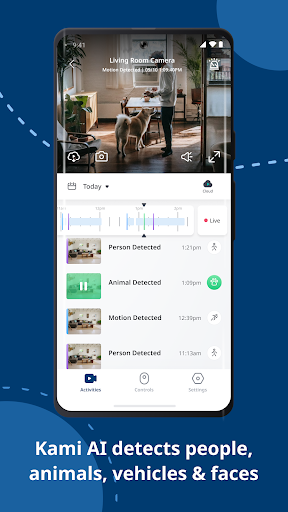
The follow-up matters as much as the live view. If an alert arrives while I am busy, I can use the recording tools to look back at the relevant activity instead of trying to watch a camera continuously. The description says recordings can be stored in the cloud for up to 30 days, depending on the chosen solution. That makes the app more useful for occasional checks than for constant monitoring.
A camera companion, not everything
Kami Home makes most sense alongside Kami-connected products. Its main job is to bring those devices together in one place, offer live footage, and help find important moments in recordings. If I already have compatible Kami equipment, the app gives me a single place to check it rather than treating each camera as a separate task. Its value is closely tied to that existing or planned device setup.
It is not a general-purpose home automation app based on the information available here. The useful comparison is with checking a camera feed or reviewing clips, not managing every household system from a phone. Someone looking primarily for heating, lighting, or energy controls may find the focus narrower than expected. For people who do not own Kami devices, there is little reason to install it on its own.
Make review time count
A small habit that could make Kami Home easier to use is checking motion alerts when it is convenient, rather than keeping a feed open all day. Alerts point attention toward activity, while the recording playback tools help revisit what happened. This approach fits everyday interruptions: I can glance at an event after a meeting or when I have a quiet moment, instead of trying to follow every moment in real time.
When reviewing footage, the ability to fast-forward at speeds up to 32x is especially practical for skipping through uneventful stretches. I would use it to scan a day’s recording, then slow down around a moment worth checking. Cloud storage can also help when I want access to older footage, with the available period reaching up to 30 days. The exact storage choice should match how far back I expect to look.
More From Our News Desk

Zoom Meetings, Google Meet, or Teams: Which Is Easiest to Join?

How I Build a Free Streaming Lineup With Tubi

Why Crunchyroll Is the Default Anime App for So Many Fans

YouTube TV: A Practical Guide to Cutting Cable

Rummikub and the Small Comfort of Phone Games

TeamViewer Remote Control or AnyDesk for Helping Family?
Who may find it useful
I would recommend Kami Home to people who use Kami-connected cameras and want a straightforward way to check live footage, receive motion alerts, and revisit recordings. It has clear everyday uses for checking on pets, keeping an eye on a home while away, or reviewing activity after an alert. The combination of live viewing and faster playback gives the app a practical role beyond simply opening a camera feed.
It may not suit someone who wants a broad smart-home control center or who has no Kami-connected devices. The app’s appeal is also less obvious to anyone who does not expect to review camera footage or use motion notifications. On Google Play, its rating is 3.0 stars from around 11,900 ratings, so I would take a little time to compare recent user feedback with my own device needs before relying on it.
Kami Home is a Lifestyle app from Kami HK. Google Play shows over 100,000 installs and a 3.0-star rating from 11,889 ratings. The app is free to download and contains no ads. It does offer in-app purchases, with listed items ranging from $3.99 to $239.99 each. These purchase options are relevant to people considering cloud storage and should be checked against the needs of their setup.
The app has an Everyone content rating. Its listed version is 5.0.1_20261104120605, and its release date is September 16, 2018. Google Play gives November 3, 2026 as the latest update date. The Android version requirement is not included among the supplied app details, so anyone checking compatibility should look at the current Google Play information for their device.
Making Home Camera Checks More Manageable
First look and setup
When I first consider Kami Home, the clearest thing is its single purpose: bring Kami-connected devices together so I can check footage and activity. That focus is a plus for someone who wants a camera companion rather than another sprawling control app. The setup experience depends on having Kami products to connect, and the app’s usefulness becomes easier to judge once there is a camera feed or recording to work with.
The description presents device control as something that can be reached in a few simple steps, but it does not spell out the exact setup sequence. I would therefore go in expecting to connect compatible Kami equipment, rather than expecting the app to do much by itself. This is a practical distinction: it is the link between the phone and the devices that gives the app its purpose.
The daily viewing loop
Day to day, the core loop is easy to understand: check live footage when I want a current look, pay attention to activity alerts, and use playback when I need context. That is a sensible fit for a quick check during lunch or a glance at home while travelling. It also avoids making continuous viewing the only way to stay informed, since motion notifications can draw attention to activity.
Recorded footage is most useful when I have a particular question, such as what happened around the time an alert appeared. Kami Home says playback can be scanned at speeds up to 32x, which should make a long stretch less tedious to review. The app is built around access to the moments that matter, rather than watching every second at normal speed.
Playback and cloud options
Fast playback is one of the more distinctive practical details. Being able to move through footage at up to 32x can turn a long recording into a quicker check, especially when I am looking for a specific event. It is a small feature with a clear purpose: spend less time waiting through quiet periods and more time on the activity I actually want to understand.
Cloud storage adds another part to the review process. The description says recordings can be kept for up to 30 days and accessed remotely, while also describing tailored choices for storage time and home security needs. I would consider how far back I really need to look before choosing an option. The available in-app purchases vary in price, so it is worth checking the store details before committing.
A routine for busy days
A reasonable routine is to check the live view when there is a specific reason, then rely on motion alerts to flag activity while I am occupied. If an alert deserves a closer look, I can open the recording and scan it quickly. This is the sort of workflow I would use while away for a few hours: stay informed without turning home monitoring into an all-day task.
For a trip, I would think about the recording window before leaving, especially if I want to revisit activity after returning. Kami Home describes cloud backup and storage for up to 30 days, which can be useful when a quick live check is not enough. The right choice depends on how long I need access to footage and which Kami devices I use.
Keep expectations grounded
The biggest limitation is also the clearest boundary: Kami Home is designed for Kami products. It will not be much use as a standalone app for someone who has no compatible devices, and its camera-centered purpose may feel narrow to people expecting broad smart-home controls. I would decide first whether the supported device ecosystem matches what I already have or plan to use.
The app also invites a practical look at storage costs. It is free to download and has no ads, but it offers in-app purchases, and listed item prices range widely. Cloud storage can make recordings easier to access later, yet the right option depends on personal needs. I would check current purchase information and device compatibility in Google Play before setting up a routine around it.
Kami Home has a focused, understandable role: connect Kami devices, check live footage, receive motion alerts, and review recordings without spending ages searching through quiet video. Features such as fast playback and cloud storage make that role more practical for everyday checks and time away from home.
I would try it if I already used Kami-connected cameras and wanted one place for viewing and playback. If I were shopping for a general smart-home app, or had no Kami equipment, I would look elsewhere. Check the current purchase options and compatibility details before choosing a storage plan.
Kami Home Frequently Asked Questions
What is Kami Home used for?
Kami Home is used to access and manage Kami-connected devices in one place. Its described features include live home footage, motion activity alerts, and playback of recordings, with fast-forward speeds up to 32x. It can also provide access to cloud-stored recordings. The main everyday uses include checking on a home or pets and reviewing activity after an alert.
Which phones and devices work with Kami Home?
Kami Home is an Android app available through Google Play, and its description says it supports Kami products. The details supplied here do not give a minimum Android version or a complete device compatibility list. If you are unsure whether your phone or a particular Kami product is supported, check the current Google Play information and product details before setting things up.
What Android version does Kami Home require?
The minimum Android version is not included in the app details provided here, so I would check the current Google Play page for your device before installing. Requirements can change as apps are updated. Kami Home is intended to work with Kami-connected products, so it is also worth checking that the specific device you plan to use is compatible.
Does Kami Home cost money?
Kami Home is free to download and contains no ads, but it offers in-app purchases. The listed prices range from $3.99 to $239.99 per item. Since cloud storage options and other purchase details can vary, check the current Google Play purchase information and choose based on how much recording storage you need.
Is Kami Home a good fit for me?
It may be a good fit if you use Kami-connected devices and want live footage, motion alerts, and a way to review recordings. It is less suitable if you want a broad smart-home control app or do not have Kami products. The app’s focus is camera access and recording review, so the best match depends on your devices and routine.
Pros
- Brings Kami-connected devices together for live viewing and activity checks.
- Motion alerts can draw attention to detected activity without constant viewing.
- Playback speeds up to 32x help scan recordings more quickly.
- Cloud recordings can be available for up to 30 days.
Cons
- Its usefulness depends on having compatible Kami-connected devices.
- In-app purchase prices vary widely, so storage choices deserve a close look.
- The camera-centered focus may not suit people seeking broad smart-home controls.
- Category
- Lifestyle
- Version
- 5.0.1_20261104120605