Total Connect Comfort
- 90.70K
- 4.2
- Installs
- 1.00M
- Price
- Free
Screenshots
Analysis by Reviewed APKs
Total Connect Comfort is a phone companion for monitoring and adjusting compatible Honeywell heating and cooling systems. I’d consider it for someone who already has a supported thermostat and wants to check the temperature or change settings without walking to the wall control. Its appeal is practical rather than flashy: it brings useful controls and system information together, though how much you can do depends on your equipment.
A Quick Comfort Check
I can picture using Total Connect Comfort during an ordinary commute home. Before leaving work, I’d open the app to check the indoor temperature and, if my system supports it, adjust the heating or cooling setting so the house is more comfortable when I arrive. That sort of small remote change is the app’s central job. It is less about managing a smart home in general and more about keeping an eye on a compatible climate system.
The same idea helps when plans change. If I leave earlier than expected, I can check the thermostat remotely rather than relying on the schedule alone. The app can also show thermostat alerts, including high or low temperature, which gives me a reason to check in when a reading seems unusual. These are practical touches, not a substitute for being at home or inspecting equipment when something appears wrong.
A Thermostat Companion
Compared with a basic wall thermostat, the main difference is being able to view and change supported settings from the app, including when I am away. Compared with a broad smart-home hub, Total Connect Comfort has a narrower focus: heating, cooling, temperature, and certain related system controls. That specialization can be useful if my thermostat is compatible, but it does not make the app a general-purpose home automation dashboard.
It is also not a universal thermostat remote. The app works with Honeywell Wi-Fi Thermostats and certain Prestige, Prestige IAQ, Wireless FocusPRO, and EConnect Comfort Systems used with a Honeywell Internet Gateway. If my equipment is outside those groups, this is not the right control app for it. The available options can also differ by thermostat, so I would check compatibility before planning a routine around a particular feature.
Small Habits That Help
A useful habit is to glance at the indoor temperature before making a change, rather than adjusting settings from memory. I’d also take a moment to review the schedule if my thermostat supports scheduling; seeing and changing it from the app can make it easier to keep the system aligned with a changed routine. The goal is not constant fiddling, but making occasional adjustments when the day does not go as planned.
I’d use the app’s extra information selectively. A five-day forecast can add context when deciding whether a change is worthwhile, while outdoor temperature and humidity are available when an outdoor sensor is in use. If I manage more than one registered system or location, the ability to access multiple thermostats can also help me check the right place before changing anything. Those small checks reduce avoidable guesswork.
More From Our News Desk

Zoom Meetings, Google Meet, or Teams: Which Is Easiest to Join?

How I Build a Free Streaming Lineup With Tubi

Why Crunchyroll Is the Default Anime App for So Many Fans

YouTube TV: A Practical Guide to Cutting Cable

Rummikub and the Small Comfort of Phone Games

TeamViewer Remote Control or AnyDesk for Helping Family?
Who Will Find It Useful
I’d recommend Total Connect Comfort to people who already use a compatible Honeywell thermostat or supported comfort system and want straightforward remote access. It is especially relevant if your routine changes often, you manage more than one registered thermostat, or you simply like being able to check the indoor temperature from your phone. The app’s best value is tied to equipment you already own, rather than a broad collection of unrelated features.
It may not suit someone looking for an app that works with any thermostat, or someone who wants detailed energy reports, maintenance planning, or a comprehensive smart-home control center. Those are not the functions described here. I’d also be cautious about expecting every control to appear on every setup: schedule, fan, humidifier, and dehumidifier options depend on system support. If you prefer using only the physical thermostat, the remote access may not add much.
Total Connect Comfort is a Lifestyle app from Resideo Technologies, Inc. On Google Play it has over one million installs and a 4.2-star rating from about 90,700 ratings. The app is free to download, with no in-app purchases or ads. Its content rating is Everyone, making that a straightforward practical detail for households considering the app.
The app’s listed version is 3.17. It was released on January 31, 2012, and its most recent listed update was November 4, 2025. A minimum Android version is not provided in the available app facts, so I would check the Google Play page on the device where I plan to install it for current compatibility details.
Remote Controls for Everyday Comfort
A Focused First Look
When I first opened the idea of Total Connect Comfort, what stood out was how clearly its purpose is tied to the thermostat. This is not an app that needs a long explanation: it is meant to show system information and let me make supported changes from a phone. The setup’s usefulness begins with having one of the compatible Honeywell systems, so checking that detail comes before expecting the app to control anything.
For someone deciding whether to use it, Demo Mode offers a way to explore before purchasing a thermostat. That is a helpful low-commitment option if I want to get a feel for the app first. I would still treat the demo as a preview rather than proof that every control will match a particular system, since several functions depend on the thermostat or connected equipment.
The Daily Controls
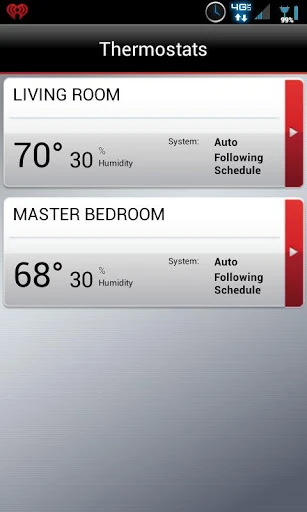
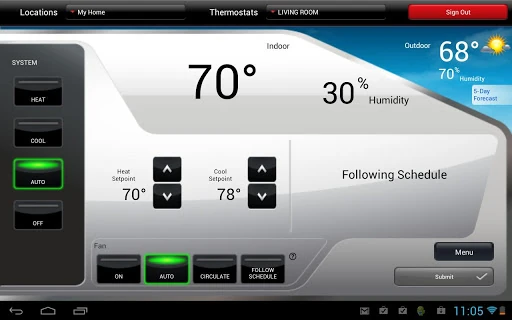
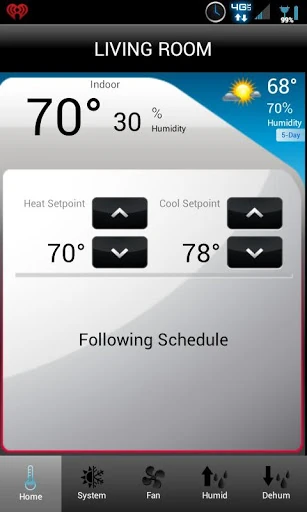
The everyday experience revolves around checking the indoor temperature and viewing or changing heating and cooling system settings. I like that this puts the basic climate check and the action that follows in the same place. If I notice the house is warmer or cooler than I expected, the app gives me a way to respond without being beside the thermostat, assuming my equipment supports remote access.
The schedule is another practical part of the routine, but it is available only for thermostats that support it. The fan setting is similarly conditional. That means I would not assume the app offers identical controls in every home. Still, where supported, being able to review or change these settings remotely can be more convenient than waiting until I am back in the room with the wall control.
Useful System Details
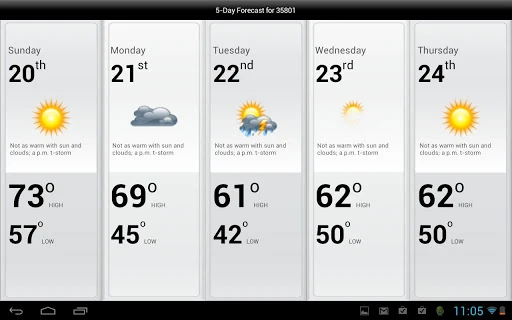
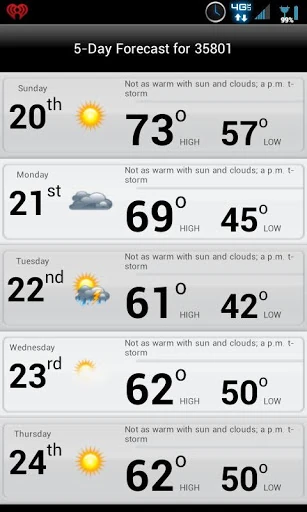
A five-day weather forecast is included, giving the thermostat controls a little everyday context. I can see how that might help when I am thinking about the coming week and whether the current schedule still makes sense. The app can also show outdoor temperature and humidity when an outdoor sensor is in use, which adds another useful reading without implying that every installation has that sensor.
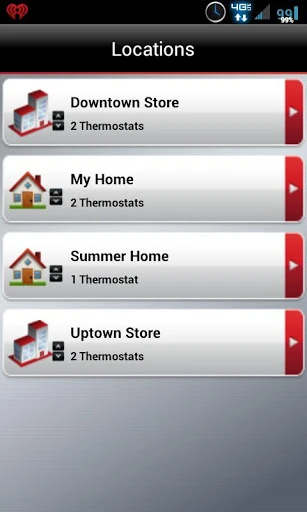
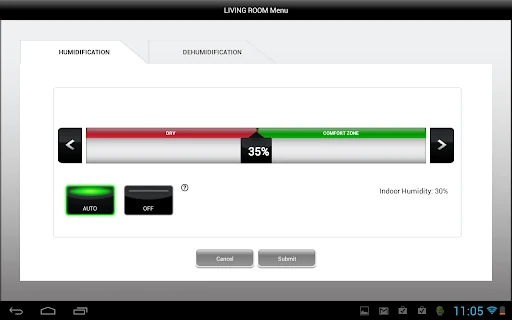
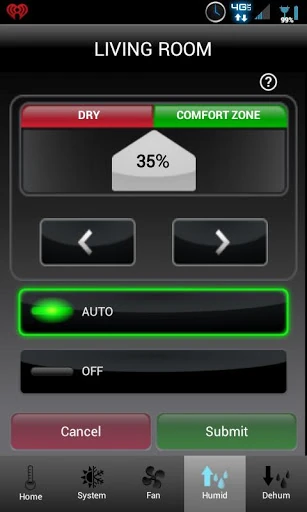
For supported systems, humidifier and dehumidifier settings are also available to view and change. Thermostat alerts, such as high or low temperature, give the app a monitoring role as well as a control role. And if more than one system or location is registered, the app can provide access to multiple thermostats. These are specific, equipment-dependent tools rather than a claim that every setup exposes every feature.
A Simple Weekly Routine
A realistic routine might start with a quick check in the morning: look at the indoor temperature, then leave the existing settings alone if everything seems right. Later, if plans change, I can use the app to review the schedule and make a supported adjustment. This approach keeps remote control available without turning the thermostat into something I need to check every few minutes.
At the start of a week, I might glance at the forecast and consider whether my schedule still fits the days ahead. If I manage more than one registered location, I would first make sure I am viewing the intended system before changing settings. Those simple habits make the app feel more useful and help avoid unnecessary adjustments based on assumptions about which thermostat is active.
Compatibility Has Limits
The biggest limit is hardware compatibility. Total Connect Comfort is designed for particular Honeywell Wi-Fi Thermostats and certain named comfort systems, with an Internet Gateway required for the Prestige, Prestige IAQ, Wireless FocusPRO, and EConnect systems described. Anyone with another brand or an unsupported setup should not expect this app to become a universal remote just because it is installed on a phone.
The second limit is that feature availability varies by thermostat and accessories. Scheduling, fan control, humidifier and dehumidifier adjustments, and outdoor readings are not universal promises. I would confirm which functions apply to my own system and check the current Google Play information for device requirements. That is a sensible bit of homework, especially if one particular control is the main reason for trying the app.
Total Connect Comfort makes the most sense as a practical companion to compatible Honeywell equipment. Remote temperature checks, system adjustments, supported scheduling, and thermostat alerts cover useful everyday needs without pretending to be a full smart-home platform. I appreciate that its scope is easy to understand, even if that same focus makes compatibility the deciding factor.
If you already have a supported system and want to manage it from your phone, I’d give it a try. If you are choosing an app before choosing equipment, verify that your thermostat and desired controls are supported first. For anyone outside that ecosystem, the app is unlikely to be a useful fit.
Total Connect Comfort Frequently Asked Questions
What is Total Connect Comfort used for?
Total Connect Comfort is used to remotely monitor and manage compatible Honeywell heating and cooling systems. Depending on the thermostat and connected equipment, you can view indoor temperature, change system settings, review a supported schedule, and see thermostat alerts. It can also show a five-day forecast and certain outdoor readings when an outdoor sensor is in use.
Which devices and systems work with Total Connect Comfort?
The app is for Android, and it works with Honeywell Wi-Fi Thermostats and certain Prestige, Prestige IAQ, Wireless FocusPRO, and EConnect Comfort Systems. The latter systems are described as requiring a Honeywell Internet Gateway. Compatibility and available controls depend on the particular setup, so check the Google Play information and your thermostat details before relying on a feature.
What Android version does Total Connect Comfort require?
The minimum Android version can vary with the app’s current release and device compatibility. Check the Google Play page from the Android phone or tablet where you plan to install Total Connect Comfort for the current requirement. Having a compatible thermostat or comfort system is also necessary to use its remote controls.
Is Total Connect Comfort free, and does it have purchases?
Total Connect Comfort is free to download on Google Play. The available app facts show no in-app purchases and no ads. The app controls supported Honeywell equipment, so you will need compatible system hardware to use those functions; check the store page for current app details and any changes.
Who should use Total Connect Comfort?
It is best suited to people who already have a compatible Honeywell thermostat or supported comfort system and want remote temperature checks or adjustments. It may not suit people with other thermostat brands or anyone seeking a general smart-home app. Some controls depend on the specific thermostat and accessories, so check compatibility before installing with a particular feature in mind.
Pros
- Remote temperature checks and adjustments are useful when plans change.
- Supports access to multiple registered thermostats and locations.
- Includes a five-day forecast and thermostat alerts.
- Free to download, with no ads or in-app purchases.
Cons
- Works only with compatible Honeywell thermostats and comfort systems.
- Several controls depend on thermostat features or additional sensors.
- A minimum Android requirement should be checked in Google Play.
- Category
- Lifestyle
- Version
- 3.17