T-Mobile Scam Shield
- 217.40K
- 4.5
- Installs
- 10.00M
- Price
- Free

Screenshots
Analysis by Reviewed APKs
T-Mobile Scam Shield is a call-control app for T-Mobile customers who want help identifying, blocking, and reporting suspicious calls. It also provides caller information and an Allow list for numbers that should ring through. I found its purpose refreshingly focused: it works alongside T-Mobile’s network protections rather than trying to replace a full phone dialer or broader security suite. It suits people who want more say over incoming calls.
A Quieter Phone Day
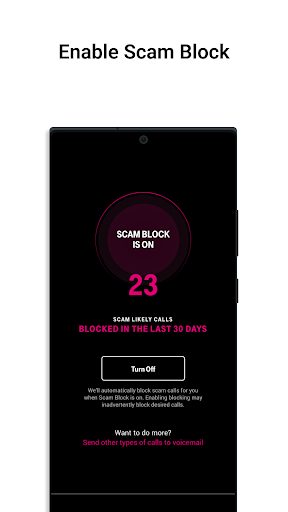
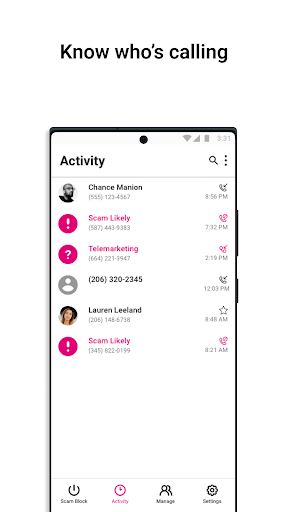
Picture a weekday morning when your phone rings during breakfast, then again while you are trying to focus on work. Scam Shield gives T-Mobile customers a place to manage protections such as Scam ID and Scam Block. With Scam Block turned on, the network can block calls it identifies as likely scams before they reach the phone. Caller ID can also show information about callers who are not saved in your contacts.
The app’s usefulness is easy to understand in that everyday setting: fewer suspicious interruptions, plus more context when an unfamiliar number does ring. I would not treat a label as proof that a call is safe or a missed call as proof of fraud. The practical value is having tools to make a more informed choice, and a way to report suspicious callers so the network can use that information.
A Network Companion, Not a Dialer
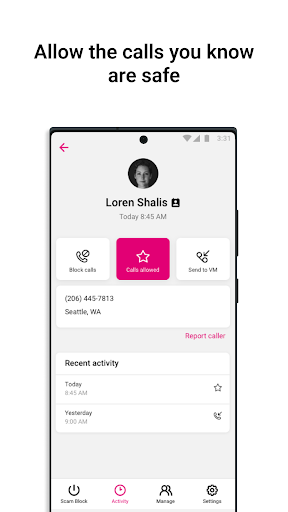
Scam Shield makes the most sense as a companion to T-Mobile’s call service. It controls network-based protections and offers caller information, rather than presenting itself as a general-purpose phone app. The Allow list is a useful counterweight to automatic blocking: numbers you add there are not blocked by the network and can ring your phone. Verified Business Calls may also show business details and a reason for calling when available.
That focus is also a boundary. I would not choose Scam Shield as a replacement for a messaging app, a complete contact manager, or a tool for handling every kind of digital threat. Its described features concern phone calls on T-Mobile service. If you use another carrier, or want one app to manage communications across several services, this is not aimed at that job.
Small Habits That Help
A sensible way to use Scam Shield is to review your call-control choices before you get busy, rather than making decisions in the middle of an unfamiliar ring. If you turn on Scam Block, keep in mind that it can block calls you wanted; the service says you can disable it at any time. Adding important numbers to the Allow list can help keep them from being blocked by the network.
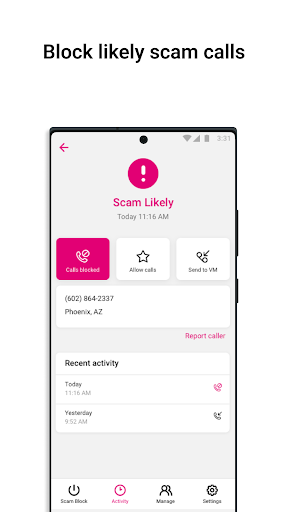
Reporting suspicious callers is another small habit that fits naturally after a questionable call. The app describes Scam Reporting as a way to help identify callers and reduce future calls to you or others. I would use that option for calls that genuinely seem suspicious, not as a reflex for every unknown number. Taken together, these habits make the app a control panel, not something that needs constant attention.
More From Our News Desk

Zoom Meetings, Google Meet, or Teams: Which Is Easiest to Join?

How I Build a Free Streaming Lineup With Tubi

Why Crunchyroll Is the Default Anime App for So Many Fans

YouTube TV: A Practical Guide to Cutting Cable

Rummikub and the Small Comfort of Phone Games

TeamViewer Remote Control or AnyDesk for Helping Family?
Who May Find It Useful
I would recommend Scam Shield to T-Mobile customers who regularly receive unwanted or suspicious calls and want network-level tools in one place. Caller ID, Scam ID, Scam Block, reporting, and an Allow list address different parts of that annoyance. The app may be especially appealing if you want to decide which numbers should ring and which categories or specific callers you would rather avoid, where those premium controls are available.
It may not suit someone who is not using qualifying T-Mobile service, or someone looking for a comprehensive communications or device-security app. Call blocking can also have trade-offs: the description warns that Scam Block might stop calls you want, even though you can disable it. If you depend on calls from unfamiliar numbers, you may prefer a cautious approach and review the available controls before relying on automatic blocking.
T-Mobile USA develops Scam Shield, a Communication app for Android. Google Play shows over 10 million installs and a 4.5-star rating from around 217,000 ratings. It is free to download, has no listed in-app purchases, and does not contain ads. Its content rating is Everyone. The app’s recorded release date is July 17, 2018.
The current version in the supplied app information is 6.0.0.3627, and the last update date is October 21, 2024. A minimum Android version is not included in the available facts, so check the Google Play store for the requirement that applies to your device. The description says qualifying T-Mobile service and a capable device are required to use the protections.
How Scam Shield Fits Everyday Calling
A Focused First Impression
When I first opened the description of Scam Shield, what stood out was how directly it ties the app to T-Mobile’s call protections. This is not framed as a universal call-screening service for every carrier. Its job is to give customers control over options such as Scam ID, Scam Block, caller information, and reporting. That clear scope makes it easier to judge whether it matches your routine.
Getting value from it depends on qualifying T-Mobile service and a capable device. The description says Scam Block is something you turn on, and that location permissions are not requested or required. Those details help set expectations: this is about handling incoming calls, not tracking where you are. I would start by understanding which protections I want active, especially before enabling blocking.
The Daily Call Experience
The most practical feature is the combination of identification and choice. Scam ID can flag likely scam calls, while Caller ID can provide information about callers outside your contacts. Scam Block adds a more decisive option by blocking likely scammers at the network level when enabled. Instead of making every call decision from scratch, you have tools to distinguish an identified concern from a number you simply do not recognize.
No call-control system can make every incoming call decision for you, and the app’s own warning about wanted calls being blocked is worth taking seriously. I would think of Scam Shield as assistance, not a reason to ignore context or stop checking important voicemail. Its value is in reducing some unwanted interruptions and giving you more information when an unfamiliar caller comes through.
Useful Call Controls
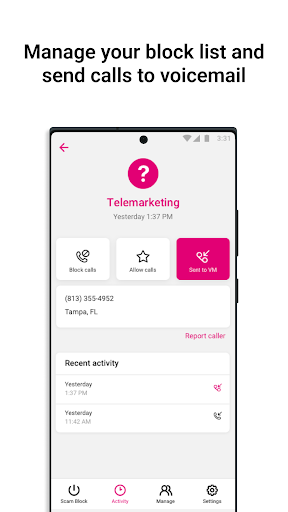
The Allow list is a small feature with a very practical purpose. Numbers on it will not be blocked by the network and will ring your phone. That matters if you use call blocking but still expect calls from a particular number. Verified Business Calls can offer another useful clue: when available, verified caller information and the reason for the call may appear on an incoming call.
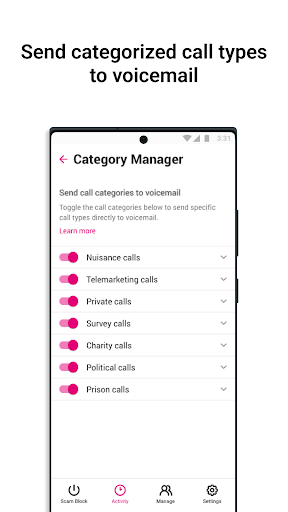
Scam Reporting gives users a way to flag suspicious callers, with the stated aim of helping prevent future calls to themselves or others. The description also names premium features: blocking specific numbers and contacts, managing allowed call categories, reverse number lookup, and voicemail-to-text readouts of blocked calls sent to voicemail. These broaden the controls, but they are distinct from the included features.
I like that the feature set covers both prevention and response. Scam Block is about stopping likely scams from reaching the phone; the Allow list helps protect calls you want; reporting contributes information about suspicious callers. Verified business information can add context at the moment of a call. None of these replaces judgment, but together they make the app more than a simple on-off switch.
A Routine for Busy Days
For a practical routine, I would first decide whether automatic blocking fits the kinds of calls I receive. If I rely on unfamiliar numbers for work or appointments, I would pay close attention to the warning that Scam Block can block calls I want. I would keep the Allow list in mind for numbers that should ring, then revisit the choice if a needed call does not get through.
After a suspicious call, reporting it is a straightforward next step described by the app. If a number is unfamiliar but not clearly suspicious, Caller ID or available verified business details may help provide context before I decide what to do. This kind of occasional review is more realistic than constantly changing settings. The point is to make the controls fit a normal day, not to turn call screening into another chore.
Limits to Keep in View
The main limitation is the service requirement: Scam Shield’s protections are for customers with qualifying T-Mobile service and a capable device. It is not a carrier-neutral option, so its appeal depends on your existing phone service. The app also concentrates on calls, which means it should not be mistaken for a wider tool covering texts, email, or other security concerns.
Automatic blocking involves a trade-off. T-Mobile’s description explicitly notes that Scam Block might block calls you want and says it can be disabled at any time. That caveat matters if you expect calls from new clients, service providers, or other numbers outside your contacts. Caller ID and scam detection offer clues, but the app does not remove the need to decide how much interruption you are willing to risk.
Some controls are labeled premium, including personal number blocking, Category Manager, reverse number lookup, and voicemail-to-text for blocked calls sent to voicemail. The facts provided do not give a separate price for these options, so I would check their availability and terms in the store or within the service. The included call protections are useful on their own, but expectations should match the features available to your account.
T-Mobile Scam Shield is a focused set of call protections rather than an all-purpose phone app. Scam ID, Caller ID, Scam Block, reporting, and the Allow list address common frustrations with suspicious or unwanted calls. I especially appreciate the clear warning that automatic blocking can catch calls you wanted, because that is the key trade-off to consider.
I would recommend it to T-Mobile customers who want more control over incoming calls and are comfortable reviewing their blocking choices. If you need a carrier-independent tool or broad security features, look elsewhere. For the right customer, Scam Shield offers a practical place to manage call protections without making the task more complicated than it needs to be.
T-Mobile Scam Shield Frequently Asked Questions
What is T-Mobile Scam Shield used for?
T-Mobile Scam Shield helps customers manage call protections such as Scam ID, Scam Block, caller information, and scam reporting. It also includes an Allow list for numbers that should not be blocked by the network. Verified Business Calls may show business details and a reason for calling when available. Qualifying T-Mobile service and a capable device are required.
Which phones and platforms support T-Mobile Scam Shield?
T-Mobile Scam Shield is an Android app available through Google Play. The supplied app details do not give a minimum Android version, and the description requires a capable device. Check the Google Play store for the Android requirement that applies to your phone. The protections also require qualifying T-Mobile service, so device compatibility alone may not be enough.
Does T-Mobile Scam Shield cost anything?
The app is free to download on Google Play, and the supplied facts say it has no in-app purchases and contains no ads. The description identifies some controls as premium features, but does not provide separate pricing or terms for them. Check the store or service details for current availability and any conditions that may apply to those options.
Can T-Mobile Scam Shield block calls I need?
It can happen: the service description warns that turning on Scam Block might block calls you want. It also says you can disable Scam Block at any time. The Allow list can help by ensuring numbers on it are not blocked by the network. If you depend on unfamiliar callers, consider that trade-off when choosing how to use the protections.
Who should use T-Mobile Scam Shield?
It is best suited to T-Mobile customers who want tools for identifying, blocking, and reporting suspicious calls, along with caller information and an Allow list. It may not suit people without qualifying T-Mobile service or anyone seeking a broader security or communications app. Specific feature availability and device requirements can vary, so check Google Play and your service details.
Pros
- Combines caller information, scam identification, reporting, and network-level blocking controls.
- An Allow list can keep selected numbers from being blocked by the network.
- Verified Business Calls may show business details and a reason for calling.
- Free to download, with no ads or in-app purchases in the supplied facts.
Cons
- Requires qualifying T-Mobile service and a capable device.
- Scam Block may also stop calls you wanted to receive.
- Several additional controls are described as premium features.
- Category
- Communication
- Version
- 6.0.0.3627