Photo Translator - Translate
- 536.27K
- 3.9
- Installs
- 10.00M
- Price
- Free
Screenshots
Analysis by Reviewed APKs
Photo Translator - Translate turns text in a photo into a translation, which is useful when a sign, menu, or page is easier to photograph than type. I see it as a handy companion for travelers and language learners who need a quick read of printed words. Its camera-based approach is straightforward, though it is best treated as a practical aid rather than a substitute for careful translation.
A quick read on the road
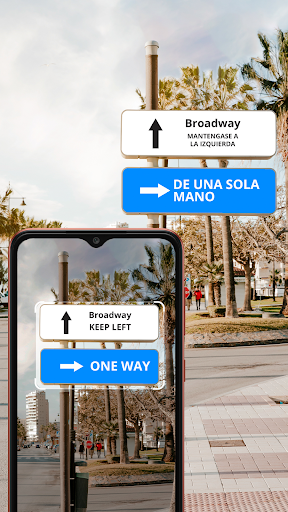
Imagine arriving somewhere new and finding a menu you cannot read. With Photo Translator, I can point my phone’s camera at the text, take a photo, and get a translation displayed over the original words. That keeps the task simple: capture what is in front of me, then use the translated image to work out what I am looking at without first typing unfamiliar letters.
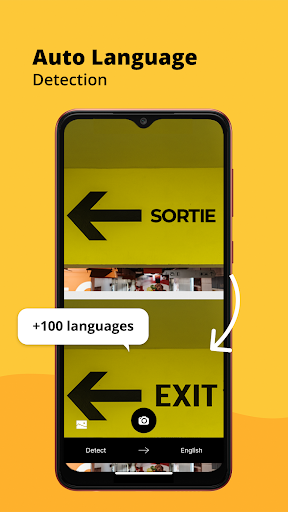
The same basic job makes sense for a station sign, a label, or a short printed notice. Automatic language detection can help when I do not know which language I am facing, while OCR is the step that identifies text in the image. I would still check the result against context, especially for small or dense print, but the photo-first workflow is a useful shortcut in everyday situations.
A camera tool, not a course
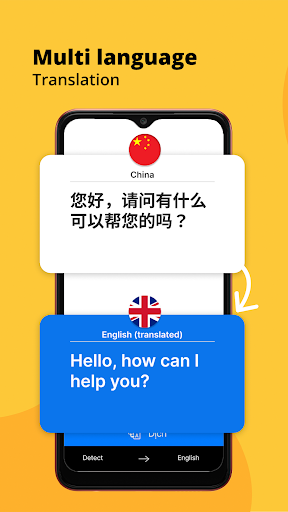
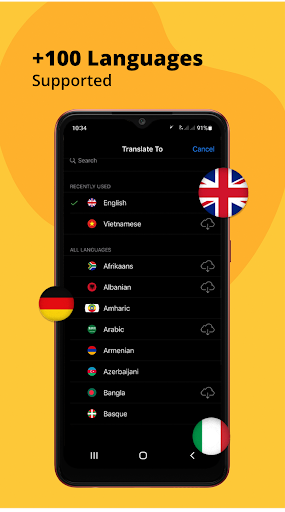
The app is focused on translating text found in images. That makes it different from a general-purpose language study routine: its main value is helping me interpret words already printed on something, rather than teaching grammar or building a vocabulary lesson. Support for more than 100 languages gives it broad reach, and automatic detection makes the first step less fiddly when I am unsure what language to select.
I would keep a typed-text translator or a conversation-focused tool in mind for tasks that do not start with a photo. Photo Translator is not presented as a full language-learning program, nor does the supplied feature description promise live spoken translation. For a quick sign or menu check, its narrow focus is sensible; for a long conversation or a detailed document, I would choose a tool suited to that job.
Small habits that help
I would make a habit of framing only the words I need before taking a picture. A tighter image gives the OCR less unrelated material to interpret, and it is easier to compare the translated text with the original when the photo is not crowded. For a menu, that might mean capturing one section at a time rather than trying to fit the entire page into a single shot.
It also helps to think about the language pair before a trip or study session. The app supports a broad range of languages, but the useful routine is simply to know what I am trying to read and review the translation in context. If a phrase looks odd, I would capture it again or compare nearby text rather than relying on one result as the final word.
More From Our News Desk

Zoom Meetings, Google Meet, or Teams: Which Is Easiest to Join?

How I Build a Free Streaming Lineup With Tubi

Why Crunchyroll Is the Default Anime App for So Many Fans

YouTube TV: A Practical Guide to Cutting Cable

Rummikub and the Small Comfort of Phone Games

TeamViewer Remote Control or AnyDesk for Helping Family?
Who will find it useful
I would recommend Photo Translator to travelers who often meet unfamiliar printed text, students who want a quick first pass over foreign-language material, and anyone who occasionally needs to understand a label or notice. Its camera-and-photo approach is easy to grasp, and the combination of OCR, automatic language detection, and broad language support makes it appealing when typing the source text would be inconvenient.
It may be less satisfying for someone looking for structured lessons, a dedicated spoken conversation tool, or a careful translation of lengthy, complex writing. Image-based translation depends on readable text and context, so I would not expect every phrase to come through perfectly. People who only need to translate a few typed words may also find the photo workflow more than they need.
Photo Translator - Translate is an Android tools app from EVOLLY.APP. Google Play shows more than 10 million installs and a 3.9-star rating from about 536,000 ratings. It is free to download, contains ads, and offers in-app purchases. The listed in-app product prices range from $0.99 to $43.99 per item.
The app has an Everyone content rating. Its listed version is 9.1.0, with a release date of April 10, 2017, and a last update date of August 21, 2026. The minimum Android version is not included in the supplied app facts, so anyone checking device compatibility should consult the Google Play store entry.
Putting Photo Translation to Work
First impressions
When I first opened the idea of this app, what stood out was how little the core task asks of me: use the phone camera to capture text, then read its translation on the image. That is a more natural fit for a sign or menu than copying unfamiliar characters into a text box. The overlay also keeps the translated words visually tied to the material I photographed.
The feature description points to automatic language detection and OCR as part of the process, so there is less emphasis on manually identifying every source word. I would approach setup with a particular language pair in mind and test the app on a short, clear piece of text first. That gives me a sensible feel for the results before relying on it while rushing through a station or ordering food.
The everyday experience
Day to day, the most useful part is the directness. I can encounter text, photograph it, and get a translation without first knowing how to spell or type the source language. That is especially convenient for scripts I cannot read. The translated words appearing over the original image also make it easier to connect a phrase with its place on a sign or page.
The experience naturally depends on the photo. Clear, well-framed text is a better starting point than a cramped image full of small print, so I would take a moment to aim carefully rather than snap in a hurry. I would also treat the result as a quick reading aid: context matters, and an awkward-looking translation deserves a second look before I act on it.
Language reach and OCR
The standout combination is OCR with support for more than 100 languages and automatic language detection. Together, those features address the two awkward parts of photo translation: recognizing what the image says and figuring out what language it is. That broad selection makes the app potentially useful across travel and study situations rather than limiting it to a small set of common languages.
I also like the translated-text overlay as a practical design choice. Instead of separating the result entirely from the source image, it presents the translation in relation to the original text. That can help when scanning a menu or notice with several short entries. It does not remove the need to check meaning, but it keeps the central task grounded in the photo I took.
A travel-day routine
For a simple travel routine, I would use Photo Translator when I reach a sign or menu that I cannot make sense of at a glance. I would frame one useful section, take the photo, and read the translated text against the surrounding context. If the result seems unclear, I would capture a closer image of that specific area rather than trying to interpret a whole page at once.
The same approach works for a study session with a short passage or a printed label. I would use the translation to get an initial sense of the text, then return to any phrase that seems important or confusing. This keeps the app in a supportive role: it can reduce the effort of getting started, while my own judgment still decides whether the result fits the situation.
Keep expectations practical
Photo translation has an obvious constraint: the words need to be visible enough for OCR to identify them. Small print, unusual layouts, or a photo that includes too much surrounding material can make the task harder. The supplied description explains the camera, OCR, language detection, and language range, but does not promise that every image will produce a clean or contextually perfect translation.
I would also keep the app’s scope in view. It is built around text in photos, not described as a full language course or a spoken conversation service. Ads and in-app purchases are part of the Google Play offer, so those are worth considering alongside the free download. For occasional visual translation, that trade-off may be fine; heavy users should check the current store details.
Photo Translator - Translate makes a specific job approachable: photograph unfamiliar text and see a translation placed over the image. OCR, automatic language detection, and support for more than 100 languages give it a useful foundation for travel and study. Its best role is a quick first read, with context and common sense filling in the gaps.
I would try it if I regularly need to understand printed words in another language and prefer pointing a camera over typing. I would look elsewhere for structured lessons or conversation-focused translation. The free download lowers the barrier to trying it, while ads and optional purchases are worth keeping in mind.
Photo Translator Frequently Asked Questions
What is Photo Translator - Translate used for?
Photo Translator - Translate is used to scan text in a photo and show a translation over the original text. Its features include OCR, automatic language detection, and support for more than 100 languages. It is suited to quick visual reading, such as checking a sign, menu, or short printed passage.
Which devices can run Photo Translator - Translate?
Photo Translator - Translate is an Android app distributed through Google Play. The supplied app information does not give a minimum Android version, so check the Google Play store entry for compatibility with a particular device. The app’s core task uses the phone camera to capture text in an image.
Does Photo Translator - Translate cost money?
The app is free to download and contains ads. It also offers in-app purchases, with listed item prices ranging from $0.99 to $43.99. Store offers and pricing can change, so check the Google Play entry for the current details before making a purchase.
Does Photo Translator - Translate need a specific Android version?
A minimum Android version is not included in the supplied facts. Because device requirements can change with app updates, check Photo Translator - Translate’s Google Play store entry to see whether it supports your phone or tablet. The listed app version is 9.1.0.
Is Photo Translator - Translate right for language learners?
It can be useful for learners who want a quick reading aid for text in photos, thanks to OCR and automatic language detection. The app is focused on translating images rather than providing structured lessons. If you want a broader study or conversation experience, this may not cover everything you need.
Pros
- Translates text captured in photos, with results shown over the original image.
- Automatic language detection can reduce guesswork when reading unfamiliar text.
- Supports more than 100 languages for a wide range of travel and study needs.
- Free to download and focused on a clear, practical task.
Cons
- Image translation depends on text being clear and readable in the photo.
- Ads and in-app purchases are part of the free app experience.
- Its photo-focused role may not suit conversation translation or structured language study.
- Category
- Tools
- Version
- 9.1.0