Camera Translator Translate AI
- 51.46K
- 3.9
- Installs
- 5.00M
- Price
- Free
Screenshots
Analysis by Reviewed APKs
Camera Translator Translate AI is a phone-based tool for reading unfamiliar writing and identifying objects through a camera. I found its basic idea useful for travel, shopping, and the occasional label I cannot make sense of at home. It combines image text translation with object recognition, so it suits people who want quick visual help more than a full language-learning or conversation app.
A Menu, Sign, or Label
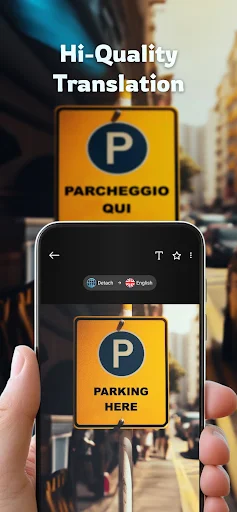
Picture arriving somewhere new, standing in front of a menu, and trying to decide what to order without recognizing the writing. Camera Translator Translate AI is built for that kind of moment: I can point the phone at text on a sign, menu, or product package and use the camera-based translation to understand it in my chosen language. It is a practical way to get a first read without typing unfamiliar characters by hand.
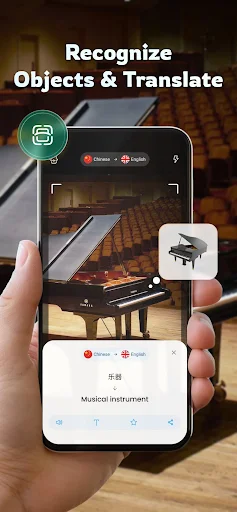
The same approach works for everyday errands. If a package has directions or a label I cannot read, I can use the camera rather than switching between looking at the item and entering its words elsewhere. The app also has an object translation mode that identifies a photographed object and translates its name. That makes it handy for a quick vocabulary clue, though it is not a substitute for carefully checking important instructions.
A Visual Tool, Not a Course
Compared with a conventional text translator, the main appeal here is starting with what the camera sees. I do not have to transcribe a sign before getting help with it, and automatic language detection is intended to remove another step. For a traveler scanning menus or someone trying to understand packaging, that visual-first approach can be more convenient than opening a blank text field and typing.
I would not choose it as a language course or a full conversation tool. The described features focus on translating text in images and identifying objects, not teaching grammar or translating a live two-person conversation. It is best treated as a quick aid for isolated words and passages. When wording is important or the camera view is unclear, I would still seek a more reliable way to verify the meaning.
Make Camera Checks Easier
A little care when aiming the camera can make this kind of workflow less frustrating. I try to hold the phone steady, frame the words I actually need, and avoid including several unrelated blocks of text at once. On a menu, that means starting with one section rather than trying to capture the whole page. A clearer, more focused image gives the app a better chance of recognizing the right text.
I also find it useful to treat the result as a starting point rather than a final answer. I can scan a short sign first, note the translation, then move on to the next one instead of rushing through a crowded scene. For object mode, photographing one item at a time keeps the request clear. These small habits suit quick errands and sightseeing without turning the app into a complicated routine.
More From Our News Desk

Zoom Meetings, Google Meet, or Teams: Which Is Easiest to Join?

How I Build a Free Streaming Lineup With Tubi

Why Crunchyroll Is the Default Anime App for So Many Fans

YouTube TV: A Practical Guide to Cutting Cable

Rummikub and the Small Comfort of Phone Games

TeamViewer Remote Control or AnyDesk for Helping Family?
Who may find it useful
I would recommend Camera Translator Translate AI to people who often encounter unfamiliar printed language and want a camera-based shortcut. Travelers may appreciate using it on signs and menus, while shoppers can try it on packaging. It may also help someone who is curious about the name of an object in another language. The appeal is strongest when the task is brief and visual, rather than a long exchange that needs nuance.
It may not suit someone looking for structured lessons, detailed explanations of grammar, or live conversation support. I would also be cautious about relying on a camera translation for anything where a small wording error could matter. The app is a tool for getting oriented, not a replacement for careful review. If you mainly translate typed messages, a text-first translator may fit your routine better than opening a camera-centered app.
Camera Translator Translate AI is developed by EVOLLY.APP and is available on Google Play for Android. The app is free to download, with ads and in-app purchases. Google Play shows more than 5 million installs and a 3.9-star rating from about 51,000 ratings. Its content rating is Everyone, making the store’s age classification broad rather than aimed at a specific older audience.
The current version shown is 2.2.6. The app was released on August 12, 2019, and was last updated on October 7, 2025. In-app product prices range from $1.99 to $43.99 per item. Google Play does not provide an Android minimum version in the supplied app details, so users should check the store page on their device for compatibility.
How Camera Translation Fits Real Life
First Look and Setup
When I first opened the idea of this app, what stood out was how direct its purpose is: use a phone camera to make unfamiliar text easier to understand. That is a narrower promise than a general language suite, and I like that the central task is easy to picture. Point at printed words, capture or scan the view, and get a translation rather than manually typing every character.
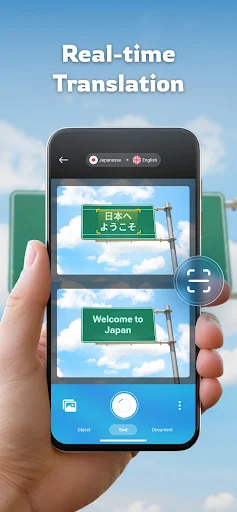
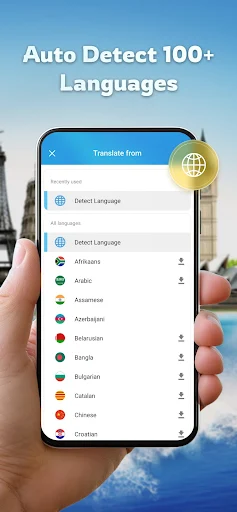
The app is described as automatically detecting more than 150 languages in an image. That can be useful when I do not know which language I am looking at, especially while traveling through places with mixed signage. I would still want to check that the chosen target language is what I intended. Automatic detection removes a decision, but the translation is only helpful if the output language fits the situation.
The Daily Camera Routine
In everyday use, the camera is the point of difference. A printed menu, a street sign, or a product package can be approached as an image instead of a typing exercise. I can imagine using it while standing in a shop aisle or pausing beside a sign, when I need a quick sense of what is in front of me and do not want to copy text character by character.
The experience is most naturally suited to short, self-contained checks. A few words on a label are easier to act on than a dense page, and quick translations fit better into a busy day than long sessions. I would keep expectations practical: camera recognition and translation are processes, not magic. For an unclear image or an ambiguous phrase, it is sensible to take another look rather than assume the first result captures every nuance.
Text and Object Modes
The standout feature is text translation through the camera, including an overlay of translated wording on the image. That can make it easier to connect the translated text with the original sign or packaging, instead of mentally matching a block of translated text to a separate photo. It is a useful idea for quick orientation when the original writing is unfamiliar and the physical item is still right in front of me.
Object translation adds a different kind of help. The app can capture an image, identify an object, and translate its name into the selected language. I see that as a small vocabulary aid: useful for learning what an everyday item is called, or getting a clue about something I have not encountered before. It is distinct from recognizing text, so it offers another reason to open the camera even when there are no printed words.
Language coverage is another notable part of the pitch. The description names familiar languages such as English, Spanish, French, German, Chinese, Japanese, Korean, and Arabic, among many others, and describes support for more than 150 languages. That breadth is appealing for travel, though the best practical test is still the particular language pair and image I need to handle.
A Useful Travel Habit
For a travel day, I would use the app in small bursts rather than leave it running as a constant companion. At breakfast, I might check a menu; while walking, I could scan a sign; later, I might look at a product label in a shop. Each task has a clear beginning and end, which makes the camera approach feel more manageable than trying to translate everything in the environment.
I would start with the most important words in view and keep the phone steady. If a result seems odd, I would reposition the camera and try a clearer image, or compare the translation with other context around me. Object mode could come in when I want a quick name for a visible item. Used this way, the app is a handy companion for curiosity and basic navigation, not the sole basis for a consequential decision.
Limits to Keep in Mind
Camera-based translation depends on being able to see the writing or object clearly. A cramped view, small lettering, or a busy background can make a quick scan less straightforward, so I would not expect every snapshot to be equally useful. Automatic language detection is convenient, but a tool still has to interpret what it can recognize. A translation that looks plausible may still miss tone, context, or a less common meaning.
The feature set described is focused on visual text and object translation. It does not make this a course, a dictionary with detailed language lessons, or a live conversation translator. That is not a flaw if the camera is what I need, but it matters when choosing an app for a different job. Ads and in-app purchases are also part of the Google Play details, so the free download does not mean every aspect is necessarily ad-free or included.
I would be particularly careful with instructions or wording where accuracy matters. A camera translation can help me understand the general subject, but it should not be treated as authoritative for a high-stakes choice. For everyday travel and casual reading, a quick translation can be enough to get oriented; for anything more important, I would verify the meaning through an appropriate source.
Camera Translator Translate AI has a clear, useful niche: it turns a phone camera into a way to read unfamiliar text and get translated names for objects. I like the practical focus and the mix of text and object modes. Its strengths are most apparent in short, everyday moments when typing the source language would be a nuisance.
I would try it if I regularly travel, shop across language barriers, or want a quick visual translation tool. I would look elsewhere if I needed lessons or live conversation support, and I would verify anything consequential. For casual camera-based help, it is a sensible app to consider, with ads and optional purchases worth keeping in mind.
Camera Translator Frequently Asked Questions
What is Camera Translator Translate AI used for?
Camera Translator Translate AI is used to translate text seen through a phone camera, such as writing on signs, menus, or product packaging. It also offers an object mode that identifies a photographed item and translates its name. The app describes automatic detection for more than 150 languages, making it useful for quick visual checks when the source language is unfamiliar.
Which devices support Camera Translator Translate AI?
Camera Translator Translate AI is listed on Google Play for Android devices. The supplied app details do not specify a minimum Android version, and compatibility can depend on the device and current store requirements. Check the Google Play page from your phone for the latest compatibility information before installing.
Is Camera Translator Translate AI free?
The app is free to download on Google Play. It contains ads and offers in-app purchases, with listed item prices ranging from $1.99 to $43.99. What a particular purchase includes can vary, so review the current Google Play details before buying.
Does Camera Translator Translate AI need a particular Android version?
The supplied app information does not state a minimum Android version. Requirements can change as the app and Android devices are updated, so check the Google Play page on the device you plan to use. That is the best place to confirm whether your phone is currently compatible.
Who is Camera Translator Translate AI best for?
It is best suited to people who want quick camera-based help with unfamiliar printed text or object names, including travelers and shoppers. It may not suit someone seeking structured language lessons or live conversation translation, since the described features focus on images and objects. Treat results as a useful aid, and verify wording when accuracy is especially important.
Pros
- Translates text through the camera, avoiding manual transcription of unfamiliar writing.
- Object mode can identify a photographed item and translate its name.
- Automatic detection supports quick checks when the source language is unclear.
- Useful for brief real-world tasks such as reading signs, menus, and packaging.
Cons
- Camera results depend on getting a clear view of the text or object.
- The described feature set does not cover lessons or live conversation translation.
- Google Play lists ads and in-app purchases alongside the free download.
- Category
- Tools
- Version
- 2.2.6