Phantom: Trading Wallet
- 64.25K
- 4.8
- Installs
- —
- Price
- Free

Screenshots
Analysis by Reviewed APKs
Phantom: Trading Wallet is an iOS app for buying, swapping, holding, and exploring cryptocurrency across several blockchain networks. It may suit people who want a wallet and market-discovery tools together, rather than a separate app for every task. My overall take is that Phantom brings a broad set of crypto activities into one place, though its range of trading and market features makes it a better fit for engaged users than for anyone seeking a simple cash-only wallet.
A wallet for a busy day
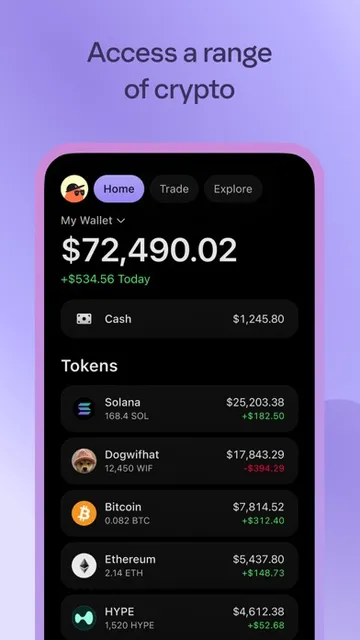
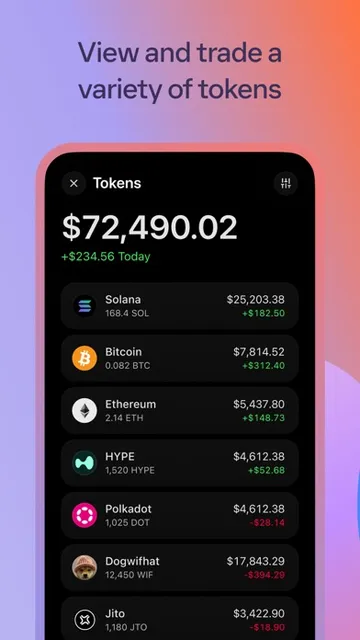
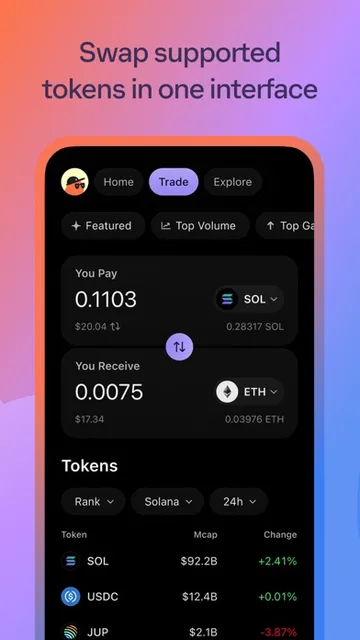
Imagine checking your crypto during a lunch break: you want to see what you hold, look at a token that caught your attention, and perhaps swap one asset for another. Phantom is designed to keep those jobs together. Its wallet supports Bitcoin, Ethereum, Solana, and other tokens, while its built-in swapper offers a way to make on-chain exchanges across supported networks.
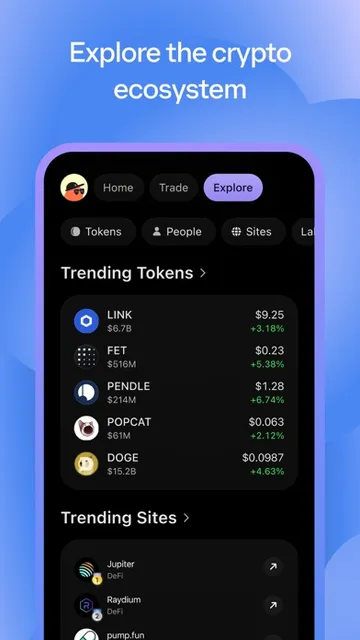
The app’s broader discovery tools add another layer to that routine. You can browse trending tokens, follow traders’ wallets, and open token chats to see discussion and live trades. I can see the appeal of having those views close to the wallet itself: there is less need to jump between apps just to explore. Still, market activity can move quickly, so browsing should not be confused with a reason to trade.
Wallet, not a market course
Compared with a basic wallet focused only on holding and sending assets, Phantom is more of an all-in-one crypto companion. It combines buying, selling, swapping, staking SOL, market discovery, and, through Phantom Cash, money transfers. The feature mix gives people already comfortable navigating crypto more to explore without leaving the app for every step.
That breadth also makes it different from an educational guide or a traditional banking app. Phantom’s description centers on managing crypto and interacting with crypto markets; it is not presented as a course for learning the fundamentals, nor as a general-purpose budgeting tool. If you mainly want to keep everyday cash organized, its token feeds, swaps, and prediction markets may feel like more than you need.
Keep a simple routine
A useful habit is to decide what you want to check before opening the app. For example, you might review your holdings, look at a particular network, or check a token category such as AI or top volume. That keeps the exploration features purposeful instead of turning every spare moment into a scroll through market activity.
It can also help to separate looking from acting. Phantom offers ways to follow wallets and watch live trades, but those signals are information to consider, not instructions. If you use the app regularly, a short routine—review, verify the asset and network, then decide whether to act—can make its many tools feel more manageable. The app also supports biometric authentication for access.
More From Our News Desk

Zoom Meetings, Google Meet, or Teams: Which Is Easiest to Join?

How I Build a Free Streaming Lineup With Tubi

Why Crunchyroll Is the Default Anime App for So Many Fans

YouTube TV: A Practical Guide to Cutting Cable

Rummikub and the Small Comfort of Phone Games

TeamViewer Remote Control or AnyDesk for Helping Family?
Who may find it useful
I’d recommend Phantom to people who already use crypto, or who are specifically looking for a self-custody wallet with buying, swapping, and discovery features in one iOS app. Its support for several networks and its mix of wallet tools, token browsing, and SOL staking give curious users plenty to investigate. People who like following market activity may also appreciate the trader-wallet and token-chat features.
It may be a poor match for someone who wants a very narrow, quiet place to store an asset and rarely interact with it. Phantom’s description includes trending tokens, market events, chats, and prediction markets alongside the core wallet. That can be a lot of activity in one product. Newcomers can create an account with an email, but anyone unfamiliar with crypto should take time to understand what they are doing before moving funds.
Phantom: Trading Wallet is developed by Phantom Technologies Incorporated and is available on the Apple App Store for iOS. The current listed version is 26.37.0. It was released on January 30, 2022, and its latest listed update was November 3, 2026. The minimum requirement is iOS 16.4.
The app is free to download, and its App Store rating is 4.8 out of 5 from 64,254 ratings. Its content rating is 17+. The supplied store details do not include an install count, and they do not provide information about in-app purchases or advertising.
A closer look at Phantom
Starting with the wallet
Phantom presents itself as a place to get started with crypto as well as a wallet for people already active in it. The setup described by the app is straightforward in outline: create an account with an email, fund the wallet, and begin using its trading tools. I like that the starting point is clear, even though the choices that follow can be more involved than the account creation itself.
The app emphasizes self-custody, meaning users control their funds and keys. It also describes biometric authentication and says the wallet has been independently audited. Those are relevant parts of its security approach, but they do not remove the need to take care with account access and transactions. Phantom also says it offers global support around the clock.
The daily wallet experience
The central job is managing crypto: buying, selling, holding, and swapping assets. Phantom supports Bitcoin, Ethereum, Solana, and thousands of tokens, with on-chain swaps available across Bitcoin, Ethereum, Solana, Polygon, Base, and HyperEVM. That is a wide set of options to have under one roof, especially for someone who moves between more than one network.
I’d expect the most useful day-to-day approach to be focused rather than trying to use every feature at once. A person might open the wallet to check an asset or make a swap, then leave the discovery tools for a separate moment. Phantom’s simple-interface description may help keep those actions approachable, but the underlying choices still involve different crypto assets and networks.
Discovery beyond balances
Phantom’s Explore area is one of its more distinctive additions to a wallet. It lets users track trending tokens by categories that include AI, majors, and top volume, and follow traders’ wallets. The app also says it provides updates on earnings and market events. These features make the product more than a place to check balances, though they also bring market watching into the same space as managing funds.
Token chat gives users a place to follow conversation and watch live trades. There are also prediction markets covering sports, financial markets, cultural moments, and other events, where users choose an outcome and manage a position. Staking SOL and Phantom Cash add still different uses: the latter is described as a way to send and receive money and swap crypto to cash, with no fees on stablecoins.
A practical check-in
For a regular check-in, I’d start with the reason I opened Phantom: perhaps to review a holding, make a planned swap, or see what is happening in a particular token category. The app supports enough different activities that a small bit of intention can be useful. It helps distinguish a practical wallet task from browsing market conversations just because they are available.
If I were exploring a new asset, I’d treat the token and trader information as context to examine, not as a shortcut to a decision. I’d also pay attention to which network a swap uses, since Phantom’s tools span several chains. That kind of deliberate workflow is especially sensible in an app where holding, trading, and market discovery sit close together.
Keep the scope in mind
Phantom’s range is its main strength, but it can also make the app feel busy for someone who only wants a basic wallet. Trending tokens, trader tracking, token chat, and prediction markets all invite attention beyond routine storage and transfers. Users who prefer a minimal experience may find that breadth distracting, even if they can simply focus on the wallet functions they need.
The app’s security language should be read in context. Self-custody means control of funds rests with the user, and biometric access is one security feature; neither makes crypto activity risk-free. Phantom’s description also mentions an independent audit and 24/7 support, but users still need to understand the assets and actions they choose. This review is about the tools, not a recommendation to buy or trade.
Phantom: Trading Wallet brings a substantial mix of crypto wallet, swap, discovery, staking, and cash features into one iOS app. I like the idea of keeping those tools together, particularly for users who already know their way around multiple networks. Its wide scope is also the main caveat: there is a lot here beyond simply holding an asset.
I’d recommend giving Phantom a look if you want a self-custody wallet with active exploration tools and are comfortable taking responsibility for your crypto. If you want a quiet, minimal wallet or a general cash-management app, it may not be the right fit. Either way, approach its market features thoughtfully and check the App Store for current details.
Phantom Frequently Asked Questions
What is Phantom: Trading Wallet used for?
Phantom is used to buy, sell, hold, and swap cryptocurrency, with support for Bitcoin, Ethereum, Solana, and other tokens. It also includes token discovery, trader-wallet following, token chat, SOL staking, Phantom Cash features, and prediction markets. The exact mix may suit active crypto users better than someone looking only for a basic place to store an asset.
Which devices can run Phantom: Trading Wallet?
Phantom: Trading Wallet is available for iOS through the Apple App Store. The minimum listed requirement is iOS 16.4. It is not an Android app according to the supplied platform information. For compatible device details and current availability, check the app’s App Store page, since store requirements and supported devices can change.
What iOS version does Phantom: Trading Wallet require?
The listed minimum requirement for Phantom: Trading Wallet is iOS 16.4. If your device is running an older version, check the App Store page for the current compatibility information before installing. The app’s version and requirements may change as it receives updates.
Is Phantom: Trading Wallet free?
Phantom: Trading Wallet is free to download on the App Store. The supplied store details do not specify whether it offers in-app purchases or contains advertising, so those details may vary or change; check the current App Store page for the latest information before downloading.
Is Phantom: Trading Wallet suitable for beginners?
Phantom says users can create an account with an email and start using the wallet, so it may be approachable for someone new to the app. However, its features cover multiple crypto networks, swaps, market discovery, and prediction markets. Beginners should be comfortable learning how those activities work and taking care with their funds before using them.
Pros
- Combines crypto holdings, buying, selling, and on-chain swaps in one iOS app.
- Supports several networks, including Bitcoin, Ethereum, Solana, Polygon, Base, and HyperEVM.
- Adds token discovery, trader-wallet following, token chat, and SOL staking.
- Includes biometric authentication and a self-custody wallet model.
Cons
- The many market and discovery features may feel busy for basic wallet users.
- Self-custody means users need to take responsibility for their funds and keys.
- Its crypto focus makes it a poor fit for general-purpose budgeting.
- Category
- Finance
- Version
- 26.37.0











