MySynchrony
- 70.52K
- 4.5
- Installs
- 5.00M
- Price
- Free

Screenshots


Analysis by Reviewed APKs
MySynchrony is a companion app for managing eligible Synchrony-issued credit cards, from checking balances and statements to scheduling payments. I’d recommend it to cardholders who want routine account tasks in one place rather than a broad budgeting or banking tool. Its focus is practical and fairly clear: keep tabs on accounts, handle payments, and find cardholder resources without needing to do everything through a desktop browser.
A quick account check
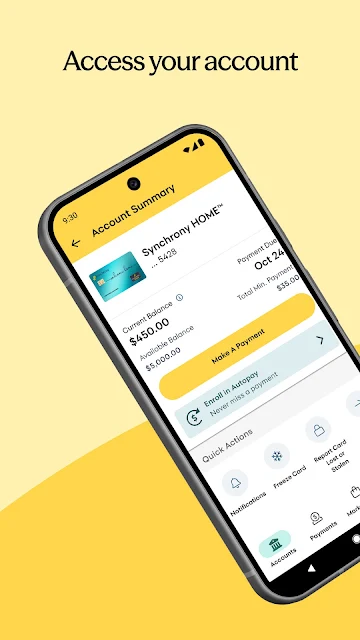
When I think about the app’s everyday role, it’s the quick check between errands: I want to see a card balance or credit limit before deciding whether a purchase belongs on that account. MySynchrony is built around those practical account details, with transaction and payment history and statements available alongside the balance. That makes it useful for answering basic questions without turning a brief check-in into a full financial planning session.
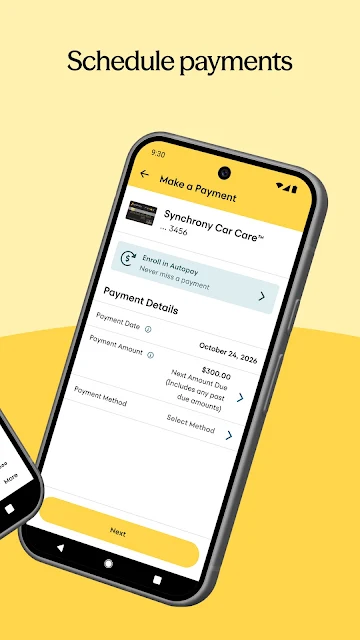
Payments are another natural part of that routine. I can use the app to schedule and manage payments, and add or remove bank accounts used to pay a bill. If I have more than one eligible Synchrony card, keeping them together gives me a single place to review them. The app’s value is less about changing how I handle money and more about making these recurring card tasks easier to reach.
A card tool, not a budget
Compared with opening separate account pages in a browser, MySynchrony puts supported Synchrony credit cards in one mobile app. That suits someone who already has one or more of those accounts and wants to check activity, statements, and payment details on a phone. Biometric authentication is available for logging in, which can make repeat access more convenient than entering credentials each time.
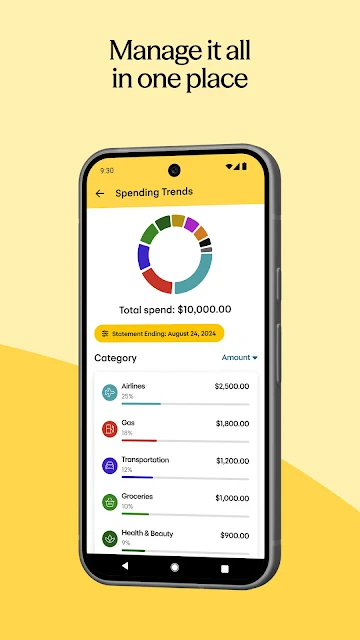
I would not mistake it for an all-purpose money manager. The described features focus on Synchrony-issued credit card accounts, not tracking every bank account, building household budgets, or managing savings. Synchrony Bank savings customers are directed to a separate Synchrony Bank app. Some Synchrony-branded card programs are also excluded, so it’s worth checking whether a particular card is supported before relying on this as its account hub.
Small habits that help
A useful habit is to check the balance and recent transaction history when reviewing the card, then look at payment history if I need to confirm a previous bill payment. Statements are available in the app too, so I can pair a quick current-account check with a more complete record when necessary. These small checks make the app feel most useful as a regular account companion rather than something opened only when a payment is due.
I’d also make time to review the statement delivery preference and keep the bank accounts used for payments current. For cardholders with several Synchrony accounts, checking each account in one place can help keep routine tasks organized. The Marketplace, Finance 101 blog, and Knowledge Center offer additional places to browse, but they’re optional extras; the strongest routine is still centered on account details and payments.
More From Our News Desk

Zoom Meetings, Google Meet, or Teams: Which Is Easiest to Join?

How I Build a Free Streaming Lineup With Tubi

Why Crunchyroll Is the Default Anime App for So Many Fans

YouTube TV: A Practical Guide to Cutting Cable

Rummikub and the Small Comfort of Phone Games

TeamViewer Remote Control or AnyDesk for Helping Family?
Who may find it useful
I’d suggest MySynchrony to people with eligible Synchrony-issued credit cards who want mobile access to balances, credit limits, statements, and payment management. It is especially relevant if you have multiple supported cards and prefer to review them together. The option to use biometric authentication may also appeal to anyone who likes a quicker way to return to an account app during an ordinary day.
It may be a poor fit if you want a complete picture of finances across many banks, a budgeting system, or savings-account management. The app’s stated purpose is narrower than that. It also won’t serve every card associated with Synchrony, since several programs are excluded. I’d check card eligibility first, and look elsewhere for tools whose main job is budgeting or managing unrelated financial accounts.
MySynchrony is developed by Synchrony and is listed as a finance app on Google Play. It has more than 5 million installs and a 4.5-star rating from about 70,500 ratings. The app is free to download, and the provided facts indicate no in-app purchases. It contains ads, and its content rating is Everyone.
The current version in the supplied app details is 6.3.1. MySynchrony was released on September 25, 2017, and its last update is dated October 26, 2026. The minimum Android version is not included in the provided details, so check the Google Play page for the requirement that applies to your device.
A closer look at everyday card management
Getting started
My first impression is that the app has a defined job: give cardholders mobile access to their Synchrony credit card accounts. The listed functions cover the basics I’d expect to return to, including balances, credit limits, statements, and payment management. Rather than promising to organize every part of someone’s finances, it stays focused on the accounts it supports.
Logging in can use biometric authentication, which is a useful convenience for an app I might open briefly to check a balance. The exact setup experience can depend on the account and device, so I wouldn’t assume every login step looks identical. The main thing to keep in mind before getting settled is whether the specific card is among those the app supports.
The daily account loop
The core experience is a familiar cycle: check account information, review activity, and take care of a payment when needed. MySynchrony lets users see balances and credit limits, review transaction and payment history, and schedule or manage payments. Those tasks work well together because they answer the small questions that tend to come up while keeping track of a card.
Statements add a more complete view than a balance snapshot, and the app also lets users manage statement delivery preferences. I like that these record-keeping tasks sit alongside payment tools rather than being treated as an unrelated feature. For someone who only needs basic card access, that practical set of functions is more relevant than a long menu of general-purpose money tools.
Useful extras beyond payments
The standout convenience is the ability to manage multiple supported Synchrony cards in one place. Users can also add or delete multiple bank accounts for bill payments, which can help keep payment options organized. These features are specific and functional; they don’t require treating the app as a comprehensive finance dashboard to see their value.
There are also resources beyond account management. The Synchrony Marketplace offers savings, deals, and partner offers, while Finance 101 provides financial-management tips. A 24/7 Knowledge Center gives cardholders access to resources and answers. I see these as useful optional destinations when a question or browsing moment comes up, rather than the main reason to install the app.
A routine that stays simple
A straightforward routine could be to open the app when reviewing a card, check the balance and credit limit, and scan recent transactions. If a bill is coming up, payment scheduling and payment history are close to the central purpose of the app. Once statements are available, reviewing them and checking delivery preferences can round out the same account-maintenance session.
For someone with several eligible cards, I’d make that review a regular habit rather than checking accounts only when something feels urgent. The app can bring those accounts together and provide a place to manage payment bank accounts. The Marketplace and Finance 101 content can be explored when useful, but there’s no need to make them part of every check-in.
Limits to keep in mind
The biggest limitation is scope. MySynchrony is for eligible Synchrony-issued credit cards, not every Synchrony-related product or every account a person may have. The description specifically excludes Venmo, PayPal Extras, PayPal Credit, TJMaxx/TJX, and eBay Extras cards. That makes checking eligibility important before treating the app as the home for a particular card.
It also isn’t the app to use for Synchrony Bank savings accounts; those customers are directed to the separate Synchrony Bank app. And while the app provides account information and financial education resources, the described feature set is not a budgeting or whole-finance tracking system. Anyone looking for those broader tools should choose an app designed around that purpose.
MySynchrony makes the most sense as a focused companion for eligible Synchrony cardholders. The combination of balances, transaction and payment history, statements, and payment controls covers a useful set of recurring tasks, with account resources and offers as extras. I appreciate that its purpose is straightforward, provided the card you use is supported.
I’d recommend giving it a look if you want to manage a supported Synchrony credit card from your Android phone. I would skip it as a general budgeting solution or a way to manage savings accounts. Before relying on it, confirm that your particular card is included and that your device meets the app’s current requirements.
MySynchrony Frequently Asked Questions
What is MySynchrony used for?
MySynchrony is used to manage eligible Synchrony-issued credit card accounts. Its described tools include checking balances and credit limits, reviewing transaction and payment history, viewing statements, managing statement delivery preferences, and scheduling or managing payments. It also includes the Synchrony Marketplace, Finance 101 blog, and a Knowledge Center for cardholder resources.
Which devices can run MySynchrony?
MySynchrony is available for Android through Google Play. The provided app details do not give a minimum Android version, so the requirement may vary as the app changes and is worth checking on its Google Play page. The app description covers mobile account management for eligible Synchrony-issued credit cards.
Does MySynchrony cost anything?
MySynchrony is free to download, and the provided facts show no in-app purchases. The app is marked as containing ads. For any changes to pricing or store details, check the current Google Play page before installing.
Can I use MySynchrony for savings accounts?
The app is focused on eligible Synchrony-issued credit cards, not Synchrony Bank savings accounts. The description directs savings customers to the separate Synchrony Bank app. MySynchrony also excludes some card programs, including Venmo, PayPal Extras, PayPal Credit, TJMaxx/TJX, and eBay Extras, so check whether your card is supported.
Who is MySynchrony best suited for?
It is best suited to cardholders who want to check and manage supported Synchrony credit card accounts from an Android phone. It may not suit people looking for a broad budgeting app, management for unrelated bank accounts, or savings-account access. The specific cards supported are limited, so confirm eligibility in the app’s store information.
Pros
- Brings supported Synchrony credit card accounts together in one mobile app.
- Combines balances, statements, transaction history, and payment management.
- Includes biometric login and a Knowledge Center for cardholders.
- Offers optional Marketplace deals and Finance 101 educational content.
Cons
- Several Synchrony-associated card programs are excluded from the app.
- It is not intended for savings accounts or broad household budgeting.
- The minimum Android requirement is worth checking before installation.
- Category
- Finance
- Version
- 6.3.1











