myCadillac
- 29.89K
- 4.6
- Installs
- 500.00K
- Price
- Free

Screenshots
Analysis by Reviewed APKs
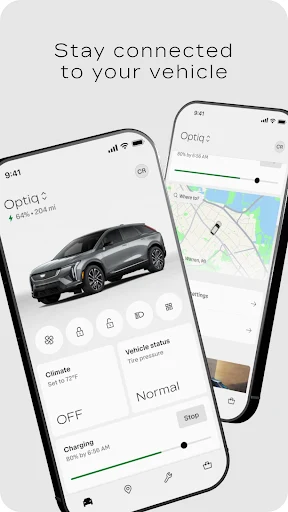
myCadillac is a companion app for owners who want to check on their vehicle and handle a few useful tasks from a phone. It brings remote controls, vehicle information, charging tools, trip planning, and service options together. I’d look at it as a practical extension of owning a compatible Cadillac, rather than a replacement for the car’s controls or a general-purpose navigation app. Its usefulness depends on the vehicle and available services.
A smoother start to the day
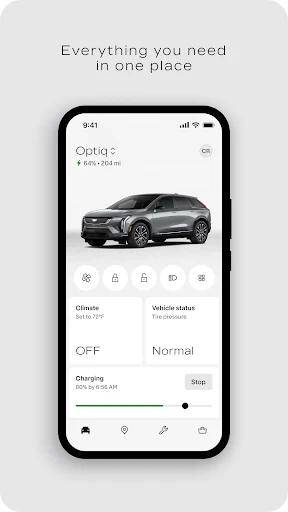
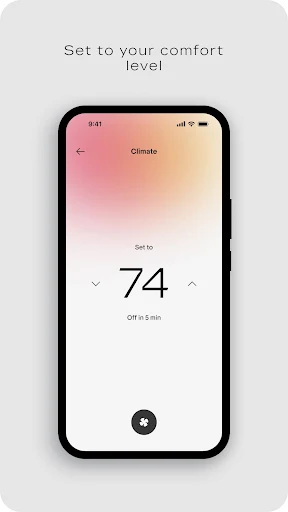
Picture a weekday morning when the weather has made getting into the car less appealing. With a supported Cadillac and service plan, myCadillac lets me remotely start the vehicle and set a preferred cabin temperature before heading outside. I can also check fuel level, tire pressure, and oil life from the phone. That means fewer small uncertainties at the door and a quick look at the car’s status before I leave.
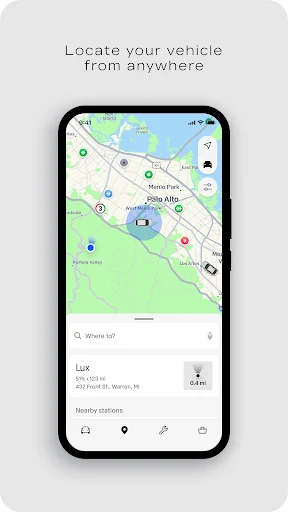
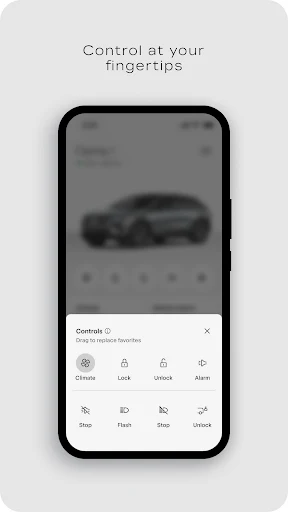
The same idea works at the other end of a busy day. If I forget whether I locked the car, the app offers remote lock and unlock controls. When I’m in a large parking area, I can use the vehicle-locating feature to help find it. These are simple jobs, but they suit a phone app well: I’m already carrying my phone, and the information is handy when I’m away from the driver’s seat.
A companion, not a replacement
Compared with checking a dashboard, myCadillac is useful when I’m away from the vehicle and want a quick status check or remote action. Its vehicle-specific tools are the main distinction from a standalone maps app or a generic trip planner. Charging status and charging-station locating are especially relevant to owners of supported electric vehicles, while fuel and maintenance information matter to other owners.
I wouldn’t choose it as my only navigation tool or expect every feature to work on every Cadillac. The app can plan trips and provide maps, but its central purpose is connecting an owner to a vehicle. Availability varies with the vehicle, device, country, and enrolled plan, and some functions need a data connection. Drivers without a compatible Cadillac have little reason to install it.
Make checks part of a routine
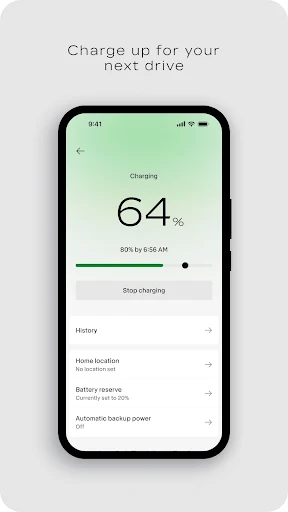
The app makes the most sense when I use it for a few quick checks rather than treating it as something to monitor constantly. A glance at fuel, tire pressure, or oil life before a longer drive can help me decide whether I should deal with anything before setting off. Electric-vehicle owners can check charging status and look for charging stations when planning a trip.
I’d also keep the remote controls tied to a clear moment: setting the cabin before departure, locking the vehicle after parking, or finding it again in an unfamiliar lot. For maintenance, the service scheduling and dealership tools give the app another practical role. A short check now and then is more useful than opening it without a specific task in mind.
More From Our News Desk

Zoom Meetings, Google Meet, or Teams: Which Is Easiest to Join?

How I Build a Free Streaming Lineup With Tubi

Why Crunchyroll Is the Default Anime App for So Many Fans

YouTube TV: A Practical Guide to Cutting Cable

Rummikub and the Small Comfort of Phone Games

TeamViewer Remote Control or AnyDesk for Helping Family?
Who will get the most from it
I’d recommend myCadillac to people who own a supported Cadillac and like having vehicle information and basic remote actions close at hand. It is particularly appealing if you often want to check the car from indoors, prepare the cabin before a drive, manage charging, or arrange service. The app gathers several ownership tasks in one place, which can save a little friction during ordinary routines.
It may be less useful to someone who prefers to do everything from the car itself, or whose vehicle and plan do not support the functions they want. It is also not a general driving app for people without a Cadillac. Since features vary by vehicle, device, and plan, I’d check which functions apply to a specific car before making the app part of a regular routine.
On Google Play, myCadillac is published by General Motors (GM) and has more than 500,000 installs. It has a 4.6-star rating from about 29,900 ratings. The app is free to download, and the provided store facts show no in-app purchases or ads. Its content rating is Everyone.
The current version listed in the provided facts is 8.20.0. The app was released on October 27, 2010, and its last update is dated October 29, 2026. Android version requirements can vary over time, so it is worth checking the Google Play page for the requirement that applies to your device.
Everyday Cadillac Tasks From Your Phone
A straightforward first impression
When I first opened myCadillac, the appeal was easy to understand: it is meant to keep vehicle tasks within reach when I’m not sitting in the car. The feature set covers several different ownership moments, from checking vehicle condition to preparing the cabin and arranging service. That makes it more of a practical dashboard for ownership than a single-purpose remote starter.
Getting value from it starts with having a compatible Cadillac and the appropriate services available. The app’s own disclosures make clear that functionality depends on the vehicle, device, and plan, and that a data connection is required. I’d approach setup with those dependencies in mind, then focus on the controls and information that match the car I actually drive.
Useful between drives
The day-to-day appeal is being able to handle small vehicle questions without walking outside or turning the car on. I can check items such as fuel level, tire pressure, and oil life, then use remote start, lock, or unlock when the situation calls for it. Those tools are most useful when they answer a specific question or save a step.
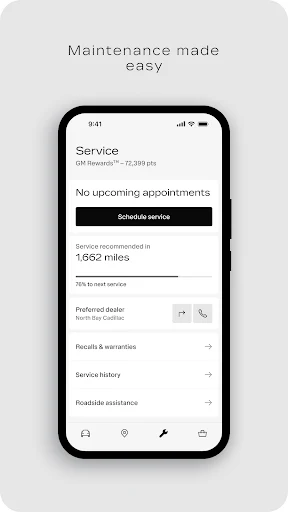
I also like that the app addresses more than the moment of departure. Service scheduling and dealership finding fit the less frequent jobs that still come with vehicle ownership. Roadside Assistance is another option when help is needed, though its availability and providers vary by country. That range gives the app a role beyond remote controls.
Features for different vehicles
The feature mix is broad, but not every owner will use every part. Remote start and door controls are the obvious conveniences, while vehicle health details make routine checks easier. The app also lets owners set a preferred cabin temperature, which pairs naturally with preparing the vehicle before a drive.
For supported electric vehicles, charging status and charging-station locating add a different kind of usefulness. Trip planning and maps can help when organizing a journey, and roadside help and service tools cover ownership needs that arise less often. I appreciate that these sit alongside the everyday status checks, though the exact selection depends on the vehicle and enrolled plan.
A practical weekly rhythm
A simple routine might be to check the vehicle before a weekend drive, especially if it has been parked for several days. I’d look at the available fuel, tire-pressure, and oil-life information, then plan the route in the app if maps are useful for that trip. An electric-vehicle owner could check charging status and locate charging stations as part of the same preparation.
On an ordinary morning, the rhythm can be even lighter: set the cabin temperature or remotely start the vehicle when appropriate, then lock it from the app after parking if needed. If a service task comes up, dealership finding and appointment scheduling provide a route to handle it. The app feels most useful when it supports these occasional, concrete tasks rather than demanding attention.
Keep the limits in view
The biggest caveat is that this is a vehicle-connected service, not a universal remote-control app. Features and functionality vary by vehicle, device, and plan, and mobile functions require a data connection. That means an owner should not assume that a feature shown as part of the app will be available for their particular car.
There are also regional limits around maps and roadside service. Map coverage and functionality differ by country, while roadside availability and providers vary by location. These are sensible details to check before relying on a particular tool for a trip. For owners whose vehicle supports the features they want, the app is a useful convenience; for everyone else, its appeal narrows quickly.
myCadillac makes a good case for keeping a few ownership tasks on the phone. Remote controls, vehicle checks, charging information, maps, service scheduling, and roadside help give it practical range without changing its central role as a Cadillac companion. I’d use it for quick checks and occasional actions, not as a substitute for the car itself.
I recommend it to Cadillac owners whose vehicle and plan support the functions they care about. The experience is less compelling if you do not own a compatible vehicle or want a general navigation app. Check the availability of specific features for your car, and it can be a useful addition to an everyday ownership routine.
myCadillac Frequently Asked Questions
What is myCadillac used for?
myCadillac is a vehicle companion app for checking information and handling selected tasks from a phone. Depending on the vehicle and available plan, it can offer remote start, lock and unlock, vehicle health details, cabin temperature settings, charging information, trip planning and maps, roadside assistance, and service or dealership tools.
Which phones and devices support myCadillac?
The provided store information is for the Android app on Google Play. The app’s mobile functionality is available on select devices and requires a data connection. Device and vehicle compatibility affect which features work, so check the Google Play page and the details for your Cadillac before relying on a particular function.
What Android version does myCadillac require?
The Android version requirement can vary as the app is updated and as device support changes. Check the current Google Play page for the requirement that applies to your phone. Also keep in mind that the app’s features and functions vary by vehicle, device, and enrolled plan.
Does myCadillac cost money to use?
The app is free to download on Google Play, and the provided facts show no in-app purchases or ads. Some vehicle services and functions depend on the plan you are enrolled in, so app download cost does not necessarily describe the availability of every connected feature. Check the store and service details for your vehicle.
Is myCadillac useful for every Cadillac owner?
It can be useful for owners who want remote vehicle controls, status checks, charging tools, service options, or trip-planning features. It is not equally suited to every car: availability varies by vehicle, device, plan, and country. I’d check which functions apply to your specific Cadillac before counting on them in a routine.
Pros
- Combines remote vehicle controls with useful status checks in one companion app.
- Includes charging, trip-planning, service, dealership, and roadside options.
- Free to download, with no ads or in-app purchases in the provided facts.
- Can help with quick vehicle tasks when you are away from the car.
Cons
- Available features depend on the specific vehicle, device, and enrolled plan.
- Mobile functions require a data connection, and regional coverage can vary.
- Its usefulness is limited for people without a compatible Cadillac.
- Category
- Lifestyle
- Version
- 8.20.0