Monzo Bank - Mobile Banking
- 186.64K
- 4.1
- Installs
- 10.00M
- Price
- Free

Screenshots



Analysis by Reviewed APKs
Monzo Bank - Mobile Banking is a phone-based banking app for people who want to keep an eye on everyday spending, bills and savings in one place. It combines a current account with tools such as spending insights, Savings Pots, bill management and payment splitting. After looking through its range, my take is that it suits hands-on money management well, though it is still a bank account rather than a general-purpose budgeting app.
A clearer view of payday
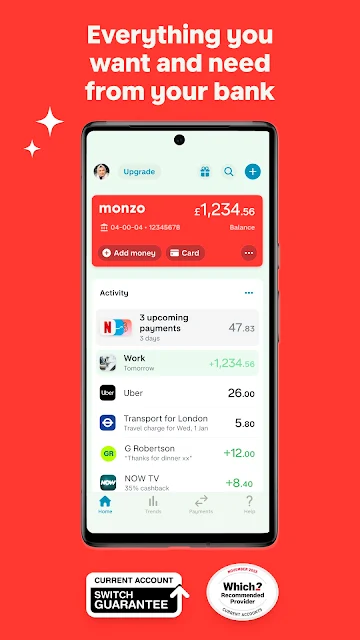
I can picture using Monzo during an ordinary pay week: check a notification when a purchase clears, glance at the balance before groceries, and see how the month is shaping up in the app’s weekly or monthly spending insights. That puts routine transactions in context without waiting until a bank statement arrives. The practical appeal is having activity and patterns close at hand, especially when small card purchases are easy to forget.
For bills, I’d use the scheduling tools to arrange regular payments, then check subscriptions when reviewing the month. A payday paid through Bacs may arrive one business day early, according to the app description. That is a useful detail for planning, but I would treat it as a timing feature rather than a reason to stretch a budget. The day-to-day value is the combination of visibility and a place to manage recurring outgoings.
Bank account, not just a tracker
Compared with a standalone expense tracker, Monzo is built around a current account: incoming money, card spending, bills and savings tools sit together. That can mean less manual logging for people who already use the account for daily purchases. It also offers ways to split bills, request money and keep track of shared costs, which makes it relevant to household routines as well as solo spending.
The trade-off is that this is not simply a neutral dashboard for accounts from any bank. The description ties features such as Savings Pots, investments and Monzo Flex to having a Monzo current account. It is also not a substitute for comparing every financial product or making decisions on your behalf. I’d see it as a banking home base with extra tools, not a complete financial-planning service.
Small routines that help
A simple habit would be to check transactions when notifications arrive, rather than trying to reconstruct a week of spending later. Then, once a week, I’d use the insights to notice recurring patterns and see whether a subscription or regular payment needs attention. These short check-ins make more sense than expecting an app to change spending habits automatically; the useful part is having recent activity and a review point together.
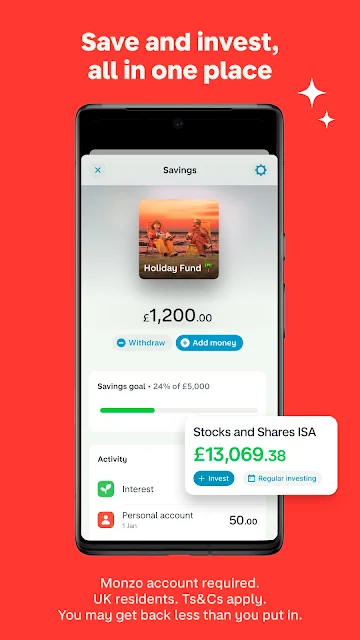
Pots can make a savings routine more tangible. I’d separate money for a particular goal from the balance I use for everyday costs, and consider roundups if I wanted spare change to go toward savings automatically. For shared expenses, logging a split or sending a payment request soon after the bill lands is likely easier than sorting it out days later. The features work best when they become small, repeatable habits.
More From Our News Desk

Zoom Meetings, Google Meet, or Teams: Which Is Easiest to Join?

How I Build a Free Streaming Lineup With Tubi

Why Crunchyroll Is the Default Anime App for So Many Fans

YouTube TV: A Practical Guide to Cutting Cable

Rummikub and the Small Comfort of Phone Games

TeamViewer Remote Control or AnyDesk for Helping Family?
Who may find it useful
I’d recommend Monzo to someone looking for a phone-first current account and who likes seeing transactions as they happen. The spending insights, scheduled payments, subscription management and savings Pots cover several common tasks without requiring a separate tracker for each one. It may also suit people who regularly split bills or travel and want to pay by card in different currencies, subject to the terms described for the account.
It may be a weaker fit for someone who only wants to track spending across existing accounts, since the product is centered on Monzo banking. People interested in its credit or investment features should also be comfortable reviewing eligibility, terms and the possibility of investment losses before deciding. I would not choose a banking app solely for an early-payday feature or expect it to replace personal attention to bills and balances.
Monzo is the developer, and Monzo Bank - Mobile Banking is a finance app for Android. Google Play shows over 10 million installs and a 4.1-star rating from about 187,000 ratings. The app is free to download, with no in-app purchases or ads. Its content rating is Everyone. The current version provided is 8.7.0, and the recorded release date is May 13, 2016.
The recorded last update is November 5, 2026. The supplied app details do not give a minimum Android version, so it is worth checking compatibility on Google Play for the device in question. The description says a Monzo current account is needed to access Investments, Instant Access Savings Pots and Monzo Flex. Some banking products and eligibility conditions are described specifically for UK applicants.
Everyday banking, in small useful steps
Opening and settling in
When I first opened the description, what stood out was how much Monzo gathers under one banking roof: current-account activity, spending summaries, savings features and optional products. That breadth can be helpful, but it also means a new user does not need to explore everything at once. I’d start with the account activity and notifications, then add a routine or feature only when it solves an everyday need.
The app is presented as a phone-based bank, with personal and business account options described. It also mentions the Current Account Switch Service for people moving an account. I’d approach setup with the usual practical questions in mind—whether the account suits my circumstances and which features I actually expect to use—rather than treating every item in the feature list as essential.
A steady daily rhythm
The day-to-day experience described here is centered on knowing when money comes in or goes out. Instant notifications can make a card purchase easier to recognize while it is still fresh in my mind. Weekly and monthly insights offer a broader check-in, which is useful when I want to understand patterns rather than inspect every individual transaction.
Recurring payments are another part of that routine. I could schedule bills, keep an eye on subscriptions and use a monthly review to see what is coming up. Those tools are most valuable when I make a habit of checking them; they do not remove the need to keep enough money available for payments or to review account activity.
Features with a practical edge
Pots are one of the clearest ways Monzo separates everyday spending from money set aside. Users can create personalized Pots, and the description also includes automatic roundups and interest-earning Savings Pots. The latter features depend on the relevant account access and product terms, so I’d check the details before relying on a particular saving option.
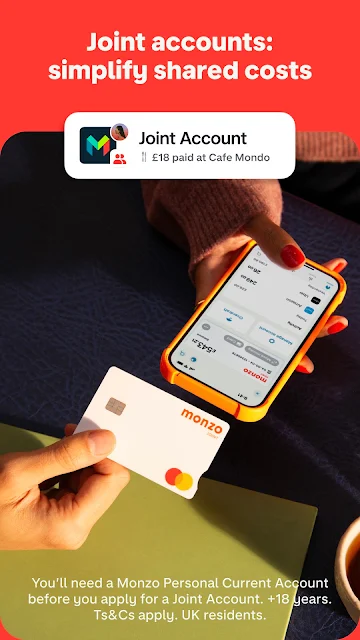
For social spending, the app can split bills, send payment reminders, track joint costs and support money requests or payments through a link, with limits applying to those links. For travel, the description says the debit or credit card can be used to pay in different currencies, with Mastercard’s exchange rate passed on. These are concrete conveniences when they match the way someone already handles money.
A routine for shared costs
Imagine a household shop or dinner bill paid by one person. I’d use the split-bill tools while the amount is easy to remember, then send a reminder or keep the shared cost visible rather than leaving it in a chat thread. A payment request link can help with settling up, within the stated limits. This is a modest workflow, but it can reduce the usual back-and-forth over who owes what.
At the end of the week, I’d pair that with a quick look at the account’s spending insights and any upcoming scheduled bills. If there is money earmarked for a goal, a separate Pot helps distinguish it from spending money. This routine does not require treating every purchase as a budget crisis; it is simply a regular chance to notice what has happened and what is coming next.
Keep the boundaries in view
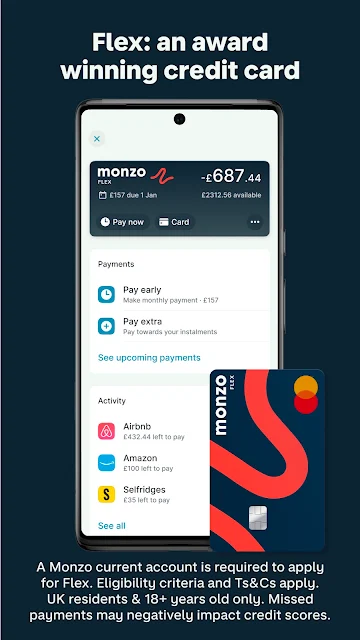
Monzo’s broader offerings involve different terms from ordinary account tools. Investments are described as available to people over 18, with three options and the possibility that the value may fall as well as rise. Monzo Flex is a credit product with eligibility criteria and payment obligations. I would read the relevant terms carefully and avoid assuming that an advertised feature is available to every account holder.
Business banking has its own scope, too: the description says UK sole traders and limited company directors can apply. A no-monthly-fee option and a paid Pro tier are described, with additional tools in Pro. International business payments carry fees. These distinctions matter because the app’s wide menu can make features look interchangeable when they are actually separate products with their own eligibility and costs.
Monzo’s strongest case is practical: it brings account activity, spending insights, scheduled payments, savings Pots and shared-cost tools into a phone-first banking experience. I like that the features connect to ordinary routines instead of focusing only on charts or abstract budgeting. The breadth is useful, provided I remember that several extras depend on the account and their own terms.
I’d give it a look if I wanted a mobile current account with frequent transaction visibility and simple ways to organize savings or bills. It is less compelling if I only need a tracker for accounts elsewhere. As with any banking or credit product, I’d check eligibility and terms before moving money or applying.
Monzo Frequently Asked Questions
What is Monzo Bank - Mobile Banking used for?
Monzo is a mobile banking app for managing a current account and everyday money. Its described tools include transaction notifications, weekly and monthly spending insights, scheduled bills, subscription management, Savings Pots, bill splitting and payment requests. Investments, Instant Access Savings Pots and Monzo Flex require a Monzo current account, and individual features have their own conditions.
Which devices can run Monzo Bank - Mobile Banking?
The supplied details identify Monzo Bank - Mobile Banking as an Android app distributed through Google Play. They do not specify a minimum Android version, so compatibility can vary by device and system version. Check the Google Play entry on the device you plan to use for current requirements and availability.
Does Monzo Bank - Mobile Banking cost money?
The app is free to download and the supplied facts say it has no in-app purchases or ads. Some products and services mentioned in the app can have separate terms or fees; for example, the description says international business payments have fees and describes a paid Business Pro plan. Check the Google Play information and product terms for current details.
Does Monzo Bank - Mobile Banking require an account?
The description says a Monzo current account is needed to access Investments, Instant Access Savings Pots and Monzo Flex. It also describes personal and business banking, with business applications limited to UK sole traders and limited company directors. Eligibility and feature access can vary, so review the relevant account details before applying.
Who is Monzo Bank - Mobile Banking best for?
It may suit people who want a phone-centered current account with transaction alerts, spending insights, scheduled payments and savings tools. It can also help with shared bills and spending abroad. It may be less suitable for someone who only wants to track accounts held elsewhere. Check the store and product terms for availability and conditions that apply to your circumstances.
Pros
- Instant transaction notifications make everyday account activity easier to keep up with.
- Spending insights, scheduled bills and subscription management support regular money check-ins.
- Pots, roundups and bill-splitting tools cover useful saving and shared-cost routines.
- The app is free to download and contains no ads or in-app purchases.
Cons
- Several features require a Monzo current account, so it is not just an account tracker.
- Credit and investment products have eligibility rules and separate terms to review.
- The minimum Android requirement is worth checking against the device before installing.
- Category
- Finance
- Version
- 8.7.0











