Mission Lane
- 201.83K
- 4.8
- Installs
- 1.00M
- Price
- Free

Screenshots
Analysis by Reviewed APKs
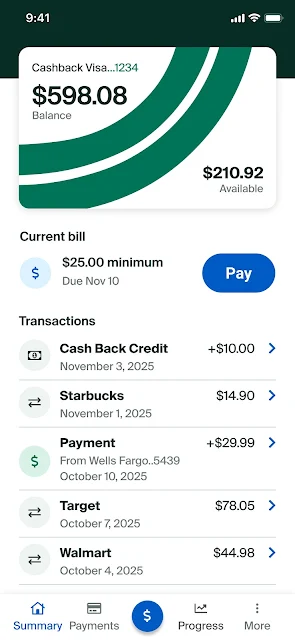
Mission Lane is a phone app for managing a Mission Lane credit card account: checking a balance, paying bills, reviewing activity, and viewing a credit score. I see it as a practical account companion for cardholders who want routine tasks close at hand, rather than a broad personal-finance toolkit. Its mix of account access, customer support, and credit education makes it useful between monthly statements, though it is focused on one card relationship.
A quick account check
When I imagine fitting Mission Lane into an ordinary day, the most useful moment is a quick check before making another purchase. I can open the app to see my account balance and recent activity, then decide whether I need to make a payment. That is a straightforward job, and it keeps the basic information about this card together instead of making me search through separate messages or paperwork.
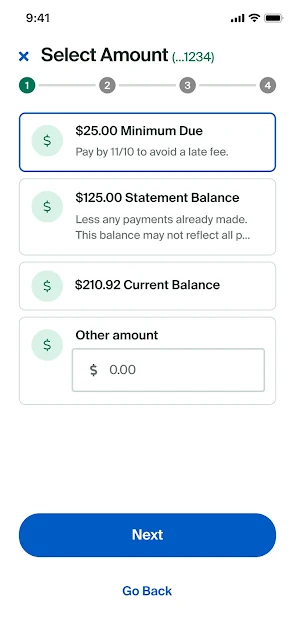
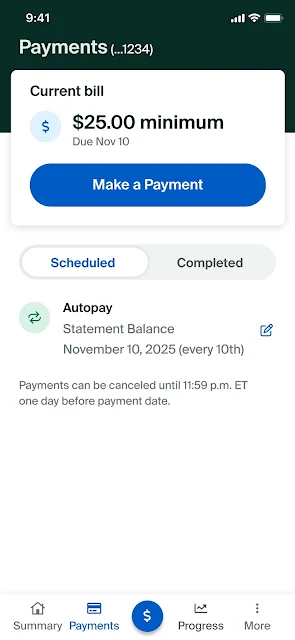
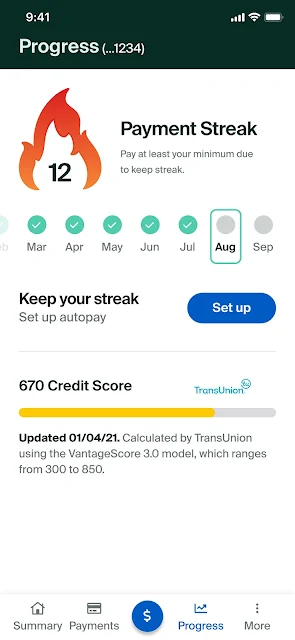
The same routine works near a bill’s due date: check the account, review activity, and pay the bill from the phone. I like that these are practical tasks rather than a complicated budgeting setup. The app also lets me keep tabs on my credit score, so an occasional visit can cover more than the immediate payment without turning into an all-day financial project.
A card companion, not a budget
Mission Lane makes the most sense alongside the credit card account it manages. Compared with a general banking or budgeting app, its focus is narrower: balance, bill payment, activity, credit score, and help for account questions. That focus can be an advantage if I mainly need a convenient way to stay current on this card, rather than a place to organize every account and expense in my life.
It is not described as a full budgeting service, a savings account, or a way to manage multiple financial products. I would not choose it expecting charts of household spending or broad financial planning tools. Instead, I would use it for the account-specific jobs it supports and turn elsewhere for a wider view of my finances. Keeping that distinction clear makes the app easier to judge fairly.
Small habits that help
A simple habit is to check the activity whenever I open the app to review my balance. That gives me a regular chance to look over recent account activity while I am already there, instead of treating the app as something I remember only when a bill is due. I can also check the credit score from time to time, making it part of an occasional account review rather than a daily ritual.
For less friction, I would set up fingerprint login if it suits my device and preferences. When a question comes up, I can use the Help Center for FAQs or the Contact Us page to call or send a secure message. I would treat the credit education courses as something to browse when I have a few spare minutes, rather than expecting them to replace personal financial guidance.
More From Our News Desk

Zoom Meetings, Google Meet, or Teams: Which Is Easiest to Join?

How I Build a Free Streaming Lineup With Tubi

Why Crunchyroll Is the Default Anime App for So Many Fans

YouTube TV: A Practical Guide to Cutting Cable

Rummikub and the Small Comfort of Phone Games

TeamViewer Remote Control or AnyDesk for Helping Family?
Who will find it useful
I would recommend Mission Lane to people who already have a Mission Lane credit card and want a convenient way to check their balance, pay bills, and review activity from a phone. The credit score view, customer service access, and educational courses add useful context around those routine account tasks. It should especially appeal to someone who prefers a focused card app over managing every detail through a desktop browser.
It may be a poor fit for someone looking for a complete budgeting system, broad banking access, or tools for accounts beyond this card. The app’s value depends on wanting to manage a Mission Lane account, rather than simply seeking general money advice. People who prefer not to handle account tasks on a phone may also find a mobile-first companion less convenient than their usual way of managing a card.
Mission Lane is developed by Mission Lane, LLC, and the Android app is in the Finance category. On Google Play it has over 1 million installs and a 4.8-star rating from about 202,000 ratings. The app itself is free to download, with no in-app purchases or ads reported. That describes the app’s pricing, not the terms or costs associated with a credit card account.
Google Play gives the app an Everyone content rating. The supplied version is 21.0.0. It was released on June 25, 2019, and its recorded last update is October 6, 2026. I would check the Google Play page for current device compatibility and requirements, since those details can change over time.
Keeping Card Tasks Within Reach
A focused first impression
When I first opened Mission Lane, the purpose was easy to understand: it is meant to put the main jobs for a Mission Lane credit card in one phone app. The listed tools cover account balance, bill payments, activity, credit score, and support. That gives a new user a clear idea of what to come back for, without suggesting that the app is a complete financial dashboard.
Getting started is most relevant for someone who already has a Mission Lane account to manage. The description also offers fingerprint login, which can make returning to the app more convenient for people who choose to use it. I would think of setup as a step toward easier account access, not as a reason to expect extra financial tools that are outside the app’s stated purpose.
The everyday account loop
The core experience revolves around a handful of repeat visits: check the balance, look over activity, and pay a bill. That is a sensible loop for a credit card app because it follows the questions that tend to come up between statements. I can picture opening it while waiting for coffee or before paying a bill, handling one quick task, and then getting back to the rest of my day.
There is also a credit score view, which gives the account check a little more reach. I would use it as a point of reference when reviewing the card account, rather than assume that a score view answers every question about credit. The app’s stated role remains practical account management, with the score as an additional item to check when it is useful.
Support beyond payments
Customer service access is one of the more useful additions to the basic account controls. The Contact Us page lets users call or send a secure message, while the Help Center provides FAQs for simpler questions. When a question is small, I would start with the FAQs; if I needed a direct response, the app gives me a way to reach support without searching around for contact details.
The credit education courses are another feature that separates the app from a bare-bones balance checker. They offer a place to explore tips and information within the same account companion. I appreciate that this is an optional layer: someone who only needs to pay a bill can stick to that, while a curious user can spend extra time with the educational material.
A simple weekly routine
A practical routine would be to open Mission Lane once during the week, check the balance, and scan recent activity. If a bill is coming up, I can handle the payment during that same visit. This keeps the app tied to a real task instead of encouraging constant checking, and it makes the account review easy to remember because it takes place alongside something I already need to do.
Every so often, I could check the credit score and browse a course or an FAQ if a question comes up. If I hit something that the Help Center does not answer, I can use Contact Us to call or send a secure message. Fingerprint login may help make this recurring routine smoother, provided I want to use that sign-in option.
Keep the scope in mind
The main limitation is also the app’s defining focus: it is for managing a Mission Lane credit card account. It does not present itself as a broad budgeting or multi-account finance app, so users who want an all-in-one view should not assume they will find that here. Its tools are most relevant when the card itself is already part of someone’s routine.
It is also worth separating the free app download from the financial terms of the credit card account. The app’s store facts say there are no in-app purchases or ads, but that does not describe account-specific card costs or conditions. I would use the app to manage the account and consult the relevant account information for questions about the card itself.
Mission Lane does a clear, useful job for its intended audience: it brings key credit card tasks, account support, and credit education into a phone app. I like the combination of quick account checks with practical routes to help. Its narrow focus means it will not replace a full budgeting tool, but it does not need to in order to be useful.
I would recommend it to Mission Lane cardholders who want to check activity and pay bills on the go. If you need a wider financial overview or do not use a Mission Lane card, it is unlikely to become a regular part of your routine. For its intended purpose, it looks like a straightforward account companion.
Mission Lane Frequently Asked Questions
What is the Mission Lane app used for?
Mission Lane is used to manage a Mission Lane credit card account from a phone. It supports checking the account balance, paying bills, viewing activity, and keeping tabs on a credit score. It also includes access to customer service, FAQs, and credit education courses, making it an account companion rather than a general-purpose budgeting app.
Which devices can run the Mission Lane app?
Mission Lane is an Android app available through Google Play. Device compatibility and the Android version required can change, so check the Google Play page on your device for current requirements. The app’s described purpose is managing a Mission Lane credit card account, so the main reason to install it is to handle that account by phone.
Is the Mission Lane app free, and does it have purchases?
The app is free to download, and its Google Play information reports no in-app purchases or ads. Those details apply to the app itself, not the terms or costs of a credit card account. For account-specific charges or conditions, check the information provided for your card; app availability and store details may also vary.
What Android version does Mission Lane require?
The Android version requirement can vary with app updates and device compatibility. Check Mission Lane’s Google Play page for the current requirement before installing or updating. The app’s listed version is 21.0.0, but version information alone does not indicate which Android releases a particular device can run.
Is Mission Lane a good fit for me?
It is a good fit to consider if you have a Mission Lane credit card and want to check its balance, review activity, pay bills, or reach support from your phone. It may not suit someone seeking broad budgeting tools or management for many financial accounts. Its usefulness depends on whether you need access to a Mission Lane card account.
Pros
- Puts balance checks, bill payments, and card activity in one place.
- Includes access to customer service, FAQs, and credit education courses.
- Offers a credit score view alongside routine account tasks.
- Fingerprint login is available for users who want it.
Cons
- Focused on Mission Lane card accounts rather than broad financial management.
- The app’s free download does not explain costs or terms for the card account.
- Current Android compatibility should be checked in Google Play.
- Category
- Finance
- Version
- 21.0.0











