M&S Bank
- 113
- 4.6
- Installs
- —
- Price
- Free

Screenshots
Analysis by Reviewed APKs
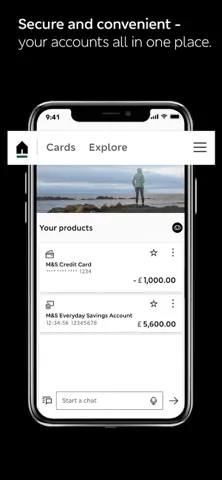
M&S Bank is a mobile banking app for existing UK customers who want to manage an M&S credit card, Everyday Savings Account or Personal Loan from an iPhone. It brings account payments, statements and card controls into one place, with secure sign-in options and in-app chat. My overall take is that it looks most useful for straightforward account upkeep, rather than for someone shopping around for a bank or a broad financial-planning tool.
A quick account check
Picture a familiar small task: I want to check my M&S credit card, make a payment and get back to my day. This app is built around that kind of visit. I can sign in with face or fingerprint recognition, look at my account, and make a payment without needing to sit down at a computer. It is a practical setup for customers who prefer handling routine banking in short bursts.
The same everyday usefulness applies when a card arrives in the post. The app lets customers activate a new credit card, view its PIN, and freeze it or report a card issue. If I need a record later, statements can be viewed and downloaded. Those tasks cover several common reasons to open a banking app, without requiring me to treat every visit as a full financial review.
Focused, not all-purpose
Compared with a general-purpose budgeting tool or a bank app intended for a wide range of products, M&S Bank has a narrower job: managing eligible M&S Bank accounts. Its listed account types are an M&S Credit Card, Everyday Savings Account and Personal Loan. That focus can be a benefit if those are the products I already use; the relevant controls and account tasks are gathered in one place.
This is not an app for people who are not M&S Bank customers, nor is it presented as a way to compare financial products or manage accounts from other providers. The service is designed for UK customers and the products shown are intended for them. I would think of it as a companion to an existing banking relationship, not a replacement for every money-related service on my phone.
Make visits more useful
A little routine can help keep the app useful without turning banking into a daily project. I could check the account when I need to, make a payment, and download a statement when I want a copy for my records. If I have a new card to set up, activation and PIN viewing are available in the app, so those tasks can sit alongside the normal account check.
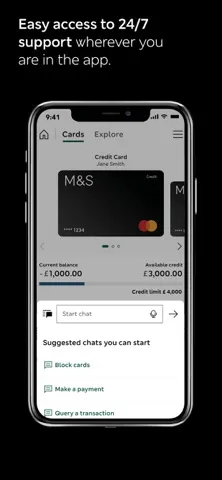
For an issue that needs a conversation, the in-app chat offers another route: customers can send a message and receive a notification when M&S Bank replies. I would use that for a question that does not need an immediate phone call, while keeping an eye on the reply notification. Card controls also make sense as occasional tools to use when a card problem comes up, rather than features to explore without a reason.
More From Our News Desk

Zoom Meetings, Google Meet, or Teams: Which Is Easiest to Join?

How I Build a Free Streaming Lineup With Tubi

Why Crunchyroll Is the Default Anime App for So Many Fans

YouTube TV: A Practical Guide to Cutting Cable

Rummikub and the Small Comfort of Phone Games

TeamViewer Remote Control or AnyDesk for Helping Family?
Who will find it useful
I would recommend M&S Bank to existing UK customers who want quick access to their M&S credit card, savings account or personal loan. The mix of account payments, downloadable statements, card activation and card controls covers useful day-to-day jobs. Secure sign-in using face or fingerprint recognition may also suit people who prefer not to enter their banking details every time they check an account.
It may not suit someone who is not an M&S Bank customer, since the app is specifically intended for existing customers. It is also a limited fit for anyone looking for a single place to manage accounts from several banks or for tools beyond the listed banking tasks. If the M&S Bank products are not part of your routine, there is little reason to install this particular app.
M&S Bank is provided by HSBC UK Bank plc. On the Apple App Store, it is rated 4.6 out of 5 from 113 ratings. The app is free to download. Its content rating is 4+, and the current version shown is 4.76.0. The supplied release date is August 4, 2017, and the last update date is November 4, 2026.
This version is for iPhone and requires iOS 15.0 or later. The app is designed for existing M&S Bank customers in the UK, and the products and services it provides are intended for UK customers. The listed account types are an M&S Credit Card, Everyday Savings Account and Personal Loan. Customers who have not registered can follow the app's sign-up steps; existing Online Banking users need their username and password to set it up.
Everyday Banking, Kept Close
Getting started
When I first considered the setup, the key distinction was whether I already had Online Banking access. Existing users need their username and password to set up the app. Someone who has not registered can download it from the App Store and follow the step-by-step instructions. That makes the app's intended audience clear from the outset: it is for customers bringing an existing M&S Bank relationship onto a phone.
Once set up, face or fingerprint recognition can be used to sign in securely. I like that this is a concrete convenience rather than a vague promise of easier banking: the app names familiar device-based sign-in methods. The experience is most relevant to people whose iPhone meets the iOS 15.0 requirement and who are comfortable accessing their bank through a mobile app.
Routine account tasks
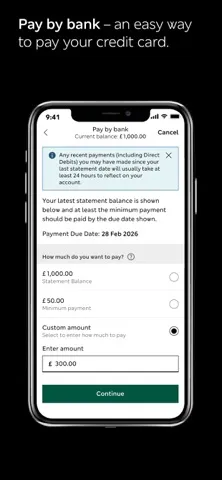
The day-to-day appeal is the range of basic account jobs collected together. Customers can make payments to their account and view or download statements. Those are useful functions when I want to take care of something quickly from a phone instead of waiting until I am at a computer. The app is not just an account balance check; it includes a few practical actions as well.
The account types matter to how useful that collection will be. M&S Bank describes support for its credit card, Everyday Savings Account and Personal Loan. Someone who uses one or more of those products can potentially return to the same app for different account tasks. If I do not hold an eligible M&S Bank product, the feature list is less compelling because it is tied to that customer relationship.
Card controls and support
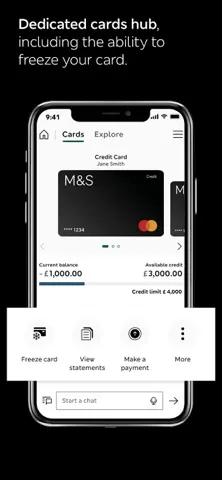
The card-related options are among the more distinctive practical touches. I can activate a new credit card, view its PIN, freeze the card or report a card issue. These are not elaborate extras, but they address moments when I might want to act promptly from my phone. Having the options listed in one banking app can make it easier to remember where to start when a card needs attention.
Chat adds a separate way to contact the bank. Customers can send a message through the app and receive a notification when a reply arrives. I would see this as useful for a question that can wait for a response, rather than assuming it replaces every other support channel. The app also offers a credit-limit change request and a balance-transfer request, with balance transfers subject to an available offer.
A sensible weekly check
A simple routine could be to open the app when I need to check an M&S Bank account, take care of a payment if needed, and leave the rest of the time to everyday life. If a statement is useful, I can view or download it from the app. This keeps the experience anchored to specific tasks instead of encouraging constant checking or adding unnecessary steps to a normal week.
I would treat notifications as a reason to return when there is something to follow up, especially for a chat reply. A new credit card also gives the app a clear one-off role: activate it, then use the account and card functions as required. The app's listed tools support this modest workflow, with no need to invent a complicated system around them.
Keep the scope in mind
The biggest limitation is also the clearest part of the product description: this is for existing M&S Bank customers in the UK. It is not presented as a general banking hub for people with accounts elsewhere, and the app's usefulness depends on having one of its supported M&S Bank products. People outside the UK should also keep the stated customer and service restrictions in mind.
The app covers account management and selected card actions, but its listed features do not make it a broad budgeting or financial-planning product. That is not necessarily a flaw; it simply sets expectations. I would choose it for access to M&S Bank accounts and related tasks, not because I expect it to replace other tools or support every kind of banking need.
M&S Bank makes a clear case for itself as a companion app: it brings account payments, statements, card controls and chat together for existing UK customers. I appreciate that its purpose is easy to understand, and that the listed features focus on practical banking jobs rather than trying to be everything at once.
If you already use an M&S Bank credit card, savings account or personal loan, this looks like a useful iPhone option for managing it on the go. If you are not a customer or want an all-bank finance app, I would look elsewhere. Its value is in serving its intended audience directly.
M&S Bank Frequently Asked Questions
What is the M&S Bank app used for?
M&S Bank is for existing UK customers managing an M&S Credit Card, Everyday Savings Account or Personal Loan. Its listed tools include account payments, statements, card activation and card controls, plus in-app chat. Customers can also request a credit-limit change or a balance transfer, subject to an available offer.
Which devices can run the M&S Bank app?
The M&S Bank app is available for iPhone through the Apple App Store. The supplied requirement is iOS 15.0 or later. It is designed for UK customers and is intended for existing M&S Bank customers, so having a compatible iPhone alone does not make it useful without an eligible account.
What iOS version does M&S Bank require?
The supplied minimum requirement is iOS 15.0. The current version shown is 4.76.0. Device and operating-system requirements can change as the app is updated, so it is worth checking the Apple App Store entry for the latest compatibility details before downloading.
Does the M&S Bank app cost money?
The app is free to download on the Apple App Store. The supplied information does not give a separate price for in-app products, so check the store entry for current details. The app is designed for existing M&S Bank customers and provides access to their eligible accounts.
Can I use M&S Bank if I am not a customer?
The app is intended for existing M&S Bank customers, and its products and services are designed for customers in the UK. If you are not an M&S Bank customer, the app is unlikely to be a fit. Existing Online Banking users need their username and password to set it up.
Pros
- Combines account payments and downloadable statements with useful card controls.
- Supports face or fingerprint recognition for sign-in.
- In-app chat can notify customers when the bank replies.
- Covers credit cards, an Everyday Savings Account and personal loans.
Cons
- Designed for existing M&S Bank customers rather than general banking use.
- UK-focused products and services limit its relevance elsewhere.
- Its listed tools are narrower than a broad budgeting app.
- Category
- Finance
- Version
- 4.76.0











