Kajabi
- 28.53K
- 3.9
- Installs
- 1.00M
- Price
- Free

Screenshots
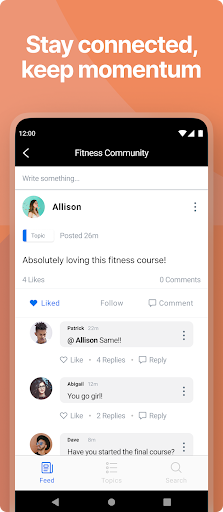
Analysis by Reviewed APKs
Kajabi is a learning app for people who already have access to courses and programs hosted on Kajabi. It brings lessons from different instructors into one mobile library, so I can watch videos, read course material, and pick up where I left off without returning to my computer. I like its focused role: it makes existing learning easier to fit into a day, rather than trying to be a general-purpose classroom.
A Lesson Between Errands
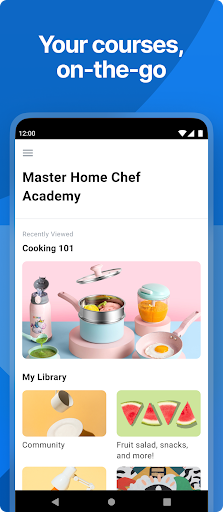
When I first imagined using Kajabi in an ordinary week, the appeal was the small gap it could fill. I might have ten minutes before an appointment or a quiet stretch on the bus, and a course I started on my computer is still available in the app. I can open my library, return to a lesson, and keep going without having to remember which instructor’s site I used.
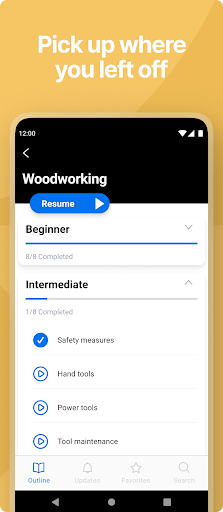
That continuity is the app’s most practical promise. Course progress is saved in the app and on the web, so moving between a phone session and a longer desktop session needn’t mean starting over. I can watch a video or read course content at my own pace, then return later. It suits the stop-and-start rhythm of real learning better than treating every lesson as a scheduled class.
A Companion, Not A Classroom
Kajabi makes the most sense if the course you want to take is already hosted on Kajabi. Its job is to put those programs in one convenient place, including courses from different instructors, rather than send me browsing across unrelated learning catalogs. If I already have access to a program, the app can make it more convenient to use away from my computer.
That focused role also defines what it is not. I wouldn’t choose it as a general search tool for finding courses across the internet, nor as an app for building and selling a course. The experience centers on viewing existing course material and resources. If I’m deciding whether a particular program is right for me, I still need to consider that program itself, not just the convenience of its mobile companion.
Make Learning Easier To Resume
A simple habit that helps is to use brief sessions for one clear next step: watch part of a video, read a section, or open a resource tied to the course. Since progress is saved across the app and web, I don’t have to make every session long enough to finish a whole lesson. That makes it easier to keep a course moving during otherwise idle moments.
I’d also keep course resources close to the lesson they support. Kajabi can display downloadable materials such as slides, worksheets, and PDFs, which can be useful when a video refers to something I want to revisit. Rather than treating the app as a place to skim endlessly, I’d use it to return to a specific program, follow its content in order, and make room for the supporting files.
More From Our News Desk

Zoom Meetings, Google Meet, or Teams: Which Is Easiest to Join?

How I Build a Free Streaming Lineup With Tubi

Why Crunchyroll Is the Default Anime App for So Many Fans

YouTube TV: A Practical Guide to Cutting Cable

Rummikub and the Small Comfort of Phone Games

TeamViewer Remote Control or AnyDesk for Helping Family?
Who Will Get The Most From It
I’d recommend Kajabi to learners who already use courses hosted on the platform and want a practical way to keep learning when they’re away from a computer. It is especially convenient for people whose programs come from several instructors: the app gathers those courses in one library, and saved progress helps make short sessions feel worthwhile. If you like learning at your own pace, that combination is appealing.
It may be less useful if you don’t have access to any Kajabi-hosted programs or are looking for an app that helps you discover a broad range of unrelated classes. The app is a companion for course content, not a replacement for deciding which course to take. I’d also look elsewhere if my priority were creating or managing a course; the described mobile experience is about accessing and studying material.
Kajabi is an Education app from developer Kajabi. Google Play shows over 1 million installs and a 3.9-star rating from around 28,500 ratings. The app is free to download, with no in-app purchases or ads. Its content rating is Everyone. Those figures give a useful snapshot of the app, while the day-to-day value depends largely on whether the courses a learner wants to access are hosted on Kajabi.
The supplied app details give version 4.17.1, a release date of November 3, 2019, and a last update date of October 21, 2026. A minimum Android version is not included in the available facts, so check Google Play for the current device requirement before installing. Course access itself may depend on whether a particular program is free or paid; the app’s download price does not make every course free.
A Mobile Home For Ongoing Courses
Opening The Course Library
My first impression of Kajabi is that its purpose is easy to understand: it is a place to access Kajabi-hosted learning on the go. That focus is useful when I already know which course I want to continue. Instead of treating the phone as a separate learning destination, the app makes it another place to view the same course material and keep a program in motion.
Getting value from the app starts with having a course or program to access. Once there is something in my library, I can use the app to view videos, read content, and look through course materials. That straightforward starting point means I don’t need to turn an ordinary spare moment into a complicated setup session. The app’s usefulness is tied to my existing learning, not to browsing for a new subject.
The Everyday Learning Loop
The central routine is simple: open a course, continue its content, and come back later when time allows. I like that progress is saved in the app and on the web, because learning often happens in fragments. A few minutes on a phone can lead into a longer session on a computer without making me feel I have to retrace the same ground.
The app supports both watching videos and reading content, so a course doesn’t have to be one uninterrupted video session. That flexibility matters during a busy day. I can choose the format that fits the moment and my attention, then return to the program when I have more time. It is a modest kind of convenience, but one that can make a course easier to stick with.
Resources Alongside Lessons
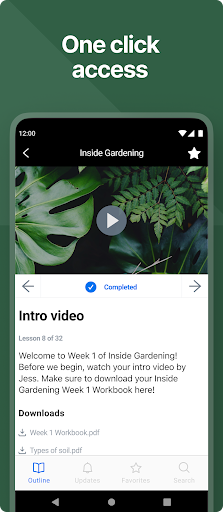
One useful detail is that Kajabi can show downloadable course resources, including slides, worksheets, and PDFs. Those files can add context to a lesson or give me something to refer to while I’m working through course material. I appreciate that the app is not limited to video viewing; it can bring the supporting materials associated with a program into the same mobile learning experience.
The other standout is having courses from different instructors together in one place. If I’m learning from more than one program hosted on Kajabi, I don’t have to treat each instructor’s course as an entirely separate mobile destination. The library approach is particularly handy for people who already have several programs to keep track of, while staying firmly focused on those Kajabi-hosted courses.
A Practical Weekly Routine
A routine I’d use is to choose one course to move forward during the week, then use short breaks for a lesson segment or a quick reading session. When I have a longer stretch, I can spend it with the parts that need more attention. Saved progress helps connect these sessions, and I can also switch to the web when a larger screen suits the material better.
For a course with downloadable resources, I’d check the related slides, worksheets, or PDFs as part of the lesson rather than leaving them for some vague later date. That gives the supporting material a purpose and helps me keep the program’s pieces together. Kajabi’s best use is not squeezing in learning at every possible moment; it is making it easier to return when a moment genuinely opens up.
Keep The Scope In Mind
The main limitation is also the app’s defining boundary: it is for courses hosted on Kajabi. If I don’t have a relevant program, the mobile library has little to do for me. It is not presented as a broad course-discovery destination, so I shouldn’t install it expecting to browse every subject or provider and find a new class from scratch.
It is also worth separating the free app download from the cost of learning materials. Kajabi can provide access to free and paid programs, so the price of a particular course may be different from the price of the app itself. For me, the app is most compelling as a convenient way to use courses I already have access to, rather than as a reason on its own to buy a program.
Kajabi does a clear, useful job for learners with courses hosted on its platform. I like the combination of a shared course library, saved progress across app and web, and access to videos, reading, and downloadable materials. It is a practical companion for continuing a program in small sessions, not a universal answer to online learning.
I’d recommend it if you already use Kajabi courses and want to study away from your computer. If you need a broad course catalog or tools for creating programs, this isn’t the right fit. For the intended audience, though, the focused approach makes it easier to return to learning when the day allows.
Kajabi Frequently Asked Questions
What is the Kajabi app used for?
Kajabi is used to access courses and programs hosted on Kajabi. In the app, learners can watch videos, read course content, view downloadable resources such as slides, worksheets, and PDFs, and continue from saved progress. It brings courses from different instructors into one place. It is best understood as a mobile companion for existing Kajabi learning, rather than a general course search app.
Which devices can I use the Kajabi app on?
The supplied app information describes Kajabi for Android, available through Google Play. It also says course progress is saved in the app and on the web, so learning can continue between those experiences. Check the Google Play entry for current device compatibility and requirements, since support can vary by device and app version.
What Android version does Kajabi require?
The minimum Android version is not included in the available app details. Requirements can change as the app is updated and may vary by device, so check the current Google Play entry before installing. The supplied details identify version 4.17.1, but that does not by itself establish which Android versions a device needs.
Is Kajabi free, and does it include paid courses?
Kajabi is free to download on Google Play, and the supplied facts say it contains no in-app purchases or ads. The app can provide access to both free and paid programs, so the cost of a course may vary. Check the course or store details for the terms of a particular program; a free app download does not mean every course is free.
Who should use the Kajabi app?
It is a good fit for someone who already has access to courses hosted on Kajabi and wants to watch or read course material on the go. Saved progress and a shared library can help learners manage short sessions and courses from different instructors. It may not suit someone looking for a broad course catalog or a mobile course-creation tool.
Pros
- Keeps courses from different Kajabi instructors together in one mobile library.
- Saves course progress across the app and web for flexible learning sessions.
- Supports video, reading, and downloadable slides, worksheets, and PDFs.
- Free to download, with no ads or in-app purchases.
Cons
- Useful only for courses and programs hosted on Kajabi.
- Not designed as a broad course-discovery service or course-creation tool.
- Some programs are paid, so free app access does not mean free learning.
- Category
- Education
- Version
- 4.17.1