Rosetta Stone Classic (2024)
- 406.04K
- 4.6
- Installs
- 10.00M
- Price
- Free

Screenshots


Analysis by Reviewed APKs
Rosetta Stone Classic (2024) is a language-learning app built around contextual lessons, speaking practice and listening. It suits current Classic subscribers and existing enterprise or education learners who want short study sessions on a phone, including offline practice. My overall take is that it offers a focused, ad-free way to work on a language, but its access restriction is important: newcomers are directed to a different Rosetta Stone app.
A Short Lesson in the Day
When I picture using Rosetta Stone Classic in an ordinary week, it is between errands or during a quiet stretch at home, not as a substitute for a classroom. The app is designed for lessons that can take around ten minutes, so I can imagine fitting one in before work or while waiting for an appointment. Interactive, contextual exercises keep the focus on learning through the language rather than treating every word as an isolated flashcard.
The speaking practice gives that small session a practical target. I can listen to a native speaker, read a story or conversation aloud, and use TruAccent for pronunciation feedback. If I want a screen break, Audio Companion offers lessons to listen to instead. Together, those options make the app feel suited to building a regular practice habit, especially for learners who want to hear and say the language as well as study it.
A Language Course, Not a Phrasebook
Compared with a simple phrasebook or translation tool, Rosetta Stone Classic is aimed at learning over time. Its Dynamic Immersion approach puts words into interactive context, while speaking, stories, conversations and audio lessons offer different ways to practise. Phrasebook is also available for useful expressions and everyday conversation. I would treat that as a handy supplement, though, rather than the whole point of the app.
This is not a universal starting point for anyone curious about Rosetta Stone. The Classic app is limited to current Rosetta Stone Classic subscribers and existing enterprise or education users; people new to Rosetta Stone are directed to Rosetta Stone Sapphire. It also is not simply a tool for translating a sentence on demand. The emphasis is guided language learning, and access depends on having the appropriate existing account or subscription.
Make Practice Easy to Repeat
I would get more from the app by keeping sessions short and attaching them to a routine I already have. A ten-minute lesson after breakfast is easier to repeat than waiting for a free hour. Lesson reminders and a learning plan based on why I am studying can help give that routine some shape. The description says plan languages offered on Android are English, French, Italian, German and Spanish.
I would also alternate between active and more relaxed practice. A core lesson can be followed by reading a story aloud, checking pronunciation with TruAccent, or listening to Audio Companion when I am away from the screen. Touching and holding content in Core Lessons can reveal a translation, which may help when a phrase has me stuck. Some extended features are available only with select languages, so the exact mix can differ.
More From Our News Desk

Zoom Meetings, Google Meet, or Teams: Which Is Easiest to Join?

How I Build a Free Streaming Lineup With Tubi

Why Crunchyroll Is the Default Anime App for So Many Fans

YouTube TV: A Practical Guide to Cutting Cable

Rummikub and the Small Comfort of Phone Games

TeamViewer Remote Control or AnyDesk for Helping Family?
Who Will Get the Most From It
I would recommend Rosetta Stone Classic to someone who already has access through a Classic subscription, an employer or an education program and wants structured practice on a mobile device. It has a useful blend of contextual lessons, pronunciation feedback, listening material and practical phrases. Learners who value short sessions, the option to study offline, and an ad-free experience may find it especially convenient to keep up a steady routine.
I would not point a brand-new Rosetta Stone learner to this particular app, since its description directs newcomers to Rosetta Stone Sapphire instead. It may also be less suited to someone who mainly wants instant translations or a casual phrase lookup rather than a course of lessons. If you are joining through an enterprise or education program, features can vary, so it is sensible to check what your access includes.
Rosetta Stone Classic (2024) is an education app from Rosetta Stone Ltd. On Google Play, it has over 10 million installs and a 4.6-star rating from about 406,000 ratings. The app is free to install and contains no ads. Google Play lists in-app purchases, with individual items ranging from $0.99 to $299.99.
The app has an Everyone content rating. Its listed version is 9.2.4, and it was released on March 27, 2013. Google Play gives October 8, 2026 as its last update date. The description presents access as intended for current Classic subscribers and existing enterprise or education learners, rather than new Rosetta Stone customers.
How Classic Fits Into Language Practice
A Focused First Impression
When I first opened the description of Rosetta Stone Classic, the detail that shaped my expectations was its audience restriction. This is a companion for people who already use Rosetta Stone Classic or have enterprise or education access, not the general entry point for a new learner. The app’s name may sound like an all-purpose course, but that access distinction is more useful to know upfront than any individual lesson feature.
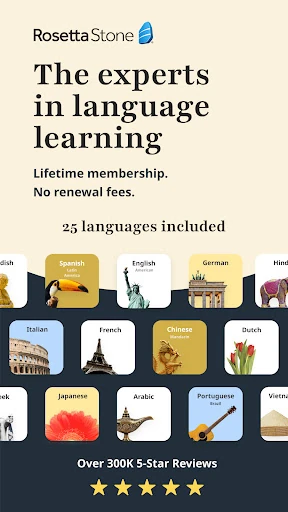
For an eligible learner, the overall setup is oriented around a language goal and repeat practice. Rosetta Stone says it can use the reason for learning to create a plan with curated content and reminders. The description also notes that Android plan languages are English, French, Italian, German and Spanish. That gives the routine some direction, while the wider language list supports a broader range of study.
The Everyday Learning Rhythm
The core experience is built around interactive lessons that put language in context. Rather than making memorization the only activity, Dynamic Immersion combines lessons with contextual material. That can suit learners who want to make a connection between a word or phrase and what is happening around it. For everyday use, the short-session format is a practical fit: I can imagine finishing a lesson in a spare ten minutes instead of postponing practice until a long study block appears.
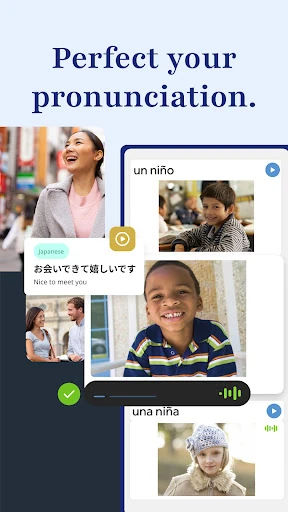
Speaking practice adds a more active step to the routine. TruAccent gives real-time pronunciation feedback, and the app also describes reading aloud while listening to native speakers in stories and useful conversations. That range makes it easier to vary a session without changing apps. I would still think of feedback as one part of practice, rather than a promise of instant fluency; the real value is having a way to repeat and work on spoken language.
Features With a Clear Purpose
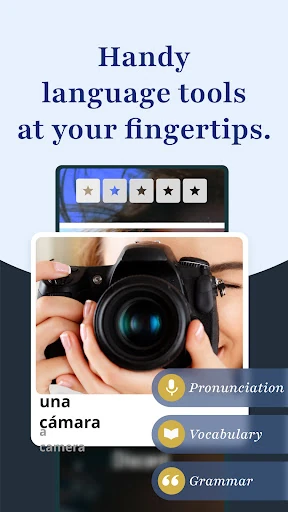
TruAccent is one of the features that stands out because it connects practice to a specific task: saying words and receiving pronunciation feedback in real time. The stories and conversations provide another speaking route, with native-speaker audio as a model. These tools make the app feel more speech-oriented than a course that relies only on reading and tapping through exercises.
Audio Companion is a useful counterpoint to screen-based lessons. I can see it fitting into a walk or another moment when looking at a phone is inconvenient, giving listening practice a place in the day. Phrasebook has a different role: it offers greetings, expressions and daily conversation material. Some features, including Phrasebook and translation access, are available only with select languages, so the combination depends on the course.
A Routine That Can Travel
A practical week with the app could start with a core lesson at home, followed later by Audio Companion when I want to listen rather than look at the screen. On another day, I could return to a story or conversation and read it aloud, using TruAccent feedback as a prompt to repeat a phrase. That pattern uses the app’s different practice modes without turning every session into the same exercise.
The offline option matters for that kind of routine. Rosetta Stone describes its learning as available online or offline, making it possible to plan practice around times when a connection may not be convenient. I would download or prepare what I need before heading out if offline use is part of my plan. Short sessions and reminders can also help make language study feel like a repeatable habit rather than a one-off burst.
Limits to Keep in Mind
The biggest limitation is access, not the lesson format. The Classic app is described as available only to current Rosetta Stone Classic subscribers and existing enterprise or education users. If you are new to the service, the app points you to Rosetta Stone Sapphire. That makes this version a poor choice to install on the assumption that it is the regular starting point for a new course.
Feature availability can also depend on the language or account type. The description says some features are for select languages, and enterprise or education learners may see different features. The language menu is broad, but a particular study plan or tool should not be assumed to work identically across every course. I would check the Google Play details and my access before building a study routine around a specific feature.
Rosetta Stone Classic (2024) makes the most sense as a mobile extension of an existing Rosetta Stone learning arrangement. Contextual lessons, TruAccent, listening practice and offline study give it several ways to support a short daily session. Its ad-free approach is another practical plus, though some features depend on the language and type of access.
My recommendation is straightforward: try it if you already have a Classic subscription or qualifying enterprise or education access and want a structured way to practise on the go. If you are new to Rosetta Stone, follow the app’s direction to Sapphire instead. This Classic app is useful for the right learner, but it is not the open front door its name might suggest.
Rosetta Stone Frequently Asked Questions
What is Rosetta Stone Classic (2024) used for?
Rosetta Stone Classic (2024) is for practising and learning languages through interactive contextual lessons, speaking and pronunciation practice, stories, useful conversations and audio lessons. It also includes Phrasebook for everyday expressions in select languages. The app is intended for current Classic subscribers and existing enterprise or education learners, so it is not the general entry point for new Rosetta Stone users.
Which devices can run Rosetta Stone Classic (2024)?
Rosetta Stone Classic (2024) is an Android app available through Google Play. Its description says learners can study on mobile devices, online or offline. Check the Google Play store details for device compatibility and current availability, since these can vary. The app’s audience is limited to current Classic subscribers and existing enterprise or education learners.
What Android version does Rosetta Stone Classic (2024) require?
The Android version requirement can vary, so check the Google Play store page for the current compatibility details for your device. Rosetta Stone Classic (2024) is available on Google Play, but access is intended for current Classic subscribers and existing enterprise or education learners. The store page is the best place to check whether your device and account are eligible.
Does Rosetta Stone Classic (2024) cost money?
Rosetta Stone Classic (2024) is free to install and contains no ads, but Google Play lists in-app purchases priced from $0.99 to $299.99 per item. The app description says it is only available to current Rosetta Stone Classic subscribers and existing enterprise or education users. Check Google Play and your account details for the applicable purchase or access terms.
Is Rosetta Stone Classic (2024) suitable for a beginner?
It can suit someone beginning a language if they already have access through a current Classic subscription or an enterprise or education program. But the app is not presented as the starting point for new Rosetta Stone customers; its description directs them to Rosetta Stone Sapphire. Learners should also check whether their chosen language includes the features they want, as availability can vary.
Pros
- Contextual lessons encourage learning through language use rather than isolated memorization.
- TruAccent offers real-time pronunciation feedback during speaking practice.
- Audio Companion provides a listening option for screen-free study moments.
- Ad-free lessons and offline study support a flexible practice routine.
Cons
- Access is limited to current Classic subscribers and existing enterprise or education learners.
- Some features are available only for select languages.
- Enterprise and education users may have different feature access.
- Category
- Education
- Version
- 9.2.4