Hotmart
- 319.47K
- 4.8
- Installs
- 10.00M
- Price
- Free

Screenshots
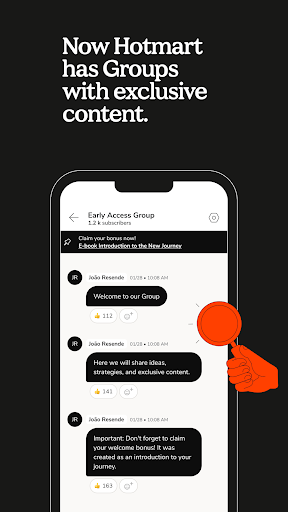


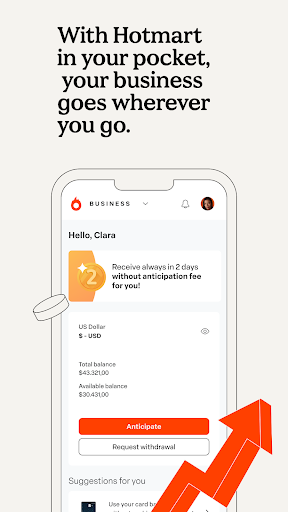

Analysis by Reviewed APKs
Hotmart is an Android app for accessing content you have purchased through Hotmart and keeping an eye on a digital business. I see it as a practical companion for people who already use the platform: learners can return to their materials away from a computer, while business owners can check progress and receive balance notifications. It is useful in focused ways, though it is not a general-purpose learning or business tool.
Learning Between Errands
When I picture using Hotmart as a learner, it is during a commute or a quiet break when I have a few minutes to return to a course or other purchased material. The app brings that content onto a phone, and the option to access it offline makes it more practical when a connection is inconvenient. Rather than waiting until I am back at a desk, I can pick up where my time allows.
That portable access is the app's clearest everyday benefit. I would use it to make a little progress during a lunch break, then return to the same purchased content later at home. The point is not that Hotmart turns every spare minute into a productivity session; it simply makes material already associated with the platform easier to reach. For people who learn in short stretches, that convenience can make a real difference.
A Companion, Not a Classroom
Compared with opening a browser on a laptop, Hotmart puts purchased content and business updates within reach on a phone. That is a useful distinction if I want to review material away from my desk or check on business progress without sitting down for a longer work session. It is best understood as a mobile access point for the Hotmart experience, not as a replacement for every tool a learner or creator might need.
I would not choose it as a broad discovery app for every subject, or expect it to function as a standalone course-authoring suite. The supported uses are narrower: accessing content purchased on Hotmart, including offline, and following a digital business's progress and platform updates. If my main goal is to create, organize, or manage work beyond those tasks, I would keep expectations measured and use the app for its specific mobile role.
Small Habits That Help
I would make a simple habit of opening Hotmart when I have a specific next step in mind: revisit purchased material, continue a lesson, or check a business update. That keeps the phone session purposeful rather than turning into aimless scrolling. If I know I will be without a reliable connection, preparing to use the content offline is also a sensible part of the routine, since offline access is one of the app's stated conveniences.
For a digital business, a quick check-in can fit naturally into the start or end of a workday. The app can provide notifications about balance and let users track business progress, so I would use those as prompts to stay aware rather than as a reason to monitor the phone constantly. A short, regular review is likely more useful than expecting a mobile app to replace the longer planning and decision-making a business may require.
More From Our News Desk

Zoom Meetings, Google Meet, or Teams: Which Is Easiest to Join?

How I Build a Free Streaming Lineup With Tubi

Why Crunchyroll Is the Default Anime App for So Many Fans

YouTube TV: A Practical Guide to Cutting Cable

Rummikub and the Small Comfort of Phone Games

TeamViewer Remote Control or AnyDesk for Helping Family?
Who Will Get the Most From It
I would recommend Hotmart to people who have already bought content through the platform and want to reach it from an Android phone. It is also worth considering for someone who already has a digital business on Hotmart and wants mobile access to progress information, balance notifications, and platform updates. The app makes the most sense when it supports an existing relationship with the service, rather than when someone is simply looking for a general education app.
It may be a weaker fit for people who want a broad catalog of free lessons, a dedicated tool for building courses, or a complete business-management workspace on their phone. The app's described strengths are access to purchased products and mobile business tracking. I would also be cautious about choosing it if I do not use Hotmart elsewhere, since its usefulness depends on having relevant content or a digital business connected to the platform.
Hotmart is an Education app from Hotmart Company. On Google Play, it has over 10 million installs and a 4.8-star rating from around 319,000 ratings. It is listed as free to download, with no in-app purchases or ads. The content rating is Teen. Those figures give a useful sense of its reach, though ratings and store details can change over time.
The supplied app details identify version 5.8.3, an original release date of August 31, 2016, and a last update of November 3, 2026. An Android minimum requirement was not provided, so check Google Play for the requirement that applies to your device. In practical terms, the app is intended for Android users who want mobile access to Hotmart content or business progress.
A Practical Pocket Companion
A Focused First Impression
When I first opened Hotmart, the main appeal I would look for is straightforward: can I reach the content I have already purchased, or get a useful glance at my digital business? The app's purpose is easy to understand because it centers on those two groups of tasks. It is not trying to present itself as a universal study planner or an all-in-one workspace, and that narrower role helps set expectations.
Setup is most relevant for someone who already has a connection to Hotmart through purchased content or a digital business. From there, the app's stated job is to put that experience on a mobile device. I appreciate that kind of clarity: I can decide whether it belongs in my routine before expecting it to do things beyond accessing content, following progress, or delivering platform-related updates.
Useful Day to Day
In regular use, the learner side is about returning to products bought on Hotmart when a phone is more convenient than a computer. That can suit a short study session at home, a break between other tasks, or time away from a desk. Offline access adds flexibility when a connection is unavailable. I would still treat the app as a way to reach the material, not assume it changes what the purchased product contains.
The business side serves a different daily rhythm. A person with a digital business can track progress and receive important notifications about their balance, which may make quick mobile check-ins easier. I would use those details to stay informed, then set aside separate time for any deeper work. The practical strength is convenience: the app puts certain updates and progress within reach without making a phone the center of every business task.
Offline Access and Updates
Offline access is a standout feature for learners because it makes purchased content more useful in places where internet access is unreliable or unavailable. I like the everyday implication: a planned study session does not have to depend entirely on being online at that moment. The description does not specify which products support offline access or how that access is managed, so I would check the app and the relevant content rather than assume every item behaves identically.
For business users, mobile balance notifications and progress tracking are the most distinct conveniences. The app also provides the latest platform updates, which gives users another reason to check in occasionally. These are useful ways to keep up with information, but they are not a promise of particular analytics, sales tools, or reporting screens. I would stick to what is described: mobile notifications, progress tracking, and platform updates.
A Routine That Fits
A realistic learner routine might be to choose one purchased product to revisit during a commute or an evening break, then use offline access when a connection will not be available. I would keep the goal small, such as returning to a section or continuing with the material already in front of me. That approach makes the app useful without asking it to organize my entire learning life.
For someone running a digital business, I would make a brief check-in part of an existing routine, perhaps at the beginning or end of the workday. Reviewing progress and paying attention to a balance notification can help keep relevant information visible. I would avoid treating frequent phone checks as a substitute for thoughtful business planning. Hotmart's mobile role appears most helpful as a convenient window into ongoing work.
Keep the Scope in Mind
Hotmart's focus is also its main limitation. The app is described around accessing content purchased on the platform and tracking a digital business, so someone seeking a large, general library of lessons may find it does not match that goal. Likewise, a creator looking for a full course-building workflow should not assume the mobile app includes one; the available description does not establish that capability.
Offline access is valuable, but I would not assume every piece of content is available in the same way without checking. Business tracking and notifications can also help with awareness without replacing whatever broader work a business requires. These are reasons to treat Hotmart as a companion to the platform, with a clear job, rather than as a single app that covers every learning or business need.
Hotmart earns its place on my phone when I have purchased content to revisit or a digital business to keep tabs on. Offline access, progress tracking, and balance notifications are practical features for those situations. The app's value is specific rather than universal, and that is easier to appreciate once I think of it as a mobile companion to an existing Hotmart routine.
I would recommend it to Hotmart customers who want convenient access on Android, especially learners who benefit from offline use and business owners who want mobile updates. If you are looking for a general education library or a complete business toolkit, I would look elsewhere for those broader needs. For its focused purpose, Hotmart looks like a useful, no-cost app to try.
Hotmart Frequently Asked Questions
What is the Hotmart app used for?
Hotmart lets users access content they have purchased through Hotmart, including offline. People with a digital business can also track progress, receive notifications about their balance, and get platform updates. It is most useful as a mobile companion for people already using Hotmart, rather than as a general-purpose learning or business app.
Which devices can run the Hotmart app?
Hotmart is an Android app distributed through Google Play. The supplied details do not give a minimum Android version, so the compatible requirement can vary by device and app release. Check Google Play for the current requirement before installing. The app's described mobile features include access to purchased content and digital-business updates.
What Android version does Hotmart require?
The minimum Android version was not provided in the available app details. Requirements may vary as the app is updated and can depend on the device, so check Hotmart's Google Play page for the current compatibility information. The supplied details identify version 5.8.3, but that does not establish the Android version needed to run it.
Is Hotmart free, and does it have in-app purchases?
Hotmart is listed as free to download, with no in-app purchases and no ads in the supplied store details. Access to content is described in relation to products purchased on Hotmart, so the app itself should not be confused with a promise that all content is free. Store information can change, so check Google Play for current details.
Is Hotmart a good fit for learners?
It can suit learners who have purchased Hotmart content and want to access it on a phone, including offline. It may be less suitable if you want a broad general catalog or a standalone learning planner. The app also serves people with digital businesses, so its best fit depends on whether you use Hotmart content or business features already.
Pros
- Access purchased Hotmart content on a phone, with offline access available.
- Digital-business users can track progress and receive balance notifications.
- Free to download, with no in-app purchases or ads in the supplied details.
- Combines learner access and business updates in one mobile app.
Cons
- Its usefulness depends on having Hotmart content or a digital business.
- It is not described as a general learning library or complete business workspace.
- The minimum Android requirement should be checked on Google Play.
- Category
- Education
- Version
- 5.8.3