Praktika – AI Language Tutor
- 1.34M
- 4.6
- Installs
- 10.00M
- Price
- Free

Screenshots
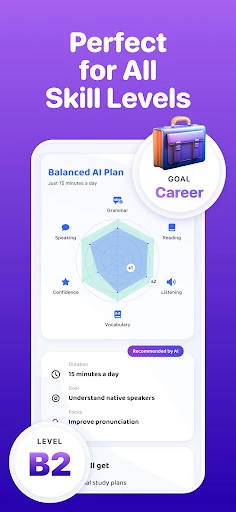
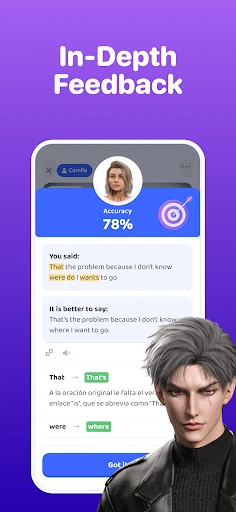
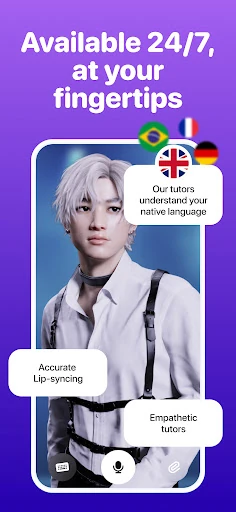
Analysis by Reviewed APKs
Praktika – AI Language Tutor is an Android learning app built around speaking practice with AI avatars. It suits learners who want to rehearse real conversations, explore different accents, or work through topics such as travel and careers without arranging a live tutor. After looking through its approach, I see the appeal: it puts conversation at the center, though it is better treated as a practice companion than a complete substitute for learning with people.
Practice for everyday conversations
I can picture opening Praktika during a quiet half hour before a trip, choosing a conversation topic, and practicing how to ask for directions or order a meal. The app’s AI avatars are intended to listen and respond, so the exercise is more like speaking than tapping through a vocabulary quiz. That shift matters when the words are familiar on a screen but harder to produce in a real exchange.
The same idea works for a job interview or a class discussion. Praktika describes lessons and role-play topics that range from career paths and business to tourism, food, and pop culture. I like that this gives a learner a reason to say something beyond isolated example sentences. Uploading a photo or a document can also provide a concrete prompt for a conversation, rather than leaving me to invent a topic.
Conversation over flashcards
Praktika occupies a different corner of language learning from apps built mainly around memorizing words or repeating short drills. Its central activity is interacting with an avatar: listening, speaking, and responding in context. That makes it a natural option for someone who already has some vocabulary and wants more chances to use it, or for a learner who finds solo speaking practice intimidating.
It is not a live conversation exchange or a human tutoring session. The app describes AI-led practice and feedback, not a person correcting every nuance in real time. I would also keep a separate plan for reading, writing, or structured study if those are important goals; the material emphasizes spoken conversation and lessons. Think of Praktika as one useful practice space, not the whole language-learning toolkit.
Make practice easy to repeat
A small routine can make a conversation app feel less like another item on a to-do list. I would pick one practical theme for a session, such as travel or work, and come back to a related topic later in the week. The app describes courses across different levels and a broad set of subjects, so there is room to move from familiar everyday exchanges toward more specific interests.
It also makes sense to bring a prompt rather than starting cold. A photo from a walk, a voice note, or a document can become material for conversation and corrections, according to the app’s description. I would use the speaking metrics, streaks, and challenges as reminders to return, not as a verdict on fluency. A short, regular session is easier to fit into an ordinary day than a grand study plan.
More From Our News Desk

Zoom Meetings, Google Meet, or Teams: Which Is Easiest to Join?

How I Build a Free Streaming Lineup With Tubi

Why Crunchyroll Is the Default Anime App for So Many Fans

YouTube TV: A Practical Guide to Cutting Cable

Rummikub and the Small Comfort of Phone Games

TeamViewer Remote Control or AnyDesk for Helping Family?
Who may enjoy Praktika
I would recommend Praktika to independent learners who want to speak more often but do not always have a conversation partner available. It may be especially appealing to people preparing for travel, exploring a career-related topic, or trying to become more comfortable answering questions aloud. The range of listed languages and avatar accents gives learners options for shaping practice around a particular language or regional sound.
It may be a weaker fit for someone who wants lessons led by a human teacher, a purely textbook-style course, or a tool focused only on memorizing vocabulary. Learners who dislike speaking to a device may also find the main format less comfortable at first. I would approach the avatar conversations as low-pressure rehearsal and judge the app by whether that practice helps me return to speaking more consistently.
Praktika – AI Language Tutor is an Education app from Praktika.ai Company. On Google Play it has over 10 million installs and a 4.6-star rating from about 1.3 million ratings. It is free to download and contains in-app purchases, with listed items ranging from $1.99 to $199.99. Google Play marks its content rating as Everyone, and the app does not contain ads.
The supplied app information gives version 4.43.0, a release date of May 18, 2022, and a last update date of November 2, 2026. A minimum Android version is not included in the available app facts, so it is worth checking the Google Play page on the device you plan to use. The version and store details can change as the app is updated.
A Closer Look at Speaking Practice
An inviting first session
When I first considered Praktika, the defining idea was easy to understand: instead of only studying a language, you practice using it with an AI avatar. That gives the app a clear starting point for learners who want to speak but feel awkward doing it in front of another person. Its educational focus is apparent without needing to treat every session like a formal class.
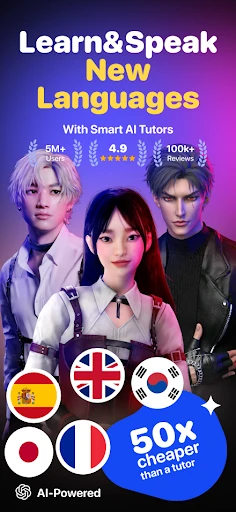
The app describes several languages, including English, Spanish, Japanese, Korean, French, Portuguese, Brazilian Portuguese, Italian, and German. It also presents avatars with different backgrounds and accents. That variety gives a learner a way to choose a conversational style that feels relevant, though the best match will depend on the language and accent they are working toward.
The day-to-day exchange
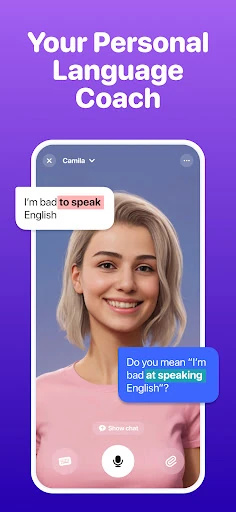
The core experience is a spoken exchange with an avatar that responds to the learner. In practice, that structure gives me a reason to listen carefully and form an answer rather than simply recognize a word. The app says its avatars can adapt to a learner’s tone, pace, and goals, and that they provide guidance during conversation. The point is to make speaking practice feel more natural and less like a test.
Feedback is part of the draw, particularly for people who want help noticing how they sound. The description mentions advanced feedback and pronunciation coaching, including an example tied to job interview preparation. I would use that kind of response as a prompt to try again and refine an answer. It is still AI-led practice, so I would not confuse an encouraging exchange with a full evaluation from a language teacher.
More than small talk
One feature that stands out is the range of conversation material. The app describes more than a thousand lessons, including academic preparation such as IELTS and TOEFL, alongside travel, lifestyle, career, and slang topics. Role-play scenarios can put a learner in a more specific frame of mind, whether they are acting as a tourist or taking on a sports commentator role.
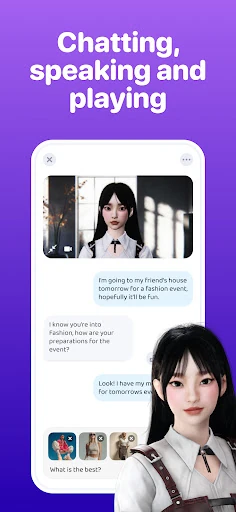
The multimodal tools offer another way into practice. Praktika says users can upload photos, audio, videos, or documents and use them to spark conversation or receive corrections. A picture of a room could lead into vocabulary practice; a resume could become a prompt for interview-related speaking. That approach feels more personal than choosing a generic subject every time, while keeping the activity tied to language use.
I also like the idea of localized avatars for learners with a regional accent goal. The description names American, British, and Latin American accents among the options. That does not make accent selection a replacement for hearing a range of real speakers, but it gives practice a more specific direction than a single generic voice would.
A practical weekly routine
For a manageable routine, I would set aside a few short sessions each week and give each one a job. One day could be travel phrases, another could focus on a work conversation, and a later session could revisit the same subject with different questions. Since Praktika offers many topic areas, it should be possible to keep practice connected to something I actually expect to discuss.
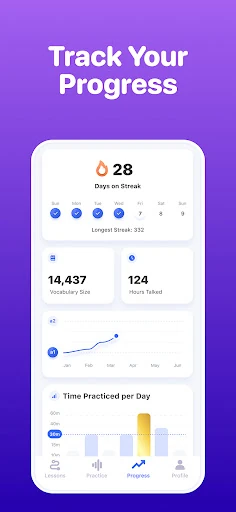
I would bring an everyday object or piece of content into a session when I want a more personal prompt. A photo can help me describe a place, while a voice note or document can give the conversation a concrete starting point. Afterward, I would pay attention to the feedback and speaking metrics the app describes, then choose one thing to try more clearly next time.
Streaks and in-app challenges can help make a routine visible, but I would keep the aim modest: show up and speak. A learner who is nervous about mistakes may benefit from treating an avatar session as rehearsal, not a performance. The small win is getting a thought out in the target language, even if the wording needs another pass.
Limits to keep in mind
The conversational format is also the main limitation for anyone whose priority is a different kind of study. Practika’s description centers speaking, listening, role-play, and feedback. Learners who need a detailed grammar course, extensive reading practice, or a human instructor should make sure those needs are covered elsewhere rather than assuming an avatar conversation will cover every skill.
The app is free to download, but it offers in-app purchases, and the listed price range is wide. Before settling into a paid routine, I would check which features are included and what a particular purchase covers in Google Play. The store’s details are the sensible place to review current pricing, especially because app versions and purchase options can change over time.
Finally, AI conversation is not identical to speaking with a person who brings their own experiences and spontaneous reactions. Praktika can provide a low-pressure place to rehearse, but real-world conversation still has its own rhythms. I see the strongest case for using it alongside other exposure to the language, rather than expecting a single app to deliver fluency on its own.
Praktika has a clear and useful focus: helping learners speak through AI-led conversation, with practical topics, avatar choices, and ways to bring personal material into a session. Its approach should appeal most to people who want low-pressure repetition and a reason to talk aloud. I would keep expectations grounded and treat it as one part of a broader learning routine.
If you are looking for a speaking-practice companion and enjoy guided role-play, Praktika is worth trying. If you want a human tutor or a course centered on other skills, it may not be enough by itself. The free download makes it easy to explore, while the in-app purchase details deserve a check before spending.
Praktika Frequently Asked Questions
What is Praktika – AI Language Tutor used for?
Praktika is an Education app for practicing languages through conversations with AI avatars. Its description covers spoken exchanges, role-play topics, lessons, feedback, and uploads such as photos, audio, videos, and documents that can prompt practice. It supports several languages, including English, Spanish, Japanese, Korean, French, Portuguese, Brazilian Portuguese, Italian, and German.
Which devices can run Praktika – AI Language Tutor?
The app is available on Android through Google Play. The supplied app facts do not give a minimum Android version, so check the Google Play page from the device you intend to use for current compatibility details. Store requirements can change as the app is updated.
Does Praktika – AI Language Tutor cost money?
Praktika is free to download and offers in-app purchases. The supplied Google Play information gives a purchase range of $1.99 to $199.99 per item, and the app contains no ads. Purchase options and prices may change, so check the current Google Play page for the exact terms before buying.
What Android version does Praktika – AI Language Tutor require?
The minimum Android version is not included in the supplied app facts. Since requirements can vary with updates and device compatibility, check Praktika’s Google Play page on the Android device you plan to use. The app facts give version 4.43.0, but that version number does not establish a minimum operating system.
Who is Praktika – AI Language Tutor best suited for?
It may suit learners who want more speaking practice, low-pressure role-play, or conversation topics related to travel, work, and everyday interests. It may be less suitable as a standalone choice for someone seeking a human tutor or a course focused on skills beyond the speaking-centered experience described. Whether the format fits is easiest to judge by trying a session.
Pros
- Centers practice on speaking and responding instead of relying only on memorization.
- Offers varied role-play topics spanning travel, careers, academic preparation, and everyday interests.
- Lets learners use photos, audio, videos, and documents as conversation prompts.
- Includes avatar options with different backgrounds and regional accents.
Cons
- AI-led conversation is not the same as practicing with a human tutor.
- Its speaking-first approach may not cover every learner’s study priorities.
- In-app purchase prices span a wide range, so check the terms before buying.
- Category
- Education
- Version
- 4.43.0