Ingo Money App – Cash Checks
- 39.35K
- 4.6
- Installs
- 1.00M
- Price
- Free
Screenshots
Analysis by Reviewed APKs
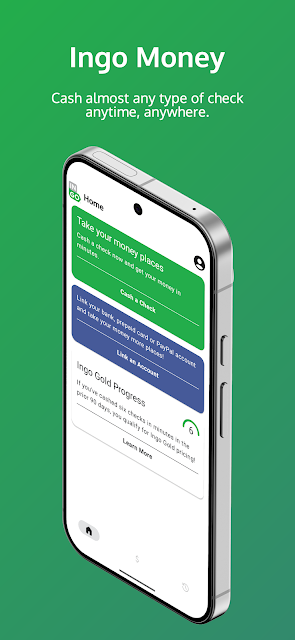
Ingo Money App – Cash Checks is for people who receive paper checks and want to submit them from a phone instead of visiting a check-cashing counter. I found its purpose refreshingly focused: photograph a check, send it for review, and choose an eligible account or bill for the funds. It can save a trip, but approval and fees mean it is not quite the same as cashing every check instantly.
A check without the detour
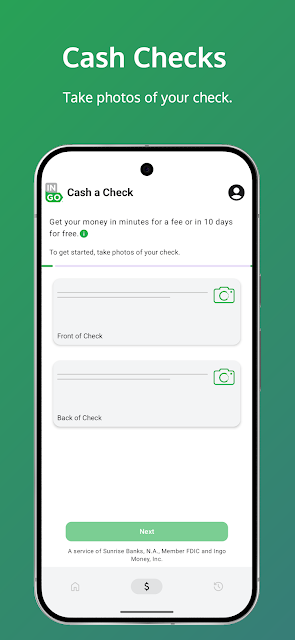
Picture getting paid by paper check on a busy weekday, with no easy chance to reach a bank during its opening hours. Ingo Money gives that moment a different route: I can create a profile, link an eligible destination, photograph both sides of the check, and submit it for review. The appeal is practical rather than flashy. I can start the process from where I am instead of building a trip around a counter.
The app’s central job is taking a check image and routing approved funds to a supported account or toward a credit-card bill. The description says approval usually takes three to five minutes, though it can take up to an hour, and every check is subject to review. That distinction matters in real life: I would treat the app as a convenient option to try, not as a promise that money will be available on my schedule.
A focused alternative
Compared with visiting a check-cashing location, the obvious advantage is starting from a phone rather than standing in line. Compared with depositing through a bank app, Ingo’s described emphasis is on getting approved funds to linked bank, prepaid, or PayPal accounts, and on paying eligible credit-card bills. It can also split a check across multiple accounts. Those choices make it useful when the destination matters as much as submitting the check.
This is not a general-purpose banking app or a replacement for every way of depositing money. It handles checks issued on U.S. financial accounts, requires identity verification, and approval is discretionary. The service is unavailable for use within New York. I would not choose it for cash that must arrive at a precise time, or assume that every check and account combination will work; the bank’s own deposit option may suit some routines better.
Make the submission smoother
A little preparation makes the main task less fiddly. Before I start, I would have the check handy and know which linked account or bill I want to use. Since the process requires photos of the front and back, a clear, well-lit surface is a sensible choice. That is ordinary phone-camera housekeeping, not a special feature, but it can help keep a simple submission from turning into repeated attempts.
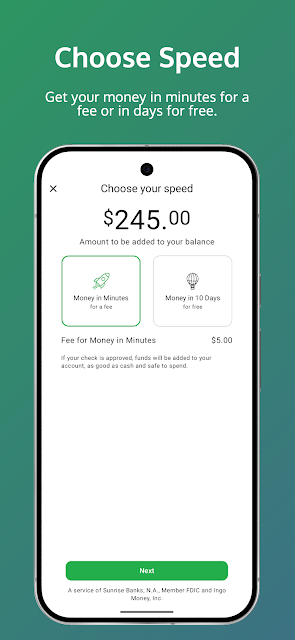
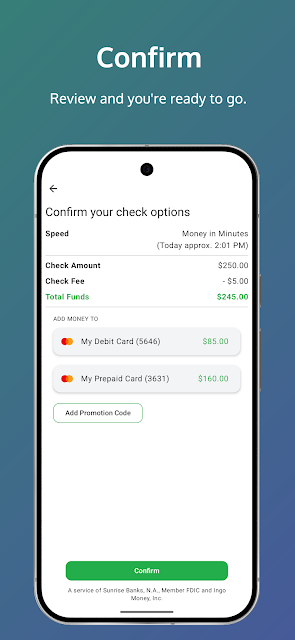
I would also leave room for review time and check the terms attached to the transaction before choosing a funding route. Ingo says fees apply to approved Money in Minutes transactions funded to a card or account; other account or card charges may also apply. If a check is for a particular bill, choosing the bill-payment option or splitting funds may fit better than sending everything to one destination. The useful habit is to plan the route before submitting.
More From Our News Desk

Zoom Meetings, Google Meet, or Teams: Which Is Easiest to Join?

How I Build a Free Streaming Lineup With Tubi

Why Crunchyroll Is the Default Anime App for So Many Fans

YouTube TV: A Practical Guide to Cutting Cable

Rummikub and the Small Comfort of Phone Games

TeamViewer Remote Control or AnyDesk for Helping Family?
Who may find it useful
I would recommend Ingo Money to someone who receives checks occasionally, has an eligible account, and values handling the submission away from a branch or check-cashing counter. The app’s support for bank and prepaid cards, PayPal, and certain credit-card bill payments gives it flexibility beyond a single destination. It may be especially handy when getting to a physical location is inconvenient, provided the user can accept review and possible fees.
It may be a poor fit for anyone who needs every check accepted or needs funds at a fixed minute. Check approval is not automatic, and the stated review window can stretch to an hour. Someone who already prefers depositing checks through their bank may not need a separate service. I would also rule it out for use in New York, and check that both the check and intended destination are supported before building a routine around it.
Ingo Money App – Cash Checks is developed by Ingo Money, Inc. On Google Play, it has over one million installs and a 4.6-star rating from about 39,000 ratings. It is free to download, and the store facts show no in-app purchases or ads. However, the service description says fees apply to approved Money in Minutes transactions funded to a card or account, and additional charges may be associated with a card or account.
The app’s Google Play content rating is Everyone. Its listed version is 4.10.10_15.09.2026.19.46, and the latest recorded update is October 16, 2026. It was first released on May 16, 2013. The Android version requirement is worth checking on Google Play, since it can vary with device and app updates.
What Using Ingo Money Really Involves
Starting with the basics
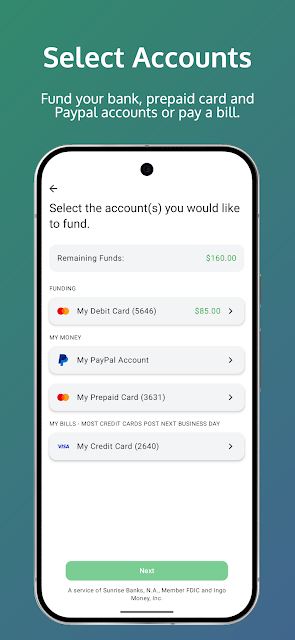
When I first opened the idea of using Ingo Money, what stood out was how narrow the job is. This is a check-cashing service, not an app asking me to learn a broad set of financial tools. The described starting point is to create a profile and link a bank debit card, prepaid card, PayPal account, or credit card. That makes the destination part of setup, rather than an afterthought at the end.
The check submission itself is built around photographing the front and back, then sending the images for review. That is an easy concept to understand, though it does put the quality of the photos and the review decision at the center of the experience. I would go in expecting a short task with a waiting period, not a one-tap transfer. A first-time user should also read the terms and fees before relying on the service.
The everyday experience
Day to day, the value is mostly about avoiding a trip. If a paper paycheck or personal check arrives when I am occupied, I can submit it from a phone and direct approved funds to a supported destination. The app description says approval usually takes three to five minutes but may take as long as one hour. That range is useful context: quick is possible, but I would not schedule a payment around the shortest estimate.
There is also a meaningful difference between submitting a check and having funds available. Checks can be declined, and the service reviews them at its discretion. For an everyday routine, I would keep another plan in mind when a bill is due soon or the money is essential at a specific time. Ingo’s strongest convenience is replacing the trip and queue, not removing uncertainty from check processing.
More than one destination
The range of destinations is one of the more useful parts of the service. The description covers many bank debit, prepaid, and credit-card accounts, along with PayPal accounts. It also describes paying retail credit-card bills and splitting a check to fund multiple accounts. That gives users options for where approved funds go, rather than limiting the process to one kind of account.
I would keep the wording “eligible” in mind. The service supports many institutions and cards, but that does not mean every account works. The description also says the service can be accessed in dozens of mobile banking apps, including American Express Serve and Bluebird by American Express. Those details are helpful for someone checking compatibility, but the practical move is to confirm that their own account is supported before depending on a particular route.
A sensible check routine
For a routine use case, I would begin by deciding what the check needs to do: land in a bank or prepaid account, go to PayPal, or cover an eligible credit-card bill. I would link the destination ahead of time, then set aside a moment to photograph both sides and review the terms shown for the transaction. That small bit of planning makes the app’s main task feel more deliberate and less like a last-minute scramble.
After submitting, I would allow time for the review rather than assuming the funds will arrive immediately. The app’s description gives a typical approval period but also notes that it can take longer, and a check may not be approved. If I were trying to pay a bill, I would avoid treating submission as proof that the bill has been paid; I would wait for the relevant confirmation and keep the bill’s due date in view.
Limits to keep in view
The main limitation is that convenience depends on approval. Ingo reviews checks and can decline them, so this will not turn every paper check into usable funds. The stated review period is not instantaneous in every case, either. I would be particularly cautious about relying on the service for urgent expenses, since a slower review or an unapproved check could disrupt plans.
Cost deserves attention, too. The download is free and the store facts show no in-app purchases, but the service description says fees apply for approved Money in Minutes transactions funded to a card or account. Other transaction costs may come from the linked card or account. The service is not available for use in New York, and check eligibility and destination support are worth verifying before making it part of a regular money routine.
Ingo Money does one clearly defined job: it lets users submit check photos for review and direct approved funds to supported accounts or eligible bills. I like the convenience of skipping a physical visit, especially when a check arrives at an inconvenient time. The trade-offs are just as clear: approval is not certain, timing can vary, and fees apply to some fast-funding transactions.
I would try it if I regularly receive checks and have a supported destination, while keeping another option available for time-sensitive money. It is less compelling if my bank’s deposit service already fits my needs or I cannot tolerate a review delay. Before using it, I would confirm account eligibility and read the transaction terms.
Ingo Money App Frequently Asked Questions
What is Ingo Money App – Cash Checks used for?
Ingo Money is used to submit photos of checks for review and, if approved, direct funds to supported bank debit, prepaid, or PayPal accounts. The description also covers paying eligible credit-card bills and splitting funds between multiple destinations. It is designed for check handling, rather than as a general-purpose banking app.
Which phones can run Ingo Money App – Cash Checks?
The app is available on Android through Google Play. The Android version requirement can vary as the app and supported devices change, so check the current Google Play page for compatibility with your phone. The service also describes access through some mobile banking apps, but the standalone app facts here are for Android.
What Android version does Ingo Money App – Cash Checks require?
The minimum Android version can vary by release and device. Check the app’s Google Play page on the phone you plan to use for the current requirement. In addition to a compatible Android device, the service description says users must be identity-verified and use checks issued on U.S. financial accounts.
Does Ingo Money App – Cash Checks cost money?
The app is free to download, and its Google Play facts show no in-app purchases or ads. That does not mean every transaction is free: Ingo says fees apply to approved Money in Minutes transactions funded to a card or account, and linked accounts may have additional charges. Review the transaction terms in the app before proceeding.
Is Ingo Money App – Cash Checks right for me?
It may suit someone who receives checks, wants to submit them by phone, and has an eligible funding destination. It may not suit someone who needs every check accepted or funds available at a precise time, since checks are reviewed and approval can take up to an hour. The service is not available for use within New York.
Pros
- Lets users submit check photos without making a trip to a check-cashing counter.
- Supports several funding destinations, including eligible bank, prepaid, and PayPal accounts.
- Can direct approved funds toward eligible credit-card bills or split them across accounts.
- Free to download, with no ads or in-app purchases shown in store facts.
Cons
- Check approval is discretionary, so not every check will be funded.
- Review can take up to an hour, making timing less predictable for urgent needs.
- Fees apply to approved Money in Minutes transactions, with possible additional account charges.
- Category
- Finance
- Version
- 4.10.10_15.09.2026.19.46











