Gospel Library
- 230.48K
- 4.7
- Installs
- 10.00M
- Price
- Free

Screenshots
Analysis by Reviewed APKs
Gospel Library is a reading and study app for people who want scriptures and other Church of Jesus Christ of Latter-day Saints materials in one place. I found its appeal in the range of content: it goes beyond books to include talks, music, manuals, magazines, audio, and video. It suits regular readers and occasional reference checks alike, though its focus is specific rather than general-purpose.
A Study Session in One Place
When I want to spend a few quiet minutes reading, Gospel Library gives me a direct route into religious texts and related study material without having to switch between separate sources. I can search for a passage or topic, read, and mark material that I want to return to. That simple loop makes sense for a short reading break as well as a longer session at home.
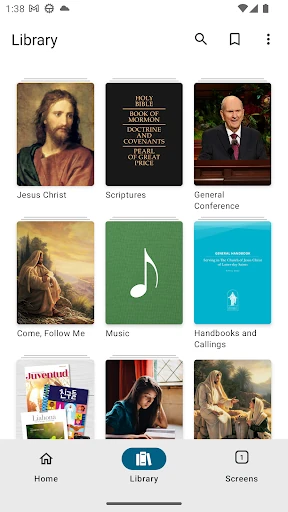
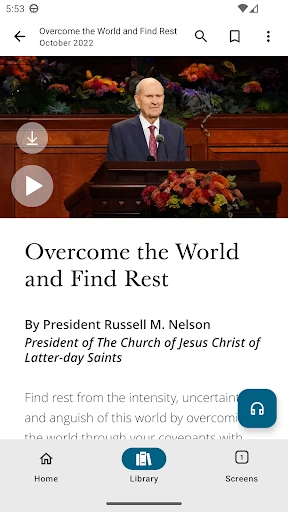
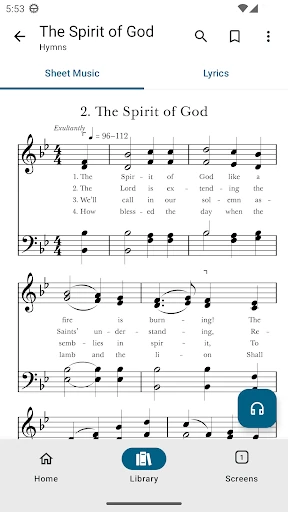
The broader collection is useful when a reading leads me to want more context. I can move from scriptures to general conference addresses, Church magazines, or learning and teaching manuals, depending on what I am trying to explore. Music, videos, audio recordings, and gospel art add other kinds of material. I appreciate that the app brings these resources together instead of treating reading as its only job.
A Focused Reference Library
Compared with a general ebook reader, Gospel Library is organized around a particular religious collection and includes material beyond books. That makes it a more natural fit for someone whose reading already centers on these scriptures and Church resources. Search and marking support the basic work of finding and revisiting content, while the range of formats gives readers more than a page of text to choose from.
It is not a broad bookstore, a general news reader, or a catch-all research tool for every faith tradition. Its contents and purpose are specific to The Church of Jesus Christ of Latter-day Saints. If I were looking for novels, unrelated reference books, or resources from many religious publishers, I would need a different app. The focused scope is a strength for the intended reader and a clear boundary for everyone else.
Make Small Study Habits Count
I get more from a collection this large when I begin with a simple question rather than browsing without direction. A quick search can help me locate relevant material, and marking a useful passage gives me a way to pick up the thread later. For a short daily reading, I can stay with one text; when I have more time, I can explore another format or resource in the library.
It also helps to choose content that suits the moment. A reader who wants to read can open a text, while someone who prefers listening can look among the audio recordings. A lesson or group preparation session may call for manuals or conference addresses instead. I would treat those options as different routes through the same collection, not as a requirement to use every type of content in one sitting.
More From Our News Desk

Zoom Meetings, Google Meet, or Teams: Which Is Easiest to Join?

How I Build a Free Streaming Lineup With Tubi

Why Crunchyroll Is the Default Anime App for So Many Fans

YouTube TV: A Practical Guide to Cutting Cable

Rummikub and the Small Comfort of Phone Games

TeamViewer Remote Control or AnyDesk for Helping Family?
Who Will Find It Useful
I would recommend Gospel Library to people who regularly read the scriptures or use materials from The Church of Jesus Christ of Latter-day Saints. It is especially convenient for readers who want texts, talks, magazines, manuals, and other media gathered in a single app. The search, marking, and sharing functions also suit anyone who often looks up a passage or wants to return to something they have read.
It may be less useful for someone seeking a general library with books from many publishers or content from a wide range of religious traditions. Readers who prefer paper books may also find that an app is simply not their preferred way to study. The app’s strength is its defined collection; whether that feels focused or limiting depends on what a person wants to read.
Gospel Library is published by The Church of Jesus Christ of Latter-day Saints and is listed in the Books & Reference category. On Google Play it has over 10 million installs and a 4.7-star rating from around 230,000 ratings. The app is free, with no in-app purchases or ads, and carries an Everyone content rating.
The listed minimum Android requirement is Android 6.0. The current version in the supplied app details is 7.5.4-(754072.2677666). Gospel Library was first released on May 28, 2010, and its listed last update is February 2, 2026. The update notes describe fixes involving recurring sync errors, printing from the reading view, and annotation controls covering text-selection handles.
A Closer Look at Everyday Study
A Clear First Impression
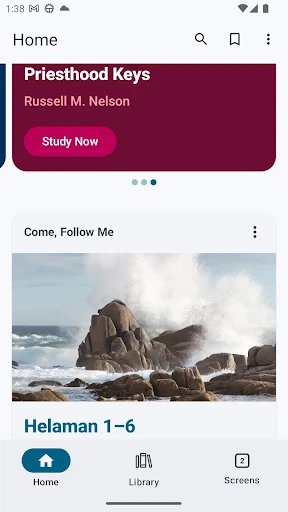
When I first opened Gospel Library, its identity was immediately clear: this is a dedicated place for gospel study, not a general reading app with a religious shelf tucked away. The variety of material caught my attention as much as the scriptures themselves. Seeing books, talks, music, manuals, magazines, video, audio, and art represented in one collection sets expectations for a broad study resource.
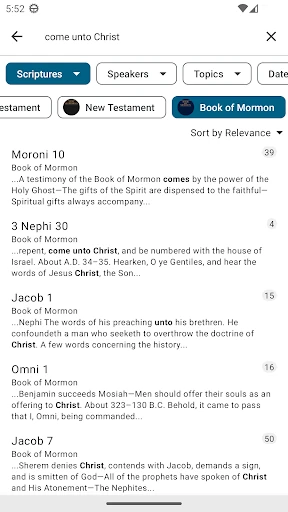
Getting started can be as simple as choosing something to read or using search to locate a subject. That gives newcomers two familiar ways in: browse the collection or follow a specific question. I like that the basic purpose does not need much explanation. The app is for finding, studying, and sharing material, so a first visit can be practical rather than a tour of unrelated tools.
The Daily Reading Loop
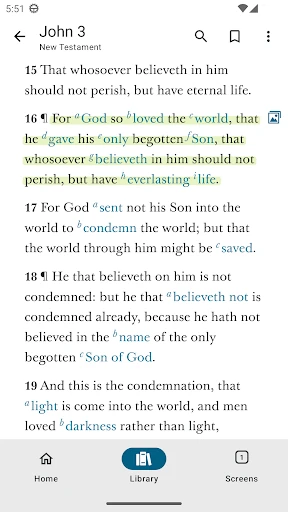
The day-to-day experience centers on a useful sequence: find a text, read it, mark something worth keeping in mind, and share material when that is helpful. These are straightforward study actions, but having them together matters when I am reading in short stretches. I can return to a meaningful passage or point someone toward a resource without changing the app’s basic purpose.
Search is particularly handy when I remember a subject but not exactly where to look. Rather than browsing every category, I can use the app’s search function to locate material. The collection includes several kinds of resources, so a search-oriented approach helps when I have a specific question. For a relaxed session, browsing and reading still make sense; not every visit needs a defined destination.
More Than Scripture Text
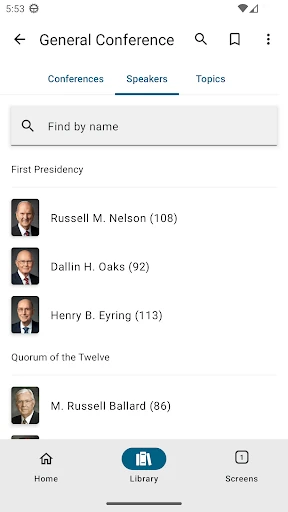
The range of formats is the feature that most distinguishes Gospel Library from a basic scripture reader. Alongside scriptures, the collection includes general conference addresses, Church magazines, learning and teaching manuals, music, videos, audio recordings, and gospel art. That breadth can support different kinds of study without implying that every reader needs to use every category.
I also value the combination of reading tools and a substantial subject-specific collection. Search helps locate material, marking supports revisiting it, and sharing makes it possible to pass along a resource. These are practical functions rather than flashy extras. They fit the app’s purpose and make the library useful both for individual reading and for situations where people want to discuss or share what they have found.
A Practical Reading Routine
For a simple routine, I would start a session with one text or topic in mind. I might read a passage, search for related material when I want another perspective within the collection, then mark a section I want to remember. On a bus ride or during a spare moment, that keeps the task manageable; at home, I can spend longer exploring talks, manuals, or other resources.
For preparing to teach or discuss a subject, the collection’s variety is useful in a different way. I can look beyond scripture text to learning and teaching manuals or conference addresses, then share relevant material. The app does not need to turn a short session into a complicated project. A clear question and one or two useful resources are enough to give the library a practical role.
Keep the Scope in Mind
The main limitation is also easy to understand: Gospel Library is built around a particular faith community’s resources. Its extensive collection will feel relevant to readers seeking those materials, but it is not a neutral, all-purpose reference shelf. People wanting content from many religions, general nonfiction, or fiction should look elsewhere rather than expecting this app to serve those needs.
A large collection can also make a specific item less obvious if I begin without a question. Search offers a useful way to narrow the field, but the number of content types still means there is plenty to explore. I find it helps to decide whether I want to read, listen, or consult a resource before opening the library. That small bit of focus keeps browsing from becoming the whole session.
The practical details are simple: the Android listing requires Android 6.0 or later, and the app is free without ads or in-app purchases. The supplied update notes mention fixes to sync, printing, and annotation behavior. Those notes are useful context, but they do not change the central point: this is a focused study collection, and its value depends on whether its material matches what I want.
Gospel Library is a substantial, focused resource rather than a general reading app. I like the way it brings scriptures together with talks, manuals, magazines, and other media, while keeping basic study actions such as searching, marking, and sharing close at hand. Its specific scope is the deciding factor, not a flaw to overlook.
I recommend it to readers who use The Church of Jesus Christ of Latter-day Saints materials and want a convenient digital library. If you are looking for a broad ebook catalog or resources from many traditions, this is not the right fit. For its intended audience, it offers a practical place to read and explore.
Gospel Library Frequently Asked Questions
What is Gospel Library used for?
Gospel Library is a gospel study app from The Church of Jesus Christ of Latter-day Saints. It brings together scriptures, general conference addresses, music, learning and teaching manuals, Church magazines, videos, audio recordings, gospel art, and other material. The app supports studying, searching, marking, and sharing resources from that collection.
Which devices can I use Gospel Library on?
The supplied store details are for the Android app on Google Play, with a minimum requirement of Android 6.0. The information here does not establish availability for other platforms or device types. If you want to use Gospel Library on a particular device beyond Android, check the relevant store or publisher information for current availability.
What Android version does Gospel Library require?
Gospel Library requires Android 6.0 or later according to its supplied Google Play details. If you are unsure which Android version your device runs, check its system settings before installing. Requirements and compatibility can change as the app is updated, so the current Google Play information is worth checking as well.
Does Gospel Library cost money?
Gospel Library is free to install and use according to the supplied app details. It has no in-app purchases and contains no ads. Store details can change over time, so it is sensible to check the current Google Play page before downloading if you want to confirm the latest cost information.
Is Gospel Library a good fit for me?
It is a strong fit if you want to read or study scriptures and other materials from The Church of Jesus Christ of Latter-day Saints in one app. Its collection includes several formats and resource types. It may not suit you if you want a general ebook store or a broad collection spanning many religious traditions.
Pros
- Combines scriptures with talks, magazines, manuals, music, video, audio, and art.
- Search, marking, and sharing support practical study and reference use.
- Free to use, with no ads or in-app purchases.
- A focused collection for readers seeking Church of Jesus Christ of Latter-day Saints materials.
Cons
- Its subject matter is specific to one faith community’s resources.
- The breadth of the library can make unfocused browsing feel sprawling.
- Not a general ebook catalog or a cross-faith reference collection.
- Category
- Books & Reference
- Version
- 7.5.4-(754072.2677666)











