GoFundMe: Fundraise and Give
- 82.67K
- 4.6
- Installs
- 5.00M
- Price
- Free

Screenshots
Analysis by Reviewed APKs
GoFundMe: Fundraise and Give brings personal fundraising and charitable giving together in one mobile app. It suits people organizing support for themselves or someone they know, as well as donors who want to follow causes and nonprofits. After looking through its main uses, my take is that it works best as a practical companion to a community effort, rather than as a replacement for the personal conversations that help people decide to give.
When a Fundraiser Needs Attention
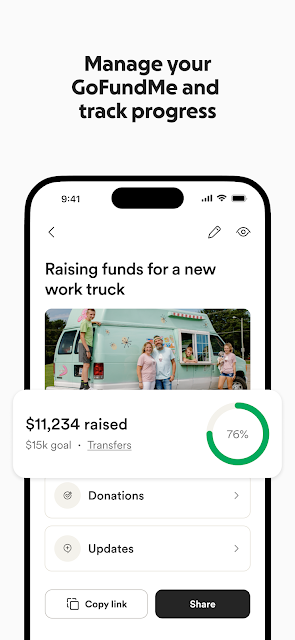
Imagine helping a friend organize a fundraiser and wanting to keep up with it between work, errands, and family messages. GoFundMe lets you start a fundraiser for yourself, another person, or a nonprofit, then manage it from your phone. You can share its unique link with your community, and app notifications can alert you to donations or important fundraiser updates. That makes the app useful when the campaign is moving and you need to stay attentive.
The everyday value is less about doing everything on a phone and more about having the campaign close at hand. I can picture checking for an update during a short break, then sending the fundraiser link to someone who asked how to help. Keeping those tasks together is convenient when several people are pitching in. It also gives a fundraiser organizer a straightforward way to stay connected to activity without treating every check-in as a separate project.
More Than a Donation App
GoFundMe covers three related jobs: creating fundraisers, supporting fundraisers, and organizing charitable giving through Giving Funds. That makes it broader than an app used only to make a one-off donation. Profiles add another layer by letting people feature fundraisers and nonprofits they care about and track their impact from campaigns they started or supported.
Still, I would not treat it as a general budgeting tool or a substitute for deciding which causes matter to you. Its focus is fundraising and giving, with tools for sharing campaigns and following related activity. If your goal is simply to keep a private household spending plan, this is not aimed at that. The social element is part of the point: people use it to connect a cause with a community that may want to help.
Small Habits That Help
For an organizer, a useful habit is to check notifications as part of a regular routine rather than constantly reopening the app. Donation alerts and important updates can help you notice activity, while the fundraiser link gives you something easy to share when someone asks for details. Keeping the link ready also makes it simpler to bring the campaign into conversations without having to explain where to find it each time.
Donors can use profiles to keep the causes they care about visible to their community, and Giving Funds offer another way to bring charitable giving together. I would take a moment to decide what I want to follow or support before sharing anything widely. That small pause helps keep the app focused on causes I actually care about, instead of turning every spare moment into another request to pass along.
More From Our News Desk

Zoom Meetings, Google Meet, or Teams: Which Is Easiest to Join?

How I Build a Free Streaming Lineup With Tubi

Why Crunchyroll Is the Default Anime App for So Many Fans

YouTube TV: A Practical Guide to Cutting Cable

Rummikub and the Small Comfort of Phone Games

TeamViewer Remote Control or AnyDesk for Helping Family?
Who May Find It Useful
I would recommend GoFundMe to people who are organizing support for themselves, a friend, or a nonprofit and want to manage the fundraiser while away from a computer. It also makes sense for donors who like following campaigns and sharing causes with people they know. The combination of fundraiser management, notifications, profiles, and Giving Funds gives different kinds of participants a reason to use the same app.
It may be a weaker fit for someone who has no interest in fundraising or charitable giving, or who wants an app centered on unrelated personal finance tasks. People who prefer to make giving decisions without a social component may also find the profiles and sharing angle less relevant. The app can help with the practical side of a campaign, but it does not remove the need to communicate clearly with people or decide which causes deserve attention.
GoFundMe: Fundraise and Give is a free Android app from GoFundMe Inc in the Finance category. Google Play shows more than 5 million installs and a 4.6-star rating from about 82,700 ratings. It is marked Everyone for its content rating. The listed version is 12.23.0, and the app’s release date is October 29, 2013.
The app is listed without in-app purchases or ads, and its listed price is zero dollars. Google Play gives a last update date of November 2, 2026. No minimum Android version is provided in the supplied app details, so check Google Play for the requirement that applies to your device. Giving Funds and other giving choices may have conditions, so review the app’s own information before using them.
A Closer Look at Giving on the Go
A Clear Starting Point
When I first opened the description of GoFundMe, the main idea was easy to grasp: help someone raise money, give to causes, or make your own interests easier to share. That clarity matters in an app people may turn to for a specific, time-sensitive campaign. Instead of presenting fundraising as an isolated task, it connects campaign management with sharing and updates.
Getting started depends on what brings you in. An organizer can begin a fundraiser for themselves, someone else, or a nonprofit. A donor may be more interested in supporting fundraisers or exploring Giving Funds. I like that these are distinct reasons to use the app, though the range of options means it helps to have a goal in mind before settling into a routine.
Keeping Up Day to Day
The day-to-day experience described here centers on managing a fundraiser from a phone and keeping track of activity. Notifications can flag donations and important updates, which is useful when an organizer is balancing a campaign with ordinary responsibilities. Rather than needing to remember to check at a particular time, you can use alerts to notice when something needs your attention.
Sharing is another practical part of that cycle. Each fundraiser has a unique link that an organizer can pass along to their community. In my experience with apps built around a social effort, having one clear link can make it easier to answer a quick question or invite someone to take a look. It does not guarantee a response, but it helps keep the next step simple.
Profiles and Giving Funds
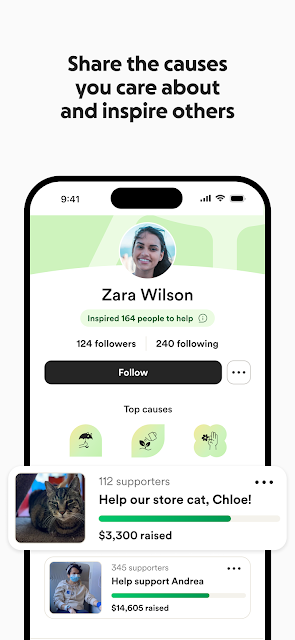
GoFundMe Profiles give users a place to share causes they care about, feature favorite fundraisers and nonprofits, and track their impact from campaigns they have started or supported. That stands out because it extends the app beyond an individual campaign. Someone who regularly supports different causes can use a profile to make those interests visible to their community.
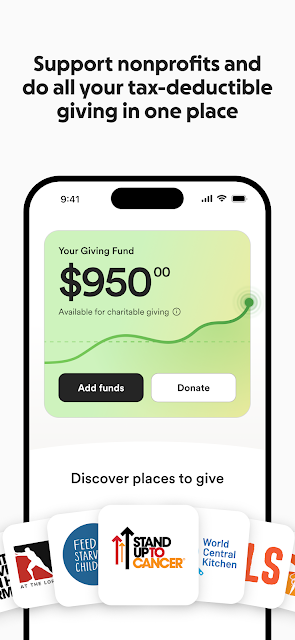
Giving Funds are another notable feature. The description presents them as donor-advised funds that bring giving together and let users direct funds to a nonprofit of their choice. It also says users receive one receipt covering their giving during tax season. Those are product details, not personal tax guidance; anyone considering this option should read the relevant terms and information in the app.
A Simple Campaign Routine
A practical routine could start with creating a fundraiser and sharing its link with the people most likely to care about it. After that, I would check notifications at a few natural points in the day rather than refreshing constantly. When a donation or important update comes in, the alert can prompt a timely response or a fresh update to the people following the effort.
For donors, a lighter routine might be to use a profile to highlight causes worth sharing, then support campaigns that feel relevant. Giving Funds may suit someone who wants to bring charitable giving together in one place. I would keep each step intentional: look at the cause, decide whether to share or give, and then move on. The app is more useful as a tool for a chosen purpose than as a stream to browse endlessly.
What to Keep in Mind
GoFundMe can make campaign management and sharing more convenient, but it cannot do the human work of explaining why a fundraiser matters. Organizers still need to communicate with their community, and donors still need to decide what they are comfortable supporting. Notifications can keep you informed, but they are not a substitute for reading updates or considering a cause carefully.
The app also serves several audiences, so not every feature will matter to every user. Someone who only wants to follow one campaign may have little use for a profile or Giving Funds. Someone arriving to support a cause may not need fundraiser management tools. That breadth is useful, but the experience is best when you focus on the part that matches your reason for opening the app.
GoFundMe: Fundraise and Give is a focused option for keeping a community fundraiser moving and bringing charitable giving into a mobile routine. Its strongest practical touches are fundraiser links, donation and update notifications, profiles, and Giving Funds. The mix gives organizers and donors a few different ways to participate without changing the app’s basic purpose.
I would recommend it to people actively organizing a campaign or looking for a home for their giving-related activity. If you are not involved in fundraising or charitable support, there is less reason to keep it installed. For the right user, though, it puts useful campaign tasks and cause-sharing tools within easy reach.
GoFundMe Frequently Asked Questions
What is GoFundMe: Fundraise and Give used for?
GoFundMe: Fundraise and Give is used to start and manage fundraisers for yourself, another person, or a nonprofit, and to support causes. Organizers can share a unique fundraiser link and receive notifications about donations or important updates. The app also includes Giving Funds and profiles for sharing favorite fundraisers and nonprofits and tracking impact.
Which devices can run GoFundMe: Fundraise and Give?
GoFundMe: Fundraise and Give is an Android app available through Google Play. The supplied app details do not give a minimum Android version, so check the Google Play page for the requirement that applies to your device. Compatibility can depend on your device and software, so it is worth checking before installing.
Does GoFundMe: Fundraise and Give cost money?
The app is listed as free, with a price of zero dollars, and the supplied details say it has no in-app purchases or ads. The app includes Giving Funds, but the details here do not spell out every condition associated with giving. Check the Google Play page and the app’s own information for current terms.
Can I use GoFundMe: Fundraise and Give to organize a fundraiser?
Yes. The app description says you can launch a fundraiser for yourself, a friend, or a nonprofit, manage it on the go, and share its unique link with your community. Notifications can help you keep up with donations and important updates. The app provides tools for the effort, while organizers remain responsible for communicating with supporters.
Who is GoFundMe: Fundraise and Give best suited to?
It is best suited to people organizing or supporting fundraisers and donors who want to share causes they care about. Profiles and Giving Funds may also interest people who want to bring related giving activity together. It may be less useful if you are looking for a general finance app or have no interest in fundraising and charitable giving.
Pros
- Lets organizers manage fundraisers and share a unique link from their phone.
- Notifications can flag donations and important fundraiser updates.
- Profiles let users feature causes and track supported or started fundraisers.
- Giving Funds bring charitable giving together in one app.
Cons
- Its fundraising and charitable-giving focus will not suit every user.
- The supplied app details do not state a minimum Android version.
- Profiles and Giving Funds may be unnecessary for users following one campaign.
- Category
- Finance
- Version
- 12.23.0











