Find a Grave
- 3.73K
- 4.7
- Installs
- —
- Price
- Free

Screenshots
Analysis by Reviewed APKs
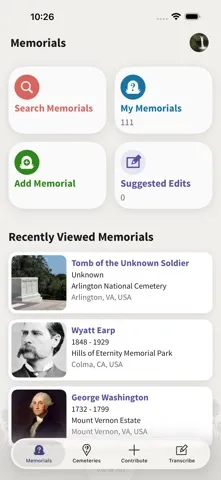
Find a Grave is a reference app for searching burial records, locating cemeteries, and helping preserve information about people who have died. I’d recommend it to family-history researchers, cemetery visitors, and anyone who wants to contribute memorial details or headstone photos. Its focus is clear and useful: it connects research with real places, though it is more specialized than a general genealogy tool.
A cemetery visit with purpose
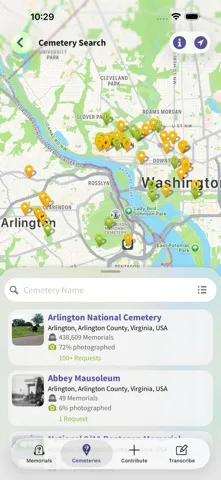
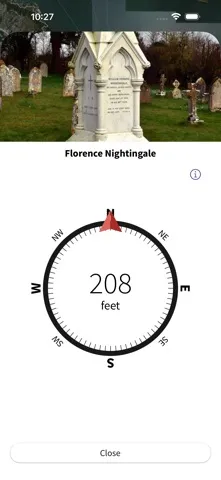
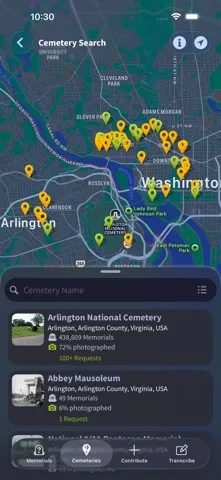
Imagine arriving in a cemetery with a family name, a few details, and limited time to search. Find a Grave lets me look for a person’s memorial and search for nearby cemeteries, which can help narrow down where to go. The app also supports GPS coordinates on memorials, giving visitors a way to connect a record with a grave location. I’d treat it as a practical research aid, not a promise that every search will turn up a match.
When I’m helping a relative trace a branch of the family, I can search the collection first, then save the useful details in my own notes or share a discovery. If a memorial needs a headstone image, I can request a photo or take one myself and add it. That combination of searching and contributing makes the app useful before and during a visit, especially when family records are incomplete.
A focused genealogy companion
Compared with a broad genealogy service, Find a Grave is centered on burial information: memorials, cemeteries, headstones, and grave locations. That narrow focus is an advantage when I have a specific cemetery question or want to document a marker. The collection described by the app includes more than 265 million graves across half a million cemeteries worldwide, so there is a substantial starting point for research.
I wouldn’t use it as a complete family-history workspace or as a substitute for other kinds of records. Its described tools are about burial details and memorials, rather than building a full family tree or exploring unrelated historical sources. That distinction matters: the app can support a genealogy project, but it works best when I already have a name, place, or family connection to investigate.
Small habits that help
I’d get more from Find a Grave by keeping searches specific when I can. A surname paired with a likely location or cemetery gives me a more manageable place to start than browsing without a lead. When I find a relevant memorial, I can note its details and share it by email, text, or Facebook. Those simple steps make it easier to bring a useful discovery into a family conversation.
If I visit a cemetery, I’d check for existing memorials before adding anything new, then consider whether a headstone photo or GPS location would improve the record. The app also supports creating memorials with biographies and photos, and tracking my own memorials, photos, and virtual cemeteries. A little care with each contribution can make the app more useful for the next person researching the same family.
More From Our News Desk

Zoom Meetings, Google Meet, or Teams: Which Is Easiest to Join?

How I Build a Free Streaming Lineup With Tubi

Why Crunchyroll Is the Default Anime App for So Many Fans

YouTube TV: A Practical Guide to Cutting Cable

Rummikub and the Small Comfort of Phone Games

TeamViewer Remote Control or AnyDesk for Helping Family?
Who may find it useful
I’d recommend Find a Grave to people who enjoy family-history research, want help locating a burial place, or are willing to add photos and memorial information for others to find. It suits both desk-based searching and occasional cemetery visits, since its purpose reaches from online records to physical grave locations. The ability to create memorials and keep track of personal contributions gives returning users a reason to make it part of an ongoing project.
It may be less appealing if you want an all-purpose genealogy app, a broad historical archive, or a tool unrelated to burial research. The experience depends on searching memorial and cemetery information, so the value will vary with the people and places you’re trying to find. I’d also expect the most satisfying use to come from a specific research question or a genuine interest in preserving cemetery records, rather than casual browsing alone.
Find a Grave is developed by Ancestry.com Operations Inc. On the Apple App Store, it has a 4.7 out of 5 rating from about 3,730 ratings. It is free to download, and the app is listed with a 12+ age rating. The supplied store details identify version 2.3.2, first released on March 3, 2014.
The app is for iOS and requires iOS 18.0 or later. Its listed last update is October 27, 2026. The supplied details do not give an install count or an in-app purchase price, so I’d check the App Store page for current purchase information and compatibility details before downloading.
Turning Cemetery Records Into Useful Finds
A straightforward first look
When I first opened Find a Grave, the appeal was easy to understand: it is built around finding and adding burial information. I could picture using it with a name from an old family story, or keeping it handy before visiting a cemetery. It does not try to be everything a researcher might need, and that focused purpose makes the app’s role clear from the start.
Setup is best approached with a question in mind. I might begin with a person’s name, a known cemetery, or a location connected to the family. The app’s described features include searching, creating memorials, and managing a profile, so there are ways to move from looking something up to contributing information. For a first session, I’d focus on one search rather than trying to catalog an entire family.
Searching in everyday use
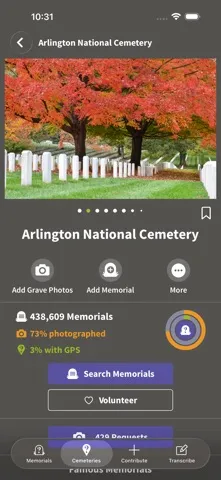
The central routine is simple to explain: search for a memorial, review what is available, and use the result to guide further research or a cemetery visit. Find a Grave says it covers more than 265 million graves in half a million cemeteries worldwide. That scale gives a researcher plenty to explore, although the most useful results will naturally depend on the person and place being searched.
What I like about this kind of reference app is that a search can lead to a practical next step. I might share a discovery with a relative, request a headstone photo, or plan to take a photo myself. The app supports sharing through email, text messages, and Facebook. That makes it easier to move information from a solo search into a conversation with someone who knows the family story.
Memorials and contributions
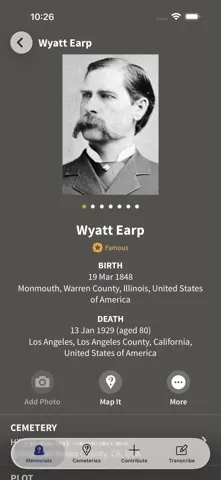
The most distinctive part of Find a Grave is that it is not only a place to look things up. Users can create memorials with biographies and photos, and add a headstone image or GPS coordinates to an existing memorial. I appreciate that the app connects research with preservation: a cemetery visit can produce information that helps someone else who is trying to identify the same grave.
There is also a practical option for handling multiple graves. The description says users can photograph them and upload the images for future transcription. That may be handy for someone documenting a section of a cemetery, rather than recording one marker at a time. I’d still take care to capture clear, relevant information and avoid treating an image as a replacement for checking the memorial details.
A repeatable research routine
For a manageable routine, I’d set aside a short session to search one family name or cemetery, then keep track of promising memorials and photos through the app’s profile tools. If I found a likely match, I could share it with a relative and ask whether the details fit what the family knows. That small check can make research feel collaborative instead of turning into a long solo search.
Before a cemetery trip, I’d look for nearby cemeteries and relevant grave records. On site, I could use the app’s support for adding a headstone photo and GPS coordinates, or request a photo if I can’t visit. Afterward, I’d review my memorials, photos, and virtual cemeteries to keep the work organized. It is a simple loop: search, verify, contribute, and share.
Keep its scope in mind
Find a Grave’s strengths come with a clear boundary: it is about burial records and memorials. If I need a complete family tree or a broad set of historical documents, I’d use other resources alongside it. The app can provide a useful clue or a place to record cemetery information, but it should not be mistaken for a universal research library.
A large collection is helpful, but it does not make every search equally fruitful. Some searches may lead to a relevant memorial, while others may require a different name, cemetery, or location to make progress. I’d also plan around its iOS requirement of version 18.0 or later. For people who are comfortable with that scope and platform, the app has a practical job; for everyone else, it may be too specialized.
Find a Grave makes a specific kind of research easier to approach: searching burial information, finding cemeteries, and adding memorial details that others can use. I like that it gives cemetery visitors and family researchers a way to contribute as well as browse. Its focused scope is a strength, provided you are looking for burial records rather than a complete genealogy service.
I’d recommend it to iOS users with an interest in family history, cemetery visits, or preserving headstone information. It is less suited to people seeking a broad research toolkit or an app for unrelated reference needs. If burial records are part of your project, Find a Grave is a sensible companion to keep nearby.
Find a Grave Frequently Asked Questions
What is Find a Grave used for?
Find a Grave is used to search burial information, look for cemeteries and grave locations, and create or contribute to memorials. The app also supports adding headstone photos and GPS coordinates, sharing discoveries, and tracking personal memorials, photos, and virtual cemeteries. It is a focused reference tool for burial research rather than a general-purpose family-history workspace.
Which devices can run Find a Grave?
Find a Grave is an iOS app available through the Apple App Store. The supplied requirements specify iOS 18.0 or later. I’d check the App Store page on the device you plan to use for current compatibility details, since supported device and operating-system information can change over time.
What iOS version does Find a Grave require?
The listed minimum requirement for Find a Grave is iOS 18.0. If you are unsure whether your iPhone or other iOS device is compatible, check its software version and compare it with the current App Store details. Requirements can change as app updates are released.
Does Find a Grave cost money?
Find a Grave is listed as free to download on the Apple App Store. The available details do not specify in-app purchase pricing, so check the current store page for any purchase information that may apply. The app’s description presents access to its burial-information collection as free.
Who should use Find a Grave?
Find a Grave is a good fit for people researching family burial places, visiting cemeteries, or contributing memorial details and headstone photos. It may not suit someone looking for a complete family-tree builder or a broad historical archive. Its value depends on whether burial records are relevant to your research or interests.
Pros
- Combines grave searches with tools for adding memorial details and headstone photos.
- Supports GPS coordinates that can connect memorial records with physical grave locations.
- Lets users share discoveries and keep track of their own memorials and photos.
- Covers more than 265 million graves across half a million cemeteries.
Cons
- Its narrow focus on burial records may not suit broader genealogy research.
- Requires iOS 18.0 or later, which may rule out older devices.
- Search results may be less useful without a relevant name, place, or cemetery.
- Category
- Books & Reference
- Version
- 2.3.2











