Epson Smart Panel
- 508.44K
- 4.5
- Installs
- 10.00M
- Price
- Free
Screenshots
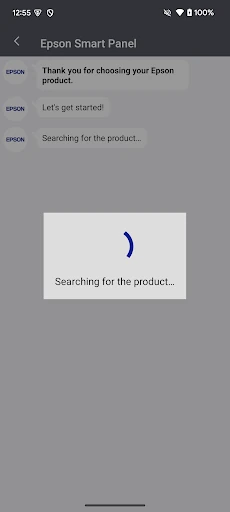
Analysis by Reviewed APKs
Epson Smart Panel is a phone app for setting up and operating compatible Epson wireless printers and scanners. I’d look at it if I want a simpler way to connect a device to Wi-Fi, find its controls, and get help or supplies without starting at a computer. My overall take is that it has a clear, practical purpose, but its usefulness depends on owning a product the app supports.
A printer in the family room
When I first opened Epson Smart Panel, I pictured using it during an ordinary home-printing scramble: a form needs printing, someone is waiting, and the printer has drifted off the Wi-Fi. The app is meant to help set up a compatible Epson product on the network and then provide a mobile place to operate it. That makes it most relevant when the printer or scanner is already part of the household routine.
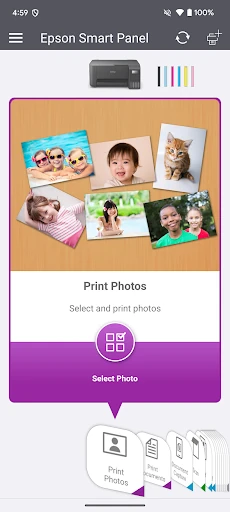
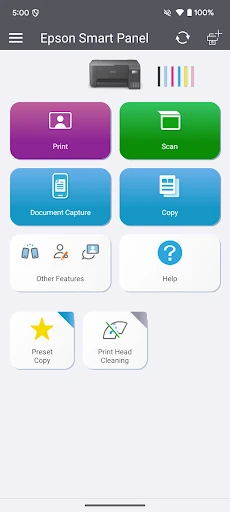
The appeal is having the setup and device controls on a phone instead of hunting through computer settings or trying to remember a printer’s own controls. Epson describes its action tiles as a quick route to common tasks, with the app adapting to the product in use. I would expect the first useful moment to be connecting a supported device; after that, the value is having its tools and support in one place.
A companion, not a printer
Compared with opening a computer’s printer settings or using whatever controls are built into a printer, Smart Panel is a mobile companion for Epson hardware. Its stated strengths are guided Wi-Fi setup, product operation, and access to support, registration, and supplies. It is not a general printing service, nor does it turn an unsupported printer or scanner into a compatible one. The product match is the important first question.
Epson says that products outside the supported list should use Epson iPrint for printers or Document Scan for scanners instead. That distinction is worth checking before I build the app into a routine. Smart Panel is therefore a focused option for people with a compatible Epson device, not a universal alternative for mixed-brand equipment. If I only need to print occasionally from unrelated devices, this app may not be the right starting point.
Make setup count
A small habit that should save time is to identify the exact printer or scanner model before starting, then check that it is supported. The app’s setup role is clearest when the device is ready to join Wi-Fi, and its automatic configuration is intended to tailor the experience to the connected product. I’d keep the phone and device close at hand during that initial step rather than treating setup as something to do in a hurry.
Once connected, I’d use the app as a convenient entry point rather than opening it only when something goes wrong. The action tiles are meant to make device tasks easy to find, while the support area brings together registration, supplies, and help. I’d also remember that the app requires a compatible smart device and that data charges may apply. Those simple checks make it easier to tell an app issue from a compatibility or connection problem.
More From Our News Desk

Zoom Meetings, Google Meet, or Teams: Which Is Easiest to Join?

How I Build a Free Streaming Lineup With Tubi

Why Crunchyroll Is the Default Anime App for So Many Fans

YouTube TV: A Practical Guide to Cutting Cable

Rummikub and the Small Comfort of Phone Games

TeamViewer Remote Control or AnyDesk for Helping Family?
Who will find it useful
I’d recommend Epson Smart Panel to someone who owns a supported Epson wireless printer or scanner and prefers handling setup and everyday device controls from a phone. It seems especially convenient in a home where printing happens in short bursts: a school form, a return label, or a document someone needs before heading out. Having setup, operation, and support together can make the printer feel less like a separate project.
It may not suit someone with an unsupported Epson model, a different brand, or no need to manage a printer or scanner from a mobile device. Compatibility is not a minor detail here: Epson says the app cannot find or connect to products outside its supported list. I’d also avoid expecting it to replace every printer utility or to provide features beyond those described. Checking the product match first is the sensible move.
Epson Smart Panel is published by Seiko Epson Corporation. On Google Play, it has over 10 million installs and a 4.5-star rating from around 508,000 ratings. The app is free to install, and the supplied store facts say it has no in-app purchases and contains no ads. Its content rating is Everyone, so the store presents it as suitable for a general audience.
The supplied version is 5.5.0. The app was released on March 24, 2020, and its last update date is September 30, 2026. A minimum Android version is not included in the supplied facts, so I’d check Google Play for the requirement that applies to a particular phone. Epson also says a compatible smart device is required and data usage fees may apply.
A closer look at Epson Smart Panel
Starting with the connection
My first impression is that Smart Panel has a narrow job, which is a benefit when that job matches your equipment. It is designed as a mobile control point for an Epson printer or scanner, with setup on Wi-Fi as a central part of the experience. Rather than presenting itself as a general office suite, it focuses on getting a compatible product ready and making its functions easier to reach.
I’d begin by checking Epson’s supported-products information, because the app’s own description is clear that it cannot find or connect to a product that is not on that list. That check prevents a frustrating start with an older or different model. After confirming compatibility, the intended setup flow is to use the app to connect the Epson product to Wi-Fi and let the interface adapt to the device.
The everyday control point
In day-to-day use, I would think of Smart Panel as the place to start when I want to interact with a supported printer or scanner from my phone. Epson describes action tiles that make product functions quick to access, and says the app automatically configures itself around the connected device. That should make the app feel more relevant than a fixed screen full of controls for hardware I do not own.
The practical payoff is convenience rather than a dramatic change in how printing works. If I am already near the printer but have a document or task on my phone, a mobile control point can remove a few steps. I would still keep expectations tied to the product’s supported functions: the app is for operating compatible Epson equipment, not a substitute for the physical device or its capabilities.
Useful features in one place
The clearest feature is Wi-Fi setup for an Epson product. Epson also highlights its action tiles, which are intended to make common product functions easier to find, and automatic configuration that tailors the app to the connected printer or scanner. Those choices make sense for an app whose usefulness depends on the particular device rather than a one-size-fits-all set of controls.
I also like the idea of having support-related tasks nearby. Epson says the app can provide a place to register a product, get supplies, or find help. That is a modest but useful addition when a printer needs attention and I cannot remember where I last looked for product information. The features described are practical housekeeping tools, not a reason to expect extras beyond the connected device and its support.
A simple home routine
For a household routine, I’d set up the compatible printer once when I have time, rather than waiting until somebody needs a page immediately. I’d confirm the model is supported, connect it through the app, and then keep Smart Panel handy for the next time I need to operate the device. That turns the first use into a small setup task instead of an interruption during a busy morning.
Later, if I need help or supplies, I’d start with the app’s support area instead of searching from scratch. The same approach works for a scanner: check compatibility, connect it, and use the mobile app as the route to the functions available for that product. This routine stays intentionally simple. It relies on the app’s stated setup, operation, and support roles rather than assuming tools that Epson does not describe.
Keep compatibility in view
The biggest limitation is product support. Epson explicitly says Smart Panel will not find or connect to a printer or scanner unless it appears on the supported-products list. That can make the app a poor fit even for someone who already owns an Epson device. I would check the model before downloading or planning around the app, and use Epson’s suggested alternatives for unsupported printers or scanners.
The app also depends on a compatible smart device and a working Wi-Fi setup for its stated connection role. A phone-based control panel will not help much if the hardware is outside the supported range or if I expect a universal tool for every brand. Data usage fees may apply, according to Epson. These are practical boundaries rather than deal-breakers, but they shape who is likely to get real value from it.
Epson Smart Panel makes the most sense as a focused companion for a compatible Epson printer or scanner. I like its straightforward combination of Wi-Fi setup, device controls, and access to support and supplies. Its value is less about a long feature list and more about keeping a few useful tasks together on a phone.
I’d recommend it to Epson owners who want mobile setup and a convenient control point, after checking their model against the supported list. If your product is not supported or you want one app for mixed-brand equipment, this is unlikely to be the answer. For the right hardware, though, it looks like a practical tool to have ready.
Epson Smart Panel Frequently Asked Questions
What is Epson Smart Panel used for?
Epson Smart Panel is a mobile app for setting up and operating compatible Epson wireless printers and scanners. It can help connect a supported product to Wi-Fi, provides action tiles for device functions, and offers access to product registration, supplies, and help. Epson says the app cannot find or connect to products that are not on its supported-products list.
Which devices can I use Epson Smart Panel on?
The supplied store information is for the Android version of Epson Smart Panel, and Epson says a compatible smart device is required. The app is intended for supported Epson wireless printers and scanners. For a particular phone or product model, requirements and compatibility can vary, so check Google Play and Epson’s supported-products information before relying on it.
What Android version does Epson Smart Panel require?
The minimum Android version can vary by app release and device, so check the Google Play store page for the requirement that applies to your phone. Epson also says Smart Panel requires a compatible smart device. Product compatibility matters too: the app will not find or connect to an Epson printer or scanner outside its supported list.
Does Epson Smart Panel cost money?
The supplied Google Play facts describe Epson Smart Panel as free, with no in-app purchases and no ads. Data usage fees may apply when using the app, according to Epson. Store details can change, so it is worth checking Google Play for current cost and availability information before installing.
Is Epson Smart Panel right for my printer?
It is a good candidate if you have a compatible Epson wireless printer or scanner and want to set it up or operate it from a phone. Epson says products outside the supported list cannot connect through Smart Panel. For unsupported Epson printers, Epson points users to Epson iPrint; for unsupported scanners, it points to Document Scan.
Pros
- Combines Wi-Fi setup and mobile operation for compatible Epson printers and scanners.
- Action tiles are designed to make product functions quick to reach.
- Includes access to Epson product registration, supplies, and help.
- Free to install, with no in-app purchases or ads in the supplied store facts.
Cons
- Works only with Epson products included on the supported-products list.
- A compatible smart device and Wi-Fi setup are needed for its main purpose.
- Data usage fees may apply, according to Epson.
- Category
- Tools
- Version
- 5.5.0