Dayforce Wallet: On-demand Pay
- 29.10K
- 4.7
- Installs
- 500.00K
- Price
- Free
Screenshots
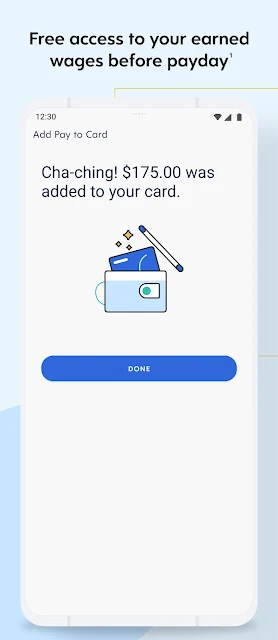
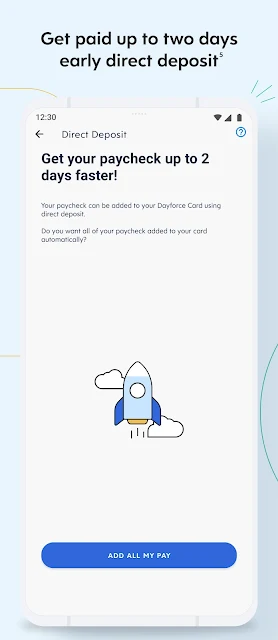
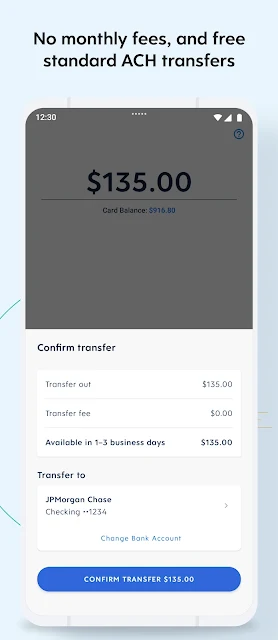
Analysis by Reviewed APKs
Dayforce Wallet: On-demand Pay is a finance app for employees whose employers have activated its pay features. It lets eligible users check earned pay, move money, and manage spending and savings in one place. I like the practical focus: it is built around the gap between earning money and payday, rather than trying to replace a full-service banking or budgeting app. Eligibility is the important catch.
Between shifts and payday
When I think about where Dayforce Wallet could fit, it is a workday that ends with a bill due before the next payday. Rather than waiting for the regular pay cycle, an eligible employee can open the app, view pay as it is earned, and access available funds on demand. That makes the app’s main job easy to understand: give participating workers another way to manage the timing of their pay.
The money can be transferred to a Dayforce Wallet Mastercard for purchases, bill payments, or cash withdrawals. Alternatively, the app describes bank transfers, including free and instant options with different conditions. I would check the transfer details before choosing one, especially if speed matters. Whatever is not accessed through the on-demand feature is paid out on payday, according to the app’s description.
A focused payday tool
Compared with a conventional banking app, Dayforce Wallet is centered on access to earned wages and the account and card connected to that service. It also includes spending tracking and savings goals, so there is more to it than simply checking a pay amount. But it is not a general-purpose budgeting system or a substitute for every service someone might use at their bank.
The biggest difference from a typical early-pay product is that employer participation matters. Dayforce says an employer must activate Wallet, and not all employers offer on-demand pay. That makes it a good fit for workers at participating employers, but a poor choice for someone looking for a pay-advance service they can join independently. I would confirm eligibility before building a routine around it.
Small habits that help
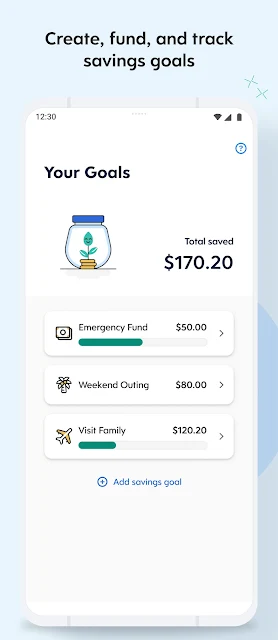
I would start by checking the app around payday and after shifts, rather than moving money automatically just because the option is there. Seeing earned pay alongside spending can help me decide whether a transfer is actually needed. If I had a specific goal, I would use the savings-goal feature to set aside money deliberately instead of treating every accessible dollar as available for day-to-day purchases.
For occasional transfers, I would compare the free and instant routes and look at their limits, timing, and fees before confirming. The app says free transfers can be subject to bank restrictions and timing rules, while an instant transfer to an eligible linked account carries a fee. Keeping those details in mind makes the convenience easier to weigh against the cost.
More From Our News Desk

Zoom Meetings, Google Meet, or Teams: Which Is Easiest to Join?

How I Build a Free Streaming Lineup With Tubi

Why Crunchyroll Is the Default Anime App for So Many Fans

YouTube TV: A Practical Guide to Cutting Cable

Rummikub and the Small Comfort of Phone Games

TeamViewer Remote Control or AnyDesk for Helping Family?
Who may find it useful
I would recommend Dayforce Wallet to employees whose workplace has enabled it and who sometimes need more control over when they can use earned pay. The combination of on-demand access, a connected Mastercard, transfers, savings goals, and spending tracking gives it a practical role between work and payday. It may be especially useful for someone who wants to see these tools together rather than handle each task separately.
It may not suit people whose employer has not activated the service, or anyone who prefers all income to arrive on a regular schedule without managing early access. Users who need a broad set of banking or long-term planning tools may also want other services alongside it. I would treat early access as an option to consider, not as extra income, and review any transaction fees that apply.
Dayforce Wallet: On-demand Pay is developed by Dayforce and is available on Google Play. The app is free to download, has no in-app purchases, and contains no ads. Google Play shows a 4.7-star rating from around 29,000 ratings, with over 500,000 installs. Its content rating is Everyone.
The current version is 26.16.0. The app was released on April 24, 2020, and its listed last update is November 3, 2026. The available app information does not give a minimum Android version, so I would check the Google Play page on the device I plan to use. The app’s description says employer activation is required for access to Dayforce Wallet.
A closer look at everyday pay access
A clear first impression
When I first opened the description, the app’s purpose was immediately apparent: see earned pay and use available money before the usual payday, if the employer supports it. That narrow focus is helpful. It gives the app a clear reason to exist instead of presenting a long list of unrelated money features.
The first setup question is not really about tapping through an app; it is whether Dayforce Wallet has been activated by the user’s employer. I would check that first, then look at the available account and transfer options. The description explains that the Wallet Mastercard is part of the experience, so it is worth understanding how the card and other ways to move funds fit together.
The everyday experience
Day to day, the useful loop is straightforward: check what pay is available, decide whether to access any of it, and keep an eye on spending. The app also describes regular paycheck deposits to a Dayforce Wallet account up to two days before payday, though timing can vary. I appreciate that the service presents both on-demand access and the regular pay cycle rather than implying they are identical.
The app’s appeal depends on needing that flexibility. If I did not need to move money between paydays, the central feature might not matter much to me. For someone who does, having earned pay, transfer choices, savings goals, and spending tracking in one app could make routine money decisions feel more connected.
More than early access
The features that broaden the app beyond early pay are its savings goals and spending tracking. Users can set and fund goals, while the app keeps earnings and spending tools together. That gives the service a modest everyday-management angle without suggesting it is a complete financial planning suite.
The card is another practical part of the experience. The description says it can be used for purchases, bill payments, and cash withdrawals, and mentions access to in-network fee-free ATMs. ATM access and transfer methods come with conditions, so I would read the applicable account terms rather than assume every transaction is free.
A practical weekly routine
A sensible routine might be to check the app once or twice during a pay period, review available earned pay, and transfer only what is needed. If a bill falls before payday, I would compare the available transfer methods and their timing before acting. Then I would use spending tracking to keep the rest of the period in view.
For a savings goal, I would make a small, intentional contribution when it fits my plans, rather than moving money simply because the app makes it accessible. That routine keeps the app’s convenience in perspective. It also makes fees easier to notice: the description says instant transfers cost $3.49 per transfer, while free transfers have limits and timing conditions.
Keep the limits in view
The main limitation is eligibility. Employers choose whether to offer on-demand pay, and the description says some blackout dates and other limitations may apply based on an employer’s pay cycle and configurations. That means the experience can differ from one worker to another, even when both use the same app.
Some money movement can also cost money or take longer than expected. The description distinguishes free bank transfers from instant transfers, which carry a fee and require an eligible linked debit card and account. Out-of-network ATM use can also incur fees. I would check the account agreements and transaction details before relying on a particular route.
Finally, early direct deposit timing can vary based on the payor, payment instructions, and bank processes. Dayforce Wallet can make pay more accessible for eligible users, but it does not remove those practical conditions. A little advance checking is more useful than assuming every transfer or deposit will arrive on the same schedule.
Dayforce Wallet has a focused purpose and a useful mix of earned-pay access, transfers, card spending, savings goals, and spending tracking. Its strongest point is giving eligible employees another way to manage pay timing. Its biggest catch is equally clear: the employer must activate the service, and particular transfers or withdrawals may have conditions or fees.
I would try it if my employer offered it and I wanted a more flexible way to use earned pay. I would not choose it expecting a universal cash-advance app or a complete replacement for my bank. For the right worker, it looks like a practical payday companion, provided its terms fit the way they plan to use it.
Dayforce Wallet Frequently Asked Questions
What is Dayforce Wallet: On-demand Pay used for?
Dayforce Wallet lets eligible employees view and access earned pay, transfer funds, and use a Dayforce Wallet Mastercard for purchases, bill payments, or cash withdrawals. It also includes savings goals and spending tracking. The app says an employer must activate Dayforce Wallet, and availability of on-demand pay depends on the employer’s setup.
Which phones can run Dayforce Wallet?
Dayforce Wallet is an Android app available through Google Play. The app information here does not specify a minimum Android version, so check the Google Play page from the device you plan to use for current compatibility details. The description discusses the app and its Mastercard, but does not establish support for other platforms.
What Android version does Dayforce Wallet require?
A minimum Android version is not provided in the available app details. Requirements can vary as the app is updated, so check the Google Play page for the current device and Android compatibility information. The listed app version is 26.16.0.
Does Dayforce Wallet cost money?
The app is free to download and has no in-app purchases or ads. The description says on-demand pay is free, but some account and card transactions may have fees. For example, it describes a fee for instant transfers and charges that may apply to out-of-network ATM use. Review the account terms and Google Play details for current information.
Is Dayforce Wallet available to every employee?
No. Dayforce says an employer must activate the service, and not every employer offers on-demand pay. Some limits or blackout dates may also depend on the employer’s pay cycle and settings. It is best suited to employees with access who want more control over pay timing; check with your employer to confirm eligibility.
Pros
- Brings earned-pay access, transfers, savings goals, and spending tracking together.
- Offers a Dayforce Wallet Mastercard for purchases, bills, and cash withdrawals.
- Free to download, with no in-app purchases or ads.
- Includes both on-demand access and regular payday deposit options.
Cons
- On-demand pay depends on employer activation and may not be available to everyone.
- Instant transfers and some ATM transactions can involve fees.
- Transfer timing and availability can vary with account and employer conditions.
- Category
- Finance
- Version
- 26.16.0